Mac下远程服务器无法使用rz并提示waiting to receive.**B0100000023be50
·
Mac下远程linux无法使用rz并提示waiting to receive.**B0100000023be50,还会卡一段时间,如图

原因:
mac上的终端不支持rz和sz,需要借助iterm2软件并配置一下,才能使用
解决:
一.下载iterm2
iterm2作为 mac 终端应用程序的替代品
brew install --cask iterm2
二.安装lrzsz
1.在mac下上安装 lrzsz
brew install lrzsz
2.服务器上也要安装 lrzsz
	# centos
	yum install lrzsz
	#ubuntu
	apt-get install lrzsz
三.需要两个脚本
1. 本地新建
本地新建两个脚本放在/usr/local/bin目录下
1.1 新建sz脚本
vim /usr/local/bin/iterm2-recv-zmodem.sh
复制下面代码保存
#!/bin/bash
# Author: Matt Mastracci (matthew@mastracci.com)
# AppleScript from http://stackoverflow.com/questions/4309087/cancel-button-on-osascript-in-a-bash-script
# licensed under cc-wiki with attribution required
# Remainder of script public domain

osascript -e 'tell application "iTerm2" to version' > /dev/null 2>&1 && NAME=iTerm2 || NAME=iTerm
if [[ $NAME = "iTerm" ]]; then
    FILE=`osascript -e 'tell application "iTerm" to activate' -e 'tell application "iTerm" to set thefile to choose folder with prompt "Choose a folder to place received files in"' -e "do shell script (\"echo \"&(quoted form of POSIX path of thefile as Unicode text)&\"\")"`
else
    FILE=`osascript -e 'tell application "iTerm2" to activate' -e 'tell application "iTerm2" to set thefile to choose folder with prompt "Choose a folder to place received files in"' -e "do shell script (\"echo \"&(quoted form of POSIX path of thefile as Unicode text)&\"\")"`
fi

if [[ $FILE = "" ]]; then
    echo Cancelled.
    # Send ZModem cancel
    echo -e \\x18\\x18\\x18\\x18\\x18
    sleep 1
    echo
    echo \# Cancelled transfer
else
    cd "$FILE"
    # /usr/local/bin/rz 这个需要根据自己安装的文件位置编写
    /usr/local/bin/rz -E -e -b
    sleep 1
    echo
    echo
    echo \# Sent \-\> $FILE
fi
1.2 新建rz脚本
vim /usr/local/bin/iterm2-send-zmodem.sh
复制下面代码保存
#!/bin/bash
# Author: Matt Mastracci (matthew@mastracci.com)
# AppleScript from http://stackoverflow.com/questions/4309087/cancel-button-on-osascript-in-a-bash-script
# licensed under cc-wiki with attribution required
# Remainder of script public domain

osascript -e 'tell application "iTerm2" to version' > /dev/null 2>&1 && NAME=iTerm2 || NAME=iTerm
if [[ $NAME = "iTerm" ]]; then
	FILE=`osascript -e 'tell application "iTerm" to activate' -e 'tell application "iTerm" to set thefile to choose file with prompt "Choose a file to send"' -e "do shell script (\"echo \"&(quoted form of POSIX path of thefile as Unicode text)&\"\")"`
else
	FILE=`osascript -e 'tell application "iTerm2" to activate' -e 'tell application "iTerm2" to set thefile to choose file with prompt "Choose a file to send"' -e "do shell script (\"echo \"&(quoted form of POSIX path of thefile as Unicode text)&\"\")"`
fi
if [[ $FILE = "" ]]; then
	echo Cancelled.
	# Send ZModem cancel
	echo -e \\x18\\x18\\x18\\x18\\x18
	sleep 1
	echo
	echo \# Cancelled transfer
else
    # /usr/local/bin/sz 这个需要根据自己安装的文件位置编写
	/usr/local/bin/sz "$FILE" --escape --binary --bufsize 4096
	sleep 1
	echo
	echo \# Received $FILE
fi
2. 直接下载
下载到/usr/local/bin目录下
cd /usr/local/bin
wget https://raw.githubusercontent.com/sugar-cookie/iterm2-zmodem/main/iterm2-send-zmodem.sh
wget https://raw.githubusercontent.com/sugar-cookie/iterm2-zmodem/main/iterm2-recv-zmodem.sh
然后给这两个文件赋予权限
chmod 777 /usr/local/bin/iterm2-*
四、配置iterm2
接下来配置iterm2,选择你的Profiles的进行配置,点击 iTerm2 的设置界面 Perference-> Profiles -> Default -> Advanced -> Triggers 的 Edit 按钮
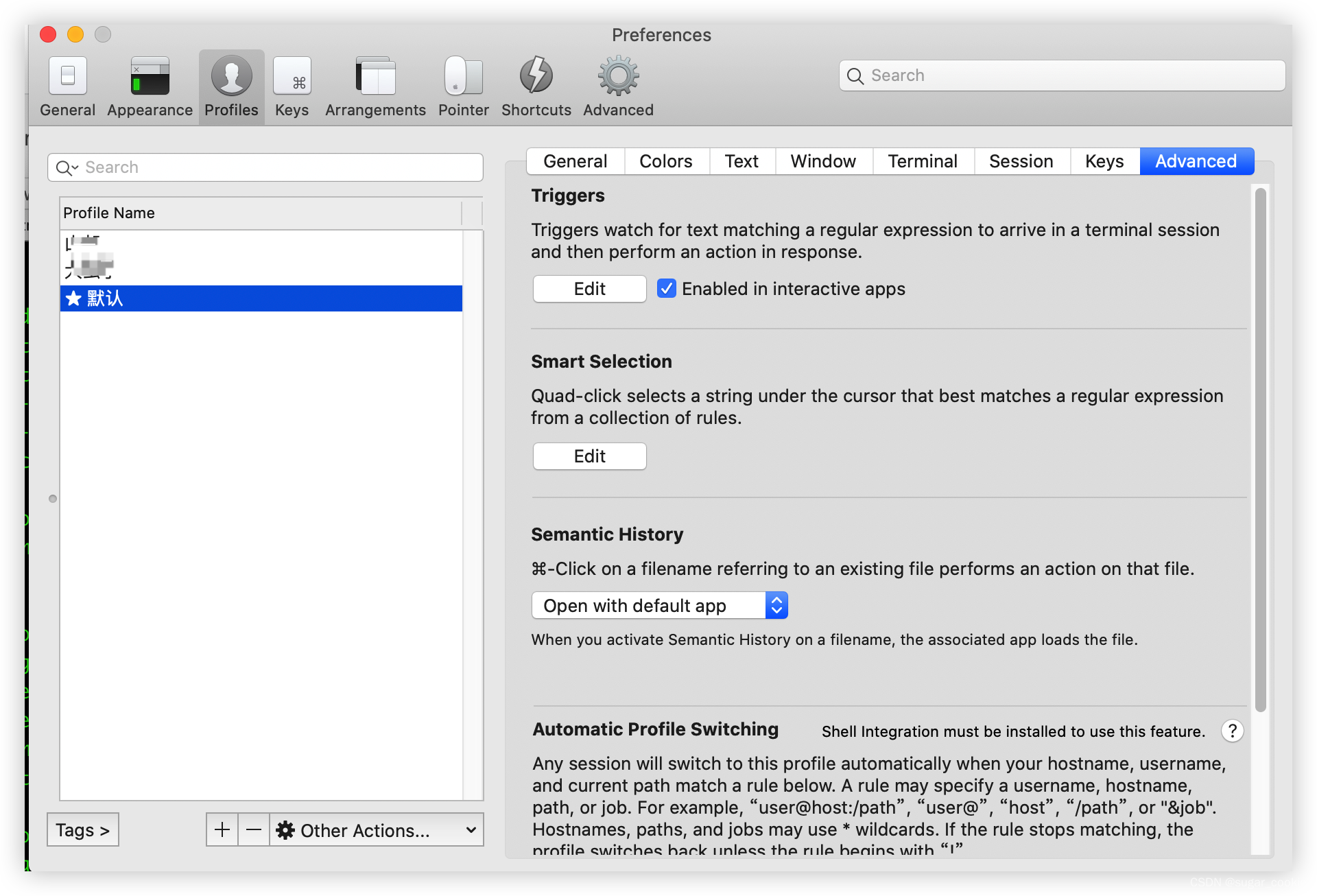
如下配置,就完成了
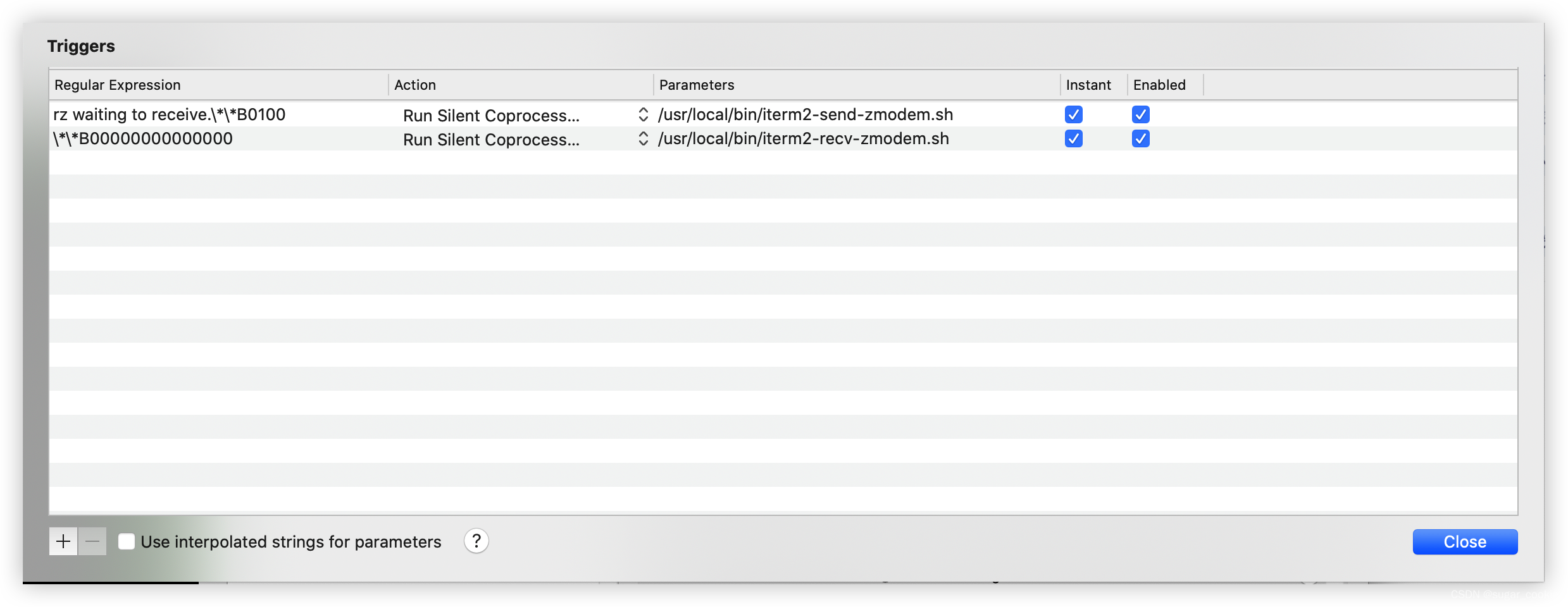
Regular expression: rz waiting to receive.\*\*B0100
            Action: Run Silent Coprocess
        Parameters: /usr/local/bin/iterm2-send-zmodem.sh
           Instant: checked

Regular expression: \*\*B00000000000000
            Action: Run Silent Coprocess
        Parameters: /usr/local/bin/iterm2-recv-zmodem.sh
           Instant: checked
注意
- 上面是iterm2-send-zmodem.sh 下面是iterm2-recv-zmodem.sh 一定不能放反位置了 要不然上传下载命令执行也会反着的
- iterm2使用rz命令Received显示成功,但是ls找不到文件,可能登录的时候使用了expect脚本,手动登录试一下,
ssh -p 22 root@ip

腾讯云面向开发者汇聚海量精品云计算使用和开发经验,营造开放的云计算技术生态圈。
更多推荐
 2
2 0
0- 0


 已为社区贡献2条内容

所有评论(0)