【vscode】解决pip和python版本不适配的问题
问题
如图:查看python版本是python3.7,但是pip的版本是对应python2.7的,因而Pip不可用

PS D:\junior\OffensiveAndDefensive\test2> pip list
DEPRECATION: Python 2.7 will reach the end of its life on January 1st, 2020. Please upgrade your Python as Python 2.7 won’t be maintained after that date. A future version of pip will drop support for Python 2.7. More details about Python 2 support in pip, can be found at https://pip.pypa.io/en/latest/development/release-process/#python-2-support
Package Version
pip 19.2.3
setuptools 41.2.0
WARNING: You are using pip version 19.2.3, however version 20.3.4 is available.
You should consider upgrading via the ‘python -m pip install --upgrade pip’ command.
PS D:\junior\OffensiveAndDefensive\test2> python -V
Python 3.7.7
解决方案
1.分别配置python、pip的系统环境变量:
发现:
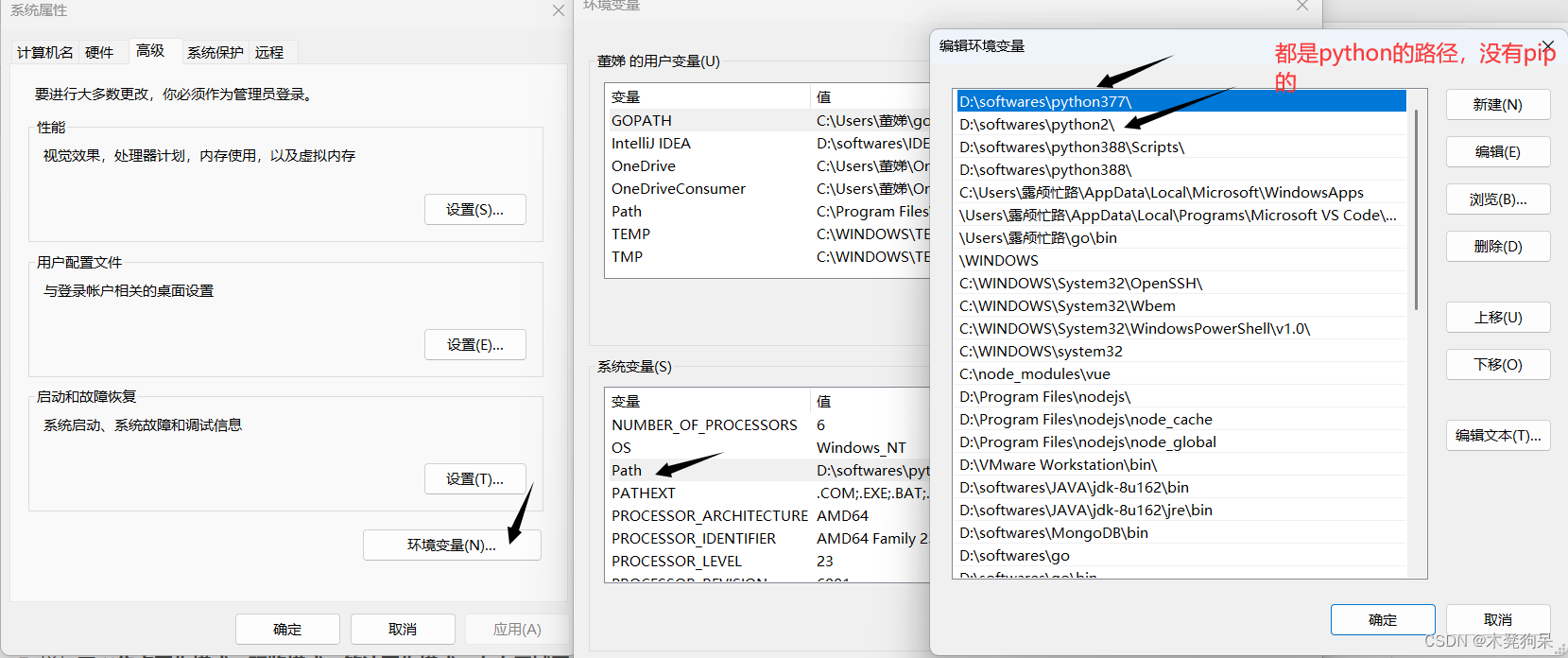
因为我使用python3.7,因此,只需要保留python3.7的路径,添加对应pip的路径, python2.7我不用,直接删掉。
如图:

2.关闭工作文件夹,重启vscode。再次尝试:


腾讯云面向开发者汇聚海量精品云计算使用和开发经验,营造开放的云计算技术生态圈。
更多推荐
 0
 0
- 0


 已为社区贡献1条内容

所有评论(0)