react学习 ---第三天
·
目录:
1 认识JSX语法
2 JSX的基本使用
3 JSX的事件绑定
4 JSX的条件渲染
5 JSX的列表渲染
6 JSX的原理和本质
一、认识JSX语法


二、JSX的基本使用

jsx中的注释主要是指组件中render渲染函数return的模板里面添加注释:
1、如果文件后缀是.html,那么这里的注释应该写成{/* */}多行注释,在这里不能使用ctrl+/来快捷生成注释;
2、如果文件是后缀是.jsx,那么直接ctrl+/就可以自动生成 注释{/* */}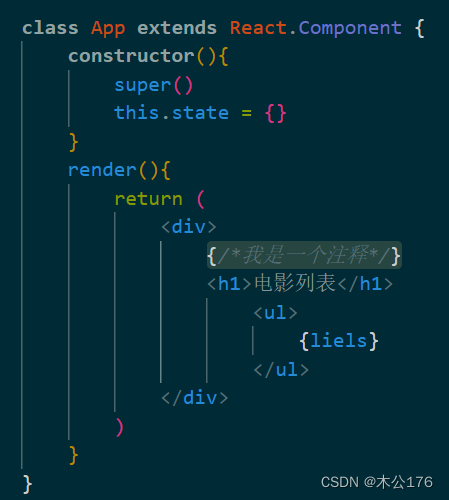
jsx嵌入变量作为子元素需要注意:(不能嵌入对象类型为子元素,但是可以绑定对象类型)
1、undefined和Boolean、null为子元素的情况下是不显示内容的,不是出了bug不显示。有时候从服务器获取内容,没有这个变量就不显示,有就显示。
2、object对象的显示方法是直接.key值就能拿value。


jsx嵌入表达式:(这种功能和vue模板语法差不多)
1、可以嵌入计算式,普通算式,或者字符串拼接,还包括变量。


2、可以使用三元运算符,也可以使用变量等号起来的三元运算


3、调用方法,包括变量等号起来的js函数运算,直接使用js的函数,直接调用自己定义的方法 。
。


绑定属性用法:(通过单花括号可以绑定)
1、基本用法:

这里面的单标签在使用属性绑定的时候要加 / 来闭合标签,不然会报错。<img src={} />
2、在jsx里面编写关键字的时候需要使用一些特殊的关键字,比如class关键字在标签属性里面需要写成className。<div className={}></div>


3、绑定style属性时:不能像在html里面使用style一样直接写入style的代码<div style="color:red;"></div>这种会报错。正确写法是写成对象的形式,写成对象形式要注意不能加-,比如font-size必须写成fontSize,并且对象的值必须是字符串{fontSize:"30px"}。style动态绑定的参数是对象类型,所以才会写成和vue模板一样的格式,但是jsx绑定属性始终是单个花括号。


三、JSX的事件绑定


默认绑定在严格模式下是undefined,在普通情况下是window

this的三种绑定方法:第三个最常用
class App extends React.Component {
            name="App123"
        constructor(){
            super()
            this.state = {

            }
        }
        btn1(){
            console.log("btn1:",this)
        }

        //ES6 class field必须是箭头函数
        btn2= () => {
            console.log("btn2:",this)
        }
        btn3(){
            console.log("btn3:",this)
        }
        render(){
            return (
                <div>
                    {/*1、this绑定方式一:bind绑定*/}
                    <button onClick={this.btn1.bind(this)}>111</button>


                    {/*2、this绑定方式二:ES6 class fields 主要是方法是箭头函数 (不建议使用)*/}
                    <button onClick={this.btn2}>222</button>


                    {/*3、this绑定方式三:直接传入一个箭头函数(重要)*/}
                    <button onClick={()=>this.btn3()}>333</button>
                </div>

            )
        }
    }

多个参数的传参时,不建议使用bind方法,因为参数的位置有限制会出现问题,建议使用箭头函数。
事件绑定案例:
<!DOCTYPE html>
<html lang="en">
<head>
    <meta charset="UTF-8">
    <meta http-equiv="X-UA-Compatible" content="IE=edge">
    <meta name="viewport" content="width=device-width, initial-scale=1.0">
    <title>Document</title>
    <style>
        .aaa{color:red}
    </style>
</head>
<body>
    <div id="root"></div>
    <script src="https://unpkg.com/react@18/umd/react.development.js" crossorigin></script>
    <script src="https://unpkg.com/react-dom@18/umd/react-dom.development.js" crossorigin></script>
    <script src="https://unpkg.com/babel-standalone@6/babel.min.js"></script>
    <script type="text/babel">
        class App extends React.Component{
            constructor(){
                super()
                this.state = {
                    movies:["aaaa","bbbb","cccc","dddd"],
                    classindex:0
                }
            }
            btn1(event){
                console.log("btn1",event,this)
            }
            btn2(event){
                console.log("btn2",event,this)
            }
            btn3(event,num1,num2){
                console.log("btn3",event,num1,num2,this)
            }
            btn4(event,name,num){
                console.log("btn4",event,name,num,this)
            }
            classchange(index){
                this.setState({classindex : index})
            }
            render(){
                /*第一种 事件抽取*/
                const liels = this.state.movies.map((item,index)=>{
                                return (
                                    <li key={index}
                                        onClick={()=>this.classchange(index)}
                                        className={this.state.classindex === index ? 'aaa': ''}
                                    >{item}</li>
                                )
                            })
                /*第三种 事件抽取*/
                const itemHandle=(item,index)=>{
                    return (
                        <li key={index}
                            onClick={()=>this.classchange(index)}
                            className={this.state.classindex === index ? 'aaa': ''}
                        >{item}</li>
                    )
                }
                /*第四种 事件抽取*/
                function itemChange(item,index){
                    return (
                        <li key={index}
                            onClick={()=>this.classchange(index)}
                            className={this.state.classindex === index ? 'aaa': ''}
                        >{item}</li>
                    )
                }
                return (
                    <div>
                        <h1></h1>
                        <button onClick={this.btn1.bind(this)}>11111</button>
                        <button onClick={(event)=>this.btn2(event)}>22222</button>
                        <button onClick={this.btn3.bind(this,123,321)}>33333</button>
                        <button onClick={(event)=>this.btn4(event,"aaaaa",666)}>44444</button>
                        {/*第一种 事件抽取*/}
                        <ul>{liels}</ul>

                        {/*第二种 普通事件绑定*/}
                        <ul>
                            {this.state.movies.map((item,index)=>{
                                return (
                                    <li key={index}
                                        onClick={()=>this.classchange(index)}
                                        className={this.state.classindex === index ? 'aaa': ''}
                                    >{item}</li>
                                )
                            })}
                        </ul>

                        {/*第三种 事件抽取*/}
                        <ul>
                            {this.state.movies.map(itemHandle)}
                        </ul>


                        {/*第四种 事件抽取*/}
                        <ul>
                            {this.state.movies.map(itemHandle,this)}
                        </ul>
                    </div>
                )
            }
        }
        const root = ReactDOM.createRoot(document.querySelector("#root"))
        root.render(<App/>)
    </script>
</body>
</html>
四、JSX的条件渲染

<!DOCTYPE html>
<html lang="en">
<head>
    <meta charset="UTF-8">
    <meta http-equiv="X-UA-Compatible" content="IE=edge">
    <meta name="viewport" content="width=device-width, initial-scale=1.0">
    <title>Document</title>
</head>
<body>

    <div id="root"></div>
    <script src="https://unpkg.com/react@18/umd/react.development.js" crossorigin></script>
    <script src="https://unpkg.com/react-dom@18/umd/react-dom.development.js" crossorigin></script>
    <script src="https://unpkg.com/babel-standalone@6/babel.min.js"></script>
    <script type="text/babel">

        class App extends React.Component{
            constructor(){
                super()
                this.state = {
                    //if的开关,也可以是值,为值的时候无法做到开关效果,相当于只能是true
                    //isready:0,
                    isready:false,


                    //与运算符 &&需求的变量,可以是Boolean值也可以是值
                    //friend:null,
                    friend:{
                        name:"aaa",
                        desc:"abcdefghijklmnopqrstuvwxyz"
                    },

                }
            }

            changeValue(){
                this.setState({ isready : !this.state.isready})
            }
            render(){
                const {isready,friend} = this.state
                let showelement = null
                if(isready){
                    showelement = <h1>isready为true</h1>
                }else{
                    showelement = <h1>isready为false</h1>
                }
                return (
                    <div>
                        {/*方式一:根据条件给变量赋值不同的内容*/}
                        <div>{showelement}</div>

                        {/*方式二:三元运算符*/}
                        <div>{isready ?<button>isready为true</button>:<button>isready为false</button>}</div>

                        {/*方式三:&&逻辑与运算*/}
                        {/*场景:当某个值,有可能为undefined时,使用&&进行条件判断*/}
                        <div>{friend && <div>{friend.name +" "+ friend.desc}</div>}</div>

                        {/*案例一 通过按钮控制标签的显示*/}
                        <div>
                            <h1>案例一的例子123</h1>
                            {isready ? <h1>案例一的例子123</h1>: ''}
                            {isready && <h1>案例一的例子123</h1>}
                            <button onClick={()=>this.changeValue()}>111</button>
                        </div>

                        {/*案例二 模仿v-show作用,不删除插入标签优化*/}
                        <div>
                            <h1 style={{display: isready ?"block":"none"}}>案例二的例子789</h1>
                            <button onClick={()=>this.changeValue()}>222</button>
                        </div>
                    </div>
                )
            }
        }
        const root = ReactDOM.createRoot(document.querySelector("#root"))
        root.render(<App/>)
    </script>
</body>
</html>
五、JSX的列表渲染


<!DOCTYPE html>
<html lang="en">
<head>
    <meta charset="UTF-8">
    <meta http-equiv="X-UA-Compatible" content="IE=edge">
    <meta name="viewport" content="width=device-width, initial-scale=1.0">
    <title>Document</title>
    <style>
        .aaa{border:3px solid #ccc;padding: 20px;}
    </style>
</head>
<body>
    <div id="root"></div>
    <script src="https://unpkg.com/react@18/umd/react.development.js" crossorigin></script>
    <script src="https://unpkg.com/react-dom@18/umd/react-dom.development.js" crossorigin></script>
    <script src="https://unpkg.com/babel-standalone@6/babel.min.js"></script>
    <script type="text/babel">

        class App extends React.Component{
            constructor(){
                super()
                this.state = {
                    students:[
                        {id:111,name:"aaa",score:99},
                        {id:112,name:"bbb",score:98},
                        {id:113,name:"ccc",score:97},
                        {id:113,name:"ddd",score:197},
                        {id:113,name:"eee",score:197},
                    ]
                }
            }
            render(){
                const {students} = this.state

                //分数大于100的学生进行展示
                const filterStudents = students.filter(item =>{
                    return item.score>100
                })
                //分数大于100且只展示两个人的信息
                //slice(start,end):[start,end)
                const sliceStudents = filterStudents.slice(0,2)
                return (
                    <div>
                        <h1>普通的列表渲染</h1>
                        {/*普通的列表渲染*/}
                        <div>{students.map((item,index) =>{
                            return <div className={"aaa"} key={index}><div>{item.id}</div><div>{item.name}</div><div>{item.score}</div></div>
                        })}</div>

                        <h1>通过过滤和剪切的列表渲染1</h1>
                        {/*通过过滤和剪切的列表渲染*/}
                        <div>{sliceStudents.map((item,index) =>{
                            return <div className={"aaa"} key={index}><div>{item.id}</div><div>{item.name}</div><div>{item.score}</div></div>
                        })}</div>
                        <h1>通过过滤和剪切的列表渲染2</h1>
                        <div>{students.filter(item=>item.score>100).slice(0,2).map((item,index) =>{
                            return <div className={"aaa"} key={index}><div>{item.id}</div><div>{item.name}</div><div>{item.score}</div></div>
                        })}</div>
                    </div>
                )
            }
        }
        const root = ReactDOM.createRoot(document.querySelector("#root"))
        root.render(<App/>)
    </script>
</body>
</html>
六、JSX的原理和本质


购物车阶段练习代码:
<!DOCTYPE html>
<html lang="en">
<head>
    <meta charset="UTF-8">
    <meta http-equiv="X-UA-Compatible" content="IE=edge">
    <meta name="viewport" content="width=device-width, initial-scale=1.0">
    <title>react购物车阶段练习</title>
</head>
<body>
    <div id="root"></div>
    <script src="https://unpkg.com/react@18/umd/react.development.js" crossorigin></script>
    <script src="https://unpkg.com/react-dom@18/umd/react-dom.development.js" crossorigin></script>
    <script src="https://unpkg.com/babel-standalone@6/babel.min.js"></script>
    <script type="text/babel">

        class App extends React.Component{
            constructor(){
                super()
                this.state = {
                    books:[
                        {
                            id:1,
                            name:"《算法导论》",
                            date:'2006-9',
                            price:85.00,
                            count:1
                        },
                        {
                            id:1,
                            name:"《计算机网络》",
                            date:'2006-2',
                            price:59.00,
                            count:1
                        },
                        {
                            id:1,
                            name:"《编程珠玑》",
                            date:'2008-10',
                            price:39.00,
                            count:1
                        },
                        {
                            id:1,
                            name:"《代码大全》",
                            date:'2006-3',
                            price:128.00,
                            count:1
                        },
                    ]
                }
            }
            //第三种计算总价的方法
            totalPriceFun(){
                const totalPrice=  this.state.books.reduce((preValue,item)=>{
                    return item.count*item.price +preValue
                },0)
                return totalPrice
            }
            //增加商品数量
            increase(index){
                //不能直接对state里的count直接做改变:this.state.books[index].count+=1
                //直接修改state里面的值会影响到子组件和父组件之间的值变化不一致
                //正确做法是做浅拷贝
                const newBooks = [...this.state.books]
                newBooks[index].count +=1
                //修改books的引用
                this.setState({ books:newBooks })
            }
            //减少商品数量
            deincrease(index){
                const newBooks = [...this.state.books]
                newBooks[index].count +=-1
                this.setState({ books:newBooks })
            }
            //删除商品
            removeItem(index){
                const newBooks = [...this.state.books]
                newBooks.splice(index,1)
                this.setState({books:newBooks})
            }
            //当有商品时显示商品
            renderBooksList(){
                const {books} = this.state
                return <div>
                        <table border='1' width="800px" align="center">
                            <thead>
                                <tr>
                                    <th>序号</th>
                                    <th>书籍名称</th>
                                    <th>出版日期</th>
                                    <th>价格</th>
                                    <th>购买数量</th>
                                    <th>操作</th>
                                </tr>
                            </thead>
                            <tbody align="center">
                                {books.map((item,index)=>{
                                    return (
                                        <tr key={index}>
                                            <td>{index+1}</td>
                                            <td>{item.name}</td>
                                            <td>{item.date}</td>
                                            <td>{"¥" + item.price}</td>
                                            <td>
                                                <button disabled={item.count >1?false:true}
                                                    onClick={()=>this.deincrease(index)}>-</button>
                                                {item.count}
                                                <button
                                                onClick={()=>this.increase(index)}>+</button>
                                            </td>
                                            <td><button onClick={()=>this.removeItem(index)}>删除</button></td>
                                        </tr>
                                    )
                                })}
                                <tr>
                                    {/*<td>总价格:¥{totalPrice}</td>  */}
                                    <td>总价格:¥{this.totalPriceFun()}</td>
                                </tr>
                            </tbody>
                        </table>
                    </div>
            }
            //当没有商品时显示购物车为空
            renderBooksEmpty(){
                return <div><h1>购物车为空,快去购物把</h1></div>
            }
            render(){
                const {books} = this.state
                //第一种计算总价的方法
                // let totalPrice= 0
                // for(let i=0;i<books.length;i++){
                //     let price =  books[i].count* books[i].price
                //     totalPrice = price + totalPrice
                // }

                //第二种计算总价方法
                // let totalPrice = books.reduce((preValue,item)=>{
                //     return item.count*item.price +preValue
                // },0)
                return books.length ? this.renderBooksList():this.renderBooksEmpty()
            }
        }
        const root = ReactDOM.createRoot(document.querySelector("#root"))
        root.render(<App/>)
    </script>
</body>
</html>



腾讯云面向开发者汇聚海量精品云计算使用和开发经验,营造开放的云计算技术生态圈。
更多推荐
 0
0 0
0- 0


 已为社区贡献6条内容

所有评论(0)