基于kubernetes部署gitlab
·
前提
已经搭建完kubernets集群并可提供服务。
下载镜像
去docker hub 下载具体版本镜像,当使用最新版本时,也建议具体制定版本号,而不是使用latest.
如 gitlab/gitlab-ce:15.10.0-ce.0
当然可以pull到本地,然后tag ,并push到本地harbor,以便本地化管理。
部署
kind: Deployment
apiVersion: apps/v1
metadata:
  name: gitlab
  namespace: xx-erp
  labels:
    app: gitlab
  annotations:
    deployment.kubernetes.io/revision: '5'
    kubesphere.io/creator: xxx
spec:
  replicas: 1
  selector:
    matchLabels:
      app: gitlab
  template:
    metadata:
      creationTimestamp: null
      labels:
        app: gitlab
      annotations:
        kubesphere.io/restartedAt: '2023-03-23T07:37:27.995Z'
    spec:
      containers:
        - name: gitlab
          image: 'gitlab/gitlab-ce:15.10.0-ce.0'
          ports:
            - containerPort: 80
              protocol: TCP
            - containerPort: 22
              protocol: TCP
          resources:
            limits:
              cpu: '4'
              memory: 8Gi
              nvidia.com/gpu: '0'
            requests:
              cpu: '4'
              memory: 8Gi
              nvidia.com/gpu: '0'
          terminationMessagePath: /dev/termination-log
          terminationMessagePolicy: File
          imagePullPolicy: IfNotPresent
          securityContext:
            privileged: true
            allowPrivilegeEscalation: true
      restartPolicy: Always
      terminationGracePeriodSeconds: 30
      dnsPolicy: ClusterFirst
      serviceAccountName: default
      serviceAccount: default
      securityContext: {}
      schedulerName: default-scheduler
  strategy:
    type: RollingUpdate
    rollingUpdate:
      maxUnavailable: 25%
      maxSurge: 25%
  revisionHistoryLimit: 10
  progressDeadlineSeconds: 600
此处需要注意 设置特权模式,以主机上的 root 用户运行容器进程。如下:
securityContext:
privileged: true
allowPrivilegeEscalation: true
服务
apiVersion: v1
kind: Service
metadata:
  name: gitlab
  namespace: xx-erp
spec:
  selector:
    app: gitlab
  ports:
  - name: http
    port: 80
    targetPort: 80
    nodePort: 30419
  - name: ssh
    port: 22
    targetPort: 22
  type: ClusterIP
这里30419 是开通的外部端口。可以在界面上操作的方式来增加。
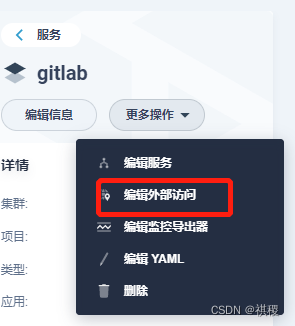
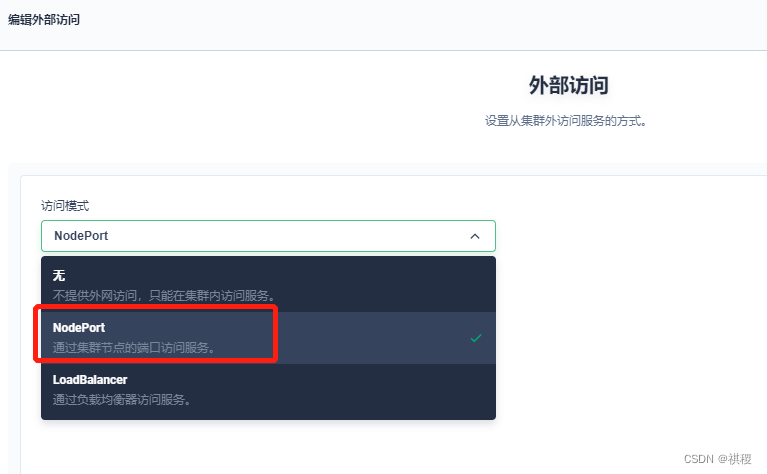
到这里,就可以使用服务的ip+端口来访问gitlab了。
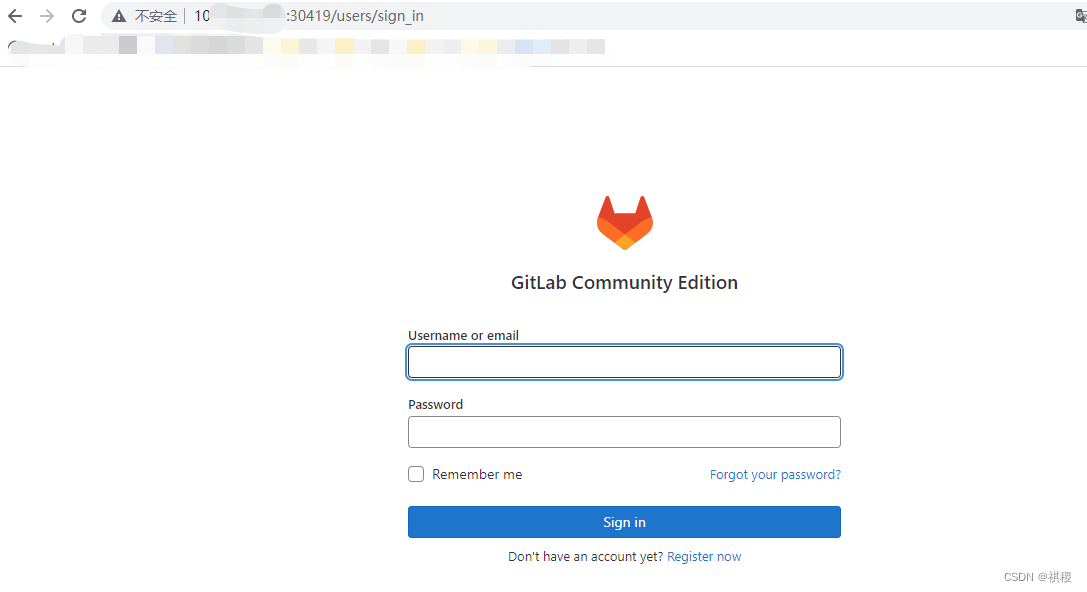
root默认密码在文件
/etc/gitlab/initial_root_password 中。可以编辑或者拷贝出来,登录后再在界面上用户管理中修改。

腾讯云面向开发者汇聚海量精品云计算使用和开发经验,营造开放的云计算技术生态圈。
更多推荐
 0
0 0
0- 0


 已为社区贡献3条内容

所有评论(0)