vscode安装easy sass插件
·
大无语事件,今天好歹都要发个博,真是无语到家了
今天下载安装了Vscode,然后在微信开发者工具中导入已安装的vscode扩展,也进行了相关配置。本来一切准备就绪,开始用scss编译wxss文件,发现代码不显示提示,也编译不成功,弹出提示EasySass: could not generate CSS file. See Output panel for details. 搜了半天原来是后缀名写错了,无语子!!!!!!!!
省流:
问题:
vscode安装easy sass插件,使用的时候提示错误 :EasySass: could not generate CSS file. See Output panel for details.
错误原因:
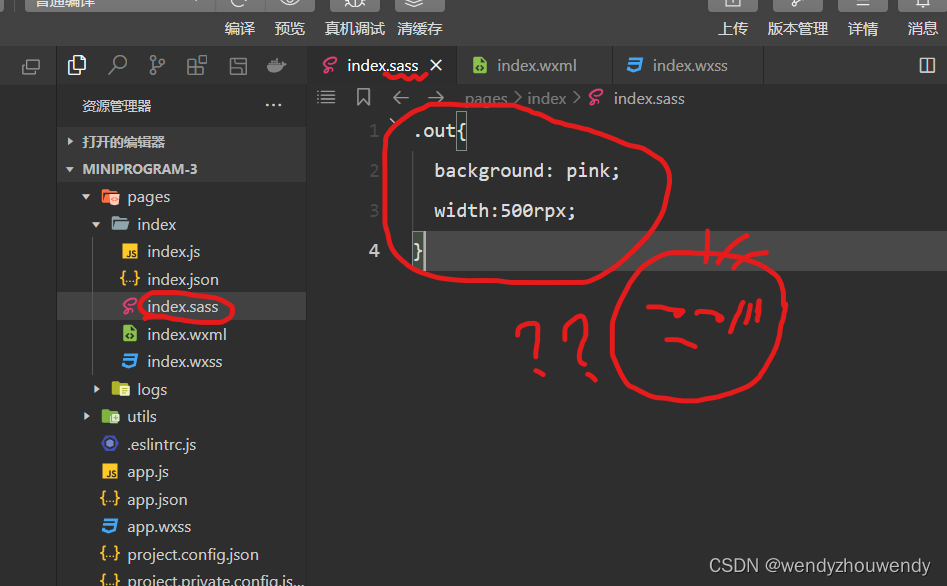
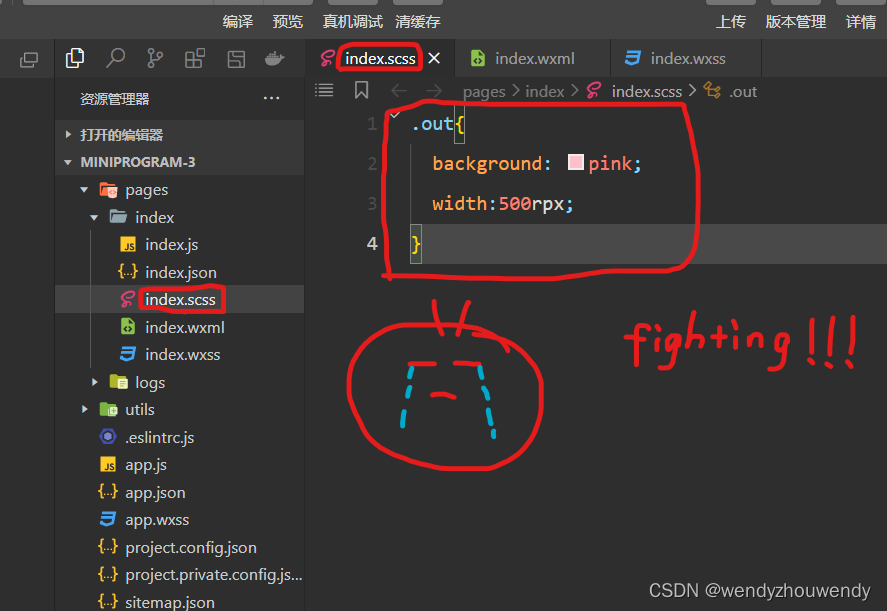
后缀名是.scss,不是.cass
错误截图:(代码无提示)
 改后截图:
改后截图:
另外:
1.解决安装vscode下载缓慢问题:https://blog.csdn.net/lvoelife/article/details/127297091?spm=1001.2014.3001.5506
2.微信小程序如何使用scss编译wxss文件:
https://blog.csdn.net/qq_18798149/article/details/128977729?spm=1001.2014.3001.5501(博客教程)
https://www.bilibili.com/video/BV19G4y1K74d?p=42&vd_source=d7b39bd4b9339c72d73cc9c86d7f57b9(视频教程,老师讲的很好呀)

腾讯云面向开发者汇聚海量精品云计算使用和开发经验,营造开放的云计算技术生态圈。
更多推荐
 1
1 0
0- 0


 已为社区贡献1条内容

所有评论(0)