【react native】Flatlist实现上拉滚动加载
·
enum FooterType {
  Null = 0,
  NoData = 1,
  LoadingData = 2,
}

export default function CaseList() {
  const [caseData, setCaseData] = useState<CaseItem[]>([]);
  const [limit, setLimit] = useState<number>(1);
  const [isFoot, setIsFoot] = useState<FooterType>(FooterType.Null);


  const getCaseData = async () => {
    try {
      // 如果数据已经全部加载完成,则不再请求接口
      if (isFoot === FooterType.NoData) return;
      setIsFoot(FooterType.LoadingData);
      const res = await getCaseLists({ limit });
      // 之前 caseData 数据也需要一起存放起来
      const result = [...caseData, ...res.data];
      setCaseData(result);
      const isLoadEnd = result.length >= res?.total;
      if (isLoadEnd) {
        // 数据加载完成
        setIsFoot(FooterType.NoData);
      }
    } catch (err) {
      console.warn('err:', err);
    }
  };

  const { run } = useRequest(getCaseData, {
    debounceWait: 300,
    manual: true,
  });

  useEffect(() => {
    run();
  }, [limit]);

  const renderCaseItem = ({ item }: { item: CaseItem }) => {
    const { case_name: title, steps, update_time: time, isStar } = item;

    return (
      <TouchableOpacity onPress={() => {}} style={styles.itemView}>
        <View style={styles.leftItemView}>
          <Text style={styles.title} numberOfLines={1}>
            {title}
          </Text>
          <Text style={[styles.subTitle, styles.remarkText]} numberOfLines={1}>
            {steps}
          </Text>
        </View>
        <View style={styles.rightItemView}>
          {isStar ? <Image source={icStarSolid} style={styles.icon} /> : null}
          <Image
            source={icRightShape}
            style={[styles.icon, styles.rightShapeIcon]}
          />
        </View>
      </TouchableOpacity>
    );
  };

  const renderListFooter = () => {
    if (isFoot === FooterType.NoData) {
      return (
        <View style={styles.footerView}>
          <Text style={styles.footerText}>End</Text>
        </View>
      );
    }
    if (isFoot === FooterType.LoadingData) {
      return (
        <View style={styles.footerView}>
          <ActivityIndicator />
          <Text style={styles.footerText}>Loading...</Text>
        </View>
      );
    }
    return null;
  };

  return (
    <View style={styles.flatlistView}>
      <FlatList
        data={caseData}
        renderItem={renderCaseItem}
        keyExtractor={item => `${item.id}+${item.case_name}`}
        onEndReached={() => setLimit(limit + 1)} // limit变化,会触发接口调用
        onEndReachedThreshold={0.1} // 决定当距离内容最底部还有多远时触发onEndReached回调
        ListFooterComponent={renderListFooter()}  // 决定底部展示什么。end & loading··· 状态
        ListEmptyComponent={<Empty />}
      />
    </View>
  );
}

const styles = StyleSheet.create({
  flatlistView: {
    height: WINDOW_HEIGHT - 320, // 一定要有一个高度
  },
  searchInput: {
    backgroundColor: '#F5F5F5',
    borderColor: '#F5F5F5',
  },
  icon: {
    width: 14,
    height: 14,
  },
  itemView: {
    display: 'flex',
    flexDirection: 'row',
    justifyContent: 'space-between',
    paddingLeft: 10,
    paddingRight: 10,
    borderTopColor: 'rgba(0, 0, 0, 0.09)',
    borderTopWidth: 1,
    height: 60,
  },
  leftItemView: {
    width: 280,
    overflow: 'hidden',
    alignSelf: 'center',
  },
  rightItemView: {
    display: 'flex',
    flexDirection: 'row',
    justifyContent: 'flex-end',
    alignItems: 'center',
  },
  title: {
    fontWeight: '500',
    fontSize: 14,
    lineHeight: 20,
    color: 'rgba(0, 0, 0, 0.87)',
  },
  subTitle: {
    fontWeight: '400',
    fontSize: 12,
    lineHeight: 14,
    color: 'rgba(0, 0, 0, 0.54)',
  },
  remarkText: {
    marginTop: 5,
  },
  rightShapeIcon: {
    marginLeft: 8,
    width: 6.15,
    height: 11.71,
  },
  bottomSheetContentView: {},
  sheetContentTitle: {
    marginTop: 5,
  },
  sheetContentsubTitle: {
    marginTop: 5,
  },
  timeView: {
    display: 'flex',
    flexDirection: 'row',
    alignItems: 'center',
    justifyContent: 'flex-start',
    marginTop: 12,
    marginBottom: 8,
  },
  timeIcon: {
    width: 12,
    height: 12,
    marginRight: 5,
  },
  timeText: {},
  bottomSheetFooterView: {
    display: 'flex',
    flexDirection: 'row',
    alignItems: 'center',
    justifyContent: 'space-between',
  },
  sheetStarIcon: {
    width: 24,
    height: 24,
  },
  sheetButton: {
    width: 300,
  },
  footerView: {
    alignItems: 'center',
    justifyContent: 'center',
  },
  footerText: {
    fontSize: 12,
    color: 'rgba(0, 0, 0, 0.26)',
  },
});
注意事项:
- 当 FlatList 容器无法滚动的时候,外包一层View,并设置一个宽度。
- FlatList 组件的data表示的是列表中所有数据,所以对于接口返回的数据,需要
[...data, ...result]操作。
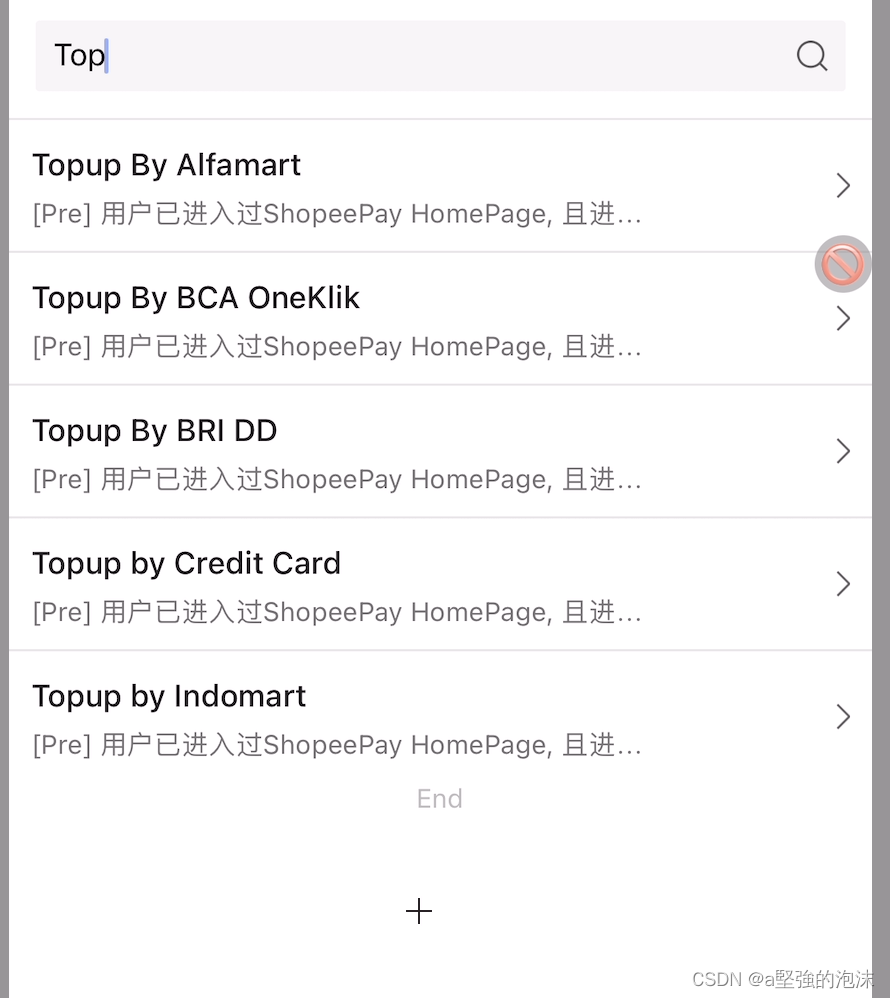
效果:


腾讯云面向开发者汇聚海量精品云计算使用和开发经验,营造开放的云计算技术生态圈。
更多推荐
 0
0 0
0- 0


 已为社区贡献12条内容

所有评论(0)