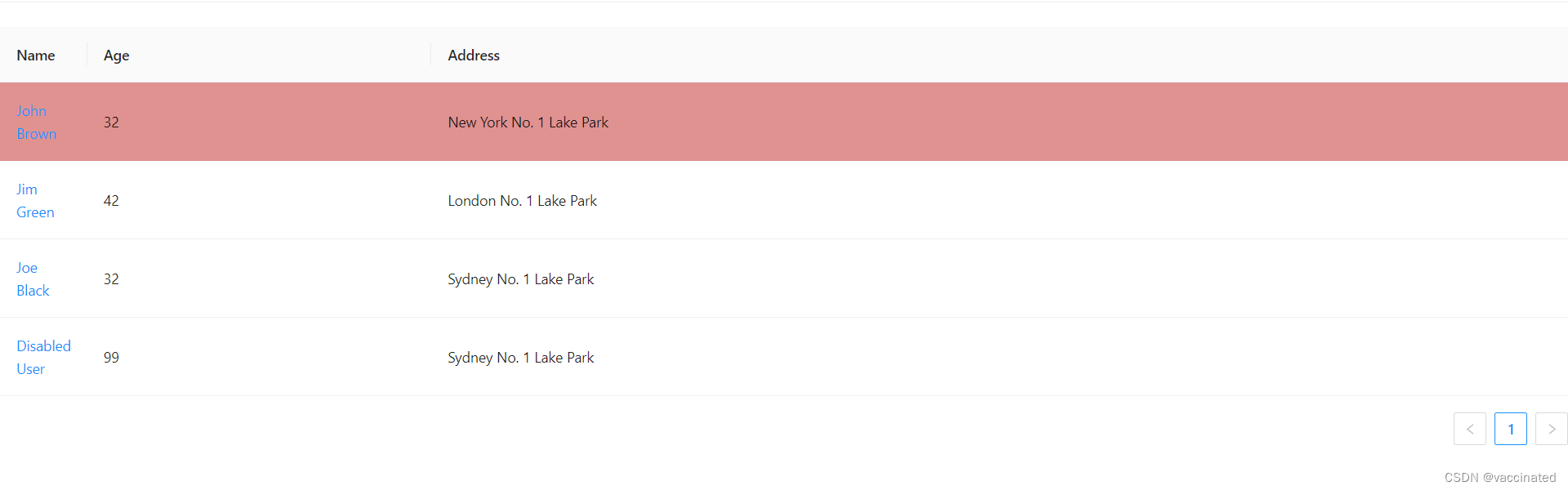
react如何使用实现antd Table选中行高亮显示
·
首先定义高亮选中的key列表
const [arr, setarr] = useState([""])
获取table表单数据根据自己的数据进行配置
const columns = [
  {
    title: 'Name',
    dataIndex: 'name',
    render: (text) => <a>{text}</a>,
  },
  {
    title: 'Age',
    dataIndex: 'age',
  },
  {
    title: 'Address',
    dataIndex: 'address',
  },
];
const data = [
  {
    key: '1',
    name: 'John Brown',
    age: 32,
    address: 'New York No. 1 Lake Park',
  },
  {
    key: '2',
    name: 'Jim Green',
    age: 42,
    address: 'London No. 1 Lake Park',
  },
  {
    key: '3',
    name: 'Joe Black',
    age: 32,
    address: 'Sydney No. 1 Lake Park',
  },
  {
    key: '4',
    name: 'Disabled User',
    age: 99,
    address: 'Sydney No. 1 Lake Park',
  },
];
将数据进行渲染
<Table
        rowSelection={{
            selectedRowKeys:arr,//被选中的key列表
                }}打开Table的表头选择 选择根据自己需要设置type:为多选或单选checkbox | radio

        onRow={record => ({
                    onClick: () => {setarr([...record.key]);}, //鼠标左击事件这里是单选的直接进行修改
        })}
        columns={columns}
        dataSource={data}
      />
如果需要多选进行判断是否存在arr内进行对应操作。
最后将表头进行隐藏就可以了
.ant-table-selection-column{
    display: none;
}
.ant-table-tbody > tr.ant-table-row-selected > td{
    background-color: rgb(224, 145, 145) !important;
}//通过这个css选择器自定义高亮颜色

腾讯云面向开发者汇聚海量精品云计算使用和开发经验,营造开放的云计算技术生态圈。
更多推荐
 0
0 0
0- 0


 已为社区贡献1条内容

所有评论(0)