【nvidia-smi报错】Failed to initialize NVML: Driver/library version mismatch
问题:
使用nvidia-smi命令查看显卡状态时,出现错误:
Failed to initialize NVML: Driver/library version mismatch
而使用nvcc -V查看cuda版本时,显示正常
分析解决:
从现象看是cuda正常,但与之匹配的显卡驱动版本变了,导致出现不匹配问题。
个人简单粗暴的做法是重新下载当前cuda版本的安装包,只安装驱动不安装cuda恢复正常。例如,我是cuda-12.0,下载安装:
wget https://developer.download.nvidia.com/compute/cuda/12.0.0/local_installers/cuda_12.0.0_525.60.13_linux.run
sudo sh cuda_12.0.0_525.60.13_linux.run
安装后执行nvidia-smi,正常显示显卡状态。
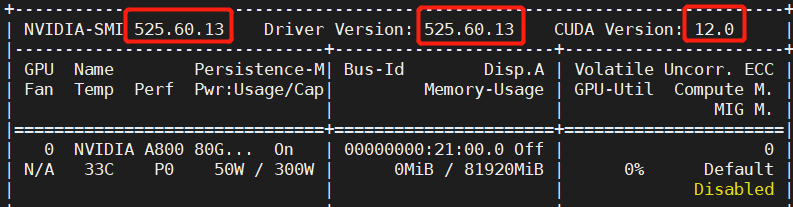
但是安装驱动可能出错,例如:
ERROR: An NVIDIA kernel module 'nvidia-uvm' appears to already be loaded in your kernel. This may be because it is in use (for example, by an X server, a CUDA program, or the NVIDIA Persistence Daemon), but this may also happen if your kernel was configured without support for module unloading. Please be sure to exit any programs that may be us ing the GPU(s) before attempting to upgrade your driver. If no GPU-based programs are running, you know that your k ernel supports module unloading, and you still receive this message, then an error may have occurred that has corrup ted an NVIDIA kernel module's usage count, for which the simplest remedy is to reboot your computer.
查看内核模块
lsmod | grep nvidia nvidia_uvm
995356 2 nvidia_drm 53134 0 nvidia_modeset
1195268 1 nvidia_drm nvidia
35237551 14 nvidia_modeset,nvidia_uvm drm_kms_helper
179394 2 i915,nvidia_drm drm
429744 5 i915,drm_kms_helper,nvidia,nvidia_drm
查看相应进程并结束
lsof /dev/nvidia*
COMMAND PID USER FD TYPE DEVICE SIZE/OFF NODE NAME
sbatchd 3680 root 5u CHR 195,255 0t0 56434 /dev/nvidiactl
sbatchd 3680 root 6u CHR 237,0 0t0 52212 /dev/nvidia-uvm
sbatchd 3680 root 7u CHR 195,0 0t0 54226 /dev/nvidia0
sbatchd 3680 root 8u CHR 195,0 0t0 54226 /dev/nvidia0
sbatchd 3680 root 9u CHR 195,0 0t0 54226 /dev/nvidia0
kill -9 3680
卸载相应模块,重新安装
sudo sh cuda_12.0.0_525.60.13_linux.run

腾讯云面向开发者汇聚海量精品云计算使用和开发经验,营造开放的云计算技术生态圈。
更多推荐
 0
0 0
0- 0


 已为社区贡献10条内容

所有评论(0)