react项目引入百度地图api报有警告:A parser-blocking, cross site (i.e. different eTLD+1) script
项目场景:
最近在写一个react项目,需要使用到百度地图API,于是去百度地图官网React-BMapGL添加地图API。
问题描述
首先引入脚本,在index.html中引入以下script,密钥可去百度地图开放平台官网申请。
本人引入的文件是:public/index.html
<script type="text/javascript" src="//api.map.baidu.com/api?type=webgl&v=1.0&ak=您的密钥"></script>引入之后,地图加载不会出错,功能也完整。但是浏览器会报出警告:
A parser-blocking, cross site (i.e. different eTLD+1) script, http://api.map.baidu.com/getscript?type=webgl&v=1.0&ak=您的密钥&services=&t=, is invoked via document.write. The network request for this script MAY be blocked by the browser in this or a future page load due to poor network connectivity. If blocked in this page load, it will be confirmed in a subsequent console message.
See https://www.chromestatus.com/feature/5718547946799104 for more details.翻译:
通过document.write调用一个解析器阻塞,跨站点(即不同的eTLD+1)脚本,http://api.map.baidu.com/getscript?type=webgl&v=1.0&ak=“&services=&t=”。由于网络连接不良,对该脚本的网络请求可能会在当前或将来的页面加载中被浏览器阻止。如果在此页面加载中被阻塞,将在随后的控制台消息中进行确认。
详见https://www.chromestatus.com/feature/5718547946799104。
原因分析:
于是去提示的 https://www.chromestatus.com/feature/5718547946799104 中看了一眼,其中解释了为什么会报出这个警告,以下是其内容:
For users on slow connections such as 2G, the performance penalty from third-party scripts loaded via document.write() is often so severe as to delay display of main page content for tens of seconds. This feature will block the load of cross-origin, parser-blocking scripts inserted via document.write() in case of an HTTP cache miss for users on a 2G connection. The feature will only be applicable to such scripts in the main frame.
翻译:
对于使用慢速连接(如2G)的用户,通过document.write()加载的第三方脚本的性能损失通常非常严重,以至于导致主页内容的显示延迟数十秒。在2G连接上的用户HTTP缓存丢失的情况下,该特性将阻止通过document.write()插入的跨域解析器阻塞脚本的加载。该功能将仅适用于主框架中的此类脚本。
解决方案:
尝试方法一:(未解决)
根据网络上搜索的各种博客的方法:
将https://api.map.baidu.com/api后面紧跟的api换成getscript
script原文:
<script type="text/javascript"
src="//api.map.baidu.com/api?type=webgl&v=1.0&ak=您的密钥"></script>修改之后的:
 <script type="text/javascript"
   src="https://api.map.baidu.com/getscript?v=1.0&&type=webgl&ak=您的密钥">
   </script>
结果:
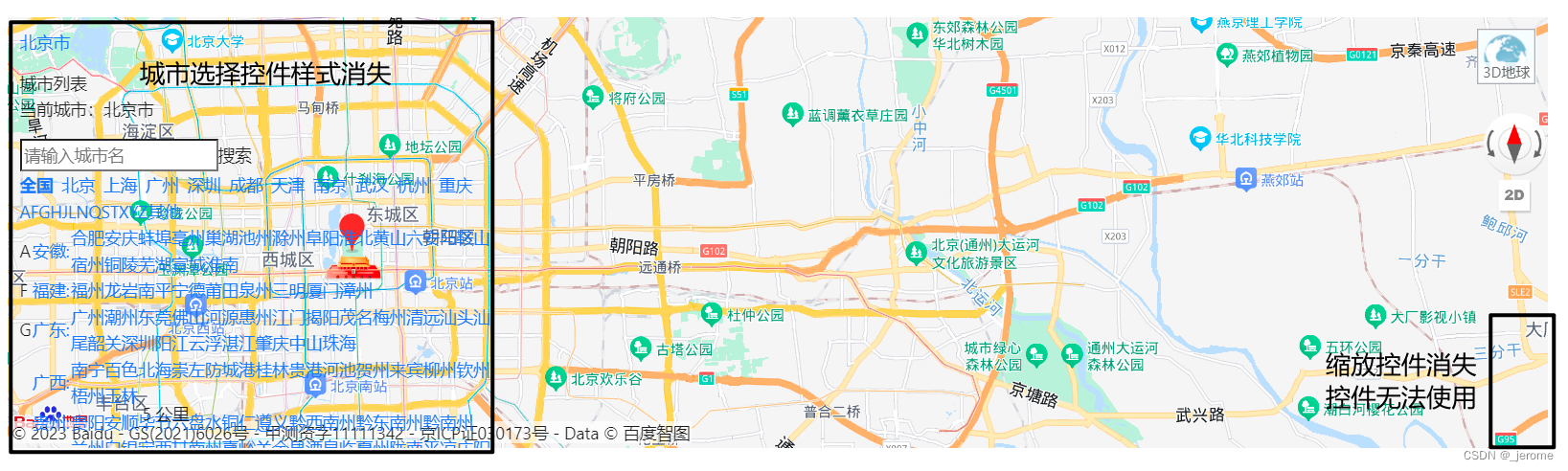
不报警告了,但是某些控件功能丧失,某些控件样式消失。
如图所示:
尝试方法二:(未解决)
根据网络上搜索的各种博客的方法:
<script>
 let cnzz_s_tag = document.createElement('script');
 cnzz_s_tag.type = 'text/javascript';
 cnzz_s_tag.async = true;
 cnzz_s_tag.charset = 'utf-8';
 cnzz_s_tag.src = 'https://api.map.baidu.com/api?type=webgl&v=1.0&ak=您的密钥';
 let root_s = document.getElementsByTagName('script')[0];
 root_s.parentNode.insertBefore(cnzz_s_tag, root_s);
</script>
结果:
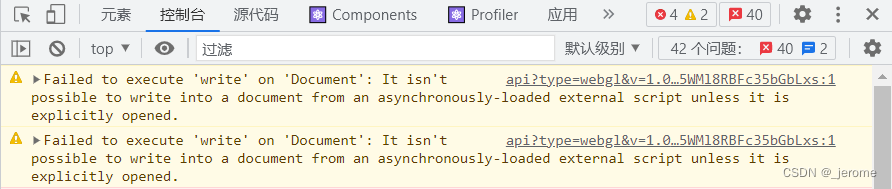
出现警告内容:
Failed to execute 'write' on 'Document': It isn't possible to write into a document from an asynchronously-loaded external script unless it is explicitly opened.
里面包含了 document.write方法,异步加载的js是不允许使用document.write方法的。
警告内容图示:
尝试方法三:(解决)
我想方法一既然可以解决警告,只是样式缺失,那么我是否可以通过link标签去引入样式?
于是我先将带有api的script引入:
文件路径:public\index.html
 <script type="text/javascript"
src="//api.map.baidu.com/api?type=webgl&v=1.0&ak=您的密钥"></script>然后去项目中通过F12查看源代码:
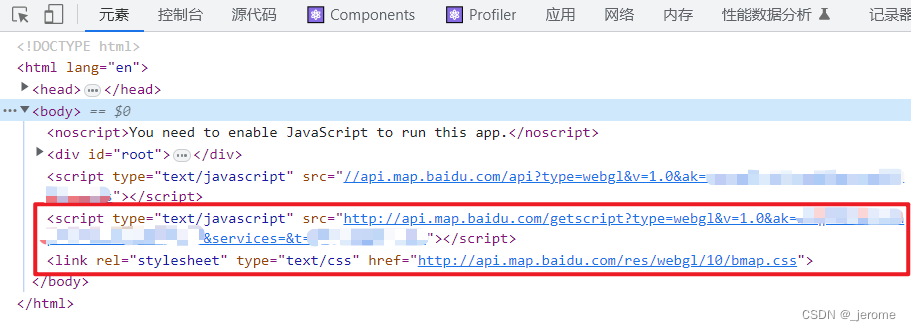 我将这俩个标签复制下来,直接引入到我的
index.html文件中:
<!-- <script type="text/javascript"
src="//api.map.baidu.com/api?type=webgl&v=1.0&ak=您的密钥"></script> -->
<script type="text/javascript"
src="http://api.map.baidu.com/getscript?type=webgl&v=1.0&ak=您的密钥;services=&t="></script>
<link rel="stylesheet" type="text/css" href="http://api.map.baidu.com/res/webgl/10/bmap.css">结果:
至此,警告问题完全解决,并且样式也没有任何问题。

腾讯云面向开发者汇聚海量精品云计算使用和开发经验,营造开放的云计算技术生态圈。
更多推荐
 4
4 0
0- 0


 已为社区贡献1条内容

所有评论(0)