Android: 时钟 TextClock、DigitalClock、AnalogClock
Android: 时钟 TextClock、DigitalClock、AnalogClock
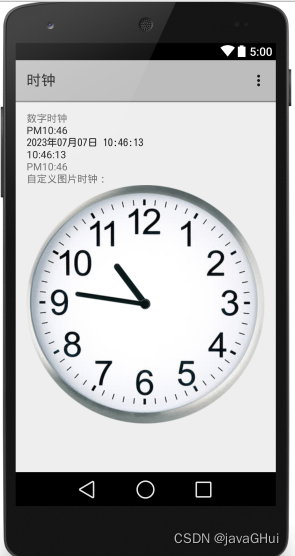
main.xml:
<LinearLayout xmlns:android="http://schemas.android.com/apk/res/android"
xmlns:tools="http://schemas.android.com/tools" android:layout_width="match_parent"
android:layout_height="match_parent" android:paddingLeft="@dimen/activity_horizontal_margin"
android:paddingRight="@dimen/activity_horizontal_margin"
android:paddingTop="@dimen/activity_vertical_margin"
android:paddingBottom="@dimen/activity_vertical_margin"
android:orientation="vertical"
tools:context=".MainActivity">
<TextView android:text="数字时钟" android:layout_width="wrap_content"
android:layout_height="wrap_content" />
<!--
(TextClock)DigitalClock:数字时钟,它也继承了TextView,它的本质也是文框。
只不过它的文本内容总是显示当前时间。
其中TextClock比DigitalClock多了可指定12时制的格式、24时制的格式等。
android:format24Hour="yyyy年MM月dd日 hh:mm:ss"
android:format12Hour="yyyy-MM-dd hh:mm:ss"
-->
<TextClock
android:layout_width="wrap_content"
android:layout_height="wrap_content"
android:format24Hour="yyyy-MM-dd hh:mm:ss"
/>
<TextClock
android:layout_width="wrap_content"
android:layout_height="wrap_content"
android:format12Hour="yyyy年MM月dd日 hh:mm:ss"
/>
<TextClock
android:layout_width="wrap_content"
android:layout_height="wrap_content"
android:format12Hour="hh:mm:ss"
/>
<DigitalClock
android:layout_width="wrap_content"
android:layout_height="wrap_content"
/>
<TextView
android:layout_width="wrap_content"
android:layout_height="wrap_content"
android:text="自定义图片时钟:"/>
<!--
AnalogClock:
如果希望对模拟器进行定制。
引用图片
hand_hour:指定时针的外观。
hand_minute:指定分针的外观。
android:dial:指定表盘的外观
-->
<AnalogClock
android:layout_width="wrap_content"
android:layout_height="wrap_content"
android:dial="@drawable/biaopan"
android:hand_hour="@drawable/shizhen"
android:hand_minute="@drawable/fenzhen"
/>
</LinearLayout>

腾讯云面向开发者汇聚海量精品云计算使用和开发经验,营造开放的云计算技术生态圈。
更多推荐
 0
0 0
0- 0


 已为社区贡献3条内容

所有评论(0)