django+paramiko结合layui实现webssh,sftp的文件上传功能
·
django+paramiko结合layui实现webssh,sftp的文件上传功能
环境准备
python: 3.7.5
django:3.2.15
paramiko:3.1.0
layui:2.8.2
要求已经搭建基础环境。
公共类--py_sftp.py
import paramiko
from django.core.files.base import ContentFile

class SFTPClient:
    def __init__(self, host, port, username, password):
        self.host = host
        self.port = port
        self.username = username
        self.password = password

        self.sftp = None
        self.transport = None

    # sftp连接方法
    def connect(self):
        self.transport = paramiko.Transport((self.host, self.port))
        self.transport.connect(username=self.username, password=self.password)
        self.sftp = self.transport.open_sftp_client()

    # 上传方法
    def upload_file(self, file_object, remote_path):
        # 创建ContentFile对象并将文件内容写入其中
        content_file = ContentFile(file_object.read())

        self.sftp.putfo(content_file, remote_path)

    # 下载方法
    def download_file(self, remote_path, local_path):
        if self.sftp is None:
            raise Exception("Please connect first!")
        self.sftp.get(remote_path, local_path)

    # 文件是否存在判断
    def file_exists(self, path):
        try:
            self.sftp.stat(path)
        except IOError as e:
            if 'No such file' in str(e):
                return False
            raise
        return True
    # 其他方法保持不变

    def disconnect(self):
        if self.sftp is not None:
            self.sftp.close()
        if self.transport is not None:
            self.transport.close()
Python
主方法--views.py
from django.shortcuts import render
from django.http import JsonResponse, QueryDict,FileResponse
import requests,socket,pexpect,ping3,re,time,subprocess,os,pytz,json
from io import StringIO,BytesIO
from datetime import datetime,timedelta
from django.core.files.base import ContentFile
# 文件上传下载方法
from django.core.files.storage import FileSystemStorage
from monitor.py_sftp import SFTPClient
from pathlib import PurePosixPath

def webssh_file_operation(request):
    if request.method == "POST":
        file_storage = FileSystemStorage()
        action = request.POST.get('action')
        path_to_file = request.POST.get('path')
        id = request.GET.get("id")

        try:
            # 通过ID在数据库中查出用于认证的信息并建立连接
            host_ssh = HostMonitoring.objects.get(id=id)
            host_ip = host_ssh.ipv4_address
            host_name = host_ssh.ipv4_address
            host_port = int(host_ssh.port)
            sys_user_name = host_ssh.username
            sys_user_passwd = host_ssh.password
            if action == 'upload':
                file = request.FILES['file']
                if 'file' not in request.FILES:
                    return JsonResponse({'status': 400, 'msg': '你未选择任何文件。'}, safe=False)
                try:
                    # 连接到SFTP主机
                    sftp_client = SFTPClient(host_ip, host_port, sys_user_name, sys_user_passwd)
                    sftp_client.connect()
                    # 上传的文件
                    uploads = request.FILES.getlist("file")

                    for upload in uploads:
                         # 拼接路径
                        remote_path = PurePosixPath(path_to_file) / upload.name
                        # 获取前端的状态,用于判断上传的文件是否覆盖上传
                        overwrite = request.POST.get("overwrite", default="false")

                        if overwrite == "true":
                            # 创建ContentFile对象并将文件内容写入其中
                            content_file = ContentFile(upload.read())
                            # 将ContentFile对象上传到服务器,不存在文件也会被创建,存在则会被覆盖
                            sftp_client.upload_file(content_file, str(remote_path))

                        elif sftp_client.file_exists(str(remote_path)):
                            # 如果没有 overwrite=True 参数,并且存在该文件,则返回状态码300
                            return JsonResponse({'status': 300, 'msg': '文件已存在,是否覆盖?'}, safe=False)

                        else:
                            # 否则正常进行上传
                            content_file = ContentFile(upload.read())
                            sftp_client.upload_file(content_file, str(remote_path))

                    print(f"上传文件: {remote_path} 成功")
                    sftp_client.disconnect()
                    return JsonResponse({'status': 200, 'msg': '文件上传成功'}, safe=False)


                except Exception as e:
                    print("有错误:", e)
                    return JsonResponse({'status': 500, 'msg': '文件上传失败'}, safe=False)
             # 下载方法(待完善)
            elif action == 'download':
                # 连接到SFTP主机
                sftp_client = SFTPClient(host_ip, host_port, sys_user_name, sys_user_passwd)
                sftp_client.connect()

                # 创建一个BytesIO对象并将其作为file-like object
                file_like_object = BytesIO()

                # 下载文件到file-like object
                sftp_client.download_file(path_to_file, file_like_object)

                # 将file-like object重置到开始位置
                file_like_object.seek(0)

                # 断开与SFTP主机的连接
                sftp_client.disconnect()

                print(f"下载文件: {request.path} 成功")

                response = FileResponse(file_like_object)
                response['Content-Type'] = 'application/octet-stream'
                response['Content-Disposition'] = 'attachment; filename="%s"' % os.path.basename(path_to_file)

                return response
             # 删除方法(待完善)
            elif action == 'delete':
                if not file_storage.exists(path_to_file):
                    return JsonResponse({'status': 400, 'msg': 'File does not exist.'}, safe=False)
                file_storage.delete(path_to_file)

            else:
                return JsonResponse({'code': 400, 'msg': 'Invalid action.'}, safe=False)

            return JsonResponse({'status': 200, 'msg': 'Operation complete.'}, safe=False)
        except Exception as e:
            print("有错误:",e)

    return JsonResponse({'status': 400, 'msg': 'Action must be POST.'}, safe=False)
Bash
前端文件--webssh_file.html
<!DOCTYPE html>
<html lang="en">
<head>
<meta charset="UTF-8">
<meta name="viewport" content="width=device-width, initial-scale=1.0">
<title>Linux 文件管理器</title>
<!-- 引入Layui CSS -->
<link href="/static/layui/css/layui.css" rel="stylesheet" />
<style>
.folder-name {
background-color: #d9edff;
padding-left: 5px;
padding-right: 5px;
}
.control-btn {
margin-right: 10px;
}
.return-btn {
background-color: #CCCCCC;
border-color: #CCCCCC;
color: #000000;
}
</style>
</head>
<body>
<!-- Add this in -->
<script src="/static/layui/layui.js"></script>
<script>
// 初始化Layui
layui.use(['jquery', 'element', 'table'], function (table) { // 将 table add into callback arguments.
var $ = layui.jquery;
var element = layui.element;
var table = layui.table;
var hostId = "{{ id }}";
var isProcessing = false; // 创建全局变量用于标记是否正在处理目录
// 在页面加载时,运行 fetchDirectoryList 函数来获取目录列表
$(document).ready(function () {
fetchDirectoryList();
});
// 目录切换事件
$('body').on('dblclick', '.folder-name', function () {
if (isProcessing) return; // 如果正在处理,直接返回不做操作
var newFolderName = $(this).text();
if (newFolderName == '..') {
var currentPath = $('#current-path').val();
if (currentPath === '/') { // 已在根目录,无需再上一级
return;
}
// 分割 currentPath
var pathParts = currentPath.split('/');
// 移除最后一个路径部分
pathParts.pop();
// 特殊情况: 当只剩下 [''] 或者 [] 时, 都应该转换为 '/'
if (pathParts.length === 0 || (pathParts.length === 1 && pathParts[0] === '')) {
$('#current-path').val('/')
} else {
$('#current-path').val(pathParts.join('/'));
}
}
else {
// 如同之前的代码, 进入子文件夹
var currentPath = $('#current-path').val();
if (currentPath[currentPath.length - 1] !== '/') {
currentPath += '/';
}
$('#current-path').val(currentPath + newFolderName);
}
fetchDirectoryList();
});
// 返回按钮事件
$(document).ready(function () {
fetchDirectoryList();
$('#go-back').on('click', function () {
var currentPath = $('#current-path').val();
if (currentPath === '/') { // 已在根目录,无需再上一级
return;
}
// 分割 currentPath
var pathParts = currentPath.split('/');
// 移除最后一个路径部分
pathParts.pop();
// 特殊情况: 当只剩下 [''] 或者 [] 时, 都应该转换为 '/'
if (pathParts.length === 0 || (pathParts.length === 1 && pathParts[0] === '')) {
$('#current-path').val('/')
} else {
$('#current-path').val(pathParts.join('/'));
}
fetchDirectoryList();
});
});
//手动刷新按钮
$('#refresh').on('click', function () {
var loadingIndex = layer.load(3); // 开启加载
// 延迟一秒后执行关闭加载效果,并执行fetchDirectoryList函数刷新目录列表
setTimeout(function () {
layer.close(loadingIndex); // 关闭加载
fetchDirectoryList(); // 刷新目录列表
}, 1000);
});
// 绑定上传文件按钮的点击事件,触发file input的点击事件
$(".upload-file").click(function () {
$("#file-upload").trigger("click");
});
$("#file-upload").change(function () {
fileInputHandler(); // 抽象出的文件输入变化处理函数
});
function fileInputHandler(overwrite = false) {
var hostId = "{{ id }}";
var actionType = "upload";
var selectedFilePath = $("#current-path").val();
var formData = new FormData();
// 每次调用都会重新创建一个新的formData实例
formData.append("action", actionType);
formData.append("path", selectedFilePath);
if (overwrite){
formData.append('overwrite', 'true');
}
var fileInput = $("#file-upload")[0];
if (fileInput.files.length > 0) {
formData.append('file', fileInput.files[0]);
}
$.ajax({
url: "{% url 'webssh_file_operation' %}?id=" + hostId,
type: 'POST',
data: formData,
processData: false,
contentType: false,
success: function (data) {
if (data.status === 200) {
alert(data.msg);
fetchDirectoryList();
} else if(data.status===300){
if(confirm(data.msg)){
fileInputHandler(true); // 当用户确认覆盖时,调用此函数并设置overwrite为true
}
} else if(data.status===400){
layer.msg(data.msg, { icon: 5 })
}else {
alert("上传失败了: " + data.msg);
}
},
});
}
layer.msg("请求中,请稍等")
// 显示 loading 效果
var loadingIndex = layer.load(3);
function fetchDirectoryList() {
var hostId = "{{ id }}"; // 将从 Django context 中传递的主机 ID 保存到变量中
var currentPath = document.getElementById("current-path").value; // 获取 HTML 元素中当前保存的路径
$.ajax({
url: "{% url 'webssh_get_directory_list' %}",
type: "GET",
data: {
'path': currentPath,
'id': hostId
},
success: function (response) {
// 关闭 loading 效果
layer.close(loadingIndex);
isProcessing = false;
// 判断返回状态,处理目录404等错误
if (response.code === 404) {
alert('Directory not found.');
} else if (response.code === 200) {
var data = response.data.files;
// 数据表格列表
table.render({
elem: "#file-table",
cols: [
[
{
field: "name", title: "名称", templet: function (row) {
if (row.isFolder) {
// 如果是文件夹,则给他加上 folder-name 类别,这样我们才能监听click事件
return '<div class="folder-name"><i class="layui-icon layui-icon-layer"></i>' + row.name + '</div>';
} else {
return '<i class="layui-icon layui-icon-file"></i> ' + row.name;
}
}
},
{ field: "size", title: "大小", align: 'center' },
{ field: "owner", title: "用户" },
{ field: "permissions", title: "权限" },
{ field: "date", title: "修改日期" },
{ title: "操作列表", toolbar: "#operations" },
]
],
data: data,
done: function () {
$('#file-table tbody tr').each(function () {
var row = table.cache['file-table'][$(this).data('index')];
if (row.isFolder) {
$(this).find('.download').prop('disabled', true);
}
});
}
});
table.on('row(file-table)', function (obj) {
var data = obj.data;
console.log(data.isFolder)
if (!data.isFolder) {
$(this).find('.download').prop('disabled', false);
} else {
$(this).find('.download').prop('disabled', true);
}
});
} else {
alert('Error: ' + response.msg);
}
},
error: function (error) {
// 关闭 loading 效果
layer.close(loadingIndex);
isProcessing = false;
console.log('Error', error);
alert('网络错误,请稍后重试。');
}
});
}
});
</script>
<div class="layui-container">
<div class="layui-row layui-col-space15">
<div class="layui-col-md12">
<fieldset class="layui-elem-field layui-field-title">
<legend>Linux 文件管理器</legend>
<div class="layui-field-box">
<div class="layui-form-item">
<button id="go-back" class="layui-btn return-btn control-btn">返回</button>
<label class="layui-form-label" style="margin-left: 20px;">当前路径:</label>
<div class="layui-input-inline">
<input type="text" id="current-path" value="/" readonly class="layui-input">
</div>
<button class="layui-btn control-btn action-btn" data-action="createDir">新建目录</button>
<!-- 设置一个隐藏的file input接收用户上传的文件-->
<input type="file" id="file-upload" style="display: none;">
<!--将上传文件按钮设为触发file input的点击事件-->
<button class="layui-btn layui-btn-normal control-btn upload-file" data-action="upload">上传文件</button>
<button id="refresh" class="layui-btn layui-btn-normal control-btn">刷新</button>
</div>
<table id="file-table" lay-filter="demo"></table>
<script type="text/html" id="operations">
<button class="layui-btn layui-btn-xs layui-btn-normal download" data-action="download">下载</button>
<button class="layui-btn layui-btn-xs layui-btn-danger delete" data-action="delete">删除</button>
</script>
</div>
</fieldset>
</div>
</div>
</div>
</body>
</html>HTML
效果图如下
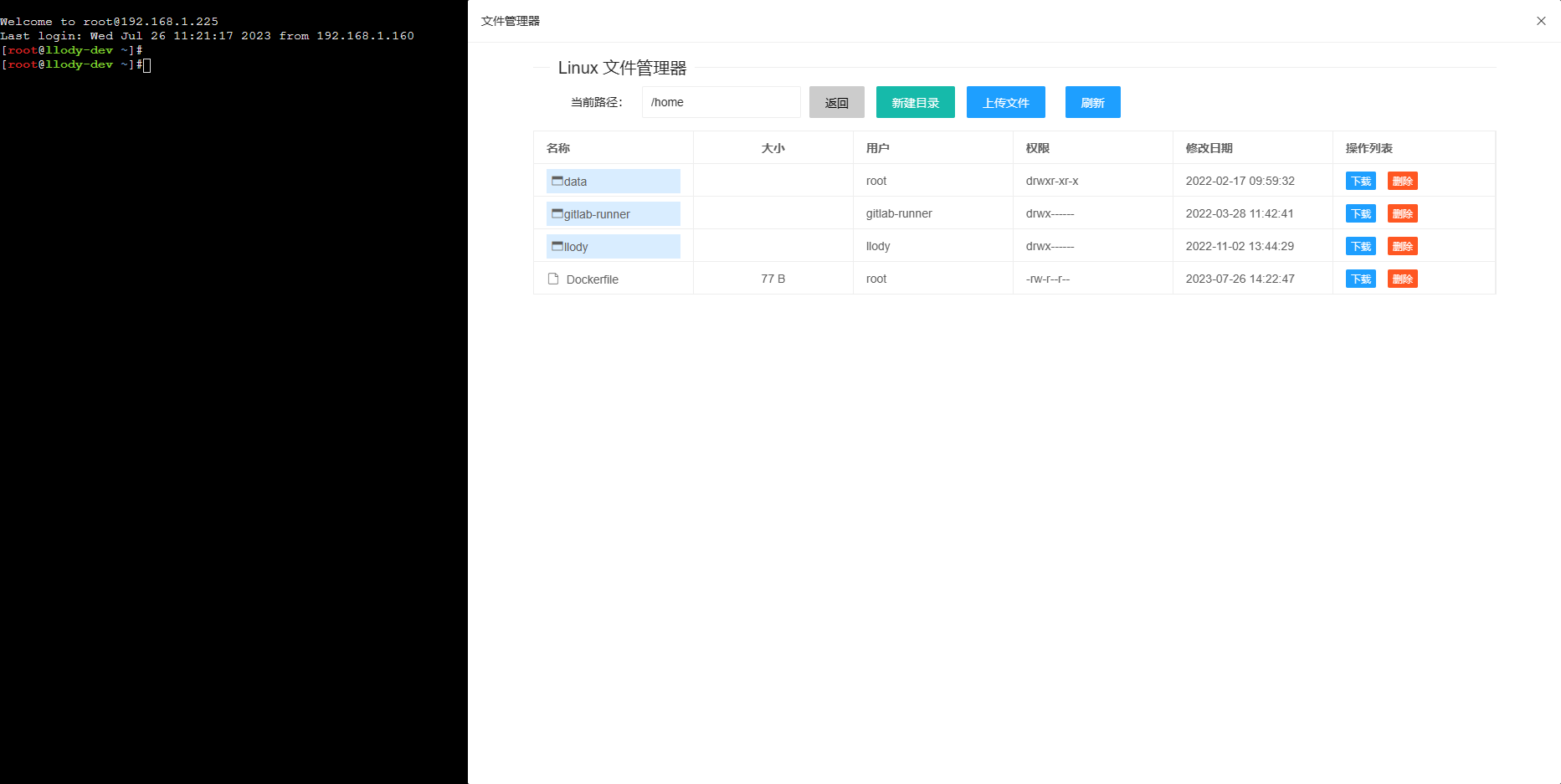
此代码只是实现了基础的上传功能和判断,用于联系用,有诸多不足的地方欢迎留言。
缺陷:1、代码使用同步上传,上传大文件时会有阻塞,后面优化异步或者分片上传。2、暂不支持多文件同时上传,但是实现也不难。3、上传时未提供进度条显示,无法观察上传进度与状态。
文章作者: llody_55
本文链接: /archives/django-paramikojie-he-layuishi-xian-webssh-sftpde-wen-jian-shang-chuan-gong-neng
版权声明: 本站所有文章除特别声明外,均采用 CC BY-NC-SA 4.0 许可协议。转载请注明来自 运维之路!

腾讯云面向开发者汇聚海量精品云计算使用和开发经验,营造开放的云计算技术生态圈。
更多推荐
 0
0 0
0- 0


 已为社区贡献2条内容

所有评论(0)