2.paimon-hive-flink整合
概述
paimon系列中已经完成默认catalog使用,基于文件系统
paimon现在支持两种
- 文件系统catalog是默认的
- hive方式 相关元数据信息保存在hive中(实际上是mysql),通过hive就可以直接访问
今天主要说明hive的使用
paimon其它相关文章请 移步
paimon官方文档
paimon与hive整合
跟着官网进行配置;
注意:
1.使用 hive catalog,数据库名称、表名称和字段名称应为小写
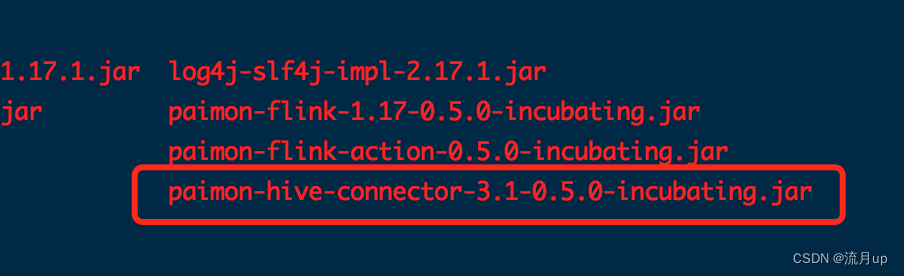
2.flink lib目录下添加 flink hive connector的jar包
启动 hive 服务
[root@hadoop01 apache-hive-3.1.3-bin]# nohup bin/hive --service metastore &
[1] 18297
[root@hadoop01 apache-hive-3.1.3-bin]# nohup: 忽略输入并把输出追加到"nohup.out"

[root@hadoop01 apache-hive-3.1.3-bin]# netstat -nlp | grep :9083
tcp6       0      0 :::9083                 :::*                    LISTEN      18297/java
[root@hadoop01 apache-hive-3.1.3-bin]#

# 查看是否正常启动
netstat -nlp | grep :9083
建立 hive catalog
CREATE CATALOG paimon_hive WITH (
‘type’ = ‘paimon’,
‘metastore’ = ‘hive’,
‘uri’ = ‘thrift://10.32.36.142:9083’,
‘warehouse’ = ‘hdfs:///data/hive/warehouse/paimon/hive’,
‘default-database’=‘test’
);
使用 所建立 的catalog paimon_hive,并在其中建立表
USE CATALOG paimon_hive;
插入数据,并查询一下插入的数据
Flink SQL> CREATE CATALOG paimon_hive WITH (
>     'type' = 'paimon',
>     'metastore' = 'hive',
>     'uri' = 'thrift://10.32.36.142:9083',
>     'warehouse' = 'hdfs:///data/hive/warehouse/paimon/hive',
>     'default-database'='test'
> );
[INFO] Execute statement succeed.

Flink SQL> USE CATALOG paimon_hive;
[INFO] Execute statement succeed.

Flink SQL> show databases;
+---------------+
| database name |
+---------------+
|       default |
|          test |
+---------------+
2 rows in set

Flink SQL> CREATE TABLE test_table (
>   a int,
>   b string
> );
[INFO] Execute statement succeed.

Flink SQL> INSERT INTO test_table VALUES (1, 'Table'), (2, 'Store');WARNING: An illegal reflective access operation has occurred
WARNING: Illegal reflective access by org.apache.flink.api.java.ClosureCleaner (file:/data/soft/flink/lib/flink-dist-1.17.1.jar) to field java.lang.Class.ANNOTATION
WARNING: Please consider reporting this to the maintainers of org.apache.flink.api.java.ClosureCleaner
WARNING: Use --illegal-access=warn to enable warnings of further illegal reflective access operations
WARNING: All illegal access operations will be denied in a future release
2023-10-21 16:35:43,712 WARN  org.apache.flink.yarn.configuration.YarnLogConfigUtil        [] - The configuration directory ('/data/soft/flink/conf') already contains a LOG4J config file.If you want to use logback, then please delete or rename the log configuration file.
2023-10-21 16:35:43,750 INFO  org.apache.hadoop.yarn.client.RMProxy                        [] - Connecting to ResourceManager at hadoop01/10.32.36.142:8032
2023-10-21 16:35:43,842 INFO  org.apache.flink.yarn.YarnClusterDescriptor                  [] - No path for the flink jar passed. Using the location of class org.apache.flink.yarn.YarnClusterDescriptor to locate the jar
2023-10-21 16:35:43,843 WARN  org.apache.flink.yarn.YarnClusterDescriptor                  [] - Neither the HADOOP_CONF_DIR nor the YARN_CONF_DIR environment variable is set.The Flink YARN Client needs one of these to be set to properly load the Hadoop configuration for accessing YARN.
2023-10-21 16:35:43,869 INFO  org.apache.flink.yarn.YarnClusterDescriptor                  [] - Found Web Interface hadoop02:42563 of application 'application_1697598809136_0008'.

[INFO] Submitting SQL update statement to the cluster...
[INFO] SQL update statement has been successfully submitted to the cluster:
Job ID: 7177023eb237173633fd2efd69d86e82


Flink SQL>
> SELECT * FROM test_table;2023-10-21 16:35:51,215 WARN  org.apache.flink.yarn.configuration.YarnLogConfigUtil        [] - The configuration directory ('/data/soft/flink/conf') already contains a LOG4J config file.If you want to use logback, then please delete or rename the log configuration file.
2023-10-21 16:35:51,237 INFO  org.apache.hadoop.yarn.client.RMProxy                        [] - Connecting to ResourceManager at hadoop01/10.32.36.142:8032
2023-10-21 16:35:51,238 INFO  org.apache.flink.yarn.YarnClusterDescriptor                  [] - No path for the flink jar passed. Using the location of class org.apache.flink.yarn.YarnClusterDescriptor to locate the jar
2023-10-21 16:35:51,238 WARN  org.apache.flink.yarn.YarnClusterDescriptor                  [] - Neither the HADOOP_CONF_DIR nor the YARN_CONF_DIR environment variable is set.The Flink YARN Client needs one of these to be set to properly load the Hadoop configuration for accessing YARN.
2023-10-21 16:35:51,240 INFO  org.apache.flink.yarn.YarnClusterDescriptor                  [] - Found Web Interface hadoop02:42563 of application 'application_1697598809136_0008'.

[INFO] Result retrieval cancelled.

Flink SQL> SET 'sql-client.execution.result-mode' = 'tableau';
[INFO] Execute statement succeed.

Flink SQL> SELECT * FROM test_table;2023-10-21 16:36:47,923 WARN  org.apache.flink.yarn.configuration.YarnLogConfigUtil        [] - The configuration directory ('/data/soft/flink/conf') already contains a LOG4J config file.If you want to use logback, then please delete or rename the log configuration file.
2023-10-21 16:36:47,945 INFO  org.apache.hadoop.yarn.client.RMProxy                        [] - Connecting to ResourceManager at hadoop01/10.32.36.142:8032
2023-10-21 16:36:47,945 INFO  org.apache.flink.yarn.YarnClusterDescriptor                  [] - No path for the flink jar passed. Using the location of class org.apache.flink.yarn.YarnClusterDescriptor to locate the jar
2023-10-21 16:36:47,945 WARN  org.apache.flink.yarn.YarnClusterDescriptor                  [] - Neither the HADOOP_CONF_DIR nor the YARN_CONF_DIR environment variable is set.The Flink YARN Client needs one of these to be set to properly load the Hadoop configuration for accessing YARN.
2023-10-21 16:36:47,948 INFO  org.apache.flink.yarn.YarnClusterDescriptor                  [] - Found Web Interface hadoop02:42563 of application 'application_1697598809136_0008'.

+----+-------------+--------------------------------+
| op |           a |                              b |
+----+-------------+--------------------------------+
| +I |           1 |                          Table |
| +I |           2 |                          Store |
^CQuery terminated, received a total of 2 rows
Flink SQL> use test;
[INFO] Execute statement succeed.

Flink SQL> show tables;
+------------+
| table name |
+------------+
| test_table |
+------------+
1 row in set

Flink SQL>
注意点
注意:当使用配置 hive catalog ,通过表更改不兼容的列类型时,需要配置配置单元.metastore.disable.incompatible.col.type.changes=false
如果使用的是hive3版本,还要关闭 HIVE ACID
hive.strict.managed.tables=false
hive.create.as.insert.only=false
metastore.create.as.acid=false
修改hive-site.xml配置
# 加至末尾,其它找到配置属性,修改配置属性
<property>
  <name>hive.strict.managed.tables</name>
  <value>false</value>
</property>
<property>
  <name>metastore.create.as.acid</name>
  <value>false</value>
</property>
重新启动,配置后面需要用到
结束
至此,paimon,hive及flink进行整合

腾讯云面向开发者汇聚海量精品云计算使用和开发经验,营造开放的云计算技术生态圈。
更多推荐
 0
0 0
0- 0


 已为社区贡献5条内容

所有评论(0)