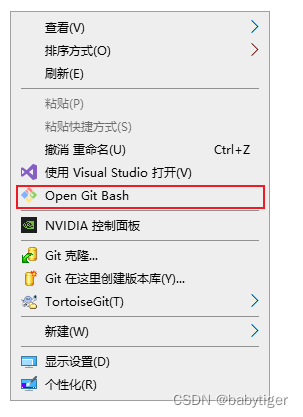
git增加右键菜单
·
有次不小心清理系统垃圾,把git右击菜单搞没了,下面是恢复方法
将下面代码存为.reg文件,双击后导出生效,注意,你安装的git必须是默认C盘的,如果换了地方要改下面注册表文件中相关的位置
Windows Registry Editor Version 5.00
; Open files
; Default Git-Bash Location C:\Program Files\Git\git-bash.exe

[HKEY_CLASSES_ROOT\*\shell\Open Git Bash]
@="Open Git Bash"
"Icon"="C:\\Program Files\\Git\\git-bash.exe"

[HKEY_CLASSES_ROOT\*\shell\Open Git Bash\command]
@="\"C:\\Program Files\\Git\\git-bash.exe\" \"--cd=%1\""

; This will make it appear when you right click ON a folder
; The "Icon" line can be removed if you don't want the icon to appear

[HKEY_CLASSES_ROOT\Directory\shell\bash]
@="Open Git Bash"
"Icon"="C:\\Program Files\\Git\\git-bash.exe"


[HKEY_CLASSES_ROOT\Directory\shell\bash\command]
@="\"C:\\Program Files\\Git\\git-bash.exe\" \"--cd=%1\""

; This will make it appear when you right click INSIDE a folder
; The "Icon" line can be removed if you don't want the icon to appear

[HKEY_CLASSES_ROOT\Directory\Background\shell\bash]
@="Open Git Bash"
"Icon"="C:\\Program Files\\Git\\git-bash.exe"

[HKEY_CLASSES_ROOT\Directory\Background\shell\bash\command]
@="\"C:\\Program Files\\Git\\git-bash.exe\" \"--cd=%v.\""

腾讯云面向开发者汇聚海量精品云计算使用和开发经验,营造开放的云计算技术生态圈。
更多推荐
 0
0 0
0- 0


 已为社区贡献7条内容

所有评论(0)