BeautifulSoup包的使用以及json数据处理(爬取csdn帖子数据)
·
目的:采集csdn社区帖子数据。
- 网址:https://bbs.csdn.net/forums/python?category=10001。
- 采集数据包括帖子标题、内容、作者、发布时间、所有回复的内容、作者、发布时间。
- 采集第一页的所有帖子数据,一个帖子的数据采用一个文本文件保存在磁盘中,文件名可以为帖子的标题或帖子的编号(url最后的一串数字)
相关必要准备:
- BeautifulSoup的安装、引入与使用
- ①可以通过命令:pip install beautifulsoup安装 ②将一段文档传入BeaytifulSoup的构造方法,就能得到一个文档的对象,可以传入一段字符串或一个文件句柄。
- BeautifulSoup的四种对象:①Tag ②NavigableString ③BeautifulSoup ④Comment
- BeautifulSoup的遍历方法
- BeautifulSoup的搜索方法
- 掌握json数据的解析方法
问题分析与重点环节设计:
采集过程主要使用BeautifulSoup库的select方法,通过CSS样式搜索相应的元素。数据采集过程分为两步,首先采集帖子列表页中所有帖子标题超链接的链接地址,然后对于每一个链接地址,采集其网页的帖子标题、内容、时间以及回帖数据。
帖子列表数据并不在html源码中,是js脚本发起的请求,返回json数据,要分析请求地址,返回数据使用json包处理;获取每个帖子内容时,要分析帖子内容、帖子回复以及回复的回复所在的页面元素层次,合理应用选择器。
代码如下:
import json
import myRequests
from bs4 import BeautifulSoup as bs
with open('1.json', 'r', encoding='utf-8') as f:
    jsonData = json.load(f)

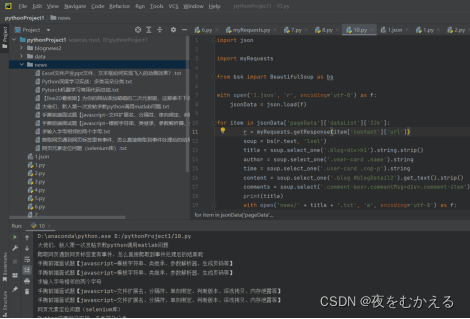
for item in jsonData['pageData']['dataList']['326']:
        r = myRequests.getResponse(item['content']['url'])
        soup = bs(r.text, 'lxml')
        title = soup.select_one('.blog>div>h1').string.strip()
        author = soup.select_one('.user-card .name').string
        time = soup.select_one('.user-card .cop-p').string
        content = soup.select_one('.blog #blogDetail2').get_text().strip()
        comments = soup.select('.comment-box>.commentMsg>div>.comment-item')
        print(title)
        with open('news/' + title + '.txt', 'w', encoding='utf-8') as f:
            f.write(title)
            f.write(author)
            f.write(time)
            f.write(content)
        for  comment in comments:
                commentAuthor = comment.select(' .name .name')
                commentTime = comment.select(' .name .time')
                commentText = comment.select('.comment-msg .msg')
                for i in range(len(commentAuthor)):
                    commentauthor = commentAuthor[i].string
                    commenttime = commentTime[i].string
                    commentext = commentText[i].get_text()
                    with open('news/' + title + '.txt', 'a', encoding='utf-8') as f:
                        f.write(commentauthor)
                        f.write(commenttime)
                        f.write(commentext)
运行结果

腾讯云面向开发者汇聚海量精品云计算使用和开发经验,营造开放的云计算技术生态圈。
更多推荐
 10
10 0
0- 0


 已为社区贡献2条内容

所有评论(0)