spring boot集成极光推送,创建应用,生成app Demo, api实现
·
第一 极光官网创建应用
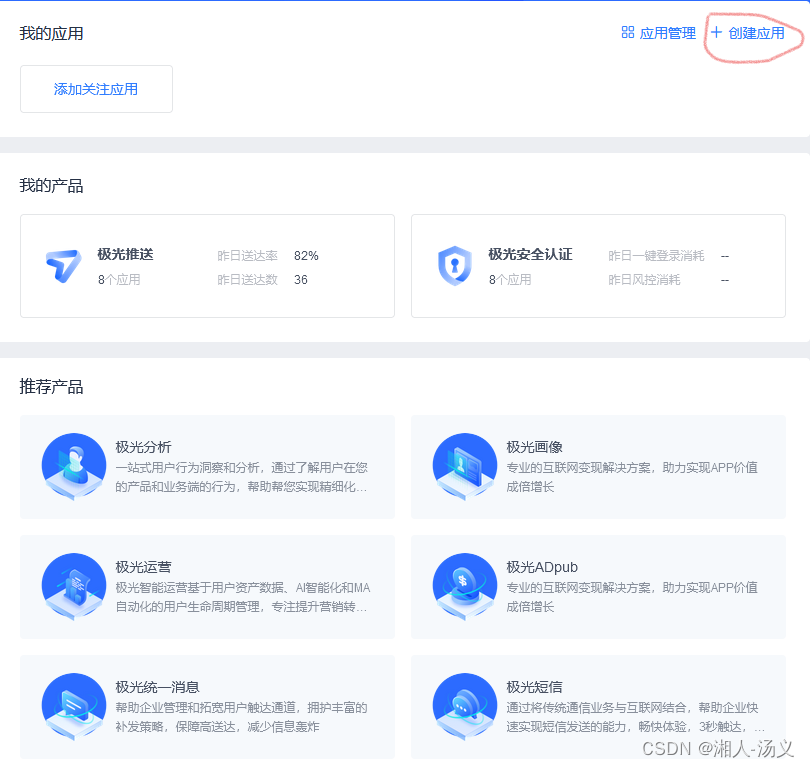
选择创建应用
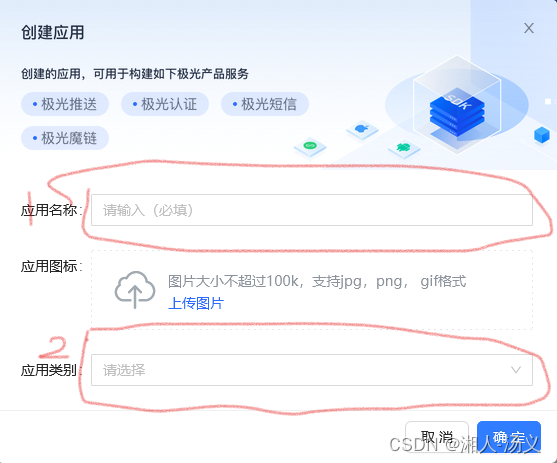
 填写应用名称
应用类别是选添
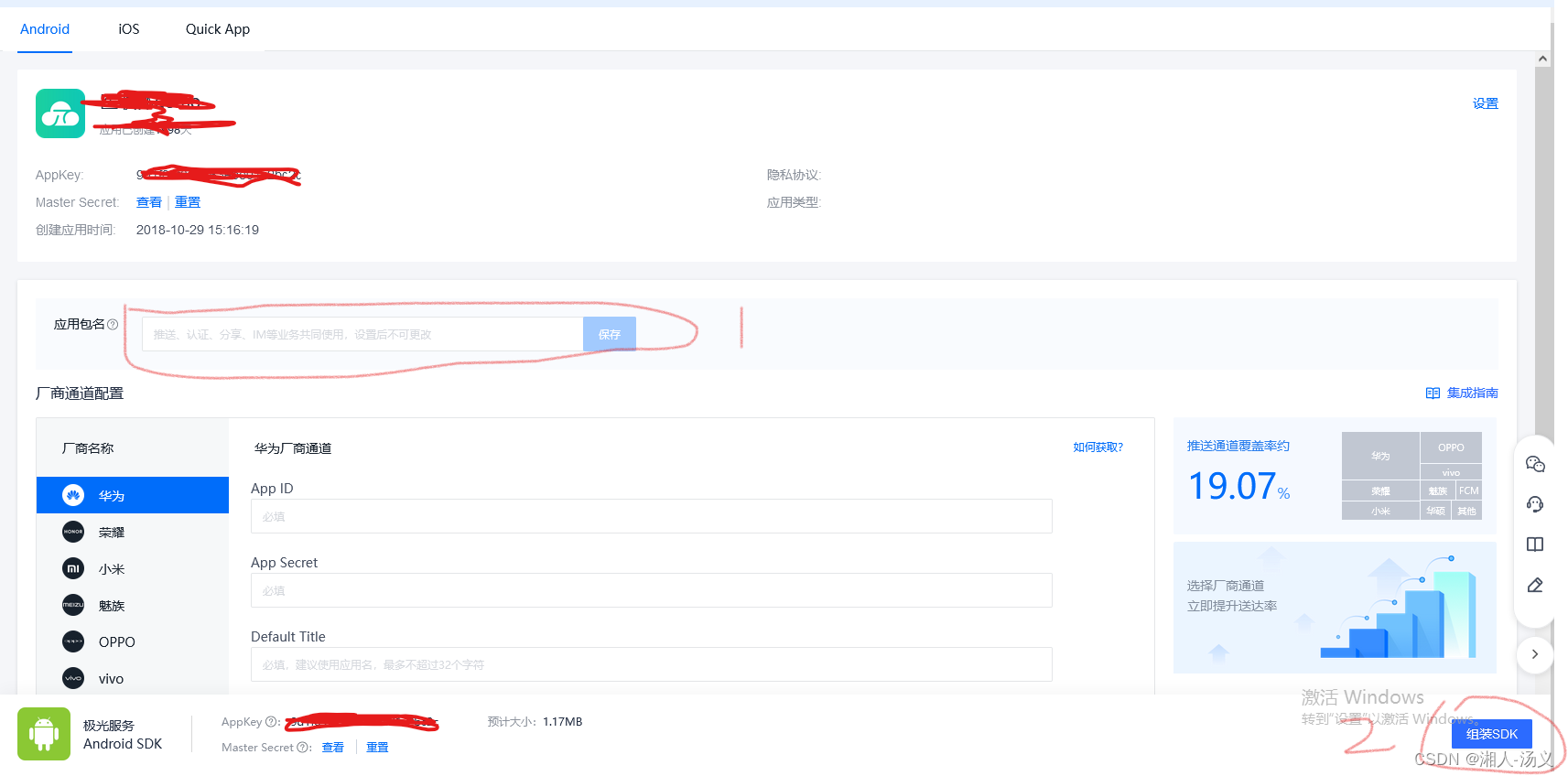
 下面选择的是安卓应用
填写应用的包名
组装SDK
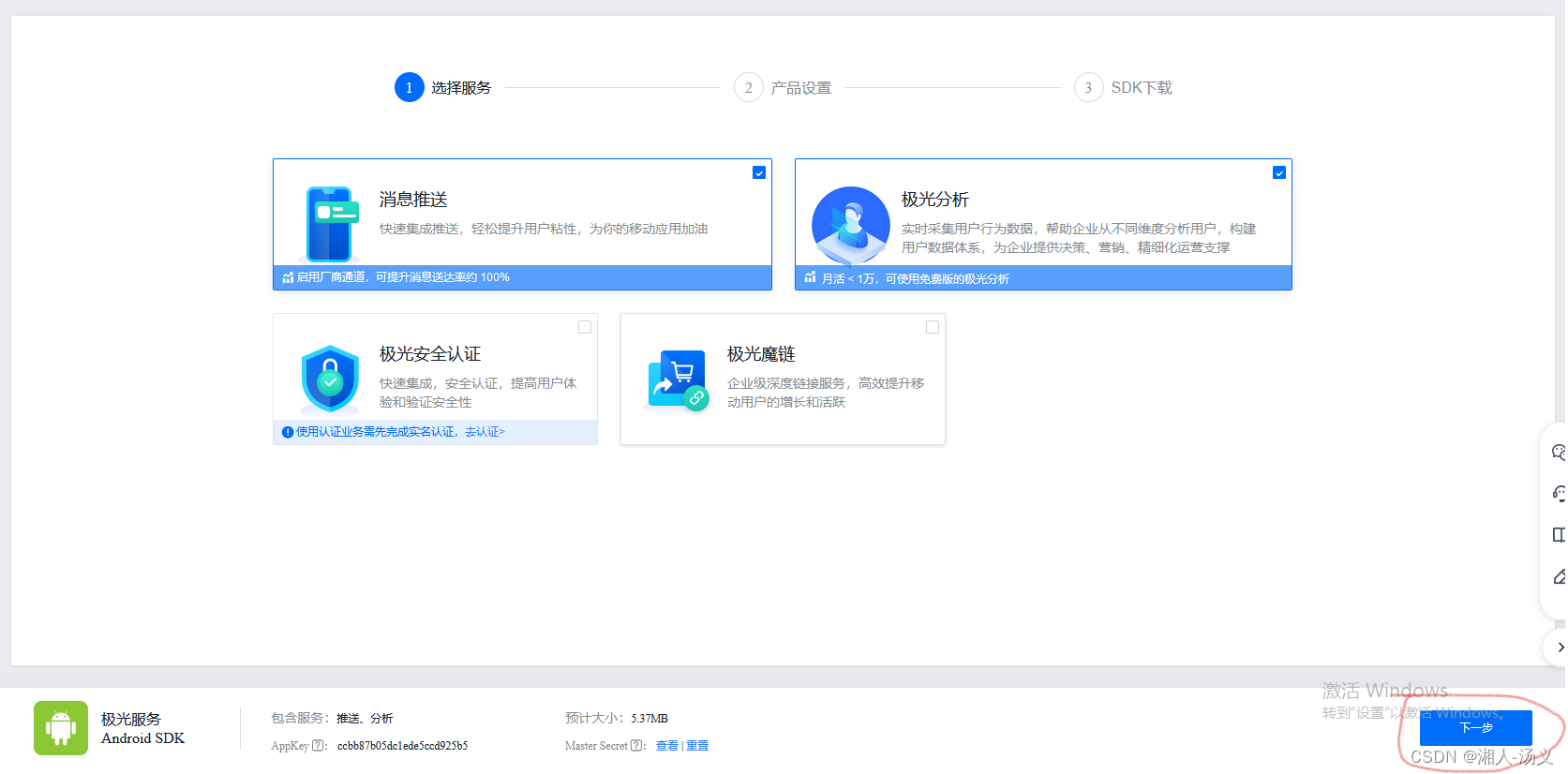
 选择下一步
选择下一步
 注意,这里是步骤是必须的,这里会影响后面的调试,如果不做的话,后面无法进行调试。
1,是下载demo,安装在手机上。
2,这个sdk是对应应用开发的SDK集成,用于对应应用的推送,这里主要是app开发人员使用。
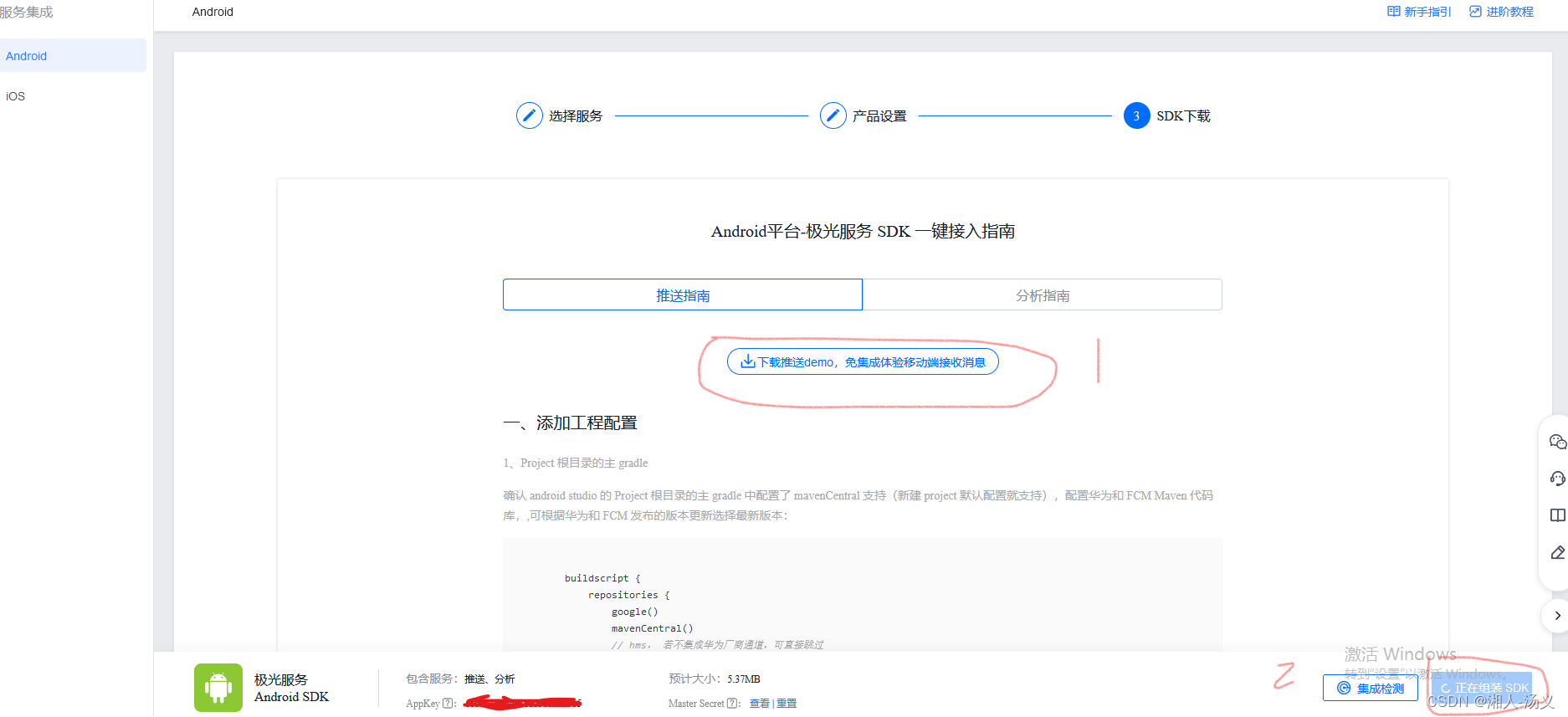 点击上部第一个步骤,会生成下面页面,这个二维码生成时间有点长,需要耐心等待一下。
生成的二维码后,就可用手机扫码下载、安装到自己手机上。右下角按钮也可以验证一下,是否能给手机成功推送消息。
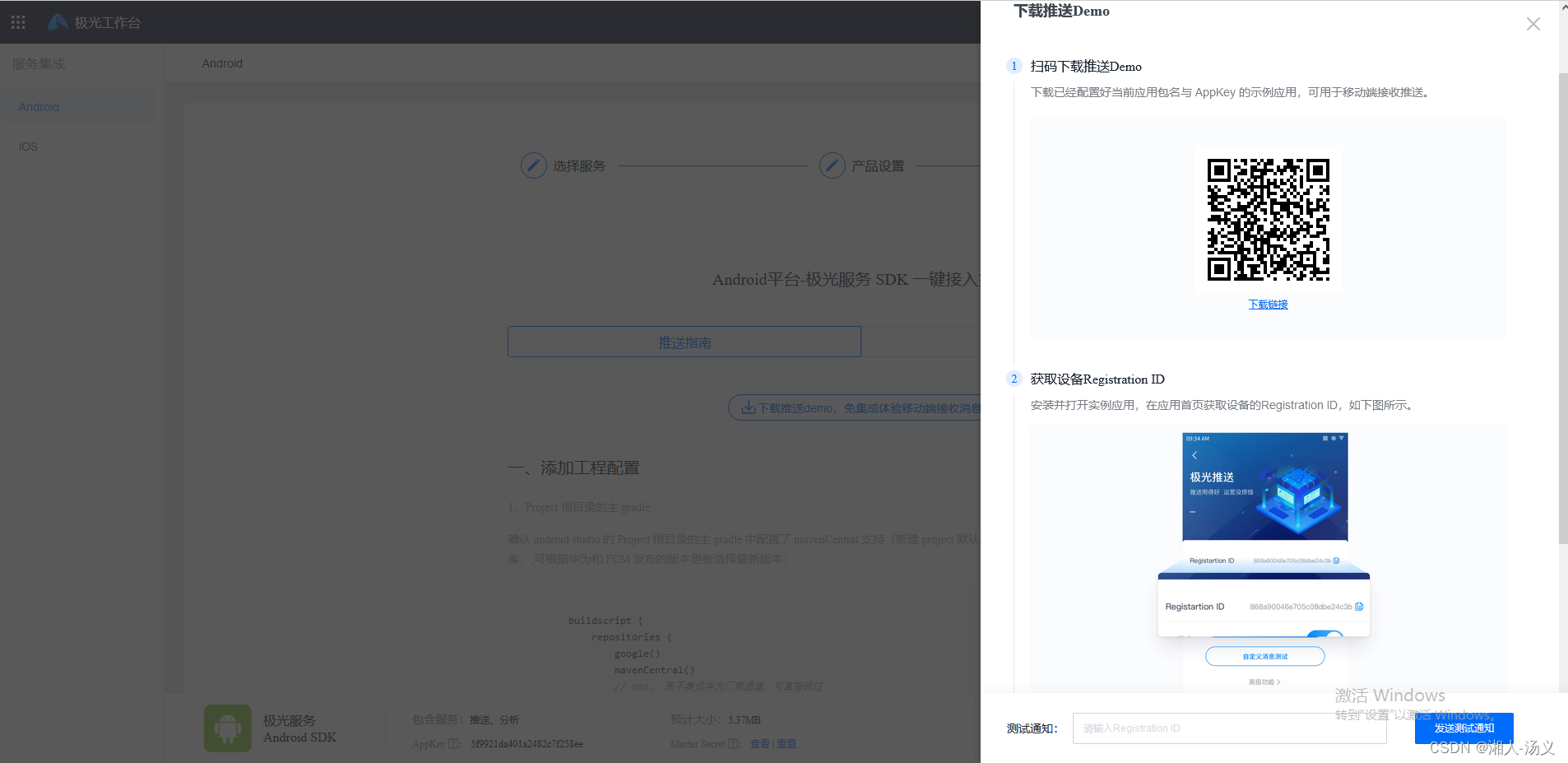 到此处,第一大步骤就完成了。
第二步 springboot集成极光推送
maven
        <dependency>
            <groupId>cn.jpush.api</groupId>
            <artifactId>jpush-client</artifactId>
            <version>3.3.5</version>
        </dependency>

        <dependency>
            <groupId>cn.jpush.api</groupId>
            <artifactId>jiguang-common</artifactId>
            <version>1.1.1</version>
        </dependency>
java的极光推送api中用于发送消息的入口类是JPushClient,什么类型的发送通过这个类调用对应的方法就可以实现。
下面先介绍一个简单的使用:
.yml 配置appKey和masterSecret,这些都可以在我们创建的应用中可以获取到。
jpush:
  appKey: xxx
  masterSecret: xxxx
下面是基础代码,这里主要用于初始理解和使用
package com.zwxict.common.jpush;
import cn.jpush.api.JPushClient;
import org.slf4j.Logger;
import org.slf4j.LoggerFactory;
import org.springframework.beans.factory.annotation.Value;
import org.springframework.stereotype.Component;
import cn.jiguang.common.resp.APIConnectionException;
import cn.jiguang.common.resp.APIRequestException;
import cn.jpush.api.push.PushResult;
import cn.jpush.api.push.model.Message;
import cn.jpush.api.push.model.Options;
import cn.jpush.api.push.model.Platform;
import cn.jpush.api.push.model.PushPayload;
import cn.jpush.api.push.model.audience.Audience;
import cn.jpush.api.push.model.notification.AndroidNotification;
import cn.jpush.api.push.model.notification.IosNotification;
import cn.jpush.api.push.model.notification.Notification;
import java.util.Arrays;
import java.util.List;
import java.util.Map;
/**
* @author 汤义
* @create 2024-04-14:59
*/
@Component
public class JPushClientTest {
private static final Logger logger = LoggerFactory.getLogger(JPushClientTest.class);
@Value("${jpush.appKey}")
private static String appKey;
@Value("${jpush.masterSecret}")
private static String masterSecret;
private static JPushClient jPushClient = null;
public static boolean apnsProduction=false;
private static final int RESPONSE_OK = 200;
public JPushClient getJPushClient() {
if (jPushClient == null) {
jPushClient = new JPushClient(masterSecret, appKey);
}
return jPushClient;
}
/**
* 推送到alias列表
*
* @param alias 别名或别名组
* @param notificationTitle 通知内容标题
* @param msgTitle 消息内容标题
* @param msgContent 消息内容
* @param extras 扩展字段
*/
public void sendToAliasList(List<String> alias, String notificationTitle, String msgTitle, String msgContent, String extras) {
PushPayload pushPayload = buildPushObject_all_aliasList_alertWithTitle(alias, notificationTitle, msgTitle, msgContent, extras);
this.sendPush(pushPayload);
}
/**
* 推送到tag列表
*
* @param tagsList Tag或Tag组
* @param notificationTitle 通知内容标题
* @param msgTitle 消息内容标题
* @param msgContent 消息内容
* @param extras 扩展字段
*/
public void sendToTagsList(List<String> tagsList, String notificationTitle, String msgTitle, String msgContent, String extras) {
PushPayload pushPayload = buildPushObject_all_tagList_alertWithTitle(tagsList, notificationTitle, msgTitle, msgContent, extras);
this.sendPush(pushPayload);
}
/**
* 发送给所有安卓用户
*
* @param notificationTitle 通知内容标题
* @param msgTitle 消息内容标题
* @param msgContent 消息内容
* @param extras 扩展字段
*/
public void sendToAllAndroid(String notificationTitle, String msgTitle, String msgContent, String extras) {
PushPayload pushPayload = buildPushObject_android_all_alertWithTitle(notificationTitle, msgTitle, msgContent, extras);
this.sendPush(pushPayload);
}
/**
* 发送给所有IOS用户
*
* @param notificationTitle 通知内容标题
* @param msgTitle 消息内容标题
* @param msgContent 消息内容
* @param extras 扩展字段
*/
public void sendToAllIOS(String notificationTitle, String msgTitle, String msgContent, String extras) {
PushPayload pushPayload = buildPushObject_ios_all_alertWithTitle(notificationTitle, msgTitle, msgContent, extras);
this.sendPush(pushPayload);
}
/**
* 发送给所有用户
*
* @param notificationTitle 通知内容标题
* @param msgTitle 消息内容标题
* @param msgContent 消息内容
* @param extras 扩展字段
*/
public void sendToAll(String notificationTitle, String msgTitle, String msgContent, String extras) {
PushPayload pushPayload = buildPushObject_android_and_ios(notificationTitle, msgTitle, msgContent, extras);
this.sendPush(pushPayload);
}
private PushResult sendPush(PushPayload pushPayload) {
logger.info("pushPayload={}", pushPayload);
PushResult pushResult = null;
try {
pushResult = this.getJPushClient().sendPush(pushPayload);
logger.info("" + pushResult);
if (pushResult.getResponseCode() == RESPONSE_OK) {
logger.info("push successful, pushPayload={}", pushPayload);
}
} catch (APIConnectionException e) {
logger.error("push failed: pushPayload={}, exception={}", pushPayload, e);
} catch (APIRequestException e) {
logger.error("push failed: pushPayload={}, exception={}", pushPayload, e);
}
return pushResult;
}
/**
* 向所有平台所有用户推送消息
*
* @param notificationTitle
* @param msgTitle
* @param msgContent
* @param extras
* @return
*/
public PushPayload buildPushObject_android_and_ios(String notificationTitle, String msgTitle, String msgContent, String extras) {
return PushPayload.newBuilder()
.setPlatform(Platform.android_ios())
.setAudience(Audience.all())
.setNotification(Notification.newBuilder()
.setAlert(notificationTitle)
.addPlatformNotification(AndroidNotification.newBuilder()
.setAlert(notificationTitle)
.setTitle(notificationTitle)
// 此字段为透传字段,不会显示在通知栏。用户可以通过此字段来做一些定制需求,如特定的key传要指定跳转的页面(value)
.addExtra("androidNotification extras key", extras)
.build()
)
.addPlatformNotification(IosNotification.newBuilder()
// 传一个IosAlert对象,指定apns title、title、subtitle等
.setAlert(notificationTitle)
// 直接传alert
// 此项是指定此推送的badge自动加1
.incrBadge(1)
// 此字段的值default表示系统默认声音;传sound.caf表示此推送以项目里面打包的sound.caf声音来提醒,
// 如果系统没有此音频则以系统默认声音提醒;此字段如果传空字符串,iOS9及以上的系统是无声音提醒,以下的系统是默认声音
.setSound("default")
// 此字段为透传字段,不会显示在通知栏。用户可以通过此字段来做一些定制需求,如特定的key传要指定跳转的页面(value)
.addExtra("iosNotification extras key", extras)
// 此项说明此推送是一个background推送,想了解background看:http://docs.jpush.io/client/ios_tutorials/#ios-7-background-remote-notification
// .setContentAvailable(true)
.build()
)
.build()
)
// Platform指定了哪些平台就会像指定平台中符合推送条件的设备进行推送。jpush的自定义消息,
// sdk默认不做任何处理,不会有通知提示。建议看文档http://docs.jpush.io/guideline/faq/的
// [通知与自定义消息有什么区别?]了解通知和自定义消息的区别
.setMessage(Message.newBuilder()
.setMsgContent(msgContent)
.setTitle(msgTitle)
.addExtra("message extras key", extras)
.build())
.setOptions(Options.newBuilder()
// 此字段的值是用来指定本推送要推送的apns环境,false表示开发,true表示生产;对android和自定义消息无意义
.setApnsProduction(apnsProduction)
// 此字段是给开发者自己给推送编号,方便推送者分辨推送记录
.setSendno(1)
// 此字段的值是用来指定本推送的离线保存时长,如果不传此字段则默认保存一天,最多指定保留十天,单位为秒
.setTimeToLive(86400)
.build())
.build();
}
/**
* 向所有平台单个或多个指定别名用户推送消息
*
* @param aliasList
* @param notificationTitle
* @param msgTitle
* @param msgContent
* @param extras
* @return
*/
private PushPayload buildPushObject_all_aliasList_alertWithTitle(List<String> aliasList, String notificationTitle, String msgTitle, String msgContent, String extras) {
// 创建一个IosAlert对象,可指定APNs的alert、title等字段
// IosAlert iosAlert = IosAlert.newBuilder().setTitleAndBody("title", "alert body").build();
return PushPayload.newBuilder()
// 指定要推送的平台,all代表当前应用配置了的所有平台,也可以传android等具体平台
.setPlatform(Platform.all())
// 指定推送的接收对象,all代表所有人,也可以指定已经设置成功的tag或alias或该应应用客户端调用接口获取到的registration id
.setAudience(Audience.alias(aliasList))
// jpush的通知,android的由jpush直接下发,iOS的由apns服务器下发,Winphone的由mpns下发
.setNotification(Notification.newBuilder()
// 指定当前推送的android通知
.addPlatformNotification(AndroidNotification.newBuilder()
.setAlert(notificationTitle)
.setTitle(notificationTitle)
// 此字段为透传字段,不会显示在通知栏。用户可以通过此字段来做一些定制需求,如特定的key传要指定跳转的页面(value)
.addExtra("androidNotification extras key", extras)
.build())
// 指定当前推送的iOS通知
.addPlatformNotification(IosNotification.newBuilder()
// 传一个IosAlert对象,指定apns title、title、subtitle等
.setAlert(notificationTitle)
// 直接传alert
// 此项是指定此推送的badge自动加1
.incrBadge(1)
// 此字段的值default表示系统默认声音;传sound.caf表示此推送以项目里面打包的sound.caf声音来提醒,
// 如果系统没有此音频则以系统默认声音提醒;此字段如果传空字符串,iOS9及以上的系统是无声音提醒,以下的系统是默认声音
.setSound("default")
// 此字段为透传字段,不会显示在通知栏。用户可以通过此字段来做一些定制需求,如特定的key传要指定跳转的页面(value)
.addExtra("iosNotification extras key", extras)
// 此项说明此推送是一个background推送,想了解background看:http://docs.jpush.io/client/ios_tutorials/#ios-7-background-remote-notification
// 取消此注释,消息推送时ios将无法在锁屏情况接收
// .setContentAvailable(true)
.build())
.build())
// Platform指定了哪些平台就会像指定平台中符合推送条件的设备进行推送。jpush的自定义消息,
// sdk默认不做任何处理,不会有通知提示。建议看文档http://docs.jpush.io/guideline/faq/的
// [通知与自定义消息有什么区别?]了解通知和自定义消息的区别
.setMessage(Message.newBuilder()
.setMsgContent(msgContent)
.setTitle(msgTitle)
.addExtra("message extras key", extras)
.build())
.setOptions(Options.newBuilder()
// 此字段的值是用来指定本推送要推送的apns环境,false表示开发,true表示生产;对android和自定义消息无意义
.setApnsProduction(apnsProduction)
// 此字段是给开发者自己给推送编号,方便推送者分辨推送记录
.setSendno(1)
// 此字段的值是用来指定本推送的离线保存时长,如果不传此字段则默认保存一天,最多指定保留十天;
.setTimeToLive(86400)
.build())
.build();
}
/**
* 向所有平台单个或多个指定Tag用户推送消息
*
* @param tagsList
* @param notificationTitle
* @param msgTitle
* @param msgContent
* @param extras
* @return
*/
private PushPayload buildPushObject_all_tagList_alertWithTitle(List<String> tagsList, String notificationTitle, String msgTitle, String msgContent, String extras) {
//创建一个IosAlert对象,可指定APNs的alert、title等字段
//IosAlert iosAlert = IosAlert.newBuilder().setTitleAndBody("title", "alert body").build();
return PushPayload.newBuilder()
// 指定要推送的平台,all代表当前应用配置了的所有平台,也可以传android等具体平台
.setPlatform(Platform.all())
// 指定推送的接收对象,all代表所有人,也可以指定已经设置成功的tag或alias或该应应用客户端调用接口获取到的registration id
.setAudience(Audience.tag(tagsList))
// jpush的通知,android的由jpush直接下发,iOS的由apns服务器下发,Winphone的由mpns下发
.setNotification(Notification.newBuilder()
// 指定当前推送的android通知
.addPlatformNotification(AndroidNotification.newBuilder()
.setAlert(notificationTitle)
.setTitle(notificationTitle)
//此字段为透传字段,不会显示在通知栏。用户可以通过此字段来做一些定制需求,如特定的key传要指定跳转的页面(value)
.addExtra("androidNotification extras key", extras)
.build())
// 指定当前推送的iOS通知
.addPlatformNotification(IosNotification.newBuilder()
// 传一个IosAlert对象,指定apns title、title、subtitle等
.setAlert(notificationTitle)
// 直接传alert
// 此项是指定此推送的badge自动加1
.incrBadge(1)
// 此字段的值default表示系统默认声音;传sound.caf表示此推送以项目里面打包的sound.caf声音来提醒,
// 如果系统没有此音频则以系统默认声音提醒;此字段如果传空字符串,iOS9及以上的系统是无声音提醒,以下的系统是默认声音
.setSound("default")
// 此字段为透传字段,不会显示在通知栏。用户可以通过此字段来做一些定制需求,如特定的key传要指定跳转的页面(value)
.addExtra("iosNotification extras key", extras)
// 此项说明此推送是一个background推送,想了解background看:http://docs.jpush.io/client/ios_tutorials/#ios-7-background-remote-notification
// 取消此注释,消息推送时ios将无法在锁屏情况接收
// .setContentAvailable(true)
.build())
.build())
// Platform指定了哪些平台就会像指定平台中符合推送条件的设备进行推送。jpush的自定义消息,
// sdk默认不做任何处理,不会有通知提示。建议看文档http://docs.jpush.io/guideline/faq/的
// [通知与自定义消息有什么区别?]了解通知和自定义消息的区别
.setMessage(Message.newBuilder()
.setMsgContent(msgContent)
.setTitle(msgTitle)
.addExtra("message extras key", extras)
.build())
.setOptions(Options.newBuilder()
// 此字段的值是用来指定本推送要推送的apns环境,false表示开发,true表示生产;对android和自定义消息无意义
.setApnsProduction(apnsProduction)
// 此字段是给开发者自己给推送编号,方便推送者分辨推送记录
.setSendno(1)
// 此字段的值是用来指定本推送的离线保存时长,如果不传此字段则默认保存一天,最多指定保留十天;
.setTimeToLive(86400)
.build())
.build();
}
/**
* 向android平台所有用户推送消息
*
* @param notificationTitle
* @param msgTitle
* @param msgContent
* @param extras
* @return
*/
private PushPayload buildPushObject_android_all_alertWithTitle(String notificationTitle, String msgTitle, String msgContent, String extras) {
return PushPayload.newBuilder()
// 指定要推送的平台,all代表当前应用配置了的所有平台,也可以传android等具体平台
.setPlatform(Platform.android())
// 指定推送的接收对象,all代表所有人,也可以指定已经设置成功的tag或alias或该应应用客户端调用接口获取到的registration id
.setAudience(Audience.all())
// jpush的通知,android的由jpush直接下发,iOS的由apns服务器下发,Winphone的由mpns下发
.setNotification(Notification.newBuilder()
// 指定当前推送的android通知
.addPlatformNotification(AndroidNotification.newBuilder()
.setAlert(notificationTitle)
.setTitle(notificationTitle)
// 此字段为透传字段,不会显示在通知栏。用户可以通过此字段来做一些定制需求,如特定的key传要指定跳转的页面(value)
.addExtra("androidNotification extras key", extras)
.build())
.build()
)
// Platform指定了哪些平台就会像指定平台中符合推送条件的设备进行推送。jpush的自定义消息,
// sdk默认不做任何处理,不会有通知提示。建议看文档http://docs.jpush.io/guideline/faq/的
// [通知与自定义消息有什么区别?]了解通知和自定义消息的区别
.setMessage(Message.newBuilder()
.setMsgContent(msgContent)
.setTitle(msgTitle)
.addExtra("message extras key", extras)
.build())
.setOptions(Options.newBuilder()
// 此字段的值是用来指定本推送要推送的apns环境,false表示开发,true表示生产;对android和自定义消息无意义
.setApnsProduction(apnsProduction)
// 此字段是给开发者自己给推送编号,方便推送者分辨推送记录
.setSendno(1)
// 此字段的值是用来指定本推送的离线保存时长,如果不传此字段则默认保存一天,最多指定保留十天,单位为秒
.setTimeToLive(86400)
.build())
.build();
}
/**
* 向ios平台所有用户推送消息
*
* @param notificationTitle
* @param msgTitle
* @param msgContent
* @param extras
* @return
*/
private PushPayload buildPushObject_ios_all_alertWithTitle(String notificationTitle, String msgTitle, String msgContent, String extras) {
return PushPayload.newBuilder()
// 指定要推送的平台,all代表当前应用配置了的所有平台,也可以传android等具体平台
.setPlatform(Platform.ios())
// 指定推送的接收对象,all代表所有人,也可以指定已经设置成功的tag或alias或该应应用客户端调用接口获取到的registration id
.setAudience(Audience.all())
// jpush的通知,android的由jpush直接下发,iOS的由apns服务器下发,Winphone的由mpns下发
.setNotification(Notification.newBuilder()
// 指定当前推送的android通知
.addPlatformNotification(IosNotification.newBuilder()
// 传一个IosAlert对象,指定apns title、title、subtitle等
.setAlert(notificationTitle)
// 直接传alert
// 此项是指定此推送的badge自动加1
.incrBadge(1)
// 此字段的值default表示系统默认声音;传sound.caf表示此推送以项目里面打包的sound.caf声音来提醒,
// 如果系统没有此音频则以系统默认声音提醒;此字段如果传空字符串,iOS9及以上的系统是无声音提醒,以下的系统是默认声音
.setSound("default")
// 此字段为透传字段,不会显示在通知栏。用户可以通过此字段来做一些定制需求,如特定的key传要指定跳转的页面(value)
.addExtra("iosNotification extras key", extras)
// 此项说明此推送是一个background推送,想了解background看:http://docs.jpush.io/client/ios_tutorials/#ios-7-background-remote-notification
// .setContentAvailable(true)
.build())
.build()
)
// Platform指定了哪些平台就会像指定平台中符合推送条件的设备进行推送。jpush的自定义消息,
// sdk默认不做任何处理,不会有通知提示。建议看文档http://docs.jpush.io/guideline/faq/的
// [通知与自定义消息有什么区别?]了解通知和自定义消息的区别
.setMessage(Message.newBuilder()
.setMsgContent(msgContent)
.setTitle(msgTitle)
.addExtra("message extras key", extras)
.build())
.setOptions(Options.newBuilder()
// 此字段的值是用来指定本推送要推送的apns环境,false表示开发,true表示生产;对android和自定义消息无意义
.setApnsProduction(apnsProduction)
// 此字段是给开发者自己给推送编号,方便推送者分辨推送记录
.setSendno(1)
// 此字段的值是用来指定本推送的离线保存时长,如果不传此字段则默认保存一天,最多指定保留十天,单位为秒
.setTimeToLive(86400)
.build())
.build();
}
/**
* 推送所有平台的个人 registrationId指定用户
*/
public static PushResult pushIndividual(Map<String, String> paramMap) {
//创建JPushClient
JPushClient jpushClient = new JPushClient(masterSecret, appKey);
//创建option
PushPayload payload = PushPayload.newBuilder()
//所有平台
.setPlatform(Platform.all())
//registrationId指定用户
.setAudience(Audience.registrationId(paramMap.get("id")))
//.setAudience(Audience.all())
.setNotification(Notification.newBuilder()
//发送ios
.addPlatformNotification(IosNotification.newBuilder()
//消息体
.setAlert(paramMap.get("msg"))
.setBadge(+1)
//ios提示音
.setSound("happy")
//附加参数
.addExtras(paramMap)
.build())
//发送android
.addPlatformNotification(AndroidNotification.newBuilder()
//消息头
.setTitle(paramMap.get("title"))
//附加参数
.addExtras(paramMap)
//消息体
.setAlert(paramMap.get("msg"))
.build())
.build())
//指定开发环境 true为生产模式 false 为测试模式 (android不区分模式,ios区分模式)
.setOptions(Options.newBuilder().setApnsProduction(false).build())
//自定义信息
.setMessage(Message.newBuilder().setMsgContent(paramMap.get("msg")).addExtras(paramMap).build())
.build();
try {
PushResult result= jpushClient.sendPush(payload);
return result;
} catch (APIConnectionException e) {
System.out.println("pushIndividual{}"+e);
} catch (APIRequestException e) {
System.out.println("pushIndividual{}"+e);
}
return null;
}
public static void main(String[] args) {
// registrationId推送
/*Map<String, String> paramMap=new HashMap<String, String>();
paramMap.put("id","100d85590845a22b981");
paramMap.put("msg","Hello 1999");
paramMap.put("title","通知消息199");
MyJPushClient.pushIndividual(paramMap);*/
// 别名推送
JPushClientTest jPushUtil = new JPushClientTest();
List<String> aliasList = Arrays.asList("108");
String notificationTitle = "notificationTitle_";
String msgTitle = "msgTitle_";
String msgContent = "msgContent_";
jPushUtil.sendToAliasList(aliasList, notificationTitle, msgTitle, msgContent, "exts_");
}
}
第三步 真实开发使用
在开发中主要考虑的是网络,在测试环境中都是内网环境中,是不能直接对外访问的。那么这里可能就需要考虑代理。
如果使用到了微服务架构,那么极光推送,可能是单独是一个服务,可能公司存在多个应用,那么这个推送就要兼容多个应用的,这是构建架构时需要考虑的。
还有就是代码的合理抽取,设置公用代码,不能和上面一样。
1.首先创建配置类,使用工厂模式,多个应用使用工厂模式来控制。
package com.zwxict.common.jpush.config;

import cn.jiguang.common.ServiceHelper;
import cn.jiguang.common.connection.HttpProxy;
import cn.jpush.api.JPushClient;
import com.alibaba.fastjson.JSON;
import com.zwxict.common.jpush.client.*;
import lombok.Data;
import org.apache.http.impl.client.CloseableHttpClient;
import org.springframework.beans.factory.annotation.Value;
import org.springframework.boot.context.properties.ConfigurationProperties;
import org.springframework.context.annotation.Bean;
import org.springframework.context.annotation.Configuration;

import java.util.HashMap;
import java.util.List;
import java.util.Map;

/**
 * @author 汤义
 * @create 2024-04-10:14
 */

@Data
@Configuration
@ConfigurationProperties(prefix = "spring.yitangpush.jpush")
public class JPushConfig {

	private List<JPushClientInfo> clientInfos;

	@Bean
	public JPushDataBuilder jpushDataBuilder() {
		return new JPushDataBuilder();
	}

	@Bean(destroyMethod = "close")
	public JPushClientFactory jpushClientFactory(CloseableHttpClient httpClient) {
		Map<Integer, JPushClient> jpushClients = new HashMap<>();
		if (clientInfos != null && clientInfos.size() > 0) {
			clientInfos.forEach((jpushClientInfo) -> {
			    //使用AppKey和MasterSecret生成一个编号
				String authCode = ServiceHelper.getBasicAuthorization(jpushClientInfo.getAppKey(),
						jpushClientInfo.getMasterSecret());
				//设置请求,httpClient在这里起到重要作用
				JPushHttpClient jpushHttpClient = new JPushHttpClient(httpClient, authCode);
				//生成jpushClient
				JPushClientImpl jpushClient = new JPushClientImpl(jpushClientInfo.getMasterSecret(),
						jpushClientInfo.getAppKey(), jpushHttpClient);
				//加入map容器中
				jpushClients.put(jpushClientInfo.getAppType(), jpushClient);
			});
		}
		//生成工厂类,返回
		JPushClientFactoryImpl jpushClientFactory = new JPushClientFactoryImpl(jpushClients);

		return jpushClientFactory;
	}
}
.yml
  yitangpush:
    restful:
      maxTotal: 200
      maxPerRoute: 40
      retryCount: 3
      retryEnabled: true
      useHttpProxy: true
      proxyHostname: 代理
      proxyPort: 代理端口
      connectTimeout: 5000
      readTimeout: 30000
      connReqTimeout: 10000
    jpush:
      clientInfos:
        - appType: 3010
          appKey: appKey
          masterSecret: masterSecret
JPushHttpClient类型
package com.zwxict.common.jpush.client;

import cn.jiguang.common.ClientConfig;
import cn.jiguang.common.connection.ApacheHttpClient;
import cn.jiguang.common.connection.HttpProxy;
import org.apache.http.impl.client.CloseableHttpClient;
/**
 * @author 汤义
 * @create 2024-04-10:14
 */
public class JPushHttpClient extends ApacheHttpClient {

	private CloseableHttpClient httpClient;

	public JPushHttpClient(CloseableHttpClient httpClient, String authCode) {
		super(authCode, null, ClientConfig.getInstance());
		this.httpClient = httpClient;
	}

	@Override
	public CloseableHttpClient createHttpClient(int maxTotal, int maxPerRoute,
                                                int maxRoute, String hostname, int port) {
		return httpClient;
	}

}
JPushClientImpl类
package com.zwxict.common.jpush.client;

import cn.jiguang.common.connection.HttpProxy;
import cn.jpush.api.JPushClient;
import cn.jpush.api.push.PushClient;
/**
 * @author 汤义
 * @create 2024-04-10:14
 */
public class JPushClientImpl extends JPushClient {

	public JPushClientImpl(String masterSecret, String appKey, JPushHttpClient jpushHttpClient) {
		super(masterSecret,appKey);
		PushClient pushClient = getPushClient();
		pushClient.setHttpClient(jpushHttpClient);
	}

}
JPushClientFactory,JPushClientFactoryImpl
package com.zwxict.common.jpush.client;

import cn.jpush.api.JPushClient;
/**
 * @author 汤义
 * @create 2024-04-10:14
 */
public interface JPushClientFactory {

	JPushClient getJPushClient(Integer appType);

	void close();
}
package com.zwxict.common.jpush.client;

import cn.jpush.api.JPushClient;

import java.util.Map;
/**
 * @author 汤义
 * @create 2024-04-10:14
 */
public class JPushClientFactoryImpl implements JPushClientFactory {
	private Map<Integer, JPushClient> jpushClients;

	public JPushClientFactoryImpl(Map<Integer, JPushClient> jpushClients) {
		this.jpushClients = jpushClients;
	}

	@Override
	public JPushClient getJPushClient(Integer appType) {
		return jpushClients.get(appType);
	}

	@Override
	public void close() {
		if (jpushClients != null) {
			jpushClients.forEach((appType, jpushClient) -> {
				if(jpushClient != null) {
					jpushClient.close();
				}
			});
		}
	}

}
2,设置代理,为了开发中的内网进行消息推送
package com.zwxict.common.jpush.config;

import lombok.Setter;
import org.apache.http.HttpHost;
import org.apache.http.config.Registry;
import org.apache.http.config.RegistryBuilder;
import org.apache.http.conn.socket.ConnectionSocketFactory;
import org.apache.http.conn.socket.LayeredConnectionSocketFactory;
import org.apache.http.conn.socket.PlainConnectionSocketFactory;
import org.apache.http.conn.ssl.SSLConnectionSocketFactory;
import org.apache.http.impl.client.CloseableHttpClient;
import org.apache.http.impl.client.DefaultHttpRequestRetryHandler;
import org.apache.http.impl.client.HttpClientBuilder;
import org.apache.http.impl.client.HttpClients;
import org.apache.http.impl.conn.PoolingHttpClientConnectionManager;
import org.springframework.boot.context.properties.ConfigurationProperties;
import org.springframework.context.annotation.Bean;
import org.springframework.context.annotation.Configuration;

import java.util.Timer;
import java.util.TimerTask;

/**
 * @author 汤义
 * @create 2024-04-14:59
 */
@Configuration
@ConfigurationProperties(prefix = "spring.shanghaipush.restful")
public class RestfulConfig {
    private final Timer connManagerTimer = new Timer("RestfulConfig.connManagerTimer", true);

    @Setter
    private int maxTotal;

    @Setter
    private int maxPerRoute;

    @Setter
    private int retryCount;

    @Setter
    private boolean retryEnabled;

    @Setter
    private boolean useHttpProxy;

    @Setter
    private String proxyHostname;

    @Setter
    private int proxyPort;

    @Bean
    public PoolingHttpClientConnectionManager poolingHttpClientConnectionManager() {
        ConnectionSocketFactory plainsf = PlainConnectionSocketFactory.getSocketFactory();
        LayeredConnectionSocketFactory sslsf = SSLConnectionSocketFactory.getSocketFactory();
        Registry<ConnectionSocketFactory> registry = RegistryBuilder.<ConnectionSocketFactory>create()
                .register("http", plainsf).register("https", sslsf).build();
        final PoolingHttpClientConnectionManager poolingHttpClientConnectionManager = new PoolingHttpClientConnectionManager(
                registry);
        poolingHttpClientConnectionManager.setMaxTotal(maxTotal);
        poolingHttpClientConnectionManager.setDefaultMaxPerRoute(maxPerRoute);
        connManagerTimer.schedule(new TimerTask() {
            @Override
            public void run() {
                poolingHttpClientConnectionManager.closeExpiredConnections();
            }
        }, 30000, 3000);

        return poolingHttpClientConnectionManager;
    }

    @Bean
    public HttpClientBuilder httpClientBuilder(PoolingHttpClientConnectionManager poolingHttpClientConnectionManager) {
        HttpClientBuilder httpClientBuilder = HttpClients.custom()
                .setConnectionManager(poolingHttpClientConnectionManager)
                .setRetryHandler(new DefaultHttpRequestRetryHandler(retryCount, retryEnabled));
        if (useHttpProxy) {
            httpClientBuilder.setProxy(new HttpHost(proxyHostname, proxyPort));
        }

        return httpClientBuilder;
    }

    @Bean(destroyMethod = "close")
    public CloseableHttpClient httpClient(HttpClientBuilder httpClientBuilder) {
        CloseableHttpClient httpClient = httpClientBuilder.build();

        return httpClient;
    }
}
3, 推送消息入口
package com.zwxict.common.jpush.service;

import cn.jiguang.common.resp.APIConnectionException;
import cn.jiguang.common.resp.APIRequestException;
import cn.jpush.api.JPushClient;
import cn.jpush.api.push.PushResult;
import com.zwxict.common.jpush.Req.JPushReq;
import com.zwxict.common.jpush.Req.JPushRsp;
import com.zwxict.common.jpush.client.JPushClientFactory;
import com.zwxict.common.jpush.client.JPushDataBuilder;
import org.slf4j.Logger;
import org.slf4j.LoggerFactory;
import org.springframework.beans.factory.annotation.Autowired;
import org.springframework.stereotype.Component;
import org.springframework.stereotype.Service;

/**
 * @author 汤义
 * @create 2024-04-10:14
 */
@Service("jPushServiceImpl")
public class JPushServiceImpl implements JPushService {
	private static final Logger log = LoggerFactory
			.getLogger(JPushServiceImpl.class);

	@Autowired
	private JPushClientFactory jpushClientFactory;

	@Autowired
	private JPushDataBuilder jpushDataBuilder;

	@Override
	public JPushRsp sendPush(JPushReq jpushReq) {
		JPushRsp jpushRsp = new JPushRsp();
		//通过工厂获取对应的JPushClient
		JPushClient jpushClient = jpushClientFactory.getJPushClient(jpushReq.getAppType());

		if(jpushClient == null) {
			log.error("Illegal appType {}, not matched any jpushClient", jpushReq.getAppType());
			jpushRsp.setStatusCode(-10003);
			jpushRsp.setErrMsg("Illegal appType");

			return jpushRsp;
		}

		PushResult result;
		try {
			//推送消息
			result = jpushClient.sendPush(jpushDataBuilder.buildPushPayload(
					jpushReq.getPlatform(),
					jpushReq.getMsgType(),
					jpushReq.getTargets().toArray(
							new String[jpushReq.getTargets().size()]), jpushReq
							.getMsgContent(), jpushReq.getContentType(), jpushReq.getTitle(), jpushReq
							.getExtras()));
			log.info("PushResult: {}", result);

			if (result == null
					|| (0 == result.msg_id && 0 == result.sendno && 0 == result.statusCode)) {
				log.error("Connect jiguang server failed");
				jpushRsp.setStatusCode(-10001);
				jpushRsp.setErrMsg("Connect jiguang server failed: connect timed out");
			} else {
				jpushRsp.setMsgId(result.msg_id);
				jpushRsp.setSendNo(result.sendno);
				jpushRsp.setStatusCode(result.statusCode);
			}
		} catch (APIConnectionException e) {
			log.error("Connection error, should retry later", e);
			jpushRsp.setStatusCode(-10002);
			jpushRsp.setErrMsg("Connection error[readTimedout="
					+ e.isReadTimedout() + ", doneRetriedTimes="
					+ e.getDoneRetriedTimes() + "], should retry later");
		} catch (APIRequestException e) {
			log.error(
					"HTTP Status: {}, Error Code: {}, Error Message: {}",
					new Object[] { e.getStatus(), e.getErrorCode(),
							e.getErrorMessage() });

			jpushRsp.setStatusCode(e.getErrorCode());
			jpushRsp.setErrMsg(e.getErrorMessage());
		}

		return jpushRsp;
	}
}
JPushDataBuilder类
package com.zwxict.common.jpush.client;

import cn.jpush.api.push.model.Message;
import cn.jpush.api.push.model.Platform;
import cn.jpush.api.push.model.PushPayload;
import cn.jpush.api.push.model.audience.Audience;
import cn.jpush.api.push.model.notification.Notification;
import com.zwxict.common.jpush.exception.MsgTypeNotSupportException;
import com.zwxict.common.jpush.exception.PlatformNotSupportException;

import java.util.Map;
/**
 * @author 汤义
 * @create 2024-04-10:14
 */
public class JPushDataBuilder {

	/**
	 * 安卓 所有用户都推送
	 * @param msgType
	 * @param targets
	 * @param msgContent
	 * @param contentType
	 * @param title
	 * @param extras
	 * @return
	 */
	private PushPayload buildAndroidPushPayload(JPushMsgType msgType,
			String[] targets, String msgContent, String contentType, String title,
			Map<String, String> extras) {
//		PushPayload.Builder builder = PushPayload.newBuilder()
//				.setPlatform(Platform.android())
//				.setAudience(Audience.alias(targets));
		PushPayload.Builder builder = PushPayload.newBuilder()
				.setPlatform(Platform.android())
				.setAudience(Audience.all());

		if (JPushMsgType.NOTIFICATION.equals(msgType)) {
			builder.setNotification(Notification.android(msgContent,
					title, extras));
		} else if (JPushMsgType.MESSAGE.equals(msgType)) {
			builder.setMessage(Message.newBuilder().setTitle(title)
					.setContentType(contentType)
					.setMsgContent(msgContent).addExtras(extras).build());
		} else {
			throw new MsgTypeNotSupportException();
		}

		return builder.build();
	}

	/**
	 * iOS 所有用户都推送
	 * @param msgType
	 * @param targets
	 * @param msgContent
	 * @param contentType
	 * @param title
	 * @param extras
	 * @return
	 */
	private PushPayload buildIOSPushPayload(JPushMsgType msgType,
			String[] targets, String msgContent, String contentType, String title,
			Map<String, String> extras) {
//		PushPayload.Builder builder = PushPayload.newBuilder()
//				.setPlatform(Platform.ios())
//				.setAudience(Audience.alias(targets));
		PushPayload.Builder builder = PushPayload.newBuilder()
				.setPlatform(Platform.ios())
				.setAudience(Audience.all());

		if (JPushMsgType.NOTIFICATION.equals(msgType)) {
			builder.setNotification(Notification.ios(msgContent,
					extras));
		} else if (JPushMsgType.MESSAGE.equals(msgType)) {
			builder.setMessage(Message.newBuilder().setTitle(title)
					.setContentType(contentType)
					.setMsgContent(msgContent).addExtras(extras).build());
		} else {
			throw new MsgTypeNotSupportException();
		}

		return builder.build();
	}

	public PushPayload buildPushPayload(String platform,
			String msgType, String[] targets, String msgContent, String contentType,
			String title, Map<String, String> extras) {
		JPushPlatform jpushPlatform;
		try {
			jpushPlatform = JPushPlatform.valueOf(platform);
		} catch(IllegalArgumentException e) {
			throw new PlatformNotSupportException(e);
		}

		JPushMsgType jpushMsgType;
		try {
			jpushMsgType = JPushMsgType.valueOf(msgType);
		} catch(IllegalArgumentException e) {
			throw new MsgTypeNotSupportException(e);
		}

		PushPayload payload;
		if (JPushPlatform.ANDROID.equals(jpushPlatform)) {
			payload = buildAndroidPushPayload(jpushMsgType, targets,
					msgContent, contentType, title, extras);
		} else if (JPushPlatform.IOS.equals(jpushPlatform)) {
			payload = buildIOSPushPayload(jpushMsgType, targets, msgContent, contentType,
					title, extras);
		} else {
			throw new PlatformNotSupportException();
		}

		return payload;
	}

}
3个异常类
package com.zwxict.common.jpush.exception;

/**
 * @author 汤义
 * @create 2024-04-10:14
 */
public class HcpMsgBaseException extends RuntimeException {
	private static final long serialVersionUID = 1L;
	protected int errCode;
	protected String errMsg;

	public HcpMsgBaseException(int errCode, String errMsg) {
		super();
		this.errCode = errCode;
		this.errMsg = errMsg;
	}

	public HcpMsgBaseException(int errCode, String errMsg, Throwable cause) {
		super(cause);
		this.errCode = errCode;
		this.errMsg = errMsg;
	}

	public int getErrCode() {
		return errCode;
	}

	public String getErrMsg() {
		return errMsg;
	}

}


package com.zwxict.common.jpush.exception;
import com.zwxict.common.constants.StatusCode;
/**
 * @author 汤义
 * @create 2024-04-10:14
 */
public class MsgTypeNotSupportException extends HcpMsgBaseException {

	private static final long serialVersionUID = 1L;

	public MsgTypeNotSupportException() {
		super(StatusCode.MSG_TYPE_NOT_SUPPORT.getCode(),
				StatusCode.MSG_TYPE_NOT_SUPPORT.getMsg());
	}

	public MsgTypeNotSupportException(Throwable cause) {
		super(StatusCode.MSG_TYPE_NOT_SUPPORT.getCode(),
				StatusCode.MSG_TYPE_NOT_SUPPORT.getMsg(), cause);
	}

}


package com.zwxict.common.jpush.exception;
import com.zwxict.common.constants.StatusCode;

/**
 * @author 汤义
 * @create 2024-04-10:14
 */
public class PlatformNotSupportException extends HcpMsgBaseException {

	private static final long serialVersionUID = 1L;

	public PlatformNotSupportException() {
		super(StatusCode.PLATFORM_NOT_SUPPORT.getCode(),
				StatusCode.PLATFORM_NOT_SUPPORT.getMsg());
	}

	public PlatformNotSupportException(Throwable cause) {
		super(StatusCode.PLATFORM_NOT_SUPPORT.getCode(),
				StatusCode.PLATFORM_NOT_SUPPORT.getMsg(), cause);
	}

}

腾讯云面向开发者汇聚海量精品云计算使用和开发经验,营造开放的云计算技术生态圈。
更多推荐
 6
6 0
0- 0


 已为社区贡献2条内容

所有评论(0)