使用java加载、调用onnx模型
1、添加maven依赖
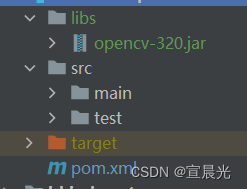
opencv-320.jar需要网上查找手动添加该依赖
        <dependency>
            <groupId>com.microsoft.onnxruntime</groupId>
            <artifactId>onnxruntime</artifactId>
            <version>1.12.0</version>
        </dependency>


        <!-- 加载lib目录下的opencv包 -->
        <dependency>
            <groupId>org.opencv</groupId>
            <artifactId>opencv</artifactId>
            <version>4.8.0</version>
            <scope>system</scope>
            <!--通过路径加载OpenCV480的jar包-->
            <systemPath>${basedir}/libs/opencv-320.jar</systemPath>
        </dependency>
2、加载onnx模型
import ai.onnxruntime.*;
import com.alibaba.fastjson2.JSONObject;
import org.opencv.core.Core;

import java.io.File;
import java.io.FileInputStream;
import java.nio.ByteBuffer;
import java.nio.FloatBuffer;
import java.nio.channels.FileChannel;
import java.util.Arrays;
import java.util.HashMap;
import java.util.Map;


public static OrtEnvironment env;
    public static OrtSession session;
    public static JSONObject names;
    public static long count;
    public static long channels;
    public static long netHeight;
    public static long netWidth;

public static void load(String path) {
        String weight = path;
        try{
            env = OrtEnvironment.getEnvironment();
            session = env.createSession(weight, new OrtSession.SessionOptions());
            OnnxModelMetadata metadata = session.getMetadata();
            Map<String, NodeInfo> infoMap = session.getInputInfo();
            TensorInfo nodeInfo = (TensorInfo)infoMap.get("images").getInfo();
            String nameClass = metadata.getCustomMetadata().get("names");
            System.out.println("getProducerName="+metadata.getProducerName());
            System.out.println("getGraphName="+metadata.getGraphName());
            System.out.println("getDescription="+metadata.getDescription());
            System.out.println("getDomain="+metadata.getDomain());
            System.out.println("getVersion="+metadata.getVersion());
            System.out.println("getCustomMetadata="+metadata.getCustomMetadata());
            System.out.println("getInputInfo="+infoMap);
            System.out.println("nodeInfo="+nodeInfo);
            System.out.println(nameClass);
            names = JSONObject.parseObject(nameClass.replace("\"","\"\""));
            count = nodeInfo.getShape()[0];//1 模型每次处理一张图片
            channels = nodeInfo.getShape()[1];//3 模型通道数
            netHeight = nodeInfo.getShape()[2];//640 模型高
            netWidth = nodeInfo.getShape()[3];//640 模型宽
            System.out.println(names.get(0));
            // 加载opencc需要的动态库
            System.loadLibrary(Core.NATIVE_LIBRARY_NAME);
        }
        catch (Exception e){
            e.printStackTrace();
            System.exit(0);
        }
    }
通过加载onnx,获取模型基础的参数信息。关键信息有
names 分类结果
getInputInfo 获取入参key=images,入参的shape=【1,3,64,64】
入参java类型Float
getProducerName=pytorch
getGraphName=torch_jit
getDescription=
getDomain=
getVersion=9223372036854775807

getCustomMetadata={
names={0: 'angry', 1: 'disgust', 2: 'fear', 3: 'happy', 4: 'neutral', 5: 'sad', 6: 'surprise'}, stride=32}

getInputInfo={images=NodeInfo(name=images,info=TensorInfo(javaType=FLOAT,
onnxType=ONNX_TENSOR_ELEMENT_DATA_TYPE_FLOAT,shape=[1, 3, 64, 64]))}

nodeInfo=TensorInfo(
javaType=FLOAT,onnxType=ONNX_TENSOR_ELEMENT_DATA_TYPE_FLOAT,
shape=[1, 3, 64, 64])

{0: 'angry', 1: 'disgust', 2: 'fear', 3: 'happy', 4: 'neutral', 5: 'sad', 6: 'surprise'}

angry
3、解析图片预测结果
将图片转为FloatBuffer ,根据onnx模型实际入参,也可能是ByteBuffer、IntBuffer等
因为我们上传的图片正好是64*64,实际需要通过resize函数进行大小调整。此处不做演示。
String modelPath="C:\\best.onnx";
        String path="C:\\img.png";
        OnnxTest.load(modelPath);
        try (OrtEnvironment env = OrtEnvironment.getEnvironment()) {
            // 初始化SessionOptions
            try(OrtSession.SessionOptions sessionOptions = new OrtSession.SessionOptions();){
                // 加载ONNX模型
                OrtSession ort = env.createSession(modelPath, sessionOptions);
                // 假定输入的文件内容
                FloatBuffer inputData = FloatBuffer.allocate(1 * 64 * 64 * 3); // 填充真实输入数据


                long[] shape = new long[]{1, 3, 64, 64};
                // 创建输入Tensor
                OnnxTensor inputTensor = OnnxTensor.createTensor(env, inputData, shape);
                Map<String, OnnxTensor> map = new HashMap<>();
                // images 是模型入参名称
                map.put("images", inputTensor);
                // 执行模型推理
                OrtSession.Result result = ort.run(map);


            }

        }
4、将结果转化为概率值
// 执行模型推理
                OrtSession.Result result = ort.run(map);

                OnnxTensor res = (OnnxTensor)result.get(0);
                float[][] dataRes = (float[][])(result.get(0).getValue());

                // 使用softmax将结果转化为概率值
                double[] data = softmax(dataRes[0]);


static double[] softmax(float[] input) {
        double[] exps = new double[input.length];
        double sum = 0.0;

        for (int i = 0; i < input.length; i++) {
            exps[i] = Math.exp(input[i]);
            sum += exps[i];
        }

        double[] probabilities = new double[input.length];
        for (int i = 0; i < input.length; i++) {
            probabilities[i] = exps[i] / sum;
        }

        return probabilities;
    }
最后附上完整代码
import ai.onnxruntime.*;
import com.alibaba.fastjson2.JSONObject;
import org.opencv.core.Core;import java.io.RandomAccessFile;
import java.nio.ByteBuffer;
import java.nio.FloatBuffer;
import java.nio.channels.FileChannel;
import java.util.HashMap;
import java.util.Map;public class OnnxTest {
public static OrtEnvironment env;
public static OrtSession session;
public static JSONObject names;
public static long count;
public static long channels;
public static long netHeight;
public static long netWidth;
public static void main(String[] args) throws Exception {
String modelPath = "best.onnx";
load(modelPath);
String path = "11.png";
// 形状
long[] shape = new long[]{1, 3, 64, 64};
// 创建输入Tensor
OnnxTensor inputTensor = OnnxTensor.createTensor(env, readFile(path), shape);
Map<String, OnnxTensor> map = new HashMap<>();
map.put("images", inputTensor);
// 执行模型推理
OrtSession.Result result = session.run(map);OnnxTensor res = (OnnxTensor) result.get(0);
float[][] dataRes = (float[][]) (result.get(0).getValue());// 使用softmax将结果转化为概率值
double[] data = softmax(dataRes[0]);
}public static void load(String path) {
String weight = path;
try {
env = OrtEnvironment.getEnvironment();
session = env.createSession(weight, new OrtSession.SessionOptions());
OnnxModelMetadata metadata = session.getMetadata();
Map<String, NodeInfo> infoMap = session.getInputInfo();
TensorInfo nodeInfo = (TensorInfo) infoMap.get("images").getInfo();
String nameClass = metadata.getCustomMetadata().get("names");
System.out.println("getProducerName=" + metadata.getProducerName());
System.out.println("getGraphName=" + metadata.getGraphName());
System.out.println("getDescription=" + metadata.getDescription());
System.out.println("getDomain=" + metadata.getDomain());
System.out.println("getVersion=" + metadata.getVersion());
System.out.println("getCustomMetadata=" + metadata.getCustomMetadata());
System.out.println("getInputInfo=" + infoMap);
System.out.println("nodeInfo=" + nodeInfo);
System.out.println(nameClass);
names = JSONObject.parseObject(nameClass.replace("\"", "\"\""));
count = nodeInfo.getShape()[0];//1 模型每次处理一张图片
channels = nodeInfo.getShape()[1];//3 模型通道数
netHeight = nodeInfo.getShape()[2];//640 模型高
netWidth = nodeInfo.getShape()[3];//640 模型宽
System.out.println(names.get(0));
// 加载opencc需要的动态库
System.loadLibrary(Core.NATIVE_LIBRARY_NAME);
} catch (Exception e) {
e.printStackTrace();
System.exit(0);
}
}public static FloatBuffer readFile(String filePath) throws Exception {
int length = 3 * 64 * 64;
FileChannel fileChannel = null;
RandomAccessFile randomAccessFile = null;
try {
randomAccessFile = new RandomAccessFile(filePath, "r");
fileChannel = randomAccessFile.getChannel();
ByteBuffer byteBuffer = ByteBuffer.allocate(length);
fileChannel.read(byteBuffer);
// 将ByteBuffer转换为FloatBuffer
float[] floatArray = new float[length];
for (int i = 0; i < floatArray.length; i++) {
floatArray[i] = (byteBuffer.get(i) & 0xFF) / 255.0f;
}
return FloatBuffer.wrap(floatArray);
} finally {
if (fileChannel != null) {
fileChannel.close();
}
if (randomAccessFile != null) {
randomAccessFile.close();
}
}
}
/**
* 转概率分布
*/
static double[] softmax(float[] input) {
double[] exps = new double[input.length];
double sum = 0.0;for (int i = 0; i < input.length; i++) {
exps[i] = Math.exp(input[i]);
sum += exps[i];
}double[] probabilities = new double[input.length];
for (int i = 0; i < input.length; i++) {
probabilities[i] = exps[i] / sum;
}return probabilities;
}
}

腾讯云面向开发者汇聚海量精品云计算使用和开发经验,营造开放的云计算技术生态圈。
更多推荐
 8
8 0
0- 0



 已为社区贡献6条内容

所有评论(0)