在远程仓库重命名了分支名,本地git pull 报错:Your configuration specifies to merge with the ref ‘XXXXX‘ from the remot
·
由于个别原因,重命名了远程仓库的测试分支名,本地git pull 报错 Your configuration specifies to merge with the ref 'XXXXX' from the remote, but no such ref was fetched.
问题解决:
1、如远程修改分支名为 feature-XXX-1234,在本地vscode对应的分支上(对应远程未改名前关联的分支名),也重命名和远程对应的分支名 feature-XXX-1234。
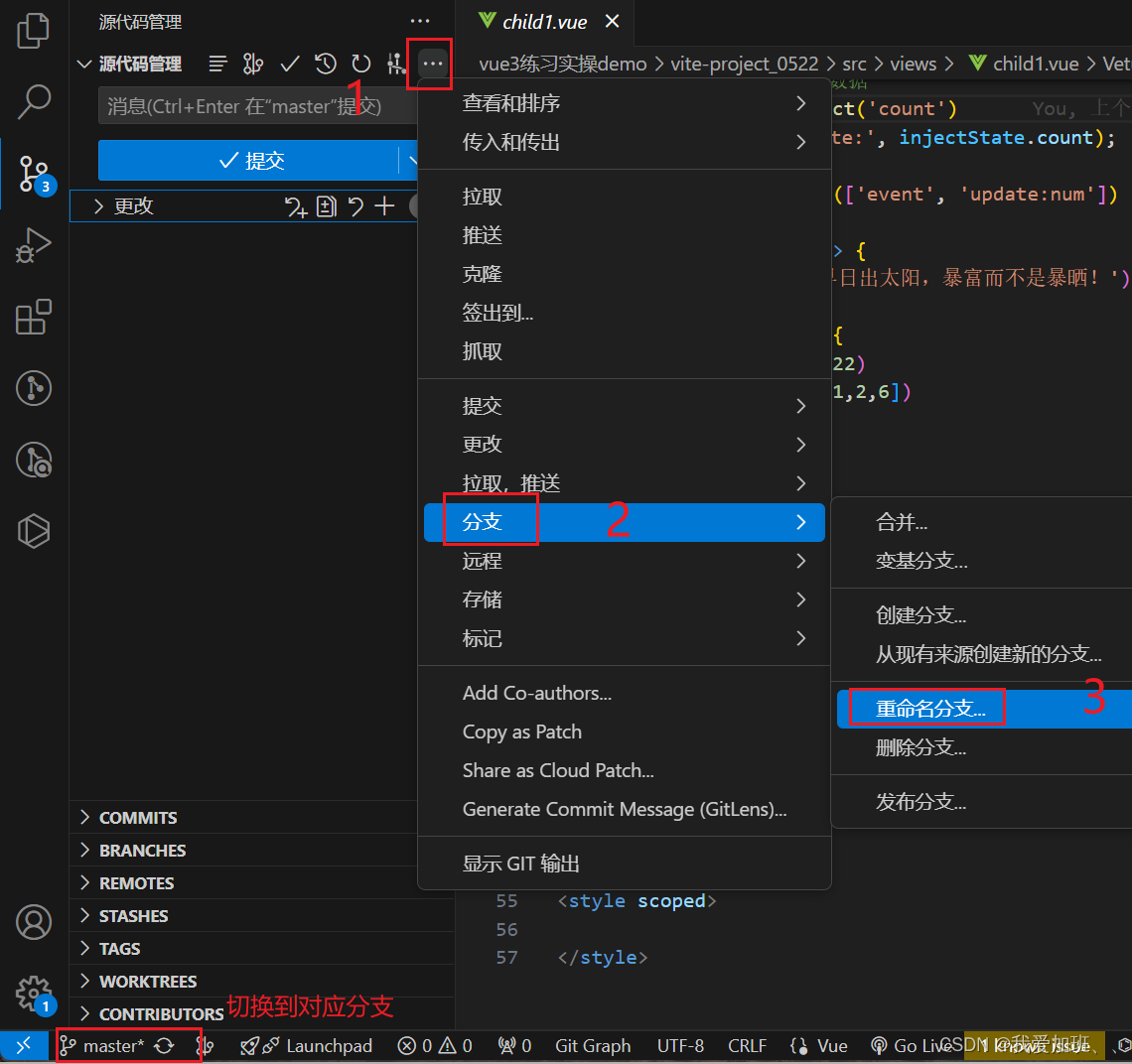
在输入框更改分支名即可。
2、修改后的本地分支与远程分支关联
git branch --set-upstream-to origin/newBranchName
关联后,通过命令 git branch -vv 可查看所有本地分支关联的远程分支以及最新的操作情况;
通过git log 可查看最新日志是否为最近一次的操作情况;
如果都对应上了,即可 git pull 成功。

腾讯云面向开发者汇聚海量精品云计算使用和开发经验,营造开放的云计算技术生态圈。
更多推荐
 2
2 0
0- 0


 已为社区贡献4条内容

所有评论(0)