华为eNSP防火墙 配置使用GRE隧道
华为eNSP防火墙配置
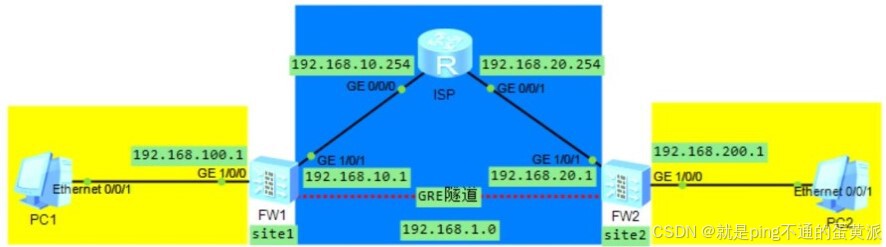
前置配置
1)防火墙基本转发配置(①添加安全区域,②安全转发策略,③配置默认路由,④基本的NAT策略)
①添加安全区域
firewall zone trust
add interface GigabitEthernet1/0/0
firewall zone untrust
add interface GigabitEthernet1/0/1
②防火墙的安全转发策略
FW1:
security-policy
rule name gre_vpn
source-zone local trust untrust
destination-zone local local trust untrust
action permit
FW2:
security-policy
rule name gre_vpn
source-zone local trust untrust
destination-zone local local trust untrust
action permit
③配置默认路由
FW1:
ip route-static 0.0.0.0 0.0.0.0 192.168.10.254
FW2:
ip route-static 0.0.0.0 0.0.0.0 192.168.20.254
④基本的NAT策略
如果防火墙内部网络设备不需要访问互联网(ISP),则无需配置
2)允许ping访问防火墙的外网接口
[USG6000V1]int 接口
[USG6000V1]service-manage ping permit
3)连通检查:
FW1防火墙的外网接口能够ping通FW2防火墙的外网接口
FW1配置:
配置Tunnel接口作为GRE VPN隧道接口
interface Tunnel 0 #使用Tunnel 0
tunnel-protocol gre #启用gre协议
ip address 192.168.1.1 24 #配置隧道IP地址
source 192.168.10.1 #配置本端地址为源地址
destination 192.168.20.1 #配置对端地址为目的地址
将创建的Tunnel接口添加到untrust区域
firewall zone untrust
add interface Tunnel 0
配置GRE VPN访问对端网络的静态路由
[FW1]ip route-static 192.168.200.0 24 Tunnel 0
FW2配置:
配置Tunnel接口作为GRE VPN隧道接口
interface Tunnel 0
tunnel-protocol gre
ip address 192.168.1.2 24
source 192.168.20.1
destination 192.168.10.1
将创建的Tunnel接口添加到untrust区域
firewall zone untrust
add interface Tunnel 0
配置GRE VPN访问对端网络的静态路由
[FW2]ip route-static 192.168.100.0 24 Tunnel 0
使用命令查看GRE VPN隧道建立情况
display interface Tunnel 0
使用命令查看GRE VPN会话建立情况
display firewall session table

腾讯云面向开发者汇聚海量精品云计算使用和开发经验,营造开放的云计算技术生态圈。
更多推荐
 5
5 0
0- 0


 已为社区贡献8条内容

所有评论(0)