Day56 数据库连接池,Druid连接池
Day56
1.数据库连接池
理解:池就是容器,容器中存放了多个连接对象
使用原因:
1.优化创建和销毁连接的时间(在项目启动时创建连接池,项目销毁时关闭连接池)
2.提高连接对象的复用率
3.有效控制项目中连接的个数(连接对象占内存资源)
数据库连接池负责分配、管理和释放数据库连接对象,它允许应用程序重复使用一个现有的数据库连接,而
不是再重新建立一个
1.1 自定义连接池
自己写的连接池类 FastConnectionPool
public class FastConnectionPool {

    private String driverClassName;
    private String url;
    private String username;
    private String password;
    private int maxActive;

    //存储connection连接对象的资源容器(removeFirst)
    private LinkedList<Connection> list;


  //get,set方法(没有list的get、set方法)

    //初始化list
    public void init() throws SQLException {

        list = new LinkedList<>();

        try {
            Class.forName(driverClassName);

            //创建连接对象,并添加到连接池容器中
            for (int i = 0; i < maxActive; i++) {
                Connection connection = DriverManager.getConnection(url, username, password);
                list.add(connection);
            }

        } catch (ClassNotFoundException e) {
            throw new RuntimeException(e);
        }

    }

    public Connection getConnection() throws SQLException {

        if(list == null){
            init();
        }

        Connection connection = null;
        if(!list.isEmpty()){
            connection = list.removeFirst();
        }
        return connection;
    }

    //回收connection对象,使用完了不用close()方法关闭,而是回收到list中继续使用,提高复用率
    public void recovery(Connection connection){
        list.add(connection);
    }

}
测试类
public class Test01 {
    public static void main(String[] args) throws SQLException {

        //创建数据库连接池
        FastConnectionPool pool = new FastConnectionPool();

        //设置参数
        pool.setDriverClassName("com.mysql.cj.jdbc.Driver");
        pool.setUrl("jdbc:mysql://localhost:3306/2403javaee?characterEncoding=utf8&serverTimezone=UTC&rewriteBatchedStatements=true");
        pool.setUsername("root");
        pool.setPassword("123456");
        pool.setMaxActive(20);

        //jdbc的查询代码
        Connection connection = pool.getConnection();
        String sql = "select * from student";
        PreparedStatement statement = connection.prepareStatement(sql);
        ResultSet resultSet = statement.executeQuery();

        while(resultSet.next()){
            int id = resultSet.getInt("id");
            String name = resultSet.getString("name");
            String sex = resultSet.getString("sex");
            int age = resultSet.getInt("age");
            float salary = resultSet.getFloat("salary");
            String course = resultSet.getString("course");

            System.out.println(id + " -- " + name + " -- " + sex + " -- " + age + " -- " + salary + " -- " + course);
        }

        resultSet.close();
        statement.close();
        pool.recovery(connection);//回收connection对象
    }
}
1.2 升级自定义连接池(重点重点关注)
DataSource:连接池各有各的实现方式,所以sun公司定义了一个标准,DataSource
注意:市面上有众多的数据库连接池(Druid、C3P0、DBCP),他们都实现Java提供的DataSource接口(简称数据源)

使用过程,重点是要实现close方法,连接资源 (connection对象) 怎么关闭:装饰模式来帮忙
装饰设计模式(包装模式):目的:改写已存在的类的某个方法或某些方法
数据库连接的包装类(需要实现很多方法)
定义Connection connection对象
定义LinkedList pool;
通过构造方法对上述两个值进行初始化
重写close方法
Public void close(){
pool.addLast(connection);
}
public class MyConnectionWrapper implements Connection {

    private Connection connection;
    private LinkedList<Connection> list;//连接池里的容器

    public MyConnectionWrapper(Connection connection, LinkedList<Connection> list) {
        this.connection = connection;
        this.list = list;
    }

    @Override
    public Statement createStatement() throws SQLException {
        return connection.createStatement();
    }

    @Override
    public PreparedStatement prepareStatement(String sql) throws SQLException {
        return connection.prepareStatement(sql);
    }

    @Override
    public CallableStatement prepareCall(String sql) throws SQLException {
        return connection.prepareCall(sql);
    }

    @Override
    public String nativeSQL(String sql) throws SQLException {
        return connection.nativeSQL(sql);
    }

    @Override
    public void setAutoCommit(boolean autoCommit) throws SQLException {
        connection.setAutoCommit(autoCommit);
    }

    @Override
    public boolean getAutoCommit() throws SQLException {
        return connection.getAutoCommit();
    }

    @Override
    public void commit() throws SQLException {
        connection.commit();
    }

    @Override
    public void rollback() throws SQLException {
        connection.rollback();
    }

    @Override
    public void close() throws SQLException {
        System.out.println("将连接包装类对象回收到连接池里的容器");
        list.add(this);
    }

    @Override
    public boolean isClosed() throws SQLException {
        return connection.isClosed();
    }

    @Override
    public DatabaseMetaData getMetaData() throws SQLException {
        return connection.getMetaData();
    }

    @Override
    public void setReadOnly(boolean readOnly) throws SQLException {
        connection.setReadOnly(readOnly);
    }

    @Override
    public boolean isReadOnly() throws SQLException {
        return connection.isReadOnly();
    }

    @Override
    public void setCatalog(String catalog) throws SQLException {
        connection.setCatalog(catalog);
    }

    @Override
    public String getCatalog() throws SQLException {
        return connection.getCatalog();
    }

    //省略一些方法
}
自定义连接池类,需要实现DataSource接口
public class FastConnectionPool implements DataSource {

    private String driverClassName;
    private String url;
    private String username;
    private String password;
    private int maxActive;
    private LinkedList<Connection> list;

    //get,set方法(没有list的get、set方法)

    public void init() throws SQLException {
        list = new LinkedList<>();

        try {
            Class.forName(driverClassName);
        } catch (ClassNotFoundException e) {
            throw new RuntimeException(e);
        }

        for (int i = 0; i < maxActive; i++) {
            Connection connection = DriverManager.getConnection(url, username, password);
            //获取连接的方法需要将原本的connection对象进行包装
            MyConnectionWrapper connectionWrapper = new MyConnectionWrapper(connection, list);
            list.add(connectionWrapper);
        }
    }

    @Override
    public Connection getConnection() throws SQLException {
        if(list == null){
            init();
        }

        Connection connection = null;
        if(!list.isEmpty()){
            connection = list.removeFirst();
        }
        return connection;
    }

    @Override
    public Connection getConnection(String username, String password) throws SQLException {
        return null;
    }

    @Override
    public <T> T unwrap(Class<T> iface) throws SQLException {
        return null;
    }

    @Override
    public boolean isWrapperFor(Class<?> iface) throws SQLException {
        return false;
    }

    @Override
    public PrintWriter getLogWriter() throws SQLException {
        return null;
    }

    @Override
    public void setLogWriter(PrintWriter out) throws SQLException {

    }

    @Override
    public void setLoginTimeout(int seconds) throws SQLException {

    }

    @Override
    public int getLoginTimeout() throws SQLException {
        return 0;
    }

    @Override
    public Logger getParentLogger() throws SQLFeatureNotSupportedException {
        return null;
    }
}
测试类,和上面的一样
public class Test01 {
    public static void main(String[] args) throws SQLException {

        //创建连接池对象
        FastConnectionPool pool = new FastConnectionPool();

        //设置参数
        //设置参数
        pool.setDriverClassName("com.mysql.cj.jdbc.Driver");
        pool.setUrl("jdbc:mysql://localhost:3306/2403javaee?characterEncoding=utf8&serverTimezone=UTC&rewriteBatchedStatements=true");
        pool.setUsername("root");
        pool.setPassword("123456");
        pool.setMaxActive(20);

        Connection connection = pool.getConnection();
        String sql = "select * from student";
        PreparedStatement statement = connection.prepareStatement(sql);
        ResultSet resultSet = statement.executeQuery();

        while(resultSet.next()){
            int id = resultSet.getInt("id");
            String name = resultSet.getString("name");
            String sex = resultSet.getString("sex");
            int age = resultSet.getInt("age");
            float salary = resultSet.getFloat("salary");
            String course = resultSet.getString("course");

            System.out.println(id + " -- " + name + " -- " + sex + " -- " + age + " -- " + salary + " -- " + course);
        }

        resultSet.close();
        statement.close();
        connection.close();
    }
}
1.3 Druid (德鲁伊) 连接池
通常我们把DataSource的实现,按其英文含义称之为数据源,数据源中都包含了数据库连接池的实现。
也有一些开源组织提供了数据源的独立实现:· DBCP 数据库连接池
· C3P0 数据库连接池
· Druid德鲁伊)数据库连接池
注意:市面上有众多的数据库连接池(Druid、C3P0、DBCP),他们都实现Java提供的DataSource接口(简称数据源)
在使用了数据库连接池之后,在项目的实际开发中就不需要编写连接数据库的代码了,直接从数据源获得数据库的连接。
需要导包

public class Test01 {

    public static void main(String[] args) throws SQLException {

        //创建连接池对象
        DruidDataSource pool = new DruidDataSource();//就只变化了这一句话

        //设置参数
        pool.setDriverClassName("com.mysql.cj.jdbc.Driver");
        pool.setUrl("jdbc:mysql://localhost:3306/2403javaee?characterEncoding=utf8&serverTimezone=UTC&rewriteBatchedStatements=true");
        pool.setUsername("root");
        pool.setPassword("123456");
        pool.setMaxActive(20);

        Connection connection = pool.getConnection();
        String sql = "select * from student";
        PreparedStatement statement = connection.prepareStatement(sql);
        ResultSet resultSet = statement.executeQuery();

        while(resultSet.next()){
            int id = resultSet.getInt("id");
            String name = resultSet.getString("name");
            String sex = resultSet.getString("sex");
            int age = resultSet.getInt("age");
            float salary = resultSet.getFloat("salary");
            String course = resultSet.getString("course");

            System.out.println(id + " -- " + name + " -- " + sex + " -- " + age + " -- " + salary + " -- " + course);
        }

        resultSet.close();
        statement.close();
        connection.close();
    }
}
1.4 Druid封装DBUtil
DBConfig.properties
driverClassName=com.mysql.cj.jdbc.Driverurl=jdbc:mysql://localhost:3306/2403javaee?characterEncoding=utf8&serverTimezone=UTC&rewriteBatchedStatements=trueuser
name=root
password=123456
maxActive=20
maxActive=20:最大连接对象个数
数据库工具类,修改DBUtil
package com.qf.utils;

public class DBUtil {

    private static DruidDataSource pool;
    private static ThreadLocal<Connection> local;

    static{
        Properties properties = new Properties();
        try {
            properties.load(DBUtil.class.getClassLoader().getResourceAsStream("DBConfig.properties"));
        } catch (IOException e) {
            throw new RuntimeException(e);
        }
        String driverClassName = properties.getProperty("driverClassName");
        String url = properties.getProperty("url");
        String username = properties.getProperty("username");
        String password = properties.getProperty("password");
        int maxActive = Integer.parseInt(properties.getProperty("maxActive"));

        //初始化数据库连接池
        pool = new DruidDataSource();

        //设置参数
        pool.setDriverClassName(driverClassName);
        pool.setUrl(url);
        pool.setUsername(username);
        pool.setPassword(password);
        pool.setMaxActive(maxActive);

        local = new ThreadLocal<>();
    }

    /**
     * 获取连接对象
     */
    public static Connection getConnection() throws SQLException {
        Connection connection = local.get();//获取当前线程的Connection对象
        if(connection == null){
            connection = pool.getConnection();//获取数据库连接池里的连接对象
            local.set(connection);//将Connection对象添加到local中
        }
        return connection;
    }

    /**
     * 关闭资源
     */
    public static void close(Connection connection, Statement statement, ResultSet resultSet){
        if(resultSet != null){
            try {
                resultSet.close();
            } catch (SQLException e) {
                throw new RuntimeException(e);
            }
        }
        if(statement != null){
            try {
                statement.close();
            } catch (SQLException e) {
                throw new RuntimeException(e);
            }
        }
        if(connection != null){
            try {
                if(connection.getAutoCommit()){
                    connection.close();
                    local.set(null);
                }
            } catch (SQLException e) {
                throw new RuntimeException(e);
            }
        }
    }

    /**
     * 开启事务
     */
    public static void startTransaction() throws SQLException {
        Connection connection = getConnection();
        connection.setAutoCommit(false);
    }

    /**
     * 提交事务
     */
    public static void commit() throws SQLException {
        Connection connection = local.get();
        if(connection != null){
            connection.commit();
            connection.close();
            local.set(null);
        }
    }

    public static void rollback() throws SQLException {
        Connection connection = local.get();
        if(connection != null){
            connection.rollback();
            connection.close();
            local.set(null);
        }
    }

    /**
     * 更新数据(添加、删除、修改)
     */
    public static int commonUpdate(String sql,Object... params) throws SQLException {
        Connection connection = null;
        PreparedStatement statement = null;
        try {
            connection = getConnection();
            statement = connection.prepareStatement(sql);
            paramHandler(statement,params);
            int num = statement.executeUpdate();
            return num;
        }finally {
            close(connection,statement,null);
        }
    }

    /**
     * 添加数据 - 主键回填(主键是int类型可以返回)
     */
    public static int commonInsert(String sql,Object... params) throws SQLException {
        Connection connection = null;
        PreparedStatement statement = null;
        ResultSet resultSet = null;
        try {
            connection = getConnection();
            statement = connection.prepareStatement(sql,PreparedStatement.RETURN_GENERATED_KEYS);
            paramHandler(statement,params);
            statement.executeUpdate();

            resultSet = statement.getGeneratedKeys();
            int primaryKey = 0;
            if(resultSet.next()){
                primaryKey = resultSet.getInt(1);
            }
            return primaryKey;
        }finally {
            close(connection,statement,resultSet);
        }
    }

    /**
     * 查询多个数据
     */
    public static <T> List<T> commonQueryList(Class<T> clazz,String sql, Object... params) throws SQLException, InstantiationException, IllegalAccessException {

        Connection connection = null;
        PreparedStatement statement = null;
        ResultSet resultSet = null;

        try {
            connection = getConnection();
            statement = connection.prepareStatement(sql);
            paramHandler(statement,params);
            resultSet = statement.executeQuery();

            //获取表数据对象
            ResultSetMetaData metaData = resultSet.getMetaData();
            //获取字段个数
            int count = metaData.getColumnCount();

            List<T> list = new ArrayList<>();

            while(resultSet.next()){

                T t = clazz.newInstance();

                //获取字段名及数据
                for (int i = 1; i <= count; i++) {
                    String fieldName = metaData.getColumnName(i);
                    Object fieldVal = resultSet.getObject(fieldName);
                    setField(t,fieldName,fieldVal);
                }
                list.add(t);
            }
            return list;
        } finally {
            DBUtil.close(connection,statement,resultSet);
        }
    }

    /**
     * 查询单个数据
     */
    public static <T> T commonQueryObj(Class<T> clazz,String sql, Object... params) throws SQLException, InstantiationException, IllegalAccessException {

        Connection connection = null;
        PreparedStatement statement = null;
        ResultSet resultSet = null;

        try {
            connection = getConnection();
            statement = connection.prepareStatement(sql);
            paramHandler(statement,params);
            resultSet = statement.executeQuery();

            //获取表数据对象
            ResultSetMetaData metaData = resultSet.getMetaData();
            //获取字段个数
            int count = metaData.getColumnCount();

            if(resultSet.next()){

                T t = clazz.newInstance();

                //获取字段名及数据
                for (int i = 1; i <= count; i++) {
                    String fieldName = metaData.getColumnName(i);
                    Object fieldVal = resultSet.getObject(fieldName);
                    setField(t,fieldName,fieldVal);
                }
                return t;
            }
        } finally {
            DBUtil.close(connection,statement,resultSet);
        }
        return null;
    }

    /**
     * 处理statement对象参数数据的处理器
     */
    private static void paramHandler(PreparedStatement statement,Object... params) throws SQLException {
        for (int i = 0; i < params.length; i++) {
            statement.setObject(i+1,params[i]);
        }
    }

    /**
     * 获取当前类及其父类的属性对象
     * @param clazz class对象
     * @param name 属性名
     * @return 属性对象
     */
    private static Field getField(Class<?> clazz,String name){

        for(Class<?> c = clazz;c != null;c = c.getSuperclass()){
            try {
                Field field = c.getDeclaredField(name);
                return field;
            } catch (NoSuchFieldException e) {
            } catch (SecurityException e) {
            }
        }
        return null;
    }

    /**
     * 设置对象中的属性
     * @param obj 对象
     * @param name 属性名
     * @param value 属性值
     */
    private static void setField(Object obj,String name,Object value){

        Field field = getField(obj.getClass(), name);
        if(field != null){
            field.setAccessible(true);
            try {
                field.set(obj, value);
            } catch (IllegalArgumentException e) {
                e.printStackTrace();
            } catch (IllegalAccessException e) {
                e.printStackTrace();
            }
        }
    }
}
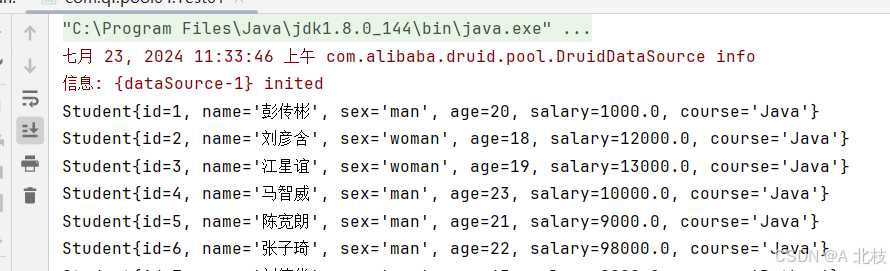
封装学生类
public class Student {

    private int id;
    private String name;
    private String sex;
    private int age;
    private float salary;
    private String course;

    //无参构造,有参构造,get,set,toString方法省略
}
测试类
public class Test01 {

    public static void main(String[] args) throws SQLException, InstantiationException, IllegalAccessException {

        String sql = "select * from student";
        List<Student> students = DBUtil.commonQueryList(Student.class, sql);//打印集合

        for (Student stu : students) {
            System.out.println(stu);
        }

    }
}

腾讯云面向开发者汇聚海量精品云计算使用和开发经验,营造开放的云计算技术生态圈。
更多推荐
 64
64 0
0- 0


 已为社区贡献1条内容

所有评论(0)