EVE-NG防火墙镜像
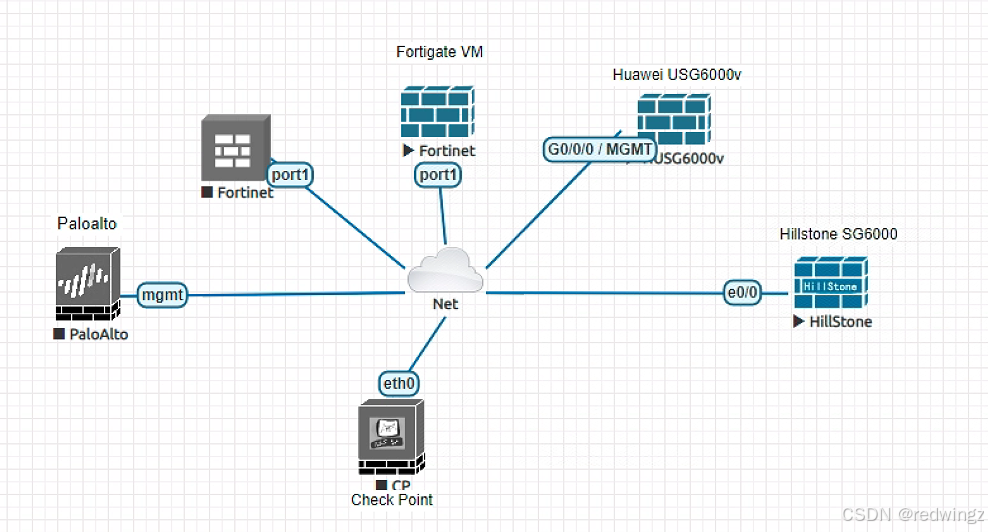
如下图所示,用到的虚拟防火墙有Checkpoint,cisco,fortinet,Paloalto,hillstone,H3C和Huawei几个品牌。
如下图所示,用到的虚拟防火墙有Checkpoint,cisco,fortinet,Paloalto,hillstone,H3C和Huawei几个品牌。
Checkpoint防火墙
Check point防火墙使用的虚拟镜像为cpsg-R81.20-Licensed。默认用户名:admin,密码:admin。手动配置eth0接口地址,可通过WEB界面访问。
CP-SG-1-R81.20> set interface eth0 ipv4-address 192.168.5.33 subnet-mask 255.255.255.0

CP-SG-1-R81.20> set interface eth0 state on
查看接口eth0的信息。
CP-SG-1-R81.20> show interface eth0
state on
mac-addr 50:00:00:05:00:00
type ethernet
link-state link up
mtu 1500
auto-negotiation on
speed 1000M
ipv6-autoconfig Not configured
monitor-mode Not configured
duplex full
link-speed 1000M/full
comments
ipv4-address 192.168.5.33/24
ipv6-address Not Configured
ipv6-local-link-address Not Configured

Statistics:
TX bytes:600 packets:10 errors:0 dropped:0 overruns:0 carrier:0
RX bytes:247201 packets:3446 errors:0 dropped:0 overruns:0 frame:0
CP-SG-1-R81.20>
Paloalto防火墙
Paloalto防火墙版本9.1.2。默认用户名和密码都是admin,注意只有在出现PA-VM login提示符的时候,才可以登录。
vm login:
PA-HDF login:
PA-VM login:
配置管理口IP地址,提交commit之后生效。
admin@PA-VM>
admin@PA-VM# configure
[edit]
admin@PA-VM#
admin@PA-VM# set deviceconfig system ip-address 192.168.5.136 netmask 255.255.255.0
admin@PA-VM#
admin@PA-VM# commit
华为USG6000
虚拟机镜像为huaweiusg6kv-5.1.7-2018,用户名admin,没有密码。配置管理IP。WEB界面登录用户名admin,密码Admin@123。
<USG6000V2>sys
Enter system view, return user view with Ctrl+Z.
[USG6000V2]
[USG6000V2]interface GigabitEthernet 0/0/0
[USG6000V2-GigabitEthernet0/0/0]
[USG6000V2-GigabitEthernet0/0/0]
[USG6000V2-GigabitEthernet0/0/0]ip address 192.168.5.32 255.255.255.0
[USG6000V2-GigabitEthernet0/0/0]dis th
2024-07-08 06:40:16.440
#
interface GigabitEthernet0/0/0
 undo shutdown
 ip binding vpn-instance default
 ip address 192.168.5.32 255.255.255.0
 service-manage http permit
 service-manage https permit
 service-manage ping permit
#
return
[USG6000V2-GigabitEthernet0/0/0]
cisco asa防火墙
虚拟机版本:ASA Version 9.1(5)16。默认enable密码为空。配置接口eth0接口ip地址。
ciscoasa> en
Password:
ciscoasa# configure terminal
ciscoasa#
ciscoasa(config)#
ciscoasa(config)# interface ethernet 0
ciscoasa(config-if)#
ciscoasa(config-if)# ip addr 192.168.5.134 255.255.255.0
ciscoasa(config-if)#
ciscoasa(config-if)# nameif inside
INFO: Security level for "inside" set to 100 by default.
ciscoasa(config-if)#
ciscoasa(config-if)# no shutdown
ciscoasa(config-if)# end
启动http服务器,配置用户名密码:
ciscoasa# con terminal
ciscoasa(config)#
ciscoasa(config)# http server enable
ciscoasa(config)#
ciscoasa(config)# http 192.168.5.0 255.255.255.0 inside
ciscoasa(config)#
ciscoasa(config)# username admin password admin123 privilege 15
山石防火墙
虚拟镜像版本hillstone-sg6000-CloudEdge-5.5R9P2-v6。默认用户名密码都是hillstone。ethernet0/0默认启动了dhcp,
login: hillstone
password:

SG-6000# configure
SG-6000(config)#
SG-6000(config)# interface  ethernet0/0
SG-6000(config-if-eth0/0)#
SG-6000(config-if-eth0/0)# show this

interface ethernet0/0 local
  zone  "trust"
  ip address dhcp setroute
  manage ssh
  manage ping
  manage snmp
  manage https
  dhcp-client classless-static-route
  dhcp-client mtu
exit
SG-6000(config-if-eth0/0)#
查看获取到的IP地址。
SG-6000# show interface ethernet0/0
---------------------------------------------
Interface ethernet0/0 local
Description:
Physical up                             Admin up
Link up                                 Protocol up
Interface ID:30
IP address:192.168.5.133 255.255.255.0
MAC address:5000.0005.0000
H3C防火墙
虚拟机镜像版本h3cvfw1k-7.1.064-E1185P21,WEB界面默认的用户名密码都是admin。
<H3C>system-view
System View: return to User View with Ctrl+Z.
[H3C]
[H3C]interface GigabitEthernet 1/0
[H3C-GigabitEthernet1/0]dis th
#
interface GigabitEthernet1/0
 port link-mode route
 ip address dhcp-alloc
#
return
[H3C-GigabitEthernet1/0]
[H3C-GigabitEthernet1/0]ip address 192.168.12.50 255.255.255.0
[H3C-GigabitEthernet1/0]
[H3C-GigabitEthernet1/0]no shutdown
Fortinet防火墙
镜像fortinet-FGT-v7.2.0-build1157。默认用户名和密码都是admin。如下配置管理IP地址。
FortiGate-VM64-KVM # config  sys interface

FortiGate-VM64-KVM (interface) # edit port1

FortiGate-VM64-KVM (port1) # set ip 192.168.5.161/24
FortiGate-VM64-KVM (port1) #
FortiGate-VM64-KVM (port1) # show
config system interface
    edit "port1"
        set vdom "root"
        set ip 192.168.5.161 255.255.255.0
        set allowaccess ping https ssh http fgfm
        set type physical
        set snmp-index 1
    next
end

腾讯云面向开发者汇聚海量精品云计算使用和开发经验,营造开放的云计算技术生态圈。
更多推荐
 12
12 0
0- 0


 已为社区贡献1条内容

所有评论(0)