连接超时添加镜像:Connect to repo.maven.apache.org:443 [repo.maven.apache.org/] failed: Connection timed
·
目录
1. 在gradle-wrapper.properties下添加
2.老版AndroidStudio: 到build.gradle文件下添加
3.2另一种添加镜像方式: 项目下的build.gradle添加
原因:可能是连接超时,导致下载失败,添加镜像即可
1. 在gradle-wrapper.properties下添加
//例如
https://mirrors.aliyun.com/macports/distfiles/gradle/gradle-8.7-bin.zip
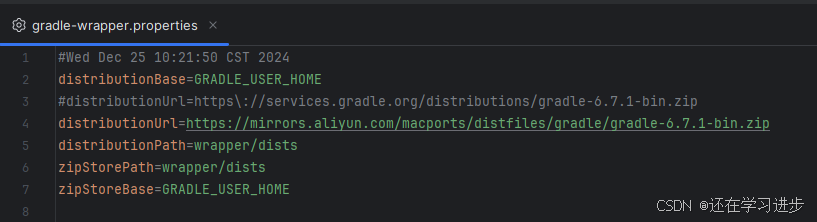
2.老版AndroidStudio: 到build.gradle文件下添加
// Top-level build file where you can add configuration options common to all sub-projects/modules.
buildscript {
    repositories {
        google()
        mavenCentral()
        maven { url 'https://maven.aliyun.com/repository/gradle-plugin' }
    }
    dependencies {
        classpath "com.android.tools.build:gradle:4.2.2"

        // NOTE: Do not place your application dependencies here; they belong
        // in the individual module build.gradle files
    }
}

allprojects {
    repositories {
        google()
        mavenCentral()
        jcenter() // Warning: this repository is going to shut down soon
        maven { url 'https://maven.aliyun.com/repository/gradle-plugin' }

    }
}

task clean(type: Delete) {
    delete rootProject.buildDir
}
//或者
buildscript {
repositories {
maven {
url 'https://maven.aliyun.com/repository/jcenter'
}
}
}
allprojects {
repositories {
maven {
url 'https://maven.aliyun.com/repository/jcenter'
}
}
}
3.新版AndroidStudio
3.1到setting.gradle添加
maven { url "https://jitpack.io" }
maven { url 'https://maven.aliyun.com/repository/public' }
maven { url 'https://maven.aliyun.com/repository/central' }
maven { url 'https://maven.aliyun.com/repository/google' }
maven { url 'https://maven.aliyun.com/repository/gradle-plugin' }

3.2另一种添加镜像方式: 项目下的build.gradle添加
maven {
      url 'https://maven.aliyun.com/repository/jcenter'
}
例如: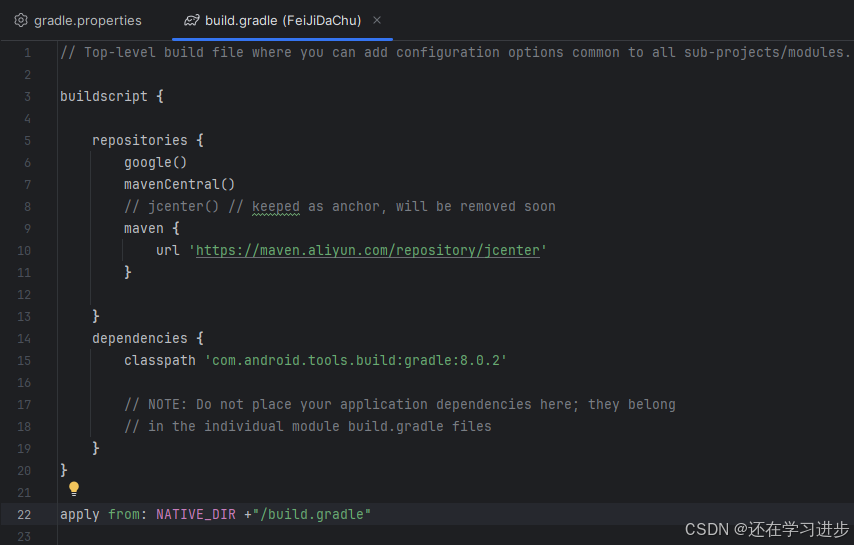

腾讯云面向开发者汇聚海量精品云计算使用和开发经验,营造开放的云计算技术生态圈。
更多推荐
 6
6 0
0- 0


 已为社区贡献2条内容

所有评论(0)