解决pycharm使用spark报错PySparkRuntimeError:Java gateway process exited before sending its port number.
·
C:\ProgramData\Miniconda3\python.exe C:\Users\86159\PycharmProjects\pythonProject1\main\Demo.py
<pyspark.conf.SparkConf object at 0x0000020A659E6190>
'cmd' 不是内部或外部命令,也不是可运行的程序
或批处理文件。
Traceback (most recent call last):
  File "C:\Users\86159\PycharmProjects\pythonProject1\main\Demo.py", line 25, in <module>
    sc = SparkContext(conf=conf)
  File "C:\ProgramData\Miniconda3\lib\site-packages\pyspark\context.py", line 144, in __init__
    SparkContext._ensure_initialized(self, gateway=gateway, conf=conf)
  File "C:\ProgramData\Miniconda3\lib\site-packages\pyspark\context.py", line 331, in _ensure_initialized
    SparkContext._gateway = gateway or launch_gateway(conf)
  File "C:\ProgramData\Miniconda3\lib\site-packages\pyspark\java_gateway.py", line 108, in launch_gateway
    raise Exception("Java gateway process exited before sending its port number")
Exception: Java gateway process exited before sending its port number

Process finished with exit code 1
报错信息如上:
解决方案:
进入到环境变量下的系统变量检查PATH目录下是否有C:\Windows\System32
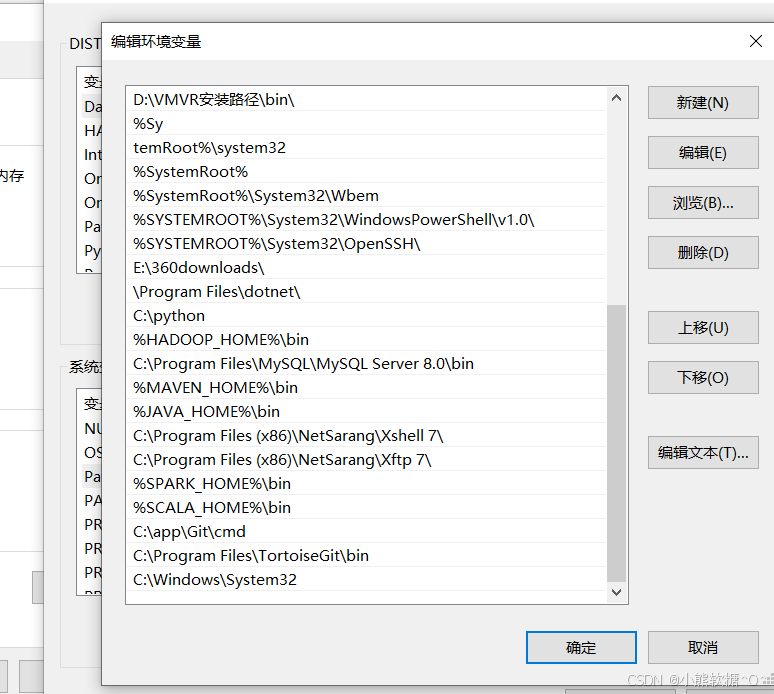
没有的话就添加这句话C:\Windows\System32,然后重启pycharm即可解决
如果还有可以打开命令行页面,进入到自己的base环境下输出pyspark看是否能启动成功,启动失败则是pyspark安装有问题,重新安装再次启动即可

腾讯云面向开发者汇聚海量精品云计算使用和开发经验,营造开放的云计算技术生态圈。
更多推荐
 2
2 0
0- 0


 已为社区贡献2条内容

所有评论(0)