node.js 配合vue3 实现前后台联调 通过@microsoft/fetch-event-source 实现流式数据,fetchEventSource总是重复发起请求
fetchEventSource 重复发起请求
·
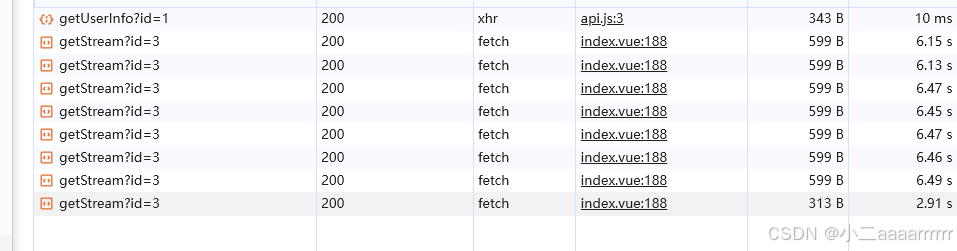
问题: 前端使用vue3 引用fetchEventSource 获取接口返回的数据流,发起请求后 发现后台一直重复发起请求。
本人前端代码
<template>
  <div class="servePage">
    <div class="pageTitle">eventStream数据流格式渲染</div>
      <el-input
            v-model="searchInput"
            placeholder="输入你想查询的问题"
            @change="handleSearch"
            :suffix-icon="Search"
            >
          </el-input>
    </div>
  </div>
</template>
<script setup>
import { getUserInfo, getStream } from "../../axios/api.js";
import {
  reactive,
  ref,
  onMounted,
  watch,
  onBeforeUnmount,
  nextTick,
} from "vue";
import { Search } from "@element-plus/icons-vue";
import { fetchEventSource } from "@microsoft/fetch-event-source";
import { cloneDeep } from "lodash";
defineProps({
  msg: String,
});

const count = ref(0);
const AIWindowRef = ref();
const searchInput = ref("");
const dialogList = ref([]);
const resultText = ref("");

const handeGetInfo = () => {
  getUserInfo({ id: 1 }).then((res) => {
    if (res.code === 200) {
      userList.value = res.data;
    }
  });
};

const handleSearch = () => {
  resultText.value = "";

  let eventSource = fetchEventSource(`/api/getStream?id=${searchInput.value}`, {
    method: "GET",
    headers: {
      "Content-Type": "application/json",
    },
    openWhenHidden: true,
    onopen(response) {
      if (
        response.ok &&
        response.headers.get("content-type") === "text/event-stream"
      ) {
        return; // 连接成功
      } else {
        throw new Error("连接失败");
      }
    },
    onmessage(ev) {
      if (JSON.parse(ev.data).message == "close") {
        eventSource.close();
        dialogItem.result = resultText.value;
        dialogList.value[dialogList.value.length - 1] = dialogItem;
        searchInput.value = "";
      } else {
        resultText.value = resultText.value + JSON.parse(ev.data).message;
      }
    },
  });
};


</script>
在网上搜索了一下相同的问题发现主要有两种写法 ;
一种是增加一个配置项 openWhenHidden=true ,但是我配置了并没有起作用
参考如下
 https://blog.csdn.net/weixin_42029374/article/details/131935713
第二种就是 如下写法
let eventSource = fetchEventSource() ...
最后调用 eventSource.close()
也在我的代码里试过了 还是不可以
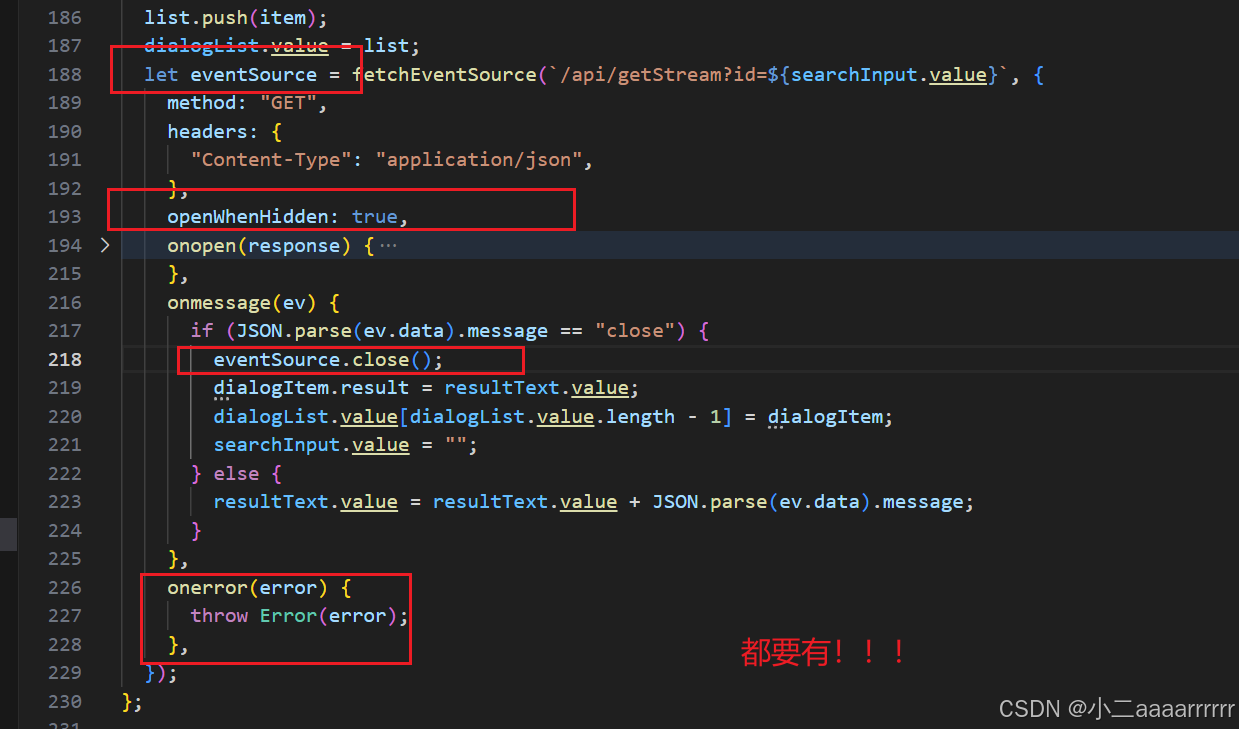
最后是发现还需要增加一个 onerror 方法,所以最终解决方法就是结合上面所说的内容 再加一个 onerror .如下代码

腾讯云面向开发者汇聚海量精品云计算使用和开发经验,营造开放的云计算技术生态圈。
更多推荐
 4
4 0
0- 0


 已为社区贡献3条内容

所有评论(0)