mac电脑安装hadoop、hive等大数据组件
背景:用本地的Hadoop测试Java调用cmd命令
一、Mac下安装Hadoop
2024-12-08 13:48:19,826 WARN util.NativeCodeLoader: Unable to load native-hadoop library for your platform... using builtin-java classes where applicable
ls: `.': No such file or directory
解决方案:
首先,编辑日志的配置文件
vim etc/hadoop/log4j.properties
然后将下面的语句添加到问年末尾处:
log4j.logger.org.apache.hadoop.util.NativeCodeLoader=ERROR
二、Mac下安装hive
Mac下查看本地MySQL的版本
SELECT VERSION();
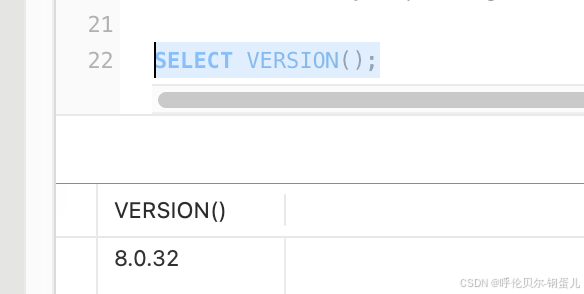
然后去官网下载对应版本的MySQL驱动
官网链接https://downloads.mysql.com/archives/c-j/
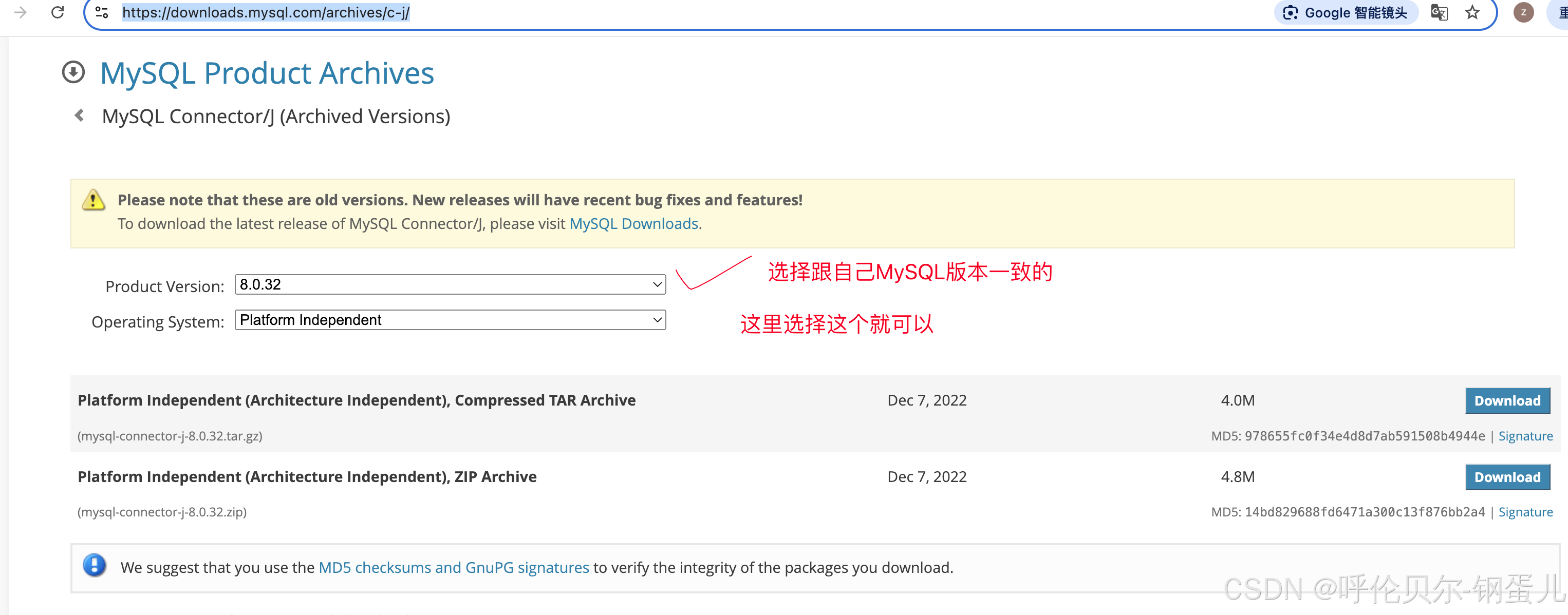
然后将MySQL解压出来的jar包复制到hive目录下的lib目录下面
执行命令./schematool -initSchema -dbType mysql报错如下;
Error: Table 'ctlgs' already exists (state=42S01,code=1050)
Schema initialization FAILED! Metastore state would be inconsistent!
Underlying cause: java.io.IOException : Schema script failed, errorcode 2
Use --verbose for detailed stacktrace.
*** schemaTool failed ***
执行失败原因,原来已经有hive库了在MySQL中,删除原来的hive库,重新创建hive数据库,然后重新执行这个命令,在最下面一行显示Initialization script completed ,则表示成功执行了
配置hive-site.xml
<?xml version="1.0" encoding="UTF-8" standalone="no"?>
<?xml-stylesheet type="text/xsl" href="configuration.xsl"?>
<configuration>
<property>
<name>javax.jdo.option.ConnectionURL</name>
<value>jdbc:mysql://localhost:3306/hive?createDatabaseIfNotExist=true&useSSL=false&allowPublicKeyRetrieval=true</value>
<description>JDBC connect string for a JDBC metastore</description>
</property>
<property>
<name>javax.jdo.option.ConnectionDriverName</name>
<value>com.mysql.jdbc.Driver</value>
<description>Driver class name for a JDBC metastore</description>
</property>
<property>
<name>javax.jdo.option.ConnectionUserName</name>
<value>root</value>
<description>username to use against metastore database</description>
</property>
<property>
<name>javax.jdo.option.ConnectionPassword</name>
<value>Wwzx152103</value>
<description>password to use against metastore database</description>
</property>
</configuration>
启动hive时,报错如下;
SLF4J: Class path contains multiple SLF4J bindings.
SLF4J: Found binding in [jar:file:/Users/wuzhanxi/mac_soft/system_soft/code_environment/hive/apache-hive-4.0.1-bin/lib/log4j-slf4j-impl-2.18.0.jar!/org/slf4j/impl/StaticLoggerBinder.class]
SLF4J: Found binding in [jar:file:/Users/wuzhanxi/mac_soft/system_soft/code_environment/hadoop/hadoop-3.3.6/share/hadoop/common/lib/slf4j-reload4j-1.7.36.jar!/org/slf4j/impl/StaticLoggerBinder.class]
SLF4J: See http://www.slf4j.org/codes.html#multiple_bindings for an explanation.
SLF4J: Actual binding is of type [org.apache.logging.slf4j.Log4jLoggerFactory]
SLF4J: Class path contains multiple SLF4J bindings.
SLF4J: Found binding in [jar:file:/Users/wuzhanxi/mac_soft/system_soft/code_environment/hive/apache-hive-4.0.1-bin/lib/log4j-slf4j-impl-2.18.0.jar!/org/slf4j/impl/StaticLoggerBinder.class]
SLF4J: Found binding in [jar:file:/Users/wuzhanxi/mac_soft/system_soft/code_environment/hadoop/hadoop-3.3.6/share/hadoop/common/lib/slf4j-reload4j-1.7.36.jar!/org/slf4j/impl/StaticLoggerBinder.class]
SLF4J: See http://www.slf4j.org/codes.html#multiple_bindings for an explanation.
SLF4J: Actual binding is of type [org.apache.logging.slf4j.Log4jLoggerFactory]
Beeline version 4.0.1 by Apache Hive
beeline> show databases;
No current connection
beeline>
提示日志冲突
解决方案:将hive下lib目录下的这个日志jar包改个名字即可

Beeline version 4.0.1 by Apache Hive
beeline> show databases;
No current connection
beeline> !connect jdbc:hive2://localhost:10000
Connecting to jdbc:hive2://localhost:10000
Enter username for jdbc:hive2://localhost:10000: hive
Enter password for jdbc:hive2://localhost:10000: ****
24/12/28 22:28:20 [main]: WARN jdbc.HiveConnection: Failed to connect to localhost:10000
Error: Could not open client transport with JDBC Uri: jdbc:hive2://localhost:10000: Failed to open new session: java.lang.RuntimeException: org.apache.hadoop.ipc.RemoteException(org.apache.hadoop.security.authorize.AuthorizationException): User: wuzhanxi is not allowed to impersonate hive (state=08S01,code=0)
问题原因分析及解决方案:
"user: wuzhanxi is not allowed to impersonate root-----用户:root不被允许冒充root."这其实就是用户权限的问题。给Hadoop的core-site.xml添加以下属性就行。(wuzhanxi表示用户名,所以将Hadoop下的core-site.xml中的配置改成wuzhanxi即可。千万不要改成主机名)。然后重启Hadoop(stop-all.sh,start-all.sh),如果是单机版,(start-sfs.sh,start-yarn.sh)
hadoop的core-site.xml
<property>
        <name>hadoop.proxyuser.XXX.hosts</name>
        <value>*</value>
</property>
<property>
        <name>hadoop.proxyuser.XXX.groups</name>
        <value>*</value>
</property>
启动hive的客户端进行测试
~/m/sy/code_environment/hive/apache-hive-4.0.1-bin/bin hive INT ✘ base Py at 09:47:55
Beeline version 4.0.1 by Apache Hive
beeline> !connect jdbc:hive2://localhost:10000
Connecting to jdbc:hive2://localhost:10000
Enter username for jdbc:hive2://localhost:10000: hive
Enter password for jdbc:hive2://localhost:10000: ****
Connected to: Apache Hive (version 4.0.1)
Driver: Hive JDBC (version 4.0.1)
Transaction isolation: TRANSACTION_REPEATABLE_READ
0: jdbc:hive2://localhost:10000> show databases;
INFO : Compiling command(queryId=wuzhanxi_20241229094826_f9000f2d-334f-4fb5-9d69-81c963606d77): show databases
INFO : Semantic Analysis Completed (retrial = false)
INFO : Created Hive schema: Schema(fieldSchemas:[FieldSchema(name:database_name, type:string, comment:from deserializer)], properties:null)
INFO : Completed compiling command(queryId=wuzhanxi_20241229094826_f9000f2d-334f-4fb5-9d69-81c963606d77); Time taken: 0.838 seconds
INFO : Concurrency mode is disabled, not creating a lock manager
INFO : Executing command(queryId=wuzhanxi_20241229094826_f9000f2d-334f-4fb5-9d69-81c963606d77): show databases
INFO : Starting task [Stage-0:DDL] in serial mode
INFO : Completed executing command(queryId=wuzhanxi_20241229094826_f9000f2d-334f-4fb5-9d69-81c963606d77); Time taken: 0.246 seconds
+----------------+
| database_name |
+----------------+
| default |
+----------------+
1 row selected (1.314 seconds)
开启hive的服务
hive --service hiveserver2
#如果执行"hive --service hiveserver2"后边多了"Hive Seession ID=*******"也是开启了hiveserver2监听服务,只要不报错就行。(建议使用后台运行命令:“hive --service hiveserver2 &”),这样可以使用"jps"查看进程是否起开。
再去浏览器里输入http://localhost:10002
https://blog.csdn.net/lady88888888/article/details/108555585?spm=1001.2101.3001.6650.2&utm_medium=distribute.pc_relevant.none-task-blog-2%7Edefault%7EBlogCommendFromBaidu%7ERate-2-108555585-blog-53559637.235%5Ev43%5Epc_blog_bottom_relevance_base9&depth_1-utm_source=distribute.pc_relevant.none-task-blog-2%7Edefault%7EBlogCommendFromBaidu%7ERate-2-108555585-blog-53559637.235%5Ev43%5Epc_blog_bottom_relevance_base9&utm_relevant_index=3
启动完Hadoop,然后用命令启动hive时报错
HADOOP_HOME not set, executing beeline using JAVA
错误: 找不到或无法加载主类 .Users.wuzhanxi.mac_soft.system_soft.code_environment.hive.apache-hive-4.0.1-bin.lib.jline-builtins-3.12.1.jar
解决方案
1.先让配置文件生效
source ~/.bash_profile
2.执行beeline的命令就可以进入到客户端了
beeline
3.执行连接的命令
!connect jdbc:hive2://localhost:10000
4.输入hive的用户名、密码,都是hive
执行小3的时候,又报错了,原因是没有开发hiveserver2,开启它,再执行连接命令就可以了
~/m/sy/code_environment/hive/apache-hive-4.0.1-bin/bin beeline ✔ base Py at 09:26:51
Beeline version 4.0.1 by Apache Hive
beeline> show databases;
No current connection
beeline> !connect jdbc:hive2://localhost:10000
Connecting to jdbc:hive2://localhost:10000
Enter username for jdbc:hive2://localhost:10000: hive
Enter password for jdbc:hive2://localhost:10000: ****
25/02/08 09:30:11 [main]: WARN jdbc.HiveConnection: Failed to connect to localhost:10000
Could not open connection to the HS2 server. Please check the server URI and if the URI is correct, then ask the administrator to check the server status. Enable verbose error messages (--verbose=true) for more information.
Error: Could not open client transport with JDBC Uri: jdbc:hive2://localhost:10000: java.net.ConnectException: Connection refused (Connection refused) (state=08S01,code=0)
beeline> show databases;
No current connection
解决方案
1.先开启hiveserver2
hive --service hiveserver2
2.然后再beeline的客户端中执行连接的命令即可
!connect jdbc:hive2://localhost:10000
需要实现一个功能,将txt文件put或者load到一个hive的分区下
CREATE TABLE IF NOT EXISTS rktx_11_ods (
    name String,
    age String,
    sex String
)
PARTITIONED BY (filename String)
ROW FORMAT DELIMITED
FIELDS TERMINATED BY ','
STORED AS TEXTFILE;

腾讯云面向开发者汇聚海量精品云计算使用和开发经验,营造开放的云计算技术生态圈。
更多推荐
 1
1 0
0- 0


 已为社区贡献4条内容

所有评论(0)