防火墙旁挂部署 结合设备的VRF
基于eNsp
结合设备的vrf,采用传统路由的方式进行防火墙旁挂的引流。
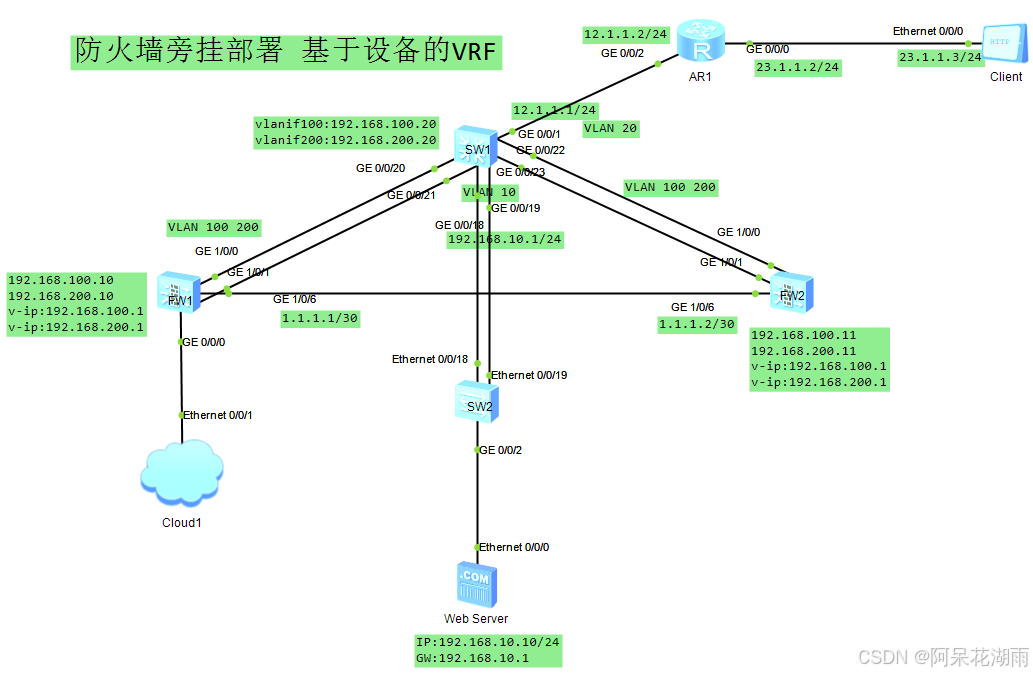
配置
SW1
sysname SW1
#
vlan batch 10 20 100 200
ip vpn-instance a
ipv4-family
#
ip vpn-instance b
ipv4-family
interface Vlanif10
description Web Service_Gateway
ip binding vpn-instance a
ip address 192.168.10.1 255.255.255.0
interface Vlanif20
description Internet
ip binding vpn-instance b
ip address 12.1.1.1 255.255.255.0
interface Vlanif100
description To_FW_Trust
ip binding vpn-instance a
ip address 192.168.100.20 255.255.255.0
interface Vlanif200
description To_FW_Untrust
ip binding vpn-instance b
ip address 192.168.200.20 255.255.255.0
interface Eth-Trunk1
description To_FW1
port link-type trunk
port trunk allow-pass vlan 100 200
stp edged-port disable
mode lacp-static
interface Eth-Trunk2
description To_FW2
port link-type trunk
port trunk allow-pass vlan 100 200
stp edged-port disable
mode lacp-static
interface Eth-Trunk3
description To_Web Service
port link-type trunk
port trunk allow-pass vlan 10
stp edged-port disable
mode lacp-static
interface GigabitEthernet0/0/1
port link-type access
port default vlan 20
stp edged-port enable
interface GigabitEthernet0/0/18
eth-trunk 3
interface GigabitEthernet0/0/19
eth-trunk 3
interface GigabitEthernet0/0/20
eth-trunk 1
interface GigabitEthernet0/0/21
eth-trunk 1
interface GigabitEthernet0/0/22
eth-trunk 2
interface GigabitEthernet0/0/23
eth-trunk 2
ip route-static vpn-instance a 0.0.0.0 0.0.0.0 192.168.100.1
ip route-static vpn-instance b 0.0.0.0 0.0.0.0 12.1.1.2
ip route-static vpn-instance b 192.168.10.0 255.255.255.0 192.168.200.1
FW1/2
配置大同小异,这里FW1配置
sysname FW1
vlan batch 100 200
hrp enable
hrp interface GigabitEthernet1/0/6 remote 1.1.1.2
interface Vlanif100
ip address 192.168.100.10 255.255.255.0
vrrp vrid 100 virtual-ip 192.168.100.1 active
interface Vlanif200
ip address 192.168.200.10 255.255.255.0
vrrp vrid 200 virtual-ip 192.168.200.1 active
interface Eth-Trunk1
portswitch
port link-type trunk
port trunk allow-pass vlan 100 200
mode lacp-static
interface GigabitEthernet0/0/0
undo shutdown
ip binding vpn-instance default
ip address 192.168.0.100 255.255.255.0
alias GE0/METH
service-manage https permit
service-manage ping permit
interface GigabitEthernet1/0/0
undo shutdown
eth-trunk 1
interface GigabitEthernet1/0/1
undo shutdown
eth-trunk 1
interface GigabitEthernet1/0/6
undo shutdown
ip address 1.1.1.1 255.255.255.252
alias Heart
firewall zone trust
set priority 85
add interface GigabitEthernet0/0/0
add interface Vlanif100
firewall zone untrust
set priority 5
add interface Vlanif200
firewall zone dmz
set priority 50
add interface GigabitEthernet1/0/6
ip route-static 0.0.0.0 0.0.0.0 192.168.200.20
ip route-static 192.168.10.0 255.255.255.0 192.168.100.20
security-policy
rule name Web
source-zone untrust
destination-zone trust
service http
service icmp
action permit
HRP_M<FW1>
R1/SW2
常规配置
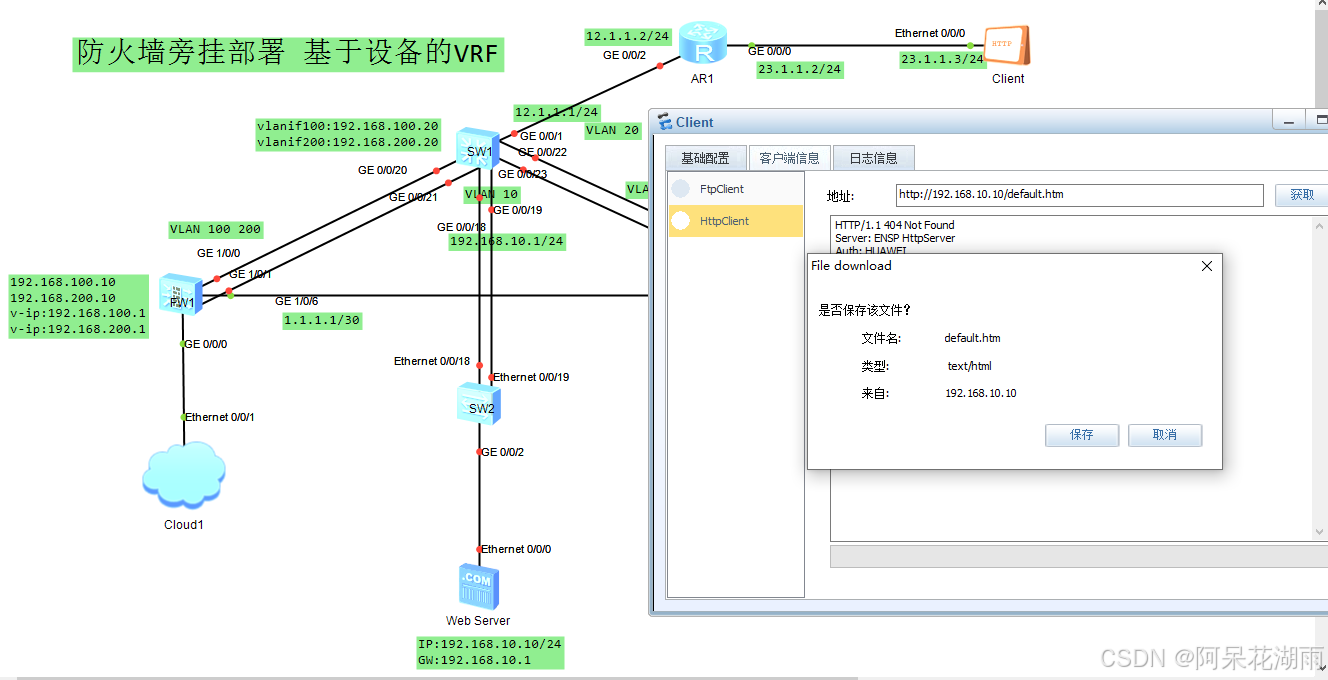
实现效果
弊端
1、网络路由条目过于庞大,且无法进行自动汇聚,手工敲太过繁琐。
2、如果是现有网络,且未按需求划分好VRF,不能改变现有网络结构,不能长时间断网的情况下,VRF的情况无法满足需求。

腾讯云面向开发者汇聚海量精品云计算使用和开发经验,营造开放的云计算技术生态圈。
更多推荐
 26
26 0
0- 0


 已为社区贡献2条内容

所有评论(0)