react antd Form表单组件的动态增减嵌套字段
在 React 应用开发中,Ant Design 的 Form 组件是一个非常强大的工具,特别适用于处理复杂的表单逻辑。本文将深入探讨如何在 Ant Design 的 Form 组件中实现动态增减嵌套字段的功能,并处理字段之间的动态依赖关系。通过 Ant Design 的Form.List组件和 React 的状态管理,我们可以轻松实现动态增减嵌套字段的功能,并处理字段之间的动态依赖关系。这种模式
·
概述
在 React 应用开发中,Ant Design 的 Form 组件是一个非常强大的工具,特别适用于处理复杂的表单逻辑。本文将深入探讨如何在 Ant Design 的 Form 组件中实现动态增减嵌套字段的功能,并处理字段之间的动态依赖关系。
场景描述
动态添加多个字段:用户可以通过点击按钮动态添加多个字段。字段间的动态依赖:当用户选择某个字段的值后,后续字段的内容会根据前一个字段的选择动态变化。
效果图
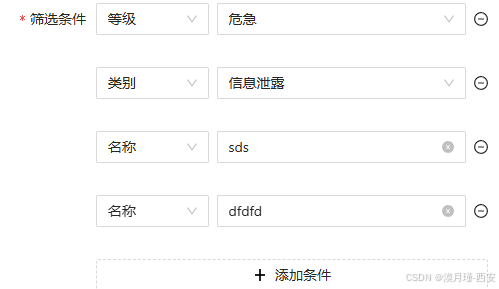
实现思路
为了实现上述功能,我们可以使用 Ant Design 的 Form.List 组件来管理动态字段,并通过状态管理来控制字段之间的依赖关系。具体实现步骤如下:
- 使用
Form.List管理动态字段:Form.List允许我们在表单中动态添加或删除字段。 - 状态管理:使用 React 的
useState来管理字段的值,并根据字段的选择动态更新后续字段的选项。 - 条件渲染:根据字段的值,条件渲染不同的表单控件(如
Select或Input)。
代码展示
以下是一个完整的代码示例,展示了如何实现动态增减嵌套字段,并根据字段选择动态更新后续字段的内容。
<Form.List name="search_filter">
                        {(fields, { add, remove }) => (
                            <>
                                {fields.map(({ key, name, ...restField }) => (
                                    <Space
                                        key={key}
                                        style={{ display: 'flex', marginBottom: 8, width: "100%" }}
                                        align="baseline"
                                        className="event-search-filter"
                                    >
                                        <Form.Item
                                            {...restField}
                                            name={[name, 'search_key']}
                                            label={name===0?"筛选条件":""}
                                            style={{marginLeft:name===0?0:100}}
                                            rules={[{ required: true, message: '请选择' }]}
                                        >
                                            <Select
                                                allowClear
                                                placeholder="请选择"
                                                getPopupContainer={(triggerNode) => triggerNode.parentNode}
                                                options={handleType}
                                                onChange={(value:string) => filterChange(value, name)}
                                            />
                                        </Form.Item>
                                        {(filterList[name]==="severity" || filterList[name]==="event_type") && (
                                            <Form.Item
                                                {...restField}
                                                name={[name, 'search_value']}
                                                rules={[{ required: true, message: 'Missing last name' }]}
                                            >
                                                <Select
                                                    allowClear
                                                    placeholder="请选择"
                                                    getPopupContainer={(triggerNode) => triggerNode.parentNode}
                                                    fieldNames={filterList[name]==="event_type" ? {label:"name",value:"name"} : undefined}
                                                    options={filterList[name]==="severity" ? alarmLevelOptions : eventType}
                                                />
                                            </Form.Item>
                                        )}
                                        {(!filterList[name] || (filterList[name]!=="severity" && filterList[name]!=="event_type")) && (
                                                <Form.Item
                                                    {...restField}
                                                    name={[name, 'search_value']}
                                                    rules={[{ required: true, message: 'Missing last name' }]}
                                                >
                                                    <Input placeholder="请输入" autoComplete="off" allowClear />
                                                </Form.Item>
                                        )}
                                        {fields.length>1 && <MinusCircleOutlined onClick={() => remove(name)} />}
                                    </Space>
                                ))}
                                {fields.length < 7 && (
                                    <Form.Item>
                                        <Button
                                            block
                                            type="dashed"
                                            onClick={() => add()}
                                            icon={<PlusOutlined />}
                                            style={{marginLeft: 100, width:"calc(100% - 100px)"}}
                                        >添加条件</Button>
                                    </Form.Item>
                                )}
                            </>
                        )}
                    </Form.List>
filterChange调用
// 筛选-筛选条件选择
const [filterList, setFilterList] = useState<any>([]);
    const filterChange = (value: string, index: number) => {
        setFilterList((prevList: any[]) => {
            // 创建一个新数组,避免修改原数组
            const newList = [...prevList];
            // 在指定位置插入 value
            newList[index] = value;
            return newList;
        })
    }
代码解析
Form.List:用于管理动态字段,fields 参数包含了当前所有的字段,add和remove方法用于添加和删除字段。filterList状态:用于存储每个字段的选择值,filterChange函数用于更新状态。- 条件渲染:根据
filterList中的值,动态渲染不同的表单控件。例如,当选择 “严重程度” 时,渲染一个Select组件,选项为alarmLevelOptions;当选择 “事件类型” 时,渲染另一个Select组件,选项为eventType。 - 动态添加和删除字段:通过
add和remove方法,用户可以动态添加或删除字段。
注意事项
- 字段的唯一性:每个字段的
name属性必须唯一,以确保表单数据的正确性。 - 状态管理:
filterList状态用于存储字段的选择值,确保后续字段能够根据前一个字段的选择动态更新。 - 性能优化:当字段数量较多时,动态渲染可能会影响性能,建议根据实际需求进行优化。
总结
通过 Ant Design 的 Form.List 组件和 React 的状态管理,我们可以轻松实现动态增减嵌套字段的功能,并处理字段之间的动态依赖关系。这种模式非常适合处理复杂的表单逻辑,能够有效提升用户体验。
希望本文对你理解和使用 Ant Design 的 Form 组件有所帮助!如果你有任何问题或建议,欢迎在评论区留言。

腾讯云面向开发者汇聚海量精品云计算使用和开发经验,营造开放的云计算技术生态圈。
更多推荐
 5
5 0
0- 0


 已为社区贡献9条内容

所有评论(0)