老男孩体验课day02-搭建百度网盘
·
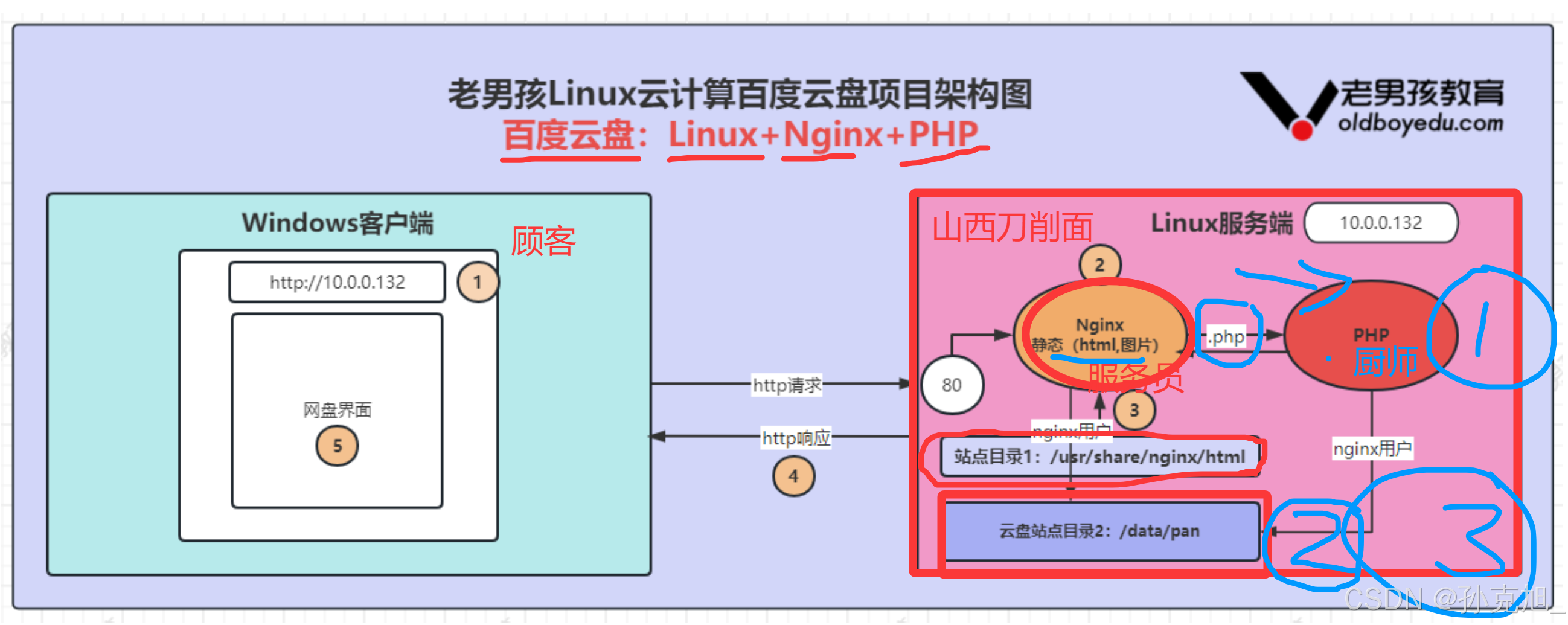
1. 网盘架构图
2. 检查Nginx服务和安装软件包
# 检查Nginx是否启动
[root@oldboy nginx]# ss -lnt|grep 80
LISTEN     0      128          *:80                       *:*
LISTEN     0      128       [::]:80                    [::]:*
导入php资源包并解压,资源包链接:通过网盘分享的文件:php.zip 链接: https://pan.baidu.com/s/1uZyyXIZq5hXRxogeWKP8sQ?pwd=v6a4 提取码: v6a4
# 解压软件包
[root@oldboy nginx]# unzip -o php*.zip
# 安装本地软件
[root@oldboy nginx]# yum localinstall *.rpm -y
已加载插件:fastestmirror
正在检查 autoconf-2.69-11.el7.noarch.rpm: autoconf-2.69-11.el7.noarch
autoconf-2.69-11.el7.noarch.rpm:不更新已安装的软件包。
正在检查 automake-1.13.4-3.el7.noarch.rpm: automake-1.13.4-3.el7.noarch
automake-1.13.4-3.el7.noarch.rpm:不更新已安装的软件包。
……
3. 配置PHP服务用户
# 检查当前PHP服务用户默认配置情况
[root@oldboy nginx]# grep "apache" /etc/php-fpm.d/www.conf
; RPM: apache Choosed to be able to access some dir as httpd
user = apache
group = apache
# 将www.conf里的apache用户修改为nginx用户
[root@oldboy nginx]# sed -i 's#apache#nginx#g' /etc/php-fpm.d/www.conf
# 检查修改后情况
[root@oldboy nginx]# grep "nginx" /etc/php-fpm.d/www.conf
; RPM: nginx Choosed to be able to access some dir as httpd
user = nginx
group = nginx
4. 启动及检查PHP
# 启动php服务
[root@oldboy nginx]# systemctl start php-fpm
# 加入开机自启
[root@oldboy nginx]# systemctl enable php-fpm
# 检查是否启动,正常启动了是9000端口
[root@oldboy nginx]# ss -lnt|grep 9000
LISTEN     0      128    127.0.0.1:9000                     *:*
5. 实现Nginx反向代理
# 生成网盘虚拟主机配置,并配置nginx连接php
# 生成网盘虚拟主机配置,不要用vim编辑,直接复制粘贴。
[root@oldboy nginx]# cat >/etc/nginx/conf.d/pan.etiantian.org.conf<<'EOF'
> server {
>         server_name pan.etiantian.org;  ## 临时域名。正式搭建需要购买域名。
>         listen 80;                      ## 网页服务端口。
>         root /data/pan;                 ## 程序存放目录。
>         index index.php index.html;     ## 首页,网页总入口。
>         ##符合php扩展名结尾抛给PHP服务处理
>         location ~ \.php$ {             ## 以.php结尾的程序发给PHP服务(9000)处理。
>             fastcgi_pass   127.0.0.1:9000;  ##发给PHP服务处理。
>             fastcgi_index  index.php;
>             fastcgi_param  SCRIPT_FILENAME  $document_root$fastcgi_script_name;
>             include        fastcgi_params;
>         }
> }
> EOF
# 检查配置
[root@oldboy nginx]# cat /etc/nginx/conf.d/pan.etiantian.org.conf
server {
        server_name pan.etiantian.org;  ## 临时域名。正式搭建需要购买域名。
        listen 80;                      ## 网页服务端口。
        root /data/pan;                 ## 程序存放目录。
        index index.php index.html;     ## 首页,网页总入口。
        ##符合php扩展名结尾抛给PHP服务处理
        location ~ \.php$ {             ## 以.php结尾的程序发给PHP服务(9000)处理。
            fastcgi_pass   127.0.0.1:9000;  ##发给PHP服务处理。
            fastcgi_index  index.php;
            fastcgi_param  SCRIPT_FILENAME  $document_root$fastcgi_script_name;
            include        fastcgi_params;
        }
}
# 检查nginx语法,重新启动NGINX
[root@oldboy nginx]# nginx -t   ## 检查语法,目的确认配置正确。正确标志是syntax is ok
nginx: the configuration file /etc/nginx/nginx.conf syntax is ok
nginx: configuration file /etc/nginx/nginx.conf test is successful
[root@oldboy nginx]# systemctl restart nginx ## 重启nginx,目的让配置生效。正确标志操作完没有反应。
##到此为止 nginx+php的环境就搭建好了。
6. 创建网盘站点目录,并切到目录下
[root@oldboy nginx]# mkdir /data/pan -p && cd /data/pan
[root@oldboy pan]# pwd
/data/pan
7. 安装网盘软件并授权
软件链接: 通过网盘分享的文件:kodexplorer4.40.zip 链接: https://pan.baidu.com/s/1V5XjSqcalwsEmVuR8rvvkQ?pwd=eej3 提取码: eej3
# 复制到当前目录下并解压
[root@oldboy pan]# unzip -o k*.zip
# 授权【nginx用户】访问网盘/data/pan目录
[root@oldboy pan]# chown -R nginx /data/pan
[root@oldboy pan]# ll
总用量 13676
drwxr-xr-x 10 nginx root      115 2月  18 21:24 app
-rwxr-xr-x  1 nginx root    91896 12月 15 2023 ChangeLog.md
drwxr-xr-x  3 nginx root       74 3月  21 2019 config
drwxr-xr-x  7 nginx root       72 2月  18 21:24 data
-rwxr-xr-x  1 nginx root      118 12月 15 2023 index.php
-rwxr-xr-x  1 nginx root 13894810 7月  24 2024 kodexplorer4.40.zip
drwxr-xr-x 15 nginx root      218 3月  21 2019 plugins
-rwxr-xr-x  1 nginx root     8074 12月 15 2023 README.MD
drwxr-xr-x  6 nginx root       57 3月  21 2019 static
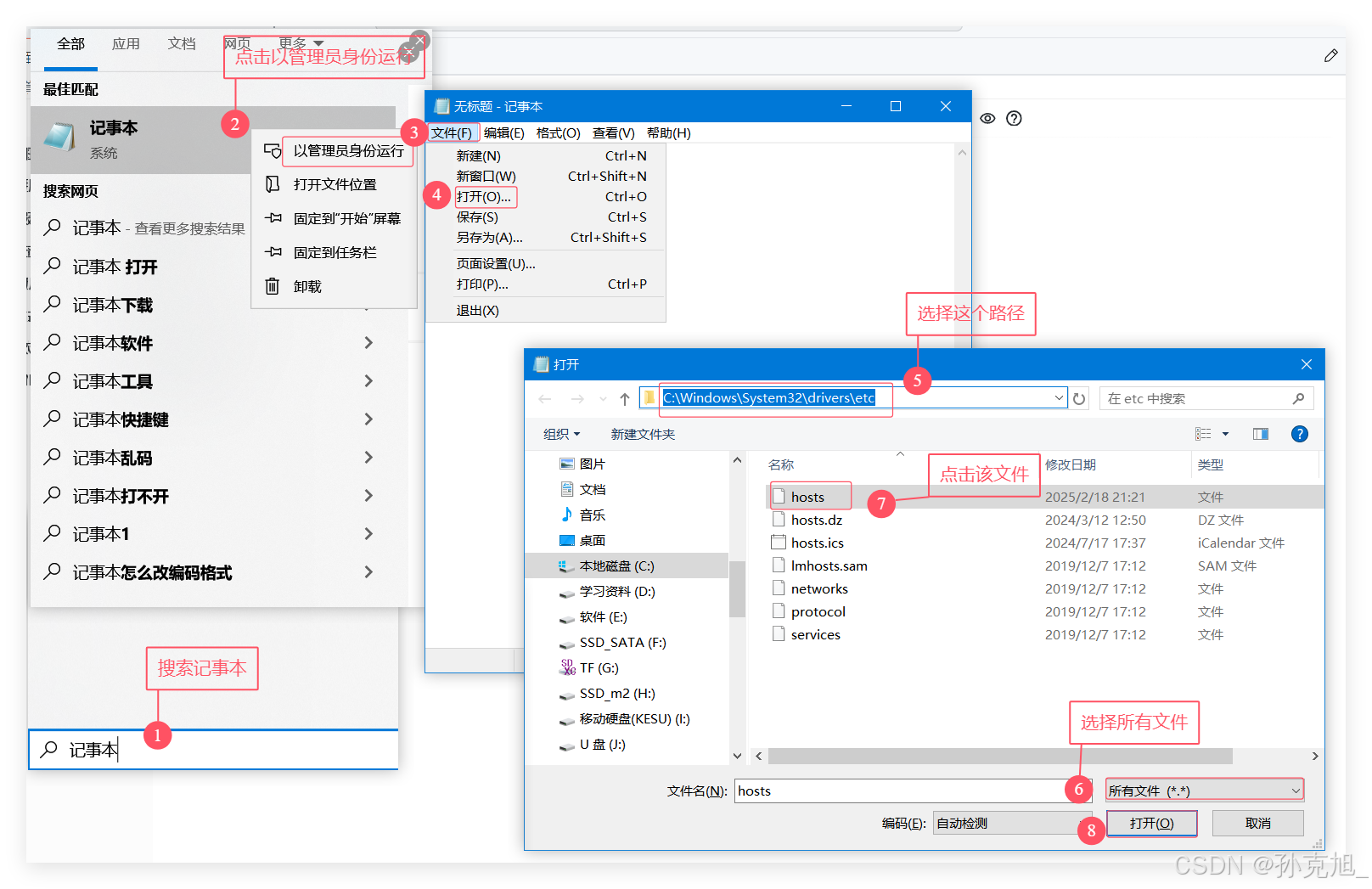
8. 修改主机DNS文件
使用管理员身份打开hosts文件:
添加域名:
##########################
##IP用自己的虚拟机IP
192.168.150.102 game.etiantian.org ##昨天小霸王游戏域名

##今天的云盘域名解析
192.168.150.102 pan.etiantian.org  ##今天百度网盘域名

##明天的网站解析
192.168.150.102 blog.etiantian.org ##明天电商博客下载站的域名
#########################
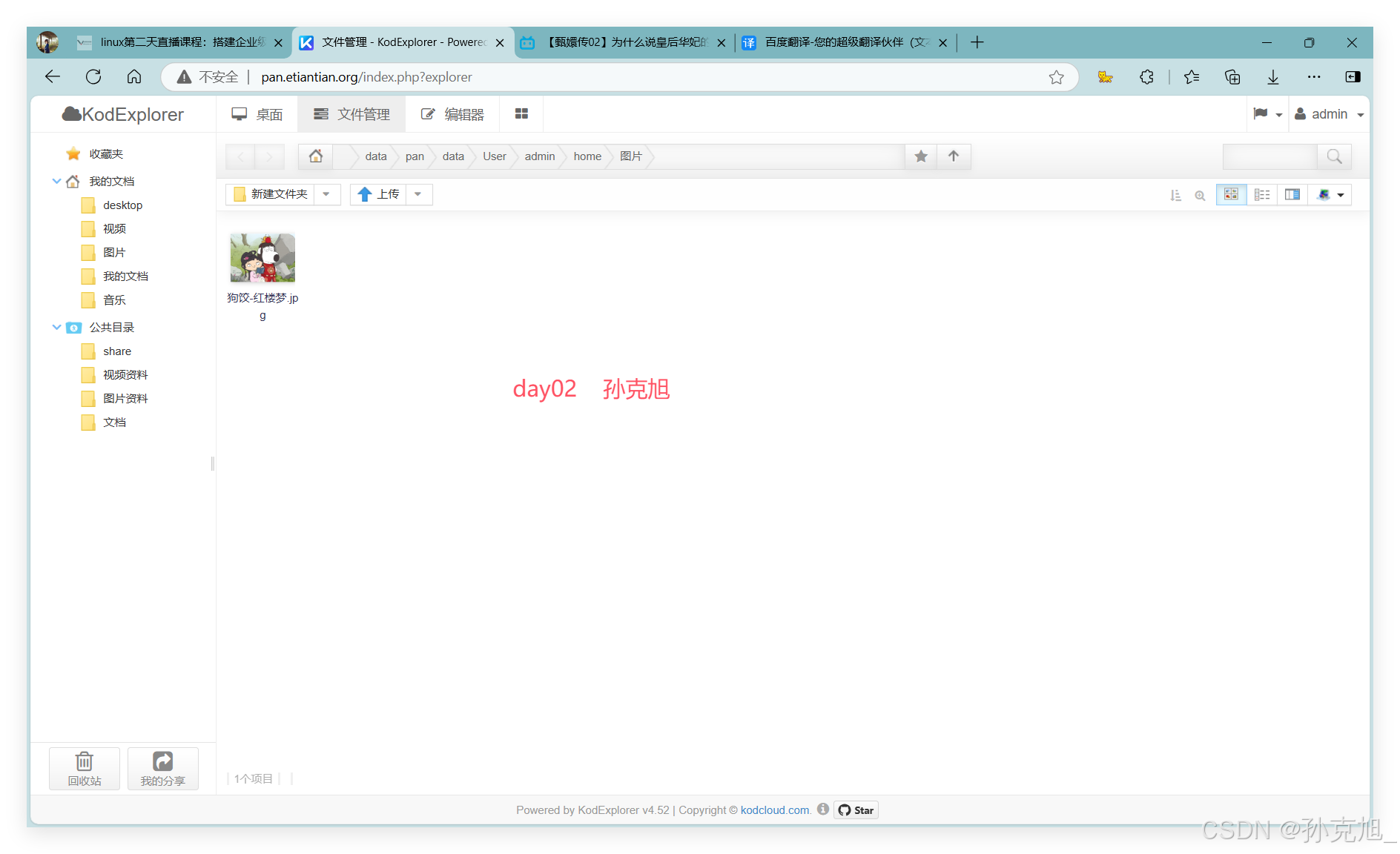
9. 打开网盘网站
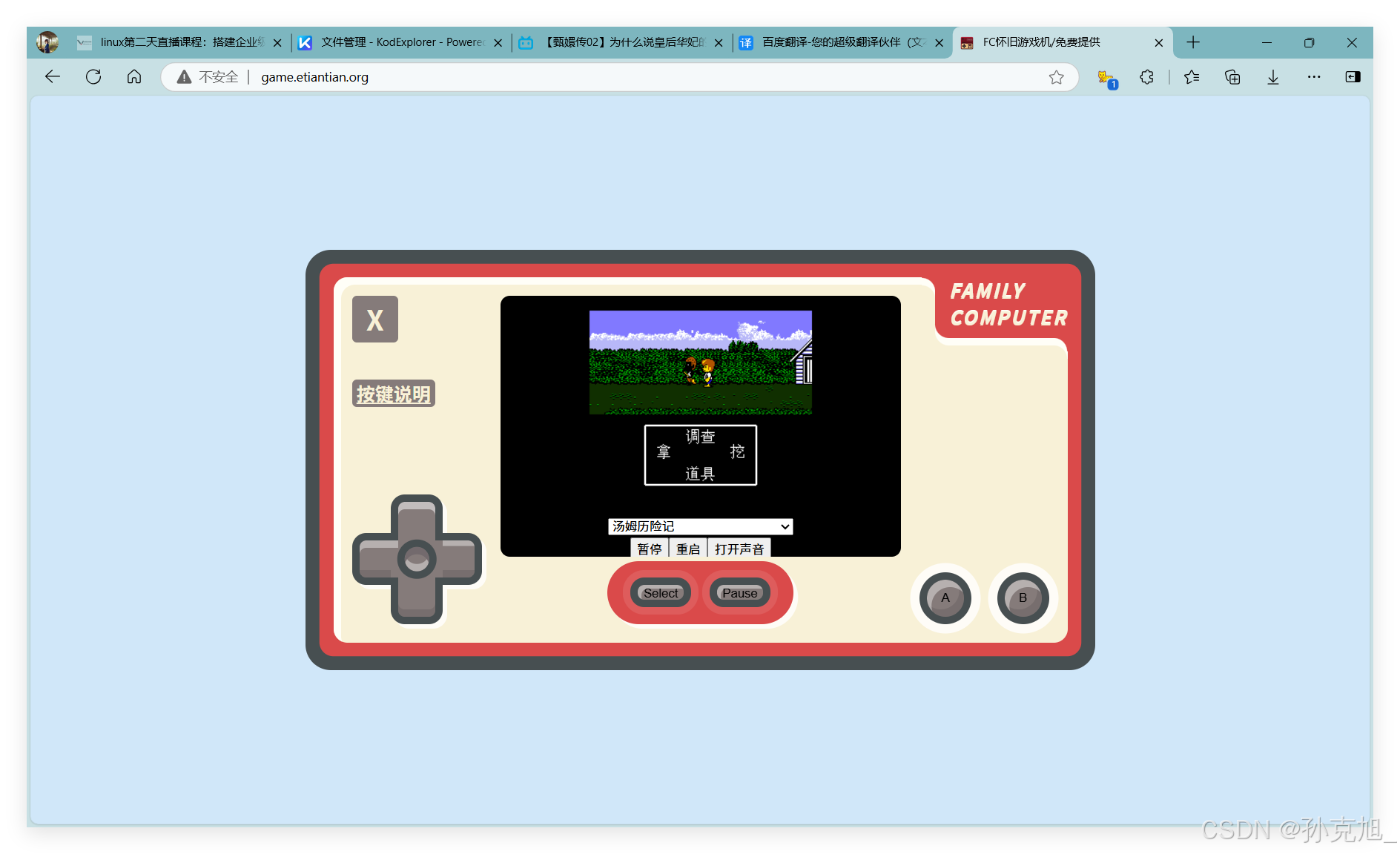
10. 为游戏站点设置反向代理
[root@oldboy pan]# cat >/etc/nginx/conf.d/01_game.etiantian.org.conf<<'EOF'
> server {
>         server_name game.etiantian.org;
>         listen 80;
>         root /usr/share/nginx/html;
>         index index.html;
> }
> EOF
# 重新启动NGINX
systemctl restart nginx
# 检查Nginx是否启动
[root@oldboy pan]# ss -lnt|grep 80
LISTEN     0      128          *:80                       *:*
LISTEN     0      128       [::]:80                    [::]:*

腾讯云面向开发者汇聚海量精品云计算使用和开发经验,营造开放的云计算技术生态圈。
更多推荐
 9
9 0
0- 0


 已为社区贡献3条内容

所有评论(0)