java aspose word转PDF
·
在Spring Boot项目中使用aspose将word文档转为PDF文档,我这用的是aspose-words-16.8.0-jdk16.jar;
附件下载: https://download.csdn.net/download/TM_soul/90477864
1.下载jar包
项目根目录下创建libs文件夹并将aspose-words-16.8.0-jdk16.jar放到目录下
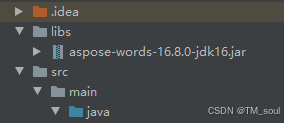
2.pom.xml引入jar包
        <dependency>
            <groupId>com.aspose</groupId>
            <artifactId>aspose-words</artifactId>
            <version>16.8.0</version>
            <scope>system</scope>
            <systemPath>${project.basedir}/libs/aspose-words-16.8.0-jdk16.jar</systemPath>
        </dependency>
3.引入license.xml
将license.xml文件放到/resources/ftl/文件夹下
4.java 工具类代码
    public static void main(String[] arg){
        String docPath = "E:\\20241125150249.doc";
        String pdfPath = "E:\\0000000.pdf";
        Word2PdfUtil.word2PDFAspose(docPath, pdfPath);
    }

    public static boolean getLicense() {
        boolean result = false;
        try {
            URL resourceUrl = Word2PdfUtil.class.getResource("/ftl/license.xml");
            InputStream is = new FileInputStream(resourceUrl.getFile());
            License aposeLic = new License();
            aposeLic.setLicense(is);
            result = true;
        } catch (Exception e) {

            e.printStackTrace();
        }
        return result;
    }

    /**
     *  windows/Linux Aspose
     */
    public static boolean word2PDFAspose(String wordPath, String pdfPath) {
        if (!getLicense()) {
            return false;
        }
        //输出文件
        File outFile = new File(pdfPath);
        //如果输出目标文件夹不存在,则创建
        if (!outFile.getParentFile().exists()){
            outFile.getParentFile().mkdirs();
        }
        InputStream docxInputStream = null;
        OutputStream outputStream = null;
        try {
            // 原word地址
            docxInputStream = new FileInputStream(wordPath);
            // 转换后pdf生成地址
            outputStream = new FileOutputStream(pdfPath);
            Document doc = new Document(docxInputStream);
            doc.save(outputStream, SaveFormat.PDF);
            outputStream.close();
            docxInputStream.close();
            return true;
        } catch (Exception e) {
            System.out.println("[activeX] word转pdf失败:" + e.toString());
            return false;
        } finally {
            if (outputStream != null) {
                try {
                    outputStream.close();
                } catch (IOException e) {
                    e.printStackTrace();
                }
            }
            if (docxInputStream != null) {
                try {
                    docxInputStream.close();
                } catch (IOException e) {
                    e.printStackTrace();
                }
            }
        }
    }
注意:当前方法在windows中正常运行,但在linux中可能会存在乱码情况,需要将windows中的字体(c:\windows\fonts)上传到linux中(/usr/share/fonts/chinese)目录下,然后(fc-cache)刷新内存中的字体缓存

腾讯云面向开发者汇聚海量精品云计算使用和开发经验,营造开放的云计算技术生态圈。
更多推荐
 13
13 0
0- 0


 已为社区贡献1条内容

所有评论(0)