debain的网络配置(看着一篇就够了)
面对debain新机时,我们往往发现ip似乎不是自己熟悉的模样,或者说,想换掉现在的ip。要更改ip的话,需改动IP的配置文件,interfaces和resolv.conf。address 192.168.7.10/24你想用的ip,24为掩码。以太网接口现已启用并处于活动状态,用的ipv6,所以ip看着陌生。注:因新机的debain12未配置防火墙,故文中未有操作关闭防火墙。我们一般选择将动态i
面对debain新机时,我们往往发现ip似乎不是自己熟悉的模样,或者说,想换掉现在的ip。
要是这样的话,那你可来对地方了,
实验环境:VMware;debain12
1. 查看ip
ip a #查看现有网卡及其IP
会发现一个环回接口和一个未配置静态 ipv4 的以太网接口
环回接口用于本机内部通信
以太网接口现已启用并处于活动状态,用的ipv6,所以ip看着陌生。
root@debian:/etc/network#ip a
1: lo: <LOOPBACK,UP,LOWER_UP> mtu 65536 gdisC noqueue state UNKNOWN group default qlen 1000
link/100pback 08:00:00:00:00:00 brd 00:00:00:00:00:00
inet 127.0.0.1/8 scope host-10
valid_ift forever preferred_ift forever
inet6 FE17i28 scope host_noprefixroute
valid_ift forever_preferred_ift_forever
ensSS:<BROADCAST,MULTICAST,UP,LOWER_UP> mtU_15OO_gdisC fq_Codel state UP group default qlen
2:
1000
link/ether 00:0c:29:bc:63:62 brd ff:ff:ff:ff:ff:ff
altname_enp2s1
inet6 2409:8a4d:ca3:6532:20c:29ff:febc:6362/64 scope global dynamic mngtmpaddr
valid_lft 256402sec_preferred_ift 170002sec
inet6 fe80::2θci29ff:febc:6362/64 scope link
valid_ift forever preferred_ift forever
我们一般选择将动态ipv6改为静态ipv4,方便食用。
2.更改虚拟机网络编辑器
找到网络编辑器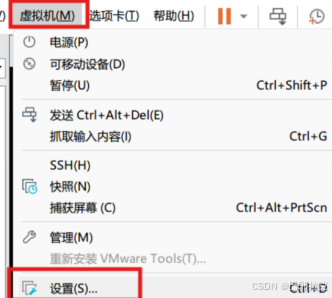
更改模式为NAT模式
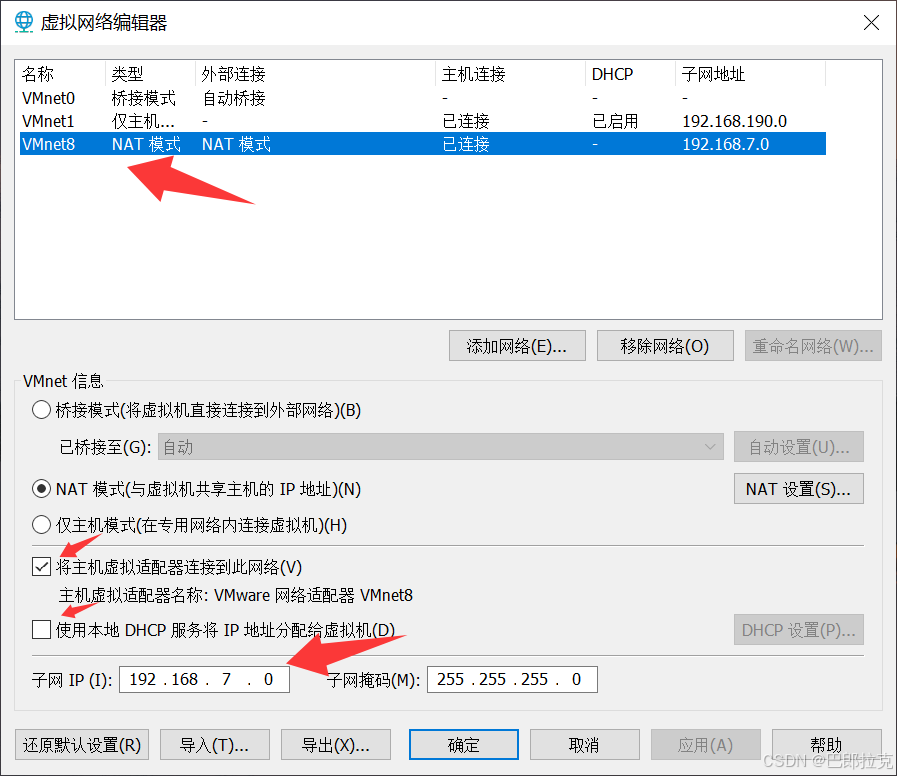
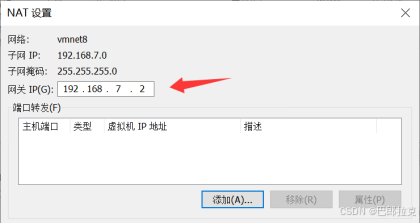
点击上图中 NAT设置可配置网关
需与ip位于同一网段
3.修改本机网络适配器
本机网络适配器也需要更改
找到与刚才虚拟机网络编辑器一样的VMnet8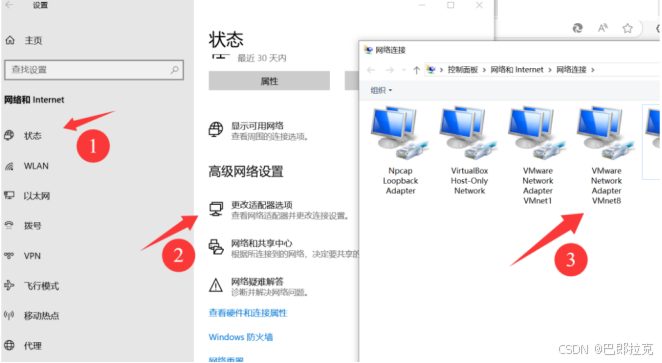
找到VMnat8,里面的ipv4协议配置
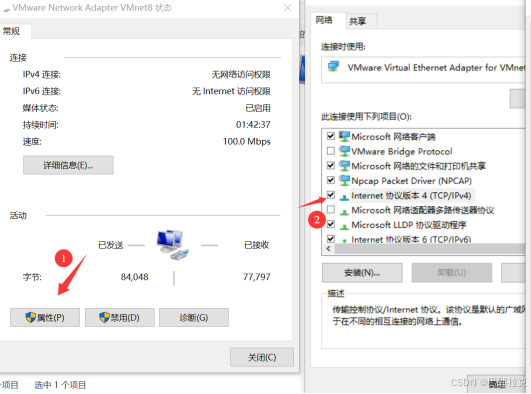
更改本机上的ipv4上的ip配置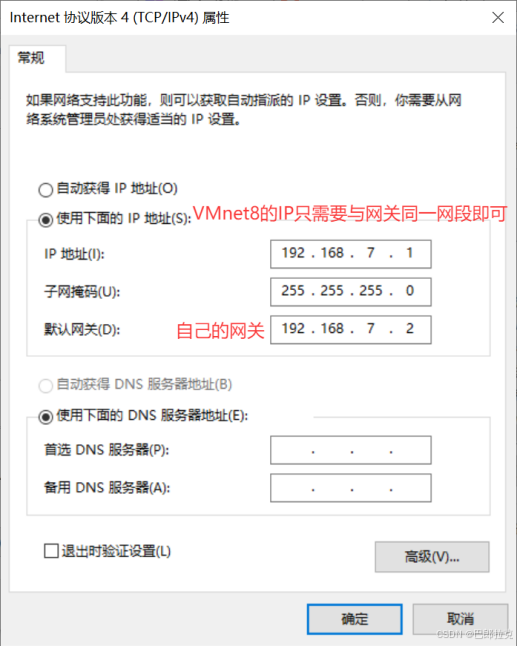
4.更改centos8配置文件
要更改ip的话,需改动IP的配置文件,interfaces和resolv.conf
nano /etc/network/interfaces
文件内容如下
# This file describes the network interfaces available on your system
# and how to activate them. For more information, see interfaces(5).

source /etc/network/interfaces.d/*

# The loopback network interface
auto lo
iface lo inet loopback

# The primary network interface
allow-hotplug ens33
iface ens33 inet dhcp     ##dhcp表示现在为动态ip,使用此,极其不利于
更改最后一行,再添加两行
iface ens33 inet static
address 192.168.7.10/24
gateway 192.168.7.2
dhcp → static 动态到静态
address 192.168.7.10/24 你想用的ip,24为掩码
gateway 192.168.7.2 你所用ip的网关地址
nano /etc/resolv.conf
改文件内容为:
domain localdomain
search localdomain
nameserver 192.168.7.2
nameserver 8.8.8.8
(文件第二行 是 本机网关)
5.重启网络配置
systemctl restart networking.service
注:因新机的debain12未配置防火墙,故文中未有操作关闭防火墙
6.ping通


大功告成!!
本人小白,若有纰漏,还请担待,烦请告知。

腾讯云面向开发者汇聚海量精品云计算使用和开发经验,营造开放的云计算技术生态圈。
更多推荐
 4
4 0
0- 0


 已为社区贡献1条内容

所有评论(0)