关于Tlias智能学习辅助系统班级学员管理和数据统计管理接口开发(java后端)的复盘,手把手教你根据接口文档规范开发接口(中)!
关于Tlias智能学习辅助系统班级学员管理和数据统计管理接口开发(java后端)的复盘,手把手教你根据接口文档规范开发接口(下)!附完整源码
关于Tlias智能学习辅助系统班级学员管理和数据统计管理接口开发(java后端)的复盘,手把手教你根据接口文档规范开发接口(上)!
-
需求:学员管理
需要开发如下几个接口,建议按照如下顺序开发接口:
准备工作,和之前类似,先写好控制层,实现层,接口层及其实现方法层,以及各种实体类
package com.itheima.controller;

import com.itheima.pojo.PageResult;
import com.itheima.pojo.Result;
import com.itheima.pojo.Student;
import com.itheima.service.StudentService;
import lombok.extern.slf4j.Slf4j;
import org.springframework.beans.factory.annotation.Autowired;
import org.springframework.web.bind.annotation.*;

@Slf4j
@RestController
@RequestMapping("/students")
public class StudentController {

    @Autowired
    private StudentService studentService;
实体
package com.itheima.pojo;

import lombok.AllArgsConstructor;
import lombok.Data;
import lombok.NoArgsConstructor;

import java.time.LocalDate;
import java.time.LocalDateTime;

@Data
@NoArgsConstructor
@AllArgsConstructor
public class Student {
    private Integer id; //ID
    private String name; //姓名
    private String no; //序号
    private Integer gender; //性别 , 1: 男 , 2 : 女
    private String phone; //手机号
    private String idCard; //身份证号
    private Integer isCollege; //是否来自于院校, 1: 是, 0: 否
    private String address; //联系地址
    private Integer degree; //最高学历, 1: 初中, 2: 高中 , 3: 大专 , 4: 本科 , 5: 硕士 , 6: 博士
    private LocalDate graduationDate; //毕业时间
    private Integer clazzId; //班级ID
    private Short violationCount; //违纪次数
    private Short violationScore; //违纪扣分
    private LocalDateTime createTime; //创建时间
    private LocalDateTime updateTime; //修改时间

    private String clazzName;//班级名称
}
package com.itheima.service;
import com.itheima.pojo.PageResult;
import com.itheima.pojo.Student;
public interface StudentService {package com.itheima.service.impl;
import com.github.pagehelper.Page;
import com.github.pagehelper.PageHelper;
import com.itheima.mapper.StudentMapper;
import com.itheima.pojo.PageResult;
import com.itheima.pojo.Student;
import com.itheima.service.StudentService;
import org.springframework.beans.factory.annotation.Autowired;
import org.springframework.stereotype.Service;
import java.time.LocalDateTime;
import java.util.List;
@Service
public class StudentServiceImpl implements StudentService {
@Autowired
private StudentMapper studentMapper;-
查询所有班级接口
参照接口文档 班级管理 -> 查询所有班级
在新增学员的时候,要展示出所有的班级信息。
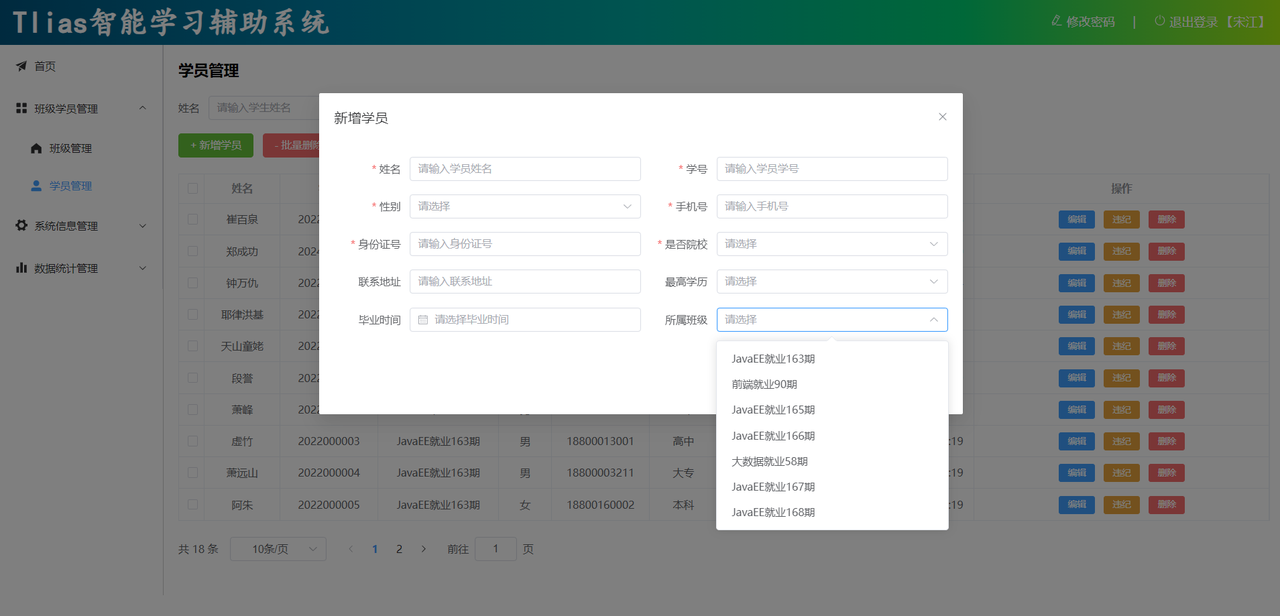
这个之前做过啦,可以看看上一篇哦
关于Tlias智能学习辅助系统班级学员管理和数据统计管理接口开发(java后端)的复盘,手把手教你根据接口文档规范开发接口(上)!
-
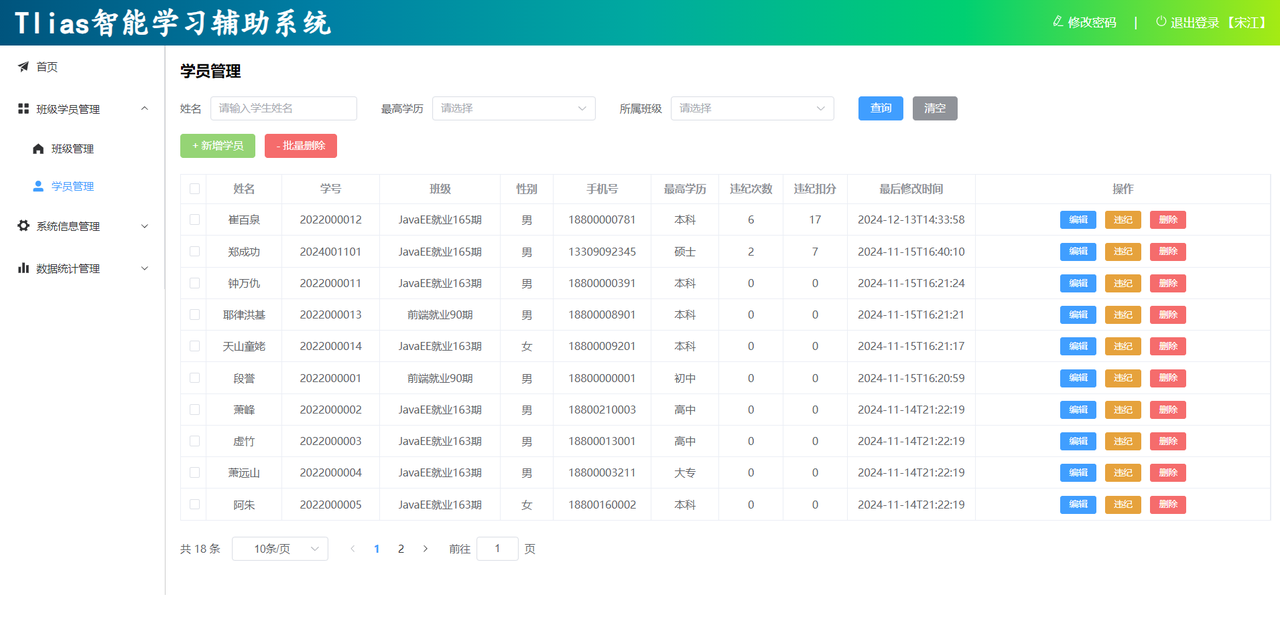
条件分页查询接口
参照接口文档 学员管理 -> 学员列表查询
-
学员管理
-
学员列表查询
-
基本信息
请求路径:/students
请求方式:GET
接口描述:该接口用于学员列表数据的条件分页查询
-
请求参数
参数格式:queryString
参数说明:
| 参数名称 | 是否必须 | 示例 | 备注 |
| name | 否 | 张三 | 学员姓名 |
| degree | 否 | 1 | 学历(1:初中,2:高中,3:大专,4:本科,5:硕士,6:博士) |
| clazzId | 否 | 2 | 班级ID |
| page | 是 | 1 | 分页查询的页码,如果未指定,默认为1 |
| pageSize | 是 | 10 | 分页查询的每页记录数,如果未指定,默认为10 |
请求数据样例:/students?name=张三°ree=1&clazzId=2&page=1&pageSize=5
-
响应数据
参数格式:application/json
参数说明:
| 名称 | 类型 | 是否必须 | 备注 |
| code | number | 必须 | 响应码, 1 成功 , 0 失败 |
| msg | string | 非必须 | 提示信息 |
| data | object | 必须 | 返回的数据 |
| |- total | number | 必须 | 总记录数 |
| |- rows | object [] | 必须 | 数据列表 |
| |- id | number | 非必须 | id |
| |- name | string | 非必须 | 姓名 |
| |- no | string | 非必须 | 学号 |
| |- gender | number | 非必须 | 性别(1: 男 , 2: 女) |
| |- phone | string | 非必须 | 手机号 |
| |- degree | number | 非必须 | 学历(1:初中,2:高中,3:大专,4:本科,5:硕士,6:博士) |
| |- idCard | string | 非必须 | 身份证号 |
| |- isCollege | number | 非必须 | 是否是院校学生 (1: 是, 0: 否) |
| |- address | string | 非必须 | 联系地址 |
| |- graduationDate | string | 非必须 | 毕业时间 |
| |- violationCount | number | 非必须 | 违纪次数 |
| |- violationScore | number | 非必须 | 违纪扣分 |
| |- clazzId | number | 非必须 | 班级ID |
| |- clazzName | string | 非必须 | 班级名称 |
| |- createTime | string | 非必须 | 创建时间 |
| |- updateTime | string | 非必须 | 更新时间 |
响应数据样例:
{
  "code": 1,
  "msg": "success",
  "data": {
    "total": 5,
    "rows": [
      {
        "id": 3,
        "name": "Lily",
        "no": "2023001003",
        "gender": 2,
        "phone": "13309230912",
        "degree": 4,
        "idCard": "110090110090110090",
        "isCollege": 0,
        "address": "回龙观东大街110号",
        "graduationDate": "2020-07-01",
        "violationCount": 2,
        "violationScore": 5,
        "clazzId": 1,
        "createTime": "2023-06-01T18:35:23",
        "updateTime": "2023-06-01T19:37:42",
        "clazzName": "黄埔班一期"
      },
      {
        "id": 4,
        "name": "Jerry",
        "no": "2023001004",
        "gender": 1,
        "phone": "15309232323",
        "degree": 4,
        "idCard": "110090110090110090",
        "isCollege": 0,
        "address": "回龙观东大街110号",
        "graduationDate": "2020-07-01",
        "violationCount": 1,
        "violationScore": 2,
        "clazzId": 1,
        "createTime": "2023-06-01T18:35:48",
        "updateTime": "2023-06-01T19:37:35",
        "clazzName": "黄埔班一期"
      }
    ]
  }
}
分页查询,相信大家再看了上一篇文章的学习之后都不陌生了,如果有些遗忘的话可以再去看看哦
这里我们不用封装,和上一节中我们用不同的实现方式
    /**
     * 条件分页查询
     */
    @GetMapping
    public Result page(String name ,
                       Integer degree,
                       Integer clazzId,
                       @RequestParam(defaultValue = "1") Integer page ,
                       @RequestParam(defaultValue = "10") Integer pageSize){
        log.info("分页查询,参数:name:{},degree:{},clazzId:{},page:{},pageSize:{}",name,degree,clazzId,page,pageSize);
        PageResult pageResult = studentService.page(name,degree,clazzId,page,pageSize);
        return Result.success(pageResult);
    }
serviceimpl
    @Override
    public PageResult page(String name, Integer degree, Integer clazzId, Integer page, Integer pageSize) {
        // 1. 使用 PageHelper 设置分页参数(当前页码和每页大小)
        //    PageHelper 是一个 MyBatis 分页插件,会自动对后续的 SQL 查询进行改造以实现分页功能
        PageHelper.startPage(page, pageSize);

        // 2. 调用 Mapper 层的 list 方法,根据查询条件获取学生列表
        //    查询条件包括:name(姓名模糊匹配)、degree(学历)、clazzId(班级 ID)
        List<Student> studentList = studentMapper.list(name, degree, clazzId);

        // 3. 将查询结果强转为 Page 类型,以提取分页相关的元数据
        //    Page 是 PageHelper 提供的一个增强型 List,包含总记录数、当前页数据等信息
        Page<Student> p = (Page<Student>) studentList;

        // 4. 封装分页结果并返回
        //    PageResult 是一个通用的分页结果封装类,包含总记录数(p.getTotal())和当前页的数据列表(p.getResult())
        return new PageResult(p.getTotal(), p.getResult());
    }
<select id="list" resultType="com.itheima.pojo.Student">
select s.*, c.name clazzName from student s left join clazz c on s.clazz_id = c.id
<where>
<if test="name != null and name != ''">
s.name like concat('%',#{name},'%')
</if>
<if test="degree != null">
and s.degree = #{degree}
</if>
<if test="clazzId != null">
and s.clazz_id = #{clazzId}
</if>
</where>
order by s.update_time desc
</select>-
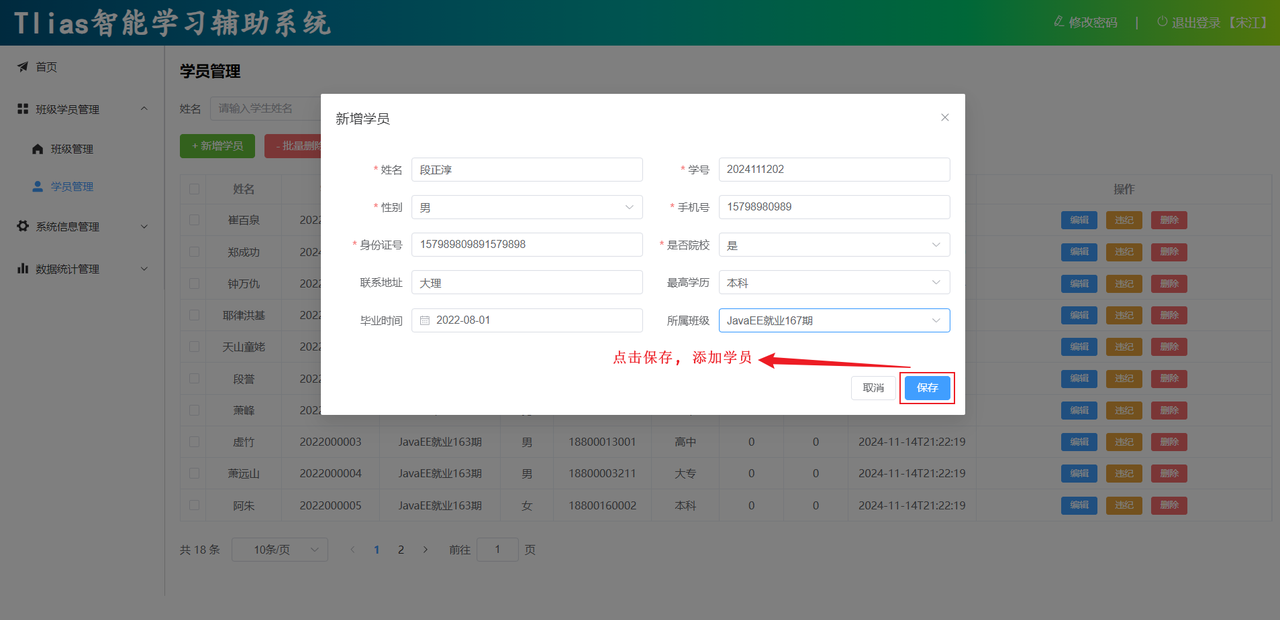
新增学生信息接口
参照接口文档 学员管理 -> 添加学员
-
添加学员
-
基本信息
请求路径:/students
请求方式:POST
接口描述:该接口用于添加学员信息
-
请求参数
参数格式:application/json
参数说明:
| 名称 | 类型 | 是否必须 | 备注 |
| name | string | 必须 | 姓名 |
| no | string | 必须 | 学号 |
| gender | number | 必须 | 性别 |
| phone | string | 必须 | 手机号 |
| degree | number | 必须 | 学历(1:初中,2:高中,3:大专,4:本科,5:硕士,6:博士) |
| clazzId | number | 必须 | 班级ID |
| idCard | string | 非必须 | 身份证号 |
| isCollege | number | 非必须 | 是否是院校学生 (1: 是, 0: 否) |
| address | string | 非必须 | 联系地址 |
| graduationDate | string | 非必须 | 毕业时间 |
请求数据样例:
{
    "name": "阿大",
    "no": "2024010801",
    "gender": 1,
    "phone": "15909091235",
    "idCard": "159090912351590909",
    "isCollege": 1,
    "address": "昌平回龙观",
    "degree": 4,
    "graduationDate": "2024-01-01",
    "clazzId": 9
}-
响应数据
参数格式:application/json
参数说明:
| 参数名 | 类型 | 是否必须 | 备注 |
| code | number | 必须 | 响应码,1 代表成功,0 代表失败 |
| msg | string | 非必须 | 提示信息 |
| data | object | 非必须 | 返回的数据 |
响应数据样例:
{
    "code":1,
    "msg":"success",
    "data":null
}
/**
* 添加学生
*/
@PostMapping
public Result save(@RequestBody Student student){
studentService.save(student);
return Result.success();
} @Override
public void save(Student student) {
student.setCreateTime(LocalDateTime.now());
student.setUpdateTime(LocalDateTime.now());
studentMapper.insert(student);
} /**
* 添加学生
*/
@Insert("insert into student(name, no, gender, phone,id_card, is_college, address, degree, graduation_date,clazz_id, create_time, update_time) VALUES " +
"(#{name},#{no},#{gender},#{phone},#{idCard},#{isCollege},#{address},#{degree},#{graduationDate},#{clazzId},#{createTime},#{updateTime})")
void insert(Student student);-
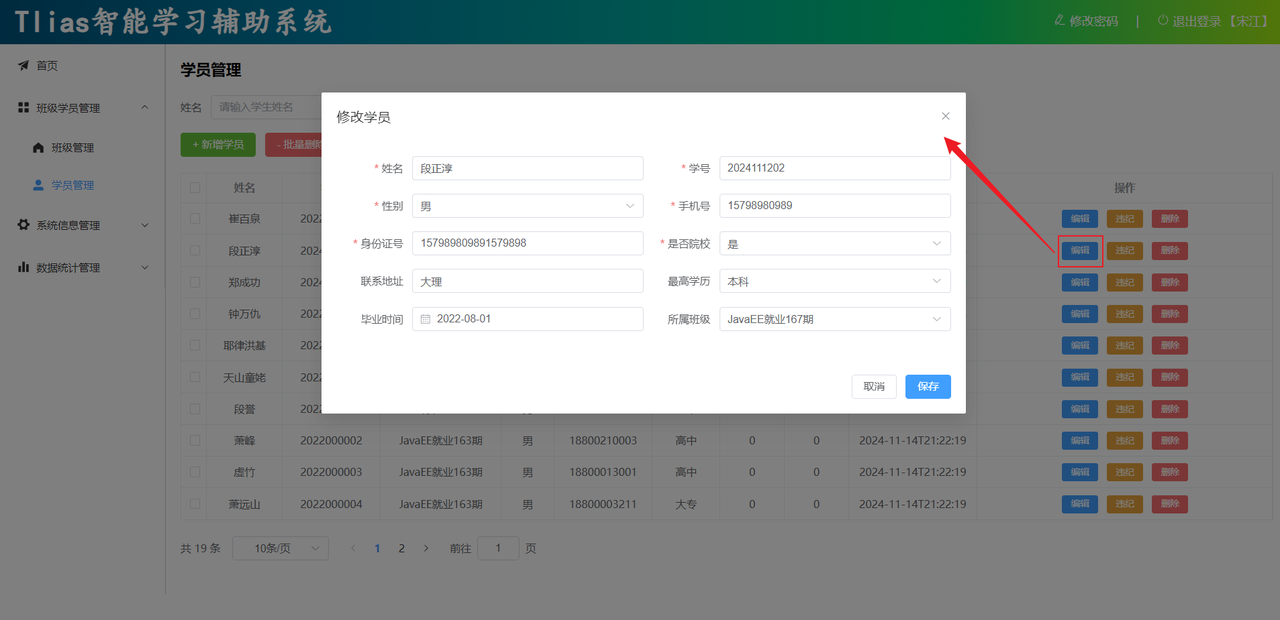
根据ID查询学生接口
参照接口文档 学员管理 -> 根据ID查询学员
-
根据ID查询
-
基本信息
请求路径:/students/{id}
请求方式:GET
接口描述:该接口用于根据主键ID查询学员的信息
-
请求参数
参数格式:路径参数
参数说明:
| 参数名 | 类型 | 是否必须 | 备注 |
| id | number | 必须 | 学员ID |
请求参数样例:/students/8
-
响应数据
参数格式:application/json
参数说明:
| 名称 | 类型 | 是否必须 | 备注 |
| code | number | 必须 | 响应码, 1 成功 , 0 失败 |
| msg | string | 非必须 | 提示信息 |
| data | object | 必须 | 返回的数据 |
| |- id | number | 必须 | id |
| |- name | string | 必须 | 姓名 |
| |- no | string | 必须 | 学号 |
| |- phone | string | 必须 | 手机号 |
| |- gender | string | 必须 | 性别(1:男, 2:女) |
| |- degree | number | 必须 | 学历(1:初中,2:高中,3:大专,4:本科,5:硕士,6:博士) |
| |- idCard | string | 非必须 | 身份证号 |
| |- isCollege | number | 非必须 | 是否是院校学生 (1: 是, 0: 否) |
| |- address | string | 非必须 | 联系地址 |
| |- graduationDate | string | 非必须 | 毕业时间 |
| |- violationCount | number | 必须 | 违纪次数 |
| |- violationScore | number | 必须 | 违纪扣分 |
| |- clazzId | number | 必须 | 班级ID |
| |- createTime | string | 必须 | 创建时间 |
| |- updateTime | string | 必须 | 更新时间 |
响应数据样例:
{
  "code": 1,
  "msg": "success",
  "data": {
    "id": 7,
    "name": "Locos",
    "no": "2023001010",
    "gender": 1,
    "phone": "13712345678",
    "degree": 5,
    "idCard": "110090110090110090",
    "isCollege": 0,
    "address": "回龙观东大街110号",
    "graduationDate": "2020-07-01",
    "violationCount": 0,
    "violationScore": 0,
    "clazzId": 2,
    "createTime": "2023-06-04T18:27:27",
    "updateTime": "2023-06-04T18:27:27"
  }
}
/**
* 根据ID查询学生信息
*/
@GetMapping("/{id}")
public Result getInfo(@PathVariable Integer id){
Student student = studentService.getInfo(id);
return Result.success(student);
} @Override
public Student getInfo(Integer id) {
return studentMapper.getById(id);
} /**
* 根据ID查询学生信息
*/
@Select("select * from student where id = #{id}")
Student getById(Integer id);
-
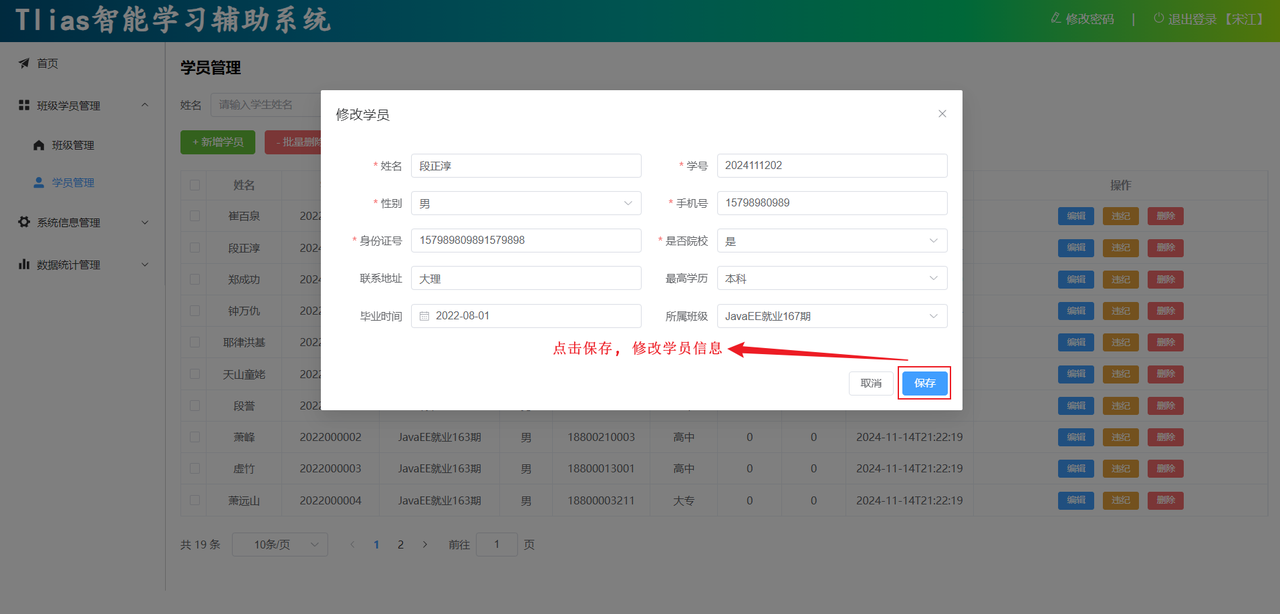
修改学生信息接口
参照接口文档 学员管理 -> 修改学员
-
修改学员
-
基本信息
请求路径:/students
请求方式:PUT
接口描述:该接口用于修改学员的数据信息
-
请求参数
参数格式:application/json
参数说明:
| 名称 | 类型 | 是否必须 | 备注 |
| id | number | 必须 | id |
| name | string | 必须 | 姓名 |
| no | string | 必须 | 学号 |
| phone | string | 必须 | 手机号 |
| gender | string | 必须 | 性别(1:男, 2:女) |
| degree | number | 必须 | 学历(1:初中,2:高中,3:大专,4:本科,5:硕士,6:博士) |
| idCard | string | 非必须 | 身份证号 |
| isCollege | number | 非必须 | 是否是院校学生 (1: 是, 0: 否) |
| address | string | 非必须 | 联系地址 |
| graduationDate | string | 非必须 | 毕业时间 |
| violationCount | number | 必须 | 违纪次数 |
| violationScore | number | 必须 | 违纪扣分 |
| clazzId | number | 必须 | 班级ID |
请求数据样例:
{
  "id": 7,
  "name": "Locos",
  "no": "2023001010",
  "gender": 1,
  "phone": "13712345678",
  "degree": 5,
  "idCard": "110090110090110090",
  "isCollege": 0,
  "address": "回龙观东大街110号",
  "graduationDate": "2020-07-01",
  "violationCount": 0,
  "violationScore": 0,
  "clazzId": 2
}-
响应数据
参数格式:application/json
参数说明:
| 参数名 | 类型 | 是否必须 | 备注 |
| code | number | 必须 | 响应码,1 代表成功,0 代表失败 |
| msg | string | 非必须 | 提示信息 |
| data | object | 非必须 | 返回的数据 |
响应数据样例:
{
    "code":1,
    "msg":"success",
    "data":null
}
/**
* 修改学生信息
*/
@PutMapping
public Result update(@RequestBody Student student){
studentService.update(student);
return Result.success();
} @Override
public void update(Student student) {
student.setUpdateTime(LocalDateTime.now());
studentMapper.update(student);
}
    /**
     * 修改学生信息
     */
    void update(Student student);
因为修改可以修改一个或者多个或者全部,所以我们最好通过动态sql进行处理
 <update id="update">
        update student
        <set>
            <if test="name != null and name != ''">
                name = #{name},
            </if>
            <if test="no != null and no != ''">
                no = #{no},
            </if>
            <if test="gender != null">
                gender = #{gender},
            </if>
            <if test="phone != null and phone != ''">
                phone = #{phone},
            </if>
            <if test="idCard != null and idCard != ''">
                id_card = #{idCard},
            </if>
            <if test="isCollege != null and isCollege != ''">
                is_college = #{isCollege},
            </if>
            <if test="address != null and address != ''">
                address = #{address},
            </if>
            <if test="graduationDate != null">
                graduation_date = #{graduationDate},
            </if>
            <if test="degree != null">
                degree = #{degree},
            </if>
            <if test="violationCount != null">
                violation_count = #{violationCount},
            </if>
            <if test="violationScore != null">
                violation_score = #{violationScore},
            </if>
            <if test="clazzId != null">
                clazz_id = #{clazzId},
            </if>
            <if test="updateTime != null">
                update_time = #{updateTime}
            </if>
        </set>
        where id = #{id}
</update>-
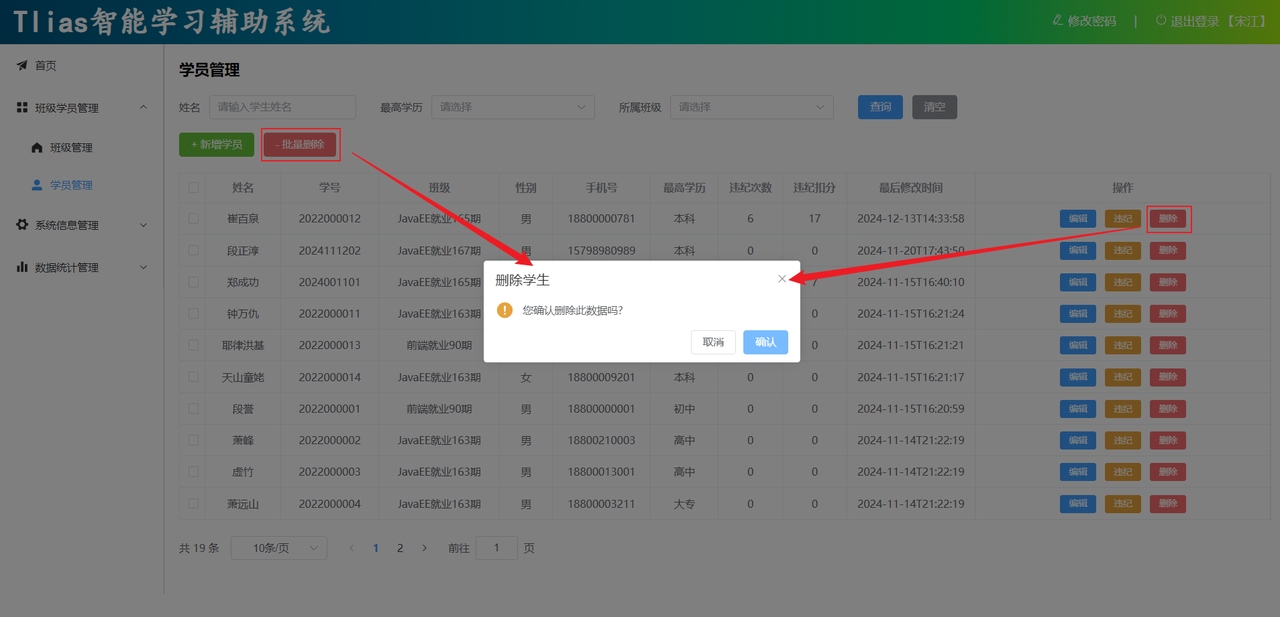
删除学生信息接口
参照接口文档 学员管理 -> 删除学员
-
删除学员
-
基本信息
请求路径:/students/{ids}
请求方式:DELETE
接口描述:该接口用于批量删除学员信息
-
请求参数
参数格式:路径参数
参数说明:
| 参数名 | 类型 | 示例 | 是否必须 | 备注 |
| ids | 数组 | 1 | 必须 | 学员的ID数组 |
请求参数样例:/students/1,2,3
-
响应数据
参数格式:application/json
参数说明:
| 参数名 | 类型 | 是否必须 | 备注 |
| code | number | 必须 | 响应码,1 代表成功,0 代表失败 |
| msg | string | 非必须 | 提示信息 |
| data | object | 非必须 | 返回的数据 |
响应数据样例:
<delete id="delete">
        delete from student where id in
        <foreach collection="ids" item="id" separator="," open="(" close=")">
            #{id}
        </foreach>
    </delete>
{
"code":1,
"msg":"success",
"data":null
}/**
* 删除学生信息
*/
@DeleteMapping("/{ids}")
public Result delete(@PathVariable List<Integer> ids){
studentService.delete(ids);
return Result.success();
} /**
* 批量删除学生信息
*/
void delete(List<Integer> ids);我们依然用动态sql处理,在xml中配置mybatis
<delete id="delete">
delete from student where id in
<foreach collection="ids" item="id" separator="," open="(" close=")">
#{id}
</foreach>
</delete>-
违纪处理接口
参照接口文档 学员管理 -> 违纪处理
违纪处理一次,需要将违纪次数+1,违纪扣分+前端输入的分数。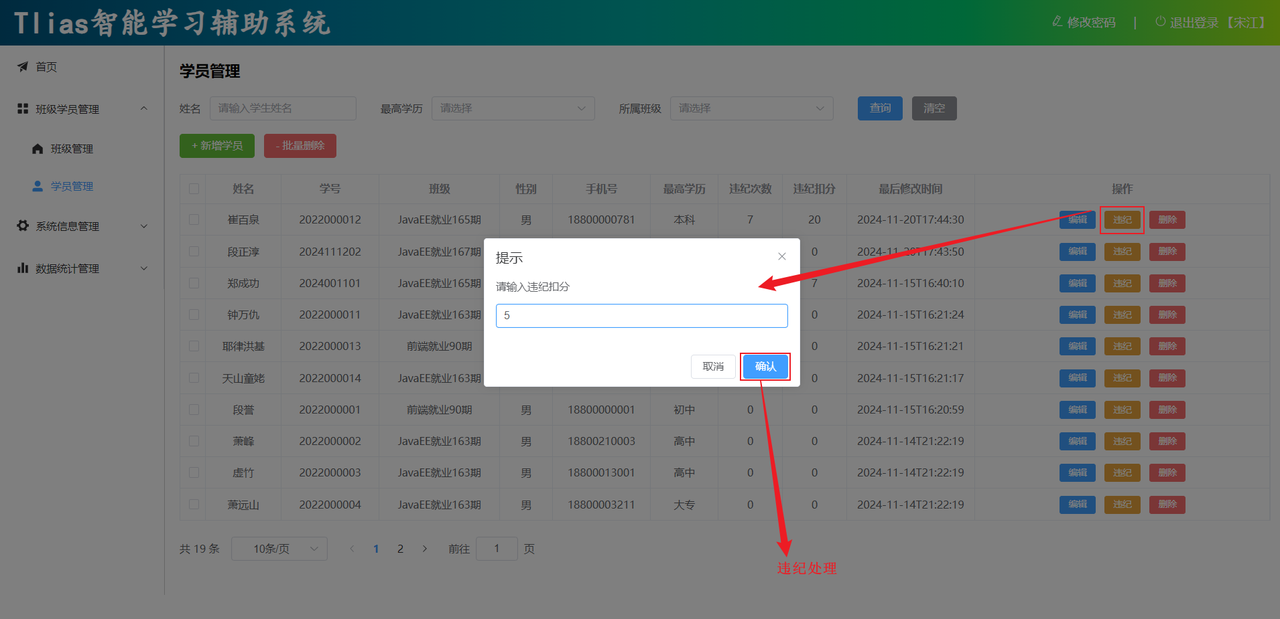
-
违纪处理
-
基本信息
请求路径:/students/violation/{id}/{score}
请求方式:PUT
接口描述:该接口用于修改学员的数据信息
-
请求参数
参数格式:路径参数
参数说明:
| 名称 | 类型 | 是否必须 | 备注 |
| id | number | 必须 | 学员ID |
| score | number | 必须 | 扣除分数 |
-
响应数据
参数格式:application/json
参数说明:
| 参数名 | 类型 | 是否必须 | 备注 |
| code | number | 必须 | 响应码,1 代表成功,0 代表失败 |
| msg | string | 非必须 | 提示信息 |
| data | object | 非必须 | 返回的数据 |
响应数据样例:
{
    "code":1,
    "msg":"success",
    "data":null
}
/**
* 违纪处理
*/
@PutMapping("/violation/{id}/{score}")
public Result violationHandle(@PathVariable Integer id , @PathVariable Integer score){
studentService.violationHandle(id, score);
return Result.success();
}
    @Override
    public void violationHandle(Integer id, Integer score) {
        studentMapper.updateViolation(id, score);
    }
/**
* 违纪处理
*/
@Update("update student set violation_count = violation_count + 1 , violation_score = violation_score + #{score} , update_time = now() where id = #{id}")
void updateViolation(Integer id, Integer score);
到此,关于学生管理的增删改查功能,我们就已经全部实现了。

腾讯云面向开发者汇聚海量精品云计算使用和开发经验,营造开放的云计算技术生态圈。
更多推荐
 34
34 0
0- 0


 已为社区贡献1条内容

所有评论(0)