基于HISI3519dv500的yolov8-obb车位检测
基于HISI3519dv500的yolov8-obb车位检测
·
1. 数据标注
标注软件:roLabelImg
安装方式:见 https://github.com/cgvict/roLabelImg.git
操作指南: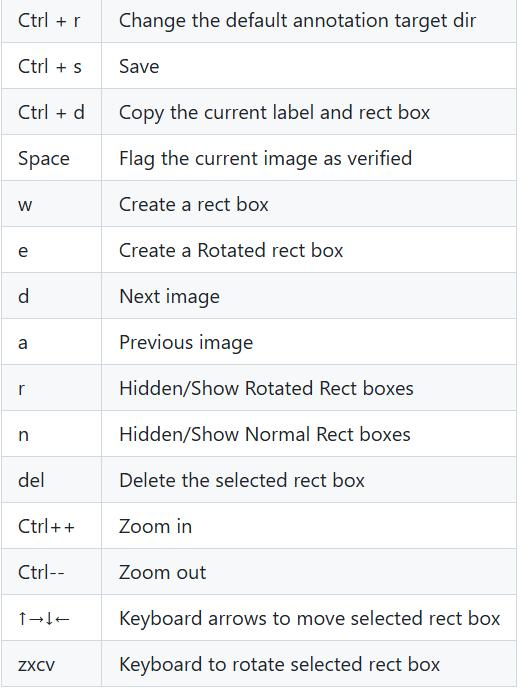
标注后的数据格式如下:
<annotation verified="no">
  <folder>4800</folder>
  <filename>frame_0000</filename>
  <path>D:\12345\20250416-9\4800\frame_0000.jpg</path>
  <source>
    <database>Unknown</database>
  </source>
  <size>
    <width>3840</width>
    <height>2160</height>
    <depth>3</depth>
  </size>
  <segmented>0</segmented>
  <object>
    <type>robndbox</type>
    <name>space-occupied</name>
    <pose>Unspecified</pose>
    <truncated>0</truncated>
    <difficult>0</difficult>
    <robndbox>
      <cx>1730.6829</cx>
      <cy>2084.2789</cy>
      <w>254.0</w>
      <h>132.0</h>
      <angle>0.07</angle>
    </robndbox>
  </object>
  <object>
    <type>robndbox</type>
    <name>space-occupied</name>
    <pose>Unspecified</pose>
    <truncated>0</truncated>
    <difficult>0</difficult>
    <robndbox>
      <cx>2228.6829</cx>
      <cy>2087.9741</cy>
      <w>254.0</w>
      <h>132.0</h>
      <angle>0.04</angle>
    </robndbox>
  </object>
  <object>
    <type>robndbox</type>
    <name>space-occupied</name>
    <pose>Unspecified</pose>
    <truncated>0</truncated>
    <difficult>0</difficult>
    <robndbox>
      <cx>1747.6829</cx>
      <cy>1946.7561</cy>
      <w>254.0</w>
      <h>132.0</h>
      <angle>0.12</angle>
    </robndbox>
  </object>
  <object>
    <type>robndbox</type>
    <name>space-occupied</name>
    <pose>Unspecified</pose>
    <truncated>0</truncated>
    <difficult>0</difficult>
    <robndbox>
      <cx>1767.6829</cx>
      <cy>1800.7561</cy>
      <w>254.0</w>
      <h>132.0</h>
      <angle>0.1</angle>
    </robndbox>
  </object>
  <object>
    <type>robndbox</type>
    <name>space-occupied</name>
    <pose>Unspecified</pose>
    <truncated>0</truncated>
    <difficult>0</difficult>
    <robndbox>
      <cx>1431.6829</cx>
      <cy>1770.7561</cy>
      <w>254.0</w>
      <h>132.0</h>
      <angle>0.12</angle>
    </robndbox>
  </object>
  <object>
    <type>robndbox</type>
    <name>space-occupied</name>
    <pose>Unspecified</pose>
    <truncated>0</truncated>
    <difficult>0</difficult>
    <robndbox>
      <cx>1400.6829</cx>
      <cy>2040.7561</cy>
      <w>254.0</w>
      <h>132.0</h>
      <angle>0.1</angle>
    </robndbox>
  </object>
  <object>
    <type>robndbox</type>
    <name>space-occupied</name>
    <pose>Unspecified</pose>
    <truncated>0</truncated>
    <difficult>0</difficult>
    <robndbox>
      <cx>1446.6829</cx>
      <cy>1630.7561</cy>
      <w>254.0</w>
      <h>132.0</h>
      <angle>0.08</angle>
    </robndbox>
  </object>
  <object>
    <type>robndbox</type>
    <name>space-empty</name>
    <pose>Unspecified</pose>
    <truncated>0</truncated>
    <difficult>0</difficult>
    <robndbox>
      <cx>2241.1829</cx>
      <cy>1949.2561</cy>
      <w>227.0</w>
      <h>141.0</h>
      <angle>0.1</angle>
    </robndbox>
  </object>
  <object>
    <type>robndbox</type>
    <name>space-empty</name>
    <pose>Unspecified</pose>
    <truncated>0</truncated>
    <difficult>0</difficult>
    <robndbox>
      <cx>2259.1829</cx>
      <cy>1816.2561</cy>
      <w>227.0</w>
      <h>141.0</h>
      <angle>0.1</angle>
    </robndbox>
  </object>
  <object>
    <type>robndbox</type>
    <name>space-empty</name>
    <pose>Unspecified</pose>
    <truncated>0</truncated>
    <difficult>0</difficult>
    <robndbox>
      <cx>2274.1829</cx>
      <cy>1675.2561</cy>
      <w>227.0</w>
      <h>141.0</h>
      <angle>0.1</angle>
    </robndbox>
  </object>
  <object>
    <type>robndbox</type>
    <name>space-empty</name>
    <pose>Unspecified</pose>
    <truncated>0</truncated>
    <difficult>0</difficult>
    <robndbox>
      <cx>1768.1829</cx>
      <cy>1667.2561</cy>
      <w>227.0</w>
      <h>141.0</h>
      <angle>0.1</angle>
    </robndbox>
  </object>
  <object>
    <type>robndbox</type>
    <name>space-empty</name>
    <pose>Unspecified</pose>
    <truncated>0</truncated>
    <difficult>0</difficult>
    <robndbox>
      <cx>1417.1829</cx>
      <cy>1897.2561</cy>
      <w>227.0</w>
      <h>141.0</h>
      <angle>0.1</angle>
    </robndbox>
  </object>
</annotation>
2. 数据格式转换
1. 先转换为DOTA的txt格式
import os
import xml.etree.ElementTree as ET
import math

cls_list = ['space-occupied','space-empty']  # 修改为自己的标签


def edit_xml(xml_file, dotaxml_file):
    """
    修改xml文件
    :param xml_file:xml文件的路径
    :return:
    """

    # dxml_file = open(xml_file,encoding='gbk')
    # tree = ET.parse(dxml_file).getroot()
    print(xml_file)
    tree = ET.parse(xml_file)
    objs = tree.findall('object')
    for ix, obj in enumerate(objs):
        x0 = ET.Element("x0")  # 创建节点
        y0 = ET.Element("y0")
        x1 = ET.Element("x1")
        y1 = ET.Element("y1")
        x2 = ET.Element("x2")
        y2 = ET.Element("y2")
        x3 = ET.Element("x3")
        y3 = ET.Element("y3")
        # obj_type = obj.find('bndbox')
        # type = obj_type.text
        # print(xml_file)

        if (obj.find('robndbox') == None):
            obj_bnd = obj.find('bndbox')
            obj_xmin = obj_bnd.find('xmin')
            obj_ymin = obj_bnd.find('ymin')
            obj_xmax = obj_bnd.find('xmax')
            obj_ymax = obj_bnd.find('ymax')
            # 以防有负值坐标
            xmin = max(float(obj_xmin.text), 0)
            ymin = max(float(obj_ymin.text), 0)
            xmax = max(float(obj_xmax.text), 0)
            ymax = max(float(obj_ymax.text), 0)
            obj_bnd.remove(obj_xmin)  # 删除节点
            obj_bnd.remove(obj_ymin)
            obj_bnd.remove(obj_xmax)
            obj_bnd.remove(obj_ymax)
            x0.text = str(xmin)
            y0.text = str(ymax)
            x1.text = str(xmax)
            y1.text = str(ymax)
            x2.text = str(xmax)
            y2.text = str(ymin)
            x3.text = str(xmin)
            y3.text = str(ymin)
        else:
            obj_bnd = obj.find('robndbox')
            obj_bnd.tag = 'bndbox'  # 修改节点名
            obj_cx = obj_bnd.find('cx')
            obj_cy = obj_bnd.find('cy')
            obj_w = obj_bnd.find('w')
            obj_h = obj_bnd.find('h')
            obj_angle = obj_bnd.find('angle')
            cx = float(obj_cx.text)
            cy = float(obj_cy.text)
            w = float(obj_w.text)
            h = float(obj_h.text)
            angle = float(obj_angle.text)
            obj_bnd.remove(obj_cx)  # 删除节点
            obj_bnd.remove(obj_cy)
            obj_bnd.remove(obj_w)
            obj_bnd.remove(obj_h)
            obj_bnd.remove(obj_angle)

            x0.text, y0.text = rotatePoint(cx, cy, cx - w / 2, cy - h / 2, -angle)
            x1.text, y1.text = rotatePoint(cx, cy, cx + w / 2, cy - h / 2, -angle)
            x2.text, y2.text = rotatePoint(cx, cy, cx + w / 2, cy + h / 2, -angle)
            x3.text, y3.text = rotatePoint(cx, cy, cx - w / 2, cy + h / 2, -angle)

        # obj.remove(obj_type)  # 删除节点
        obj_bnd.append(x0)  # 新增节点
        obj_bnd.append(y0)
        obj_bnd.append(x1)
        obj_bnd.append(y1)
        obj_bnd.append(x2)
        obj_bnd.append(y2)
        obj_bnd.append(x3)
        obj_bnd.append(y3)

        tree.write(dotaxml_file, method='xml', encoding='utf-8')  # 更新xml文件


# 转换成四点坐标
def rotatePoint(xc, yc, xp, yp, theta):
    xoff = xp - xc;
    yoff = yp - yc;
    cosTheta = math.cos(theta)
    sinTheta = math.sin(theta)
    pResx = cosTheta * xoff + sinTheta * yoff
    pResy = - sinTheta * xoff + cosTheta * yoff
    return str(int(xc + pResx)), str(int(yc + pResy))


def totxt(xml_path, out_path):
    # 想要生成的txt文件保存的路径,这里可以自己修改

    files = os.listdir(xml_path)
    i = 0
    for file in files:

        tree = ET.parse(xml_path + os.sep + file)
        root = tree.getroot()

        name = file.split('.')[0]

        output = out_path + '/' + name + '.txt'
        file = open(output, 'w')
        i = i + 1
        objs = tree.findall('object')
        for obj in objs:
            cls = obj.find('name').text
            box = obj.find('bndbox')
            x0 = int(float(box.find('x0').text))
            y0 = int(float(box.find('y0').text))
            x1 = int(float(box.find('x1').text))
            y1 = int(float(box.find('y1').text))
            x2 = int(float(box.find('x2').text))
            y2 = int(float(box.find('y2').text))
            x3 = int(float(box.find('x3').text))
            y3 = int(float(box.find('y3').text))
            if x0 < 0:
                x0 = 0
            if x1 < 0:
                x1 = 0
            if x2 < 0:
                x2 = 0
            if x3 < 0:
                x3 = 0
            if y0 < 0:
                y0 = 0
            if y1 < 0:
                y1 = 0
            if y2 < 0:
                y2 = 0
            if y3 < 0:
                y3 = 0
            for cls_index, cls_name in enumerate(cls_list):
                if cls == cls_name:
                    file.write("{} {} {} {} {} {} {} {} {} {}\n".format(x0, y0, x1, y1, x2, y2, x3, y3, cls, cls_index))
        file.close()
        # print(output)
        print(i)

if __name__ == '__main__':
    # -----**** 第一步:把xml文件统一转换成旋转框的xml文件 ****-----
    roxml_path = r'./roxml/'
    dotaxml_path = r'./dotaxml/'
    out_path = r'./txt/'
    filelist = os.listdir(roxml_path)
    for file in filelist:
        edit_xml(os.path.join(roxml_path, file), os.path.join(dotaxml_path, file))

    # -----**** 第二步:把旋转框xml文件转换成txt格式 ****-----
    totxt(dotaxml_path, out_path)
2. 转换为Yolo格式
from ultralytics.data.converter import convert_dota_to_yolo_obb
convert_dota_to_yolo_obb(r'/home/mahxn0/workspace/datasets/carLoc/car')
3. 修改yolo ultralytics/data/converter.py代码两处地方
# Class names to indices mapping
    class_mapping = {  // 根据实际修改
        "space-occupied": 0,
        "space-empty": 1
    }
image_paths = list(image_dir.iterdir())
        for image_path in TQDM(image_paths, desc=f"Processing {phase} images"):
            if image_path.suffix != ".jpg":  // 之前是png,根据实际修改
                continue
运行后得到的数据目录结构如下: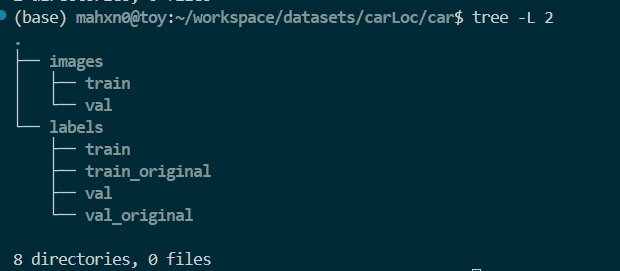
train_originnal/val_original中存放上面转换后的txt,执行脚本后在train/val下生成yolo需要的txt
0 0.41875 0.930093 0.484635 0.938426 0.482292 0.999537 0.416406 0.991204
0 0.547917 0.933333 0.614062 0.938426 0.6125 0.999074 0.546615 0.994444
0 0.424219 0.863889 0.489844 0.877778 0.485677 0.938426 0.420052 0.924537
0 0.428906 0.797222 0.494792 0.808796 0.491406 0.869907 0.425521 0.85787
0 0.341927 0.782407 0.407552 0.796296 0.403385 0.856944 0.33776 0.843056
0 0.333333 0.908333 0.399219 0.919907 0.395833 0.981019 0.329948 0.968981
0 0.345052 0.719444 0.410938 0.729167 0.408333 0.789815 0.342187 0.780556
1 0.55599 0.864352 0.614844 0.875 0.611198 0.939815 0.552344 0.92963
1 0.560677 0.802778 0.619531 0.813426 0.615885 0.878241 0.557031 0.868056
1 0.564583 0.7375 0.623437 0.748148 0.619792 0.812963 0.560937 0.802778
1 0.432812 0.733796 0.491667 0.744444 0.488021 0.809259 0.429167 0.799074
1 0.341406 0.840278 0.40026 0.850926 0.396615 0.915741 0.33776 0.905556
3. 模型训练
参考YOLOV8的训练,不再赘述
4. 模型量化
4.1 导出ONNX
将yolov8的dfl放在后处理,onnx输出修改为:
name: output0, shape: (1,64,80,80),
name: 317, shape: (1,3,80,80),
name: 338, shape: (1,64,40,40),
name: 331, shape: (1,3,40,40),
name: 352, shape: (1,64,20,20),
name: 345, shape: (1,3,20,20)
4.2 量化参数修改
aipp_op {
related_input_rank : 0
input_format : YUV420SP
model_format : RGB
aipp_mode: static
mean_chn_0 : 0
mean_chn_1 : 0
mean_chn_2 : 0
var_reci_chn_0 : 0.0039062
var_reci_chn_1 : 0.0039062
var_reci_chn_2 : 0.0039062
}
4.3 atc量化
atc --dump_data=0 --input_shape="images:1,3,640,640" --input_type="images:UINT8" --log_level=0 --online_model_type=0 --batch_num=1 --input_format=NCHW --output="./om/" --soc_version=Hi3519DV500 --insert_op_conf=./yolov8n_obb.cfg --framework=5 --compile_mode=0 --save_original_model=true --model="./onnx/yolov8n_obb.onnx" --image_list="images:./data/car_obb.list"
5. 后处理关键代码
int yolo_obb_decode(const float *box_tensor,
                     const float *cls_tensor,
                     const float *cls_sum_tensor,
                     const float *angle_tensor,
                     int stride,
                     int grid_h,
                     int grid_w,
                     int dfl_len,
                     float threshold,
                     int class_number,
                     int model_h,
                     int model_w,
                     bool net_sigmoid,
                     std::vector<ObbBox> &objects) {

            // cal obj number
            int validCount = 0;
            // tensor cp
            auto cls_tensor_ptr = cls_tensor;
            auto box_tensor_prt = box_tensor;
            auto cls_sum_tensor_prt = cls_sum_tensor;
            auto angle_tensor_ptr = angle_tensor;
            // dfl param
            int reg_max = dfl_len;
            int reg_groups = 4;
            int reg_proj_conv_weight_num = reg_max * reg_groups;
            float dis_after_sm[reg_max];
            std::vector<float> proj_conv_weights;
            // grid to get value
            // some backend need align by w
            grid_w = utils::AlignData(grid_w);
            int grid_len = grid_w * grid_h;
            for (int h = 0; h < grid_h; h++) {
                for (int w = 0; w < grid_w; w++) {
                    int max_index = -1;
                    float max_score = 0.0f;
                    // ptr move offset
                    int offset = h * grid_w + w;
                    // fast pass box by shape=[1,1,80,80]
                    if (cls_sum_tensor_prt != nullptr) {
                        if (cls_sum_tensor_prt[offset] < threshold) {
                            continue;
                        }
                    }
                    // get max score and label id
                    for (int c = 0; c < class_number; c++) {
                        float pred_score;
                        if (net_sigmoid) {
                            pred_score = cls_tensor_ptr[offset];
                        } else {
                            pred_score = sigmoid(cls_tensor_ptr[offset]);
                        }
                        if (pred_score > max_score) {
                            max_score = pred_score;
                            max_index = c;
                        }
                        offset += grid_len; //ptr move
                    }
                    if (max_score > threshold) {
                        offset = h * grid_w + w; //now offset
                        // get the reg_conv_weight to compute dfl
                        proj_conv_weights.clear();
                        for (int g = 0; g < reg_proj_conv_weight_num; g++) {
                            proj_conv_weights.emplace_back(box_tensor_prt[offset]);
                            offset += grid_len; //ptr move
                        }
                        // box decode,ltrb is rotate
                        float *proj_conv_ptr = proj_conv_weights.data();
                        float l = proj_conv_softmax(proj_conv_ptr, dis_after_sm, reg_max);
                        float t = proj_conv_softmax(proj_conv_ptr + reg_max, dis_after_sm, reg_max);
                        float r = proj_conv_softmax(proj_conv_ptr + 2 * reg_max, dis_after_sm, reg_max);
                        float b = proj_conv_softmax(proj_conv_ptr + 3 * reg_max, dis_after_sm, reg_max);

                        ObbBox obj;
                        // angle tensor
                        float angle;
                        if (net_sigmoid) {
                            angle = (angle_tensor_ptr[grid_len * 0 + h * grid_w + w] - 0.25) * 3.1415927410125732;
                        } else {
                            angle = (sigmoid(angle_tensor_ptr[grid_len * 0 + h * grid_w + w]) - 0.25) *
                                    3.1415927410125732;
                        }
                        obj.angle = angle;
                        // box
                        float cos1 = cos(angle);
                        float sin1 = sin(angle);
                        float fx = (r - l) / 2;
                        float fy = (b - t) / 2;
                        obj.cx =
                                ((fx * cos1 - fy * sin1) + (static_cast<float>(w) + 0.5f)) * static_cast<float>(stride);
                        obj.cy =
                                ((fx * sin1 + fy * cos1) + (static_cast<float>(h) + 0.5f)) * static_cast<float>(stride);
                        obj.width = (l + r) * static_cast<float>(stride);
                        obj.height = (t + b) * static_cast<float>(stride);
                        obj.score = max_score;
                        obj.label_id = max_index;

                        // post result
                        objects.emplace_back(obj);
                        validCount++;
                    }
                }
            }
            return validCount;
        }
6. 板端执行效果(预处理 + 推理 + 后处理时间小于40ms)
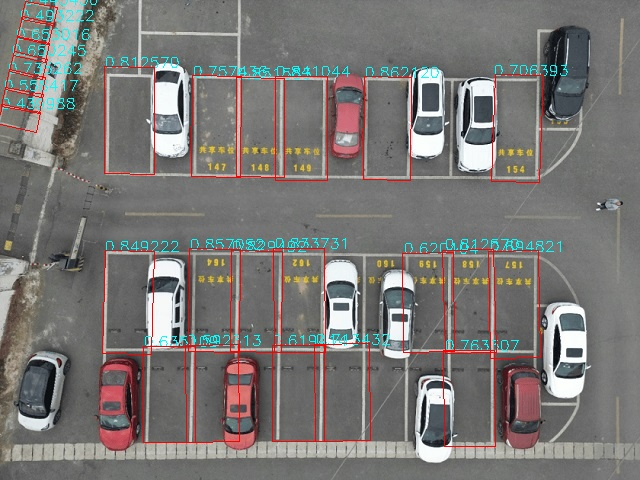

腾讯云面向开发者汇聚海量精品云计算使用和开发经验,营造开放的云计算技术生态圈。
更多推荐
 16
16 0
0- 0


 已为社区贡献5条内容

所有评论(0)