华为防火墙双机热备(负载分担)
建议先学习完 主备备份模式防火墙双机热备(主备分担)-CSDN博客
负载分担介绍:
负载分担模式下,就是两个设备都会处理流量,比如PC访问Server的上行流量,从FW1出去,然后从FW2回来。
但是负载分担模式,不是负载均衡,也就是无法做到,PC访问Server的上行流量,均衡的发送到两个防火墙进行处理,这是做不到的,因为华为的双机热备没有负载均衡的模式,只是可以进行流量的分担,都可以处理流量。
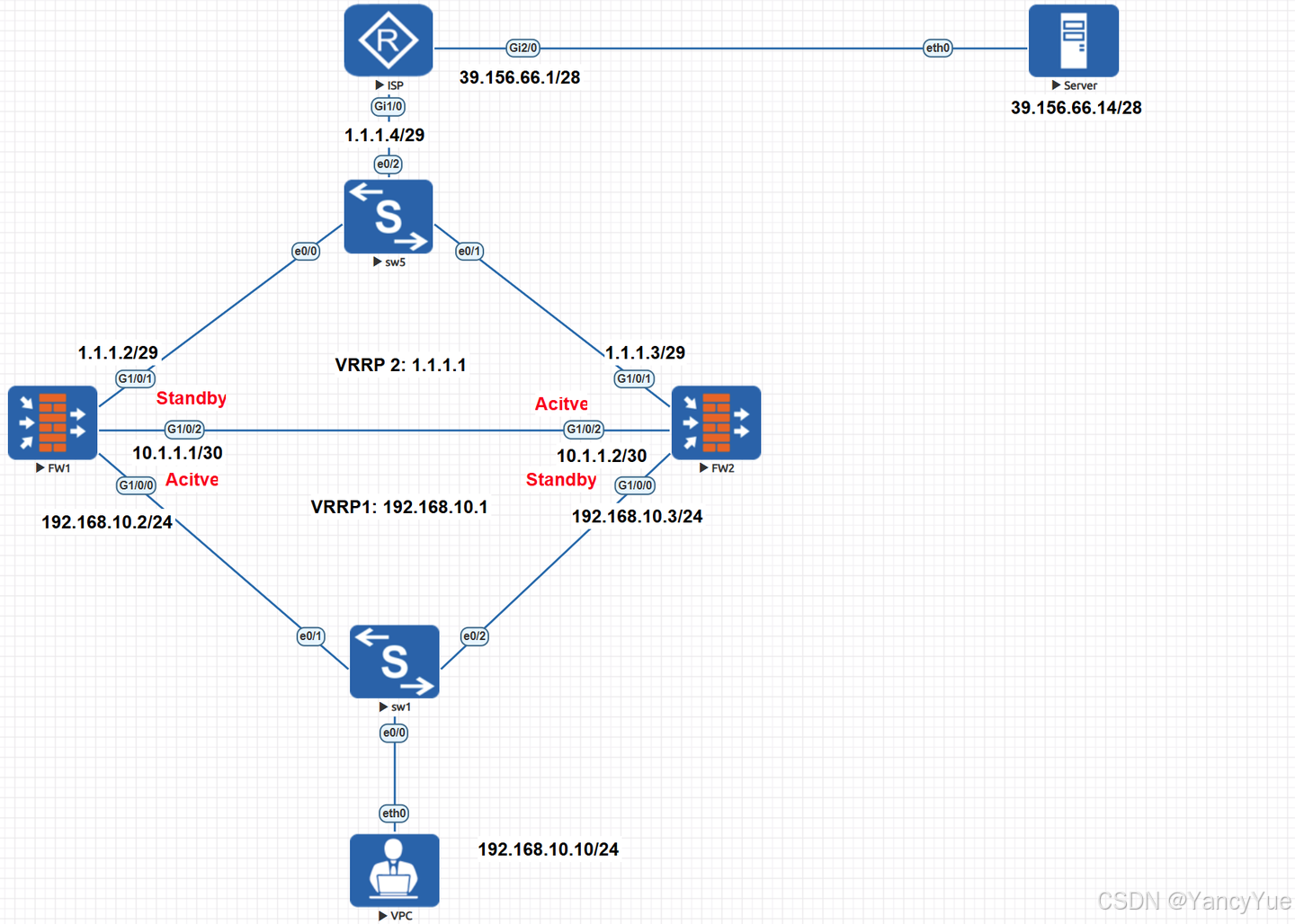
防火墙配置
FW1:
[FW1]interface GigabitEthernet1/0/0
[FW1-GigabitEthernet1/0/0] ip address 192.168.10.2 24
[FW1-GigabitEthernet1/0/0] vrrp vrid 1 virtual-ip 192.168.10.1 active
[FW1-GigabitEthernet1/0/0]#
[FW1-GigabitEthernet1/0/0]interface GigabitEthernet1/0/1
[FW1-GigabitEthernet1/0/1] ip address 1.1.1.2 29
[FW1-GigabitEthernet1/0/1] vrrp vrid 2 virtual-ip 1.1.1.1 standby
[FW1-GigabitEthernet1/0/1]#
[FW1-GigabitEthernet1/0/1]interface GigabitEthernet1/0/2
[FW1-GigabitEthernet1/0/2] ip address 10.1.1.1 30
[FW1-GigabitEthernet1/0/2]#
[FW1-GigabitEthernet1/0/2]firewall zone trust
[FW1-zone-trust] add interface GigabitEthernet1/0/0
[FW1-zone-trust]#
[FW1-zone-trust]firewall zone untrust
[FW1-zone-untrust] add interface GigabitEthernet1/0/1
[FW1-zone-untrust]#
[FW1-zone-untrust]firewall zone name hrp
[FW1-zone-hrp] set priority 51
[FW1-zone-hrp] add interface GigabitEthernet1/0/2
FW1 开启双机热备:
[FW1-zone-hrp] hrp enable
Info: NAT IP detect function is disabled.
HRP_S[FW1]hrp interface GigabitEthernet1/0/2 remote 10.1.1.2
HRP_M[FW1]hrp mirror session enable 比主备模式,多了一条hrp mirror session enable 启用会话快速备份功能。
因为在来回路径不一致组网环境下,比如,我们现在的组网就是,PC访问Server的流量,从FW1出去,从FW2回来,如果主用设备的会话没有及时备份到备用设备,则备用设备会将到达的报文丢弃。
所以需要开启快速备份会话,将主用设备相应的会话快速备份到备用设备,使返回报文在备用设备上能够查找到相应的会话,从而保证内外部用户的业务不中断。
FW2:
[USG6000V2]sysname FW2
[FW2]#
[FW2]interface GigabitEthernet1/0/0
[FW2-GigabitEthernet1/0/0] ip address 192.168.10.3 24
[FW2-GigabitEthernet1/0/0] vrrp vrid 1 virtual-ip 192.168.10.1 standby
[FW2-GigabitEthernet1/0/0]#
[FW2-GigabitEthernet1/0/0]interface GigabitEthernet1/0/1
[FW2-GigabitEthernet1/0/1] ip address 1.1.1.3 29
[FW2-GigabitEthernet1/0/1] vrrp vrid 2 virtual-ip 1.1.1.1 active
[FW2-GigabitEthernet1/0/1]#
[FW2-GigabitEthernet1/0/1]interface GigabitEthernet1/0/2
[FW2-GigabitEthernet1/0/2] ip address 10.1.1.2 30
[FW2-GigabitEthernet1/0/2]#
[FW2-GigabitEthernet1/0/2]firewall zone trust
[FW2-zone-trust] add interface GigabitEthernet1/0/0
[FW2-zone-trust]#
[FW2-zone-trust]firewall zone untrust
[FW2-zone-untrust] add interface GigabitEthernet1/0/1
[FW2-zone-untrust]#
[FW2-zone-untrust]firewall zone name hrp
[FW2-zone-hrp] set priority 51
[FW2-zone-hrp] add interface GigabitEthernet1/0/2
FW2 开启双机热备:
[FW2-zone-hrp] hrp enable
Info: NAT IP detect function is disabled.
HRP_S[FW2] hrp interface GigabitEthernet1/0/2 remote 10.1.1.1
HRP_S[FW2]hrp mirror session enable
双机热备状态
① FW1 查看双机热备状态:
两个防火墙的Role 都是active,此时就是负载分担。
对于FW1来说,VRRP 组1 是active,VRRP组2是standby
HRP_M[FW1]display hrp state verbose
2025-03-16 03:59:47.530
 Role: active, peer: active
 Running priority: 45000, peer: 45000
 Backup channel usage: 0.00%
 Stable time: 0 days, 0 hours, 2 minutes
 Last state change information: 2025-03-16 3:57:07 HRP core state changed, old_state = abnormal(active), new_state = normal, local_priority = 45000, peer_priority = 45000.

 Configuration:
 hello interval:              1000ms
 preempt:                     60s
 mirror configuration:        off
 mirror session:              off
 track trunk member:          on
 auto-sync configuration:     on
 auto-sync connection-status: on
 adjust ospf-cost:            on
 adjust ospfv3-cost:          on
 adjust bgp-cost:             on
 nat resource:                off

 Detail information:
           GigabitEthernet1/0/0 vrrp vrid 1: active
           GigabitEthernet1/0/1 vrrp vrid 2: standby
                                  ospf-cost: +0
                                ospfv3-cost: +0
                                   bgp-cost: +0
② FW2 查看双机热备状态:
对于FW2来说,VRRP 组1 是standby ,VRRP组2是active
HRP_S[FW2]display hrp state verbose
2025-03-16 04:00:10.800
 Role: active, peer: active
 Running priority: 45000, peer: 45000
 Backup channel usage: 0.00%
 Stable time: 0 days, 0 hours, 3 minutes
 Last state change information: 2025-03-16 3:57:07 HRP core state changed, old_state = abnormal(active), new_state = normal, local_priority = 45000, peer_priority = 45000.

 Configuration:
 hello interval:              1000ms
 preempt:                     60s
 mirror configuration:        off
 mirror session:              off
 track trunk member:          on
 auto-sync configuration:     on
 auto-sync connection-status: on
 adjust ospf-cost:            on
 adjust ospfv3-cost:          on
 adjust bgp-cost:             on
 nat resource:                off

 Detail information:
           GigabitEthernet1/0/0 vrrp vrid 1: standby
           GigabitEthernet1/0/1 vrrp vrid 2: active
                                  ospf-cost: +0
                                ospfv3-cost: +0
                                   bgp-cost: +0
注:有没有发现,即使是负载均衡的状态,也还是一个HRP_M,一个是HRP_S,因为虽然是双主,但还是有逻辑主逻辑备。
这是为了会话统一、配置统一,因为如果说,两个防火墙可以各配各的,FW1上写了不允许PC1上网,FW2允许PC1出去,那么这个到底是能出还是不能出。
所以即使是负载均衡的状态,也还是有逻辑主逻辑备,并且是逻辑主给逻辑备同步配置,备墙上无法进行配置。
HRP_S[FW2]security-policy
 Error: The device is in HRP standby state, so this command can not be executed.
但是会话表项是双方都会给对方进行快速同步。

腾讯云面向开发者汇聚海量精品云计算使用和开发经验,营造开放的云计算技术生态圈。
更多推荐
 20
20 0
0- 0


 已为社区贡献2条内容

所有评论(0)