Suna 是一个完全开源的 AI 助手,可帮助您轻松完成实际任务。通过自然对话,Suna 成为您进行研究、数据分析和日常挑战的数字伴侣 — 将强大的功能与直观的界面相结合,了解您的需求并提供结果
Suna 是一个完全开源的 AI 助手,可帮助您轻松完成实际任务。通过自然对话,Suna 成为您进行研究、数据分析和日常挑战的数字伴侣 — 将强大的功能与直观的界面相结合,了解您的需求并提供结果。Suna 强大的工具包包括用于导航 Web 和提取数据的无缝浏览器自动化、用于文档创建和编辑的文件管理、Web 爬虫和扩展搜索功能、用于系统任务的命令行执行、网站部署以及与各种 API 和服务的集成。
一、软件介绍
文末提供程序和源码下载
Suna 是一个完全开源的 AI 助手,可帮助您轻松完成实际任务。通过自然对话,Suna 成为您进行研究、数据分析和日常挑战的数字伴侣 — 将强大的功能与直观的界面相结合,了解您的需求并提供结果。
Suna 强大的工具包包括用于导航 Web 和提取数据的无缝浏览器自动化、用于文档创建和编辑的文件管理、Web 爬虫和扩展搜索功能、用于系统任务的命令行执行、网站部署以及与各种 API 和服务的集成。这些功能和谐地协同工作,使 Suna 能够解决您的复杂问题并通过简单的对话实现工作流程自动化!
二、Project Architecture 项目架构
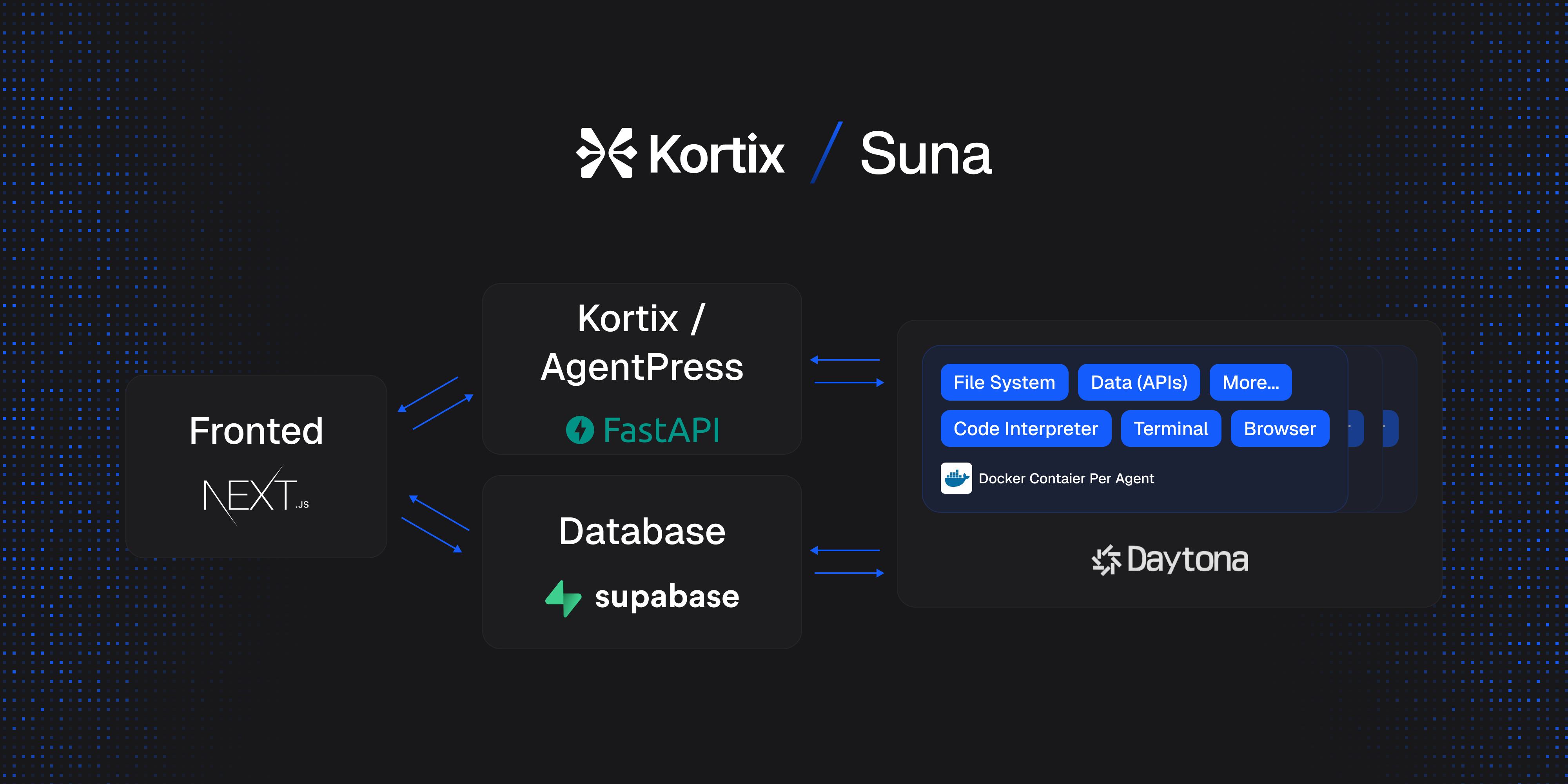
三、Suna 由四个主要组件组成:
Backend API 后端 API
Python/FastAPI service that handles REST endpoints, thread management, and LLM integration with Anthropic, and others via LiteLLM.
Python/FastAPI 服务,用于处理 REST 端点、线程管理以及与 LLM Anthropic 的集成,以及通过 LiteLLM 进行的其他服务。
Frontend 前端
Next.js/React application providing a responsive UI with chat interface, dashboard, etc.
Next.js/React 应用程序提供带有聊天界面、仪表板等的响应式 UI。
Agent Docker 代理 Docker
Isolated execution environment for every agent - with browser automation, code interpreter, file system access, tool integration, and security features.
每个代理的隔离执行环境 - 具有浏览器自动化、代码解释器、文件系统访问、工具集成和安全功能。
Supabase Database Supabase 数据库
Handles data persistence with authentication, user management, conversation history, file storage, agent state, analytics, and real-time subscriptions.
通过身份验证、用户管理、对话历史记录、文件存储、代理状态、分析和实时订阅处理数据持久性。
四、Use Cases 使用案例
-
Competitor Analysis (Watch) - "Analyze the market for my next company in the healthcare industry, located in the UK. Give me the major players, their market size, strengths, and weaknesses, and add their website URLs. Once done, generate a PDF report."
竞争对手分析(观看)- “分析我位于英国的医疗保健行业的下一家公司的市场。给我主要参与者、他们的市场规模、优势和劣势,并添加他们的网站 URL。完成后,生成 PDF 报告。 -
VC List (Watch) - "Give me the list of the most important VC Funds in the United States based on Assets Under Management. Give me website URLs, and if possible an email to reach them out."
VC List ( 观看) - “给我一份基于管理资产的美国最重要的 VC 基金名单。给我网站 URL,如果可能的话,请发送电子邮件来联系他们。 -
Looking for Candidates (Watch) - "Go on LinkedIn, and find me 10 profiles available - they are not working right now - for a junior software engineer position, who are located in Munich, Germany. They should have at least one bachelor's degree in Computer Science or anything related to it, and 1-year of experience in any field/role."
寻找候选人 ( 观看) - “去 LinkedIn 上找到 10 个可用的个人资料 - 他们现在没有工作 - 位于德国慕尼黑的初级软件工程师职位。他们应该至少拥有一个计算机科学或与之相关的学士学位,以及 1 年任何领域/角色的经验。 -
Planning Company Trip (Watch) - "Generate me a route plan for my company. We should go to California. We'll be in 8 people. Compose the trip from the departure (Paris, France) to the activities we can do considering that the trip will be 7 days long - departure on the 21st of Apr 2025. Check the weather forecast and temperature for the upcoming days, and based on that, you can plan our activities (outdoor vs indoor)."
规划公司行程 ( 观看) - “为我的公司生成路线计划。我们应该去加利福尼亚。我们将有 8 个人。考虑到旅行将持续 7 天 - 2025 年 4 月 21 日出发,我们将从出发(法国巴黎)到我们可以进行的活动进行旅行。查看未来几天的天气预报和温度,然后根据此,您可以计划我们的活动(室外与室内)。 -
Working on Excel (Watch) - "My company asked me to set up an Excel spreadsheet with all the information about Italian lottery games (Lotto, 10eLotto, and Million Day). Based on that, generate and send me a spreadsheet with all the basic information (public ones)."
在 Excel 上工作(手表)- “我的公司要求我设置一个 Excel 电子表格,其中包含有关意大利彩票游戏(Lotto、10eLotto 和 Million Day)的所有信息。在此基础上,生成并发送给我一个包含所有基本信息(公开信息)的电子表格。 -
Automate Event Speaker Prospecting (Watch) - "Find 20 AI ethics speakers from Europe who've spoken at conferences in the past year. Scrapes conference sites, cross-references LinkedIn and YouTube, and outputs contact info + talk summaries."
自动化活动演讲者潜在客户 ( Watch) - “查找来自欧洲的 20 位 AI 道德演讲者,他们在过去一年的会议上发表了演讲。抓取会议网站,交叉引用 LinkedIn 和 YouTube,并输出联系信息 + 谈话摘要。 -
Summarize and Cross-Reference Scientific Papers (Watch) - "Research and compare scientific papers talking about Alcohol effects on our bodies during the last 5 years. Generate a report about the most important scientific papers talking about the topic I wrote before."
总结和交叉引用科学论文 ( 观看) - “研究和比较过去 5 年中谈论酒精对我们身体影响的科学论文。生成一份关于我之前写的主题的最重要科学论文的报告。 -
Research + First Contact Draft (Watch) - "Research my potential customers (B2B) on LinkedIn. They should be in the clean tech industry. Find their websites and their email addresses. After that, based on the company profile, generate a personalized first contact email where I present my company which is offering consulting services to cleantech companies to maximize their profits and reduce their costs."
研究 + 首次联系草稿(观看)- “在 LinkedIn 上研究我的潜在客户 (B2B)。他们应该在清洁技术行业。查找他们的网站和电子邮件地址。之后,根据公司简介,生成一封个性化的第一封联系电子邮件,我在其中介绍我的公司,该公司正在为清洁技术公司提供咨询服务,以最大限度地提高他们的利润并降低成本。 -
SEO Analysis (Watch) - "Based on my website suna.so, generate an SEO report analysis, find top-ranking pages by keyword clusters, and identify topics I'm missing."
SEO 分析(观看) - “根据我的网站 suna.so,生成 SEO 报告分析,通过关键词集群找到排名靠前的页面,并确定我缺少的主题。” -
Generate a Personal Trip (Watch) - "Generate a personal trip to London, with departure from Bangkok on the 1st of May. The trip will last 10 days. Find an accommodation in the center of London, with a rating on Google reviews of at least 4.5. Find me interesting outdoor activities to do during the journey. Generate a detailed itinerary plan."
生成个人旅行(观看)- “生成 5 月 1 日从曼谷出发的伦敦个人旅行。行程将持续 10 天。查找伦敦市中心的住宿,在 Google 评论中评分至少为 4.5。在旅途中为我找有趣的户外活动。生成详细的行程计划。 -
Recently Funded Startups (Watch) - "Go on Crunchbase, Dealroom, and TechCrunch, filter by Series A funding rounds in the SaaS Finance Space, and build a report with company data, founders, and contact info for outbound sales."
最近资助的初创公司 ( 观看) - “在 Crunchbase、Dealroom 和 TechCrunch 上,按 SaaS Finance 领域的 A 轮融资进行筛选,并构建一份包含公司数据、创始人和对外销售联系信息的报告。” -
Scrape Forum Discussions (Watch) - "I need to find the best beauty centers in Rome, but I want to find them by using open forums that speak about this topic. Go on Google, and scrape the forums by looking for beauty center discussions located in Rome. Then generate a list of 5 beauty centers with the best comments about them."
Scrape 论坛讨论 ( 观看) - “我需要找到罗马最好的美容中心,但我想通过使用谈论这个话题的公开论坛来找到它们。去 Google,通过寻找位于罗马的美容中心讨论来抓取论坛。然后生成一份包含 5 家美容中心的名单,其中包含对它们的最佳评价。
五、本地运行 / 自托管
Suna 可以在您自己的基础设施上自托管。请按照以下步骤设置您自己的实例。
Requirements 要求
You'll need the following components:
您将需要以下组件:
- A Supabase project for database and authentication
用于数据库和身份验证的 Supabase 项目 - Redis database for caching and session management
用于缓存和会话管理的 Redis 数据库 - Daytona sandbox for secure agent execution
用于安全代理执行的 Daytona 沙盒 - Python 3.11 for the API backend
用于 API 后端的 Python 3.11 - API keys for LLM providers (Anthropic, OpenRouter)
提供商的 LLM API 密钥(Anthropic、OpenRouter) - Tavily API key for enhanced search capabilities
用于增强搜索功能的 Tavily API 密钥 - Firecrawl API key for web scraping capabilities
用于网络抓取功能的 Firecrawl API 密钥
Prerequisites 先决条件
-
Supabase: Supabase:
- Create a new Supabase project
创建新的 Supabase 项目 - Save your project's API URL, anon key, and service role key for later use
保存项目的 API URL、anon key 和服务角色 key 以备后用 - Install the Supabase CLI 安装 Supabase CLI
- Create a new Supabase project
-
Redis: 雷迪斯:
- Go to the
/backendfolder
转到/backend文件夹 - Run
docker compose up redis跑docker compose up redis
- Go to the
-
Daytona: 代托纳:
- Create an account on Daytona
在 Daytona 上创建帐户 - Generate an API key from your account settings
从您的账户设置中生成 API 密钥 - Go to Images 转到图片
- Click "Add Image" 点击“添加图片”
- Enter
kortix/suna:0.1as the image name
Enterkortix/suna:0.1作为映像名称 - Set
/usr/bin/supervisord -n -c /etc/supervisor/conf.d/supervisord.confas the Entrypoint
设置为/usr/bin/supervisord -n -c /etc/supervisor/conf.d/supervisord.confEntrypoint
- Create an account on Daytona
-
LLM API Keys: LLM API 密钥:
-
Search API Key (Optional):
搜索 API 密钥(可选):- For enhanced search capabilities, obtain an Tavily API key
要增强搜索功能,请获取 Tavily API 密钥 - For web scraping capabilities, obtain a Firecrawl API key
对于 Web 抓取功能,请获取 Firecrawl API 密钥
- For enhanced search capabilities, obtain an Tavily API key
-
RapidAPI API Key (Optional):
RapidAPI API 密钥(可选):- To enable API services like LinkedIn, and others, you'll need a RapidAPI key
要启用 LinkedIn 等 API 服务,您需要一个 RapidAPI 密钥 - Each service requires individual activation in your RapidAPI account:
每个服务都需要在你的 RapidAPI 账户中单独激活:- Locate the service's
base_urlin its corresponding file (e.g.,"https://linkedin-data-scraper.p.rapidapi.com"in backend/agent/tools/data_providers/LinkedinProvider.py)base_url在其相应的文件中找到服务的 (例如,"https://linkedin-data-scraper.p.rapidapi.com"在backend/agent/tools/data_providers/LinkedinProvider.py) - Visit that specific API on the RapidAPI marketplace
在 RapidAPI Marketplace 上访问该特定 API - Subscribe to the service (many offer free tiers with limited requests)
订阅服务(许多服务提供免费套餐,但请求有限) - Once subscribed, the service will be available to your agent through the API Services tool
订阅后,您的代理将通过 API 服务工具使用该服务
- Locate the service's
- To enable API services like LinkedIn, and others, you'll need a RapidAPI key
Installation Steps 安装步骤
- Clone the repository: 克隆存储库:如果下载慢,文末提供了网盘下载,下载后解压即可
git clone https://github.com/kortix-ai/suna.git
cd suna
- Configure backend environment:
配置后端环境:
cd backend
cp .env.example .env  # Create from example if available, or use the following template
Edit the .env file and fill in your credentials:
编辑 .env 文件并填写您的凭据:
NEXT_PUBLIC_URL="http://localhost:3000"

# Supabase credentials from step 1
SUPABASE_URL=your_supabase_url
SUPABASE_ANON_KEY=your_supabase_anon_key
SUPABASE_SERVICE_ROLE_KEY=your_supabase_service_role_key

# Redis credentials from step 2
REDIS_HOST=your_redis_host
REDIS_PORT=6379
REDIS_PASSWORD=your_redis_password
REDIS_SSL=True  # Set to False for local Redis without SSL

# Daytona credentials from step 3
DAYTONA_API_KEY=your_daytona_api_key
DAYTONA_SERVER_URL="https://app.daytona.io/api"
DAYTONA_TARGET="us"

# Anthropic
ANTHROPIC_API_KEY=

# OpenAI API:
OPENAI_API_KEY=your_openai_api_key

# Optional but recommended
TAVILY_API_KEY=your_tavily_api_key  # For enhanced search capabilities
FIRECRAWL_API_KEY=your_firecrawl_api_key  # For web scraping capabilities
RAPID_API_KEY=
- Set up Supabase database:
设置 Supabase 数据库:
# Login to Supabase CLI
supabase login

# Link to your project (find your project reference in the Supabase dashboard)
supabase link --project-ref your_project_reference_id

# Push database migrations
supabase db push
Then, go to the Supabase web platform again -> choose your project -> Project Settings -> Data API -> And in the "Exposed Schema" add "basejump" if not already there
然后,再次转到 Supabase Web 平台 ->选择您的项目 -> 项目设置 -> 数据 API -> 并在“公开的架构”中添加“basejump”(如果还没有)
- Configure frontend environment:
配置前端环境:
cd ../frontend
cp .env.example .env.local  # Create from example if available, or use the following template
Edit the .env.local file: 编辑 .env.local 文件:
<span style="background-color:var(--bgColor-muted, var(--color-canvas-subtle))"><span style="color:#1f2328"><span style="color:var(--fgColor-default, var(--color-fg-default))"><span style="background-color:var(--bgColor-muted, var(--color-canvas-subtle))"><code>NEXT_PUBLIC_SUPABASE_URL=your_supabase_url
NEXT_PUBLIC_SUPABASE_ANON_KEY=your_supabase_anon_key
NEXT_PUBLIC_BACKEND_URL="http://localhost:8000/api"  # Use this for local development
NEXT_PUBLIC_URL="http://localhost:3000"
</code></span></span></span></span>
Note: If you're using Docker Compose, use the container name instead of localhost:
注意:如果您使用的是 Docker Compose,请使用容器名称而不是 localhost:
<span style="background-color:var(--bgColor-muted, var(--color-canvas-subtle))"><span style="color:#1f2328"><span style="color:var(--fgColor-default, var(--color-fg-default))"><span style="background-color:var(--bgColor-muted, var(--color-canvas-subtle))"><code>NEXT_PUBLIC_BACKEND_URL="http://backend:8000/api"  # Use this when running with Docker Compose
</code></span></span></span></span>- Install dependencies: 安装依赖项:
# Install frontend dependencies
cd frontend
npm install

# Install backend dependencies
cd ../backend
pip install -r requirements.txt
-
Start the application: 启动应用程序:
In one terminal, start the frontend:
在一个终端中,启动前端:
cd frontend
npm run dev
In another terminal, start the backend:
在另一个终端中,启动后端:
cd backend
python api.py
5-6. Docker Compose Alternative:
5-6. Docker Compose 替代方案:
Before running with Docker Compose, make sure your environment files are properly configured:
在使用 Docker Compose 运行之前,请确保您的环境文件已正确配置:
- In
backend/.env, set all the required environment variables as described above
在backend/.env中,如上所述设置所有必需的环境变量- For Redis configuration, use
REDIS_HOST=redisinstead of localhost
对于 Redis 配置,请使用REDIS_HOST=redisinstead 而不是 localhost - The Docker Compose setup will automatically set these Redis environment variables:
Docker Compose 设置将自动设置这些 Redis 环境变量:<span style="background-color:var(--bgColor-muted, var(--color-canvas-subtle))"><span style="color:var(--fgColor-default, var(--color-fg-default))"><span style="background-color:var(--bgColor-muted, var(--color-canvas-subtle))"><code>REDIS_HOST=redis REDIS_PORT=6379 REDIS_PASSWORD= REDIS_SSL=False </code></span></span></span>
- For Redis configuration, use
- In
frontend/.env.local, make sure to setNEXT_PUBLIC_BACKEND_URL="http://backend:8000/api"to use the container name
在frontend/.env.local中,确保设置为NEXT_PUBLIC_BACKEND_URL="http://backend:8000/api"使用容器名称
Then run: 然后运行:
export GITHUB_REPOSITORY="your-github-username/repo-name"
docker compose -f docker-compose.ghcr.yaml up
If you're building the images locally instead of using pre-built ones:
如果您在本地构建镜像,而不是使用预构建的镜像:
docker compose up
The Docker Compose setup includes a Redis service that will be used by the backend automatically.
Docker Compose 设置包括一个 Redis 服务,该服务将由后端自动使用。
- Access Suna: 访问 Suna:
- Open your browser and navigate to
http://localhost:3000
打开浏览器并导航到http://localhost:3000 - Sign up for an account using the Supabase authentication
使用 Supabase 身份验证注册一个帐户 - Start using your self-hosted Suna instance!
开始使用您的自托管 Suna 实例!
- Open your browser and navigate to
六、软件下载
本文信息来源于GitHub作者地址:https://github.com/kortix-ai/suna

腾讯云面向开发者汇聚海量精品云计算使用和开发经验,营造开放的云计算技术生态圈。
更多推荐
 38
38 0
0- 0


 已为社区贡献8条内容

所有评论(0)