基于eNSP的NFV虚拟防火墙与IPsecVPN双机热备网络规划设计
该topo网络中用到的技术有Eth-trunk、VLAN划分、MSTP、VRRP、OSPF、DHCP、DHCP中继、防火墙双机热备(双活模式)、防火墙虚拟系统、安全策略、IPsecV*N、IP-link、静态路由、ISIS、NAT、NATserver、NQA、无线WLAN、无线双机双链路热备份等。该实验非常适合于把相应的单个技术学完想把这些技术综合起来的小伙伴,特别是适合于想搞NFV、防火墙这一块
作者:BSXY_19计科_陈永跃
BSXY_信息学院_公众号于结尾处
注:未经允许禁止转发任何内容
注:未经允许禁止转发任何内容
基于eNSP的NFV虚拟防火墙与IPsecVPN双机热备网络规划设计
-
- 一、设计topo图与设计要求
- 二、相应地址规划表
- 三、该网络规划过程
-
- 1、Eth-trunk配置
- 2、vlan 底层划分
- 3、MSTP配置
- 4、vrrp网关冗余
- 5、防火墙双机热备
- 6、边界路由器配置
- 7、虚拟系统
- 8、OSPF配置
- 9、DHCP&DHCP中继
- 10、无线WLAN
- 11、无线AC冗余
- 12、 IP-link配置
- 13、虚拟系统互访
- 14、互访安全策略
- 15、路由引入
- 16、ISIS
- 17、NAT
- 18、NQA
- 19、分区OSPF
- 20、分区无线
- 21、NAT server(穿越)
- 22、IPsecVN
- 23、模拟攻击
- 四、项目获取
一、设计topo图与设计要求
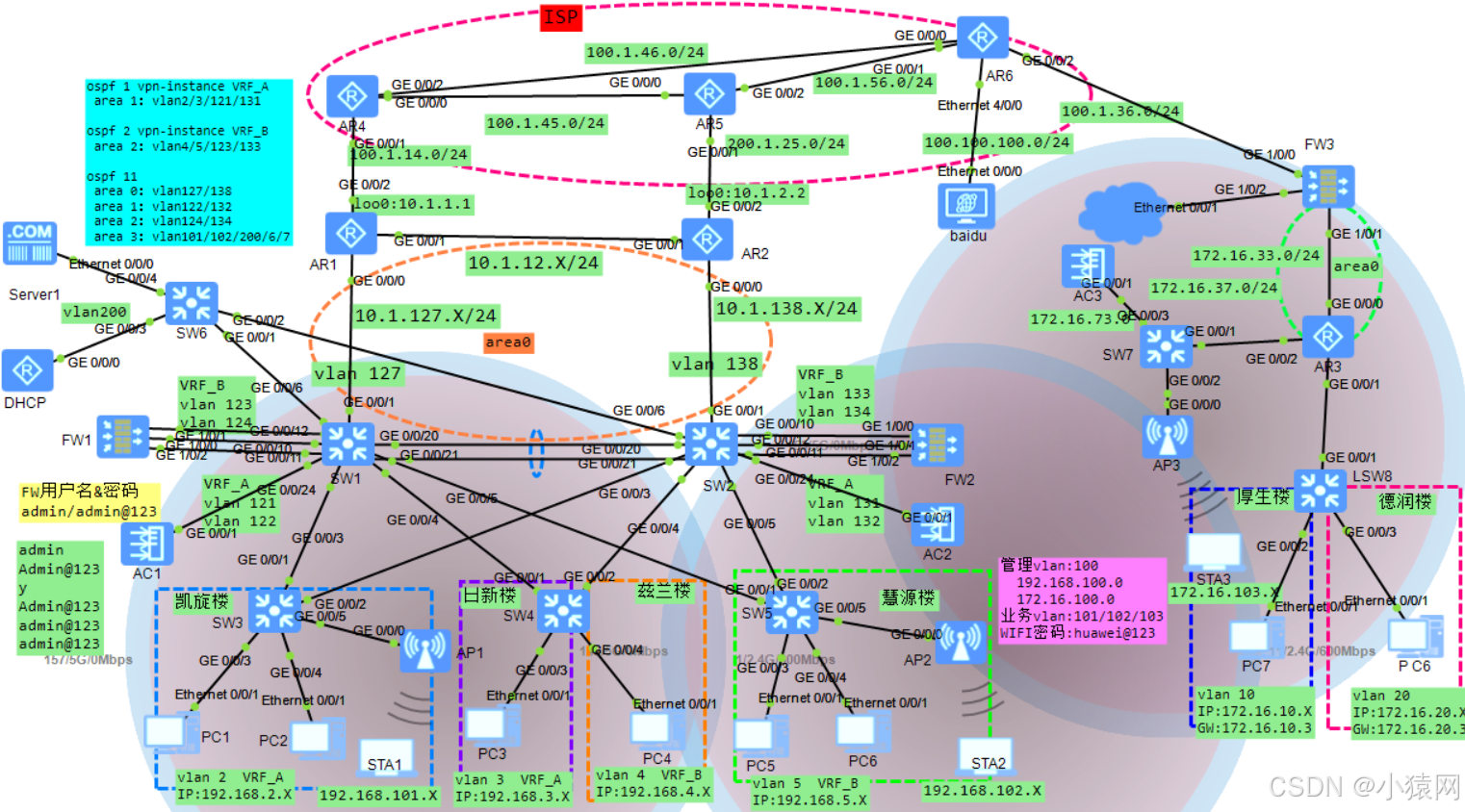
设计要求:
- 完成服务器、防火墙、路由器相应的接口地址的配置
- 合理规划地址且让相应地址可读性强和容易记忆
- 核心交换机配置Eth-Trunk链路捆绑来提高链路的冗余
- 根据不同的地域划分多个不同的vlan,减小广播域大小,提高网络的可靠性和安全性
- 配置MSTP+VRRP,同时实现冗余,划分实例,让不同的vlan优先选择相应的交换机,并减少stp震荡
- 主校区/总部防火墙需要配置双机热备实现冗余,且部署的双机热备为双活模式(active-active)
- 主校区/总部在NFV的架构的防火墙FW1和FW2中创建相应的虚拟系统
- 主校区/总部的防火墙中都创建两台虚墙,名为VRF_A和VRF_B,且需墙也需要做双机热备
- 主校区/总部部署DHCP中继使得有线用户的地址需要通过DHCP服务器获取
- 主校区/总部部署DHCP且冗余方式部署,使得无线用户和无线AP的地址由SW1和SW2获取
- 分校区/分部的用户的地址由AR3获取
- 主校区/总部与分校区/分部的内部都运行OSPF动态路由
- 主校区/总部与分校区/分部部署NAT使得内网能访问外网
- 主校区/总部的出口设备AR1和AR2需做NQA快速检测故障
- 主校区/总部无线双机双链路实现AP1优先加入AC1,AC2作为备份;AP2优先加入AC2,AC1作为备份,保证一个AP可由两个AC进行管理提高网络的可靠性
- 通过NATserver地址映射将FW1和FW2下虚拟系统的外网映射出去用于建立IPsecVPN
- 主校区/总部与分校区/分部之间建立IPsecVPN使其互通
- 部署ISIS模拟本次的ISP
二、相应地址规划表

三、该网络规划过程
1、Eth-trunk配置
    SW1:
<Huawei>sys
[Huawei]un in en
[Huawei]sysname SW1
[SW1]vlan batch 2 3 4 5 6 127 200 100
[SW1]vlan batch 121 to 124
[SW1]int eth-trunk 1
[SW1-Eth-Trunk1]mode lacp-static
[SW1-Eth-Trunk1]trunkport g0/0/20
[SW1-Eth-Trunk1]trunkport g0/0/21
[SW1-Eth-Trunk1]port link-type trunk
[SW1-Eth-Trunk1]port trunk allow-pass vlan all
[SW1-Eth-Trunk1]qui
[SW1]int eth 2
[SW1-Eth-Trunk2]trunkport g0/0/10
[SW1-Eth-Trunk2]trunkport g0/0/11
[SW1-Eth-Trunk2]port link-type trunk
[SW1-Eth-Trunk2]port trunk allow-pass vlan all
[SW1-Eth-Trunk2]qui
[SW1]
-------------------------------------------
    SW2:
<Huawei>sys
[Huawei]un in en
[Huawei]sysname SW2
[SW2]vlan batch 2 3 4 5 7 138 200 100
[SW2]vlan batch 131 to 134
[SW2]int eth-trunk 1
[SW2-Eth-Trunk1]mode lacp-static
[SW2-Eth-Trunk1]trunkport g0/0/20
[SW2-Eth-Trunk1]trunkport g0/0/21
[SW2-Eth-Trunk1]port link-type trunk
[SW2-Eth-Trunk1]port trunk allow-pass vlan all
[SW2-Eth-Trunk1]qui
[SW2]int eth 2
[SW2-Eth-Trunk2]trunkport g0/0/10
[SW2-Eth-Trunk2]trunkport g0/0/11
[SW2-Eth-Trunk2]port link-type trunk
[SW2-Eth-Trunk2]port trunk allow-pass vlan all
[SW2-Eth-Trunk2]qui
[SW2]
2、vlan 底层划分
    SW3:
<Huawei>sys
[Huawei]un in en
[Huawei]sysname SW3
[SW3]vlan batch 2 100 101
[SW3]int g0/0/1
[SW3-GigabitEthernet0/0/1]port link-type trunk
[SW3-GigabitEthernet0/0/1]port trunk allow-pass vlan 2 100 101
[SW3-GigabitEthernet0/0/1]int g0/0/2
[SW3-GigabitEthernet0/0/2]port link-type trunk
[SW3-GigabitEthernet0/0/2]port trunk allow-pass vlan 2 100 101
[SW3-GigabitEthernet0/0/2]int g0/0/3
[SW3-GigabitEthernet0/0/3]port link-type access
[SW3-GigabitEthernet0/0/3]port default vlan 2
[SW3-GigabitEthernet0/0/3]int g0/0/4
[SW3-GigabitEthernet0/0/4]port link-type access
[SW3-GigabitEthernet0/0/4]port default vlan 2
[SW3-GigabitEthernet0/0/4]int g0/0/5
[SW3-GigabitEthernet0/0/5]port link-type trunk
[SW3-GigabitEthernet0/0/5]port trunk pvid vlan 100
[SW3-GigabitEthernet0/0/5]port trunk allow-pass vlan 100 101
[SW3-GigabitEthernet0/0/5]qui
[SW3]
--------------------------------
    SW4:
<Huawei>sys
[Huawei]un in en
[Huawei]sysname SW4
[SW4]vlan batch 3 4
[SW4]int g0/0/1
[SW4-GigabitEthernet0/0/1]port link-type trunk
[SW4-GigabitEthernet0/0/1]port trunk allow-pass vlan 3 4
[SW4-GigabitEthernet0/0/1]int g0/0/2
[SW4-GigabitEthernet0/0/2]port link-type trunk
[SW4-GigabitEthernet0/0/2]port trunk allow-pass vlan 3 4
[SW4-GigabitEthernet0/0/2]int g0/0/3
[SW4-GigabitEthernet0/0/3]port link-type access
[SW4-GigabitEthernet0/0/3]port default vlan 3
[SW4-GigabitEthernet0/0/3]int g0/0/4
[SW4-GigabitEthernet0/0/4]port link-type access
[SW4-GigabitEthernet0/0/4]port default vlan 4
[SW4-GigabitEthernet0/0/4]qui
[SW4]
--------------------------------
    SW5:
<Huawei>sys
[Huawei]un in en
[Huawei]sysname SW5
[SW5]vlan batch 5 100 102
[SW5]int g0/0/1
[SW5-GigabitEthernet0/0/1]port link-type trunk
[SW5-GigabitEthernet0/0/1]port trunk allow-pass vlan 5 100 102
[SW5-GigabitEthernet0/0/1]int g0/0/2
[SW5-GigabitEthernet0/0/2]port link-type trunk
[SW5-GigabitEthernet0/0/2]port trunk allow-pass vlan 5 100 102
[SW5-GigabitEthernet0/0/2]int g0/0/3
[SW5-GigabitEthernet0/0/3]port link-type access
[SW5-GigabitEthernet0/0/3]port default vlan 5
[SW5-GigabitEthernet0/0/3]int g0/0/4
[SW5-GigabitEthernet0/0/4]port link-type access
[SW5-GigabitEthernet0/0/4]port default vlan 5
[SW5-GigabitEthernet0/0/4]int g0/0/5
[SW5-GigabitEthernet0/0/5]port link-type trunk
[SW5-GigabitEthernet0/0/5]port trunk pvid vlan 100
[SW5-GigabitEthernet0/0/5]port trunk allow-pass vlan 100 102
[SW5-GigabitEthernet0/0/5]qui
[SW5]
--------------------------------
	SW6:
<Huawei>sys
[Huawei]un in en
[Huawei]sysname SW6
[SW6]vlan batch 200
[SW6]int g0/0/1
[SW6-GigabitEthernet0/0/1]port link-type trunk
[SW6-GigabitEthernet0/0/1]port trunk allow-pass vlan 200
[SW6-GigabitEthernet0/0/1]int g0/0/2
[SW6-GigabitEthernet0/0/2]port link-type trunk
[SW6-GigabitEthernet0/0/2]port trunk allow-pass vlan 200
[SW6-GigabitEthernet0/0/2]int g0/0/3
[SW6-GigabitEthernet0/0/3]port link-type access
[SW6-GigabitEthernet0/0/3]port default vlan 200
[SW6-GigabitEthernet0/0/3]int g0/0/4
[SW6-GigabitEthernet0/0/4]port link-type access
[SW6-GigabitEthernet0/0/4]port default vlan 200
[SW6-GigabitEthernet0/0/4]qui
[SW6]
--------------------------------
    SW1:
[SW1]int g0/0/3
[SW1-GigabitEthernet0/0/3]port link-type trunk
[SW1-GigabitEthernet0/0/3]port trunk allow-pass vlan 2 100 101
[SW1-GigabitEthernet0/0/3]int g0/0/4
[SW1-GigabitEthernet0/0/4]port link-type trunk
[SW1-GigabitEthernet0/0/4]port trunk allow-pass vlan 3 4
[SW1-GigabitEthernet0/0/4]int g0/0/5
[SW1-GigabitEthernet0/0/5]port link-type trunk
[SW1-GigabitEthernet0/0/5]port trunk allow-pass vlan 5 100 102
[SW1-GigabitEthernet0/0/5]int g0/0/6
[SW1-GigabitEthernet0/0/6]port link-type trunk
[SW1-GigabitEthernet0/0/6]port trunk allow-pass vlan 200
[SW1-GigabitEthernet0/0/6]int g0/0/12
[SW1-GigabitEthernet0/0/12]port link-type trunk
[SW1-GigabitEthernet0/0/12]port trunk allow-pass vlan all
[SW1-GigabitEthernet0/0/12]int g0/0/24
[SW1-GigabitEthernet0/0/24]port link-type trunk
[SW1-GigabitEthernet0/0/24]port trunk allow-pass vlan all
[SW1-GigabitEthernet0/0/24]int g0/0/1
[SW1-GigabitEthernet0/0/1]port link access
[SW1-GigabitEthernet0/0/1]port default vlan 127
[SW1-GigabitEthernet0/0/1]qui
[SW1]
---------------------------------
    SW2:
[SW2]int g0/0/3
[SW2-GigabitEthernet0/0/3]port link-type trunk
[SW2-GigabitEthernet0/0/3]port trunk allow-pass vlan 2 100 101
[SW2-GigabitEthernet0/0/3]int g0/0/4
[SW2-GigabitEthernet0/0/4]port link-type trunk
[SW2-GigabitEthernet0/0/4]port trunk allow-pass vlan 3 4
[SW2-GigabitEthernet0/0/4]int g0/0/5
[SW2-GigabitEthernet0/0/5]port link-type trunk
[SW2-GigabitEthernet0/0/5]port trunk allow-pass vlan 5 100 102
[SW2-GigabitEthernet0/0/5]int g0/0/6
[SW2-GigabitEthernet0/0/6]port link-type trunk
[SW2-GigabitEthernet0/0/6]port trunk allow-pass vlan 200
[SW2-GigabitEthernet0/0/6]int g0/0/12
[SW2-GigabitEthernet0/0/12]port link-type trunk
[SW2-GigabitEthernet0/0/12]port trunk allow-pass vlan all
[SW2-GigabitEthernet0/0/12]int g0/0/24
[SW2-GigabitEthernet0/0/24]port link-type trunk
[SW2-GigabitEthernet0/0/24]port trunk allow-pass vlan all
[SW2-GigabitEthernet0/0/24]int g0/0/1
[SW2-GigabitEthernet0/0/1]port link access
[SW2-GigabitEthernet0/0/1]port default vlan 138
[SW2-GigabitEthernet0/0/1]qui
[SW2]
3、MSTP配置
    SW1:
[SW1]stp region-configuration
[SW1-mst-region] region-name aa
[SW1-mst-region] revision-level 1
[SW1-mst-region] instance 1 vlan 2 3 101 200
[SW1-mst-region] instance 2 vlan 4 5 102
[SW1-mst-region] active region-configuration
[SW1-mst-region] qui
[SW1]stp instance 1 root primary
[SW1]stp instance 2 root secondary
[SW1]
-----------------------------------
    SW2:
[SW2]stp region-configuration
[SW2-mst-region] region-name aa
[SW2-mst-region] revision-level 1
[SW2-mst-region] instance 1 vlan 2 3 101 200
[SW2-mst-region] instance 2 vlan 4 5 102
[SW2-mst-region] active region-configuration
[SW2-mst-region] qui
[SW2]stp instance 2 root primary
[SW2]stp instance 1 root secondary
[SW2]
-----------------------------------
    SW3:
[SW3]stp region-configuration
[SW3-mst-region] region-name aa
[SW3-mst-region] revision-level 1
[SW3-mst-region] instance 1 vlan 2 3 101 200
[SW3-mst-region] instance 2 vlan 4 5 102
[SW3-mst-region] active region-configuration
[SW3-mst-region] qui
[SW3]
-----------------------------------------
    SW4:
[SW4]stp region-configuration
[SW4-mst-region] region-name aa
[SW4-mst-region] revision-level 1
[SW4-mst-region] instance 1 vlan 2 3 101 200
[SW4-mst-region] instance 2 vlan 4 5 102
[SW4-mst-region] active region-configuration
[SW4-mst-region] qui
[SW4]
 -----------------------------------------
    SW5:
[SW5]stp region-configuration
[SW5-mst-region] region-name aa
[SW5-mst-region] revision-level 1
[SW5-mst-region] instance 1 vlan 2 3 101 200
[SW5-mst-region] instance 2 vlan 4 5 102
[SW5-mst-region] active region-configuration
[SW5-mst-region] qui
[SW5]
 -----------------------------------------
    SW6:
[SW6]stp region-configuration
[SW6-mst-region] region-name aa
[SW6-mst-region] revision-level 1
[SW6-mst-region] instance 1 vlan 2 3 101 200
[SW6-mst-region] instance 2 vlan 4 5 102
[SW6-mst-region] active region-configuration
[SW6-mst-region] qui
[SW6]
4、vrrp网关冗余
    SW1:
[SW1]ip V*N-instance VRF_A
[SW1-V*N-instance-VRF_A]ipv4-family
[SW1-V*N-instance-VRF_A-af-ipv4]qui
[SW1-V*N-instance-VRF_A]qui
[SW1]ip V*N-instance VRF_B
[SW1-V*N-instance-VRF_B]ipv4-family
[SW1-V*N-instance-VRF_B-af-ipv4]qui
[SW1-V*N-instance-VRF_B]qui
[SW1]int vlan 2
[SW1-Vlanif2]ip binding V*N-instance VRF_A
[SW1-Vlanif2]ip address 192.168.2.254 255.255.255.0
[SW1-Vlanif2]vrrp vrid 2 virtual-ip 192.168.2.1
[SW1-Vlanif2]vrrp vrid 2 priority 105
[SW1-Vlanif2]vrrp vrid 2 track int g0/0/1 reduced 20
[SW1-Vlanif2]vrrp vrid 2 track int g0/0/3 reduced 20
[SW1-Vlanif2]qui
[SW1]int vlan 3
[SW1-Vlanif3]ip binding V*N-instance VRF_A
[SW1-Vlanif3]ip address 192.168.3.254 255.255.255.0
[SW1-Vlanif3]vrrp vrid 3 virtual-ip 192.168.3.1
[SW1-Vlanif3]vrrp vrid 3 priority 105
[SW1-Vlanif3]vrrp vrid 3 track int g0/0/1 reduced 20
[SW1-Vlanif3]vrrp vrid 3 track int g0/0/4 reduced 20
[SW1-Vlanif3]qui
[SW1]int vlan 101
[SW1-Vlanif101]ip address 192.168.101.254 255.255.255.0
[SW1-Vlanif101]vrrp vrid 101 virtual-ip 192.168.101.1
[SW1-Vlanif101]vrrp vrid 101 priority 105
[SW1-Vlanif101]vrrp vrid 101 track int g0/0/1 reduced 20
[SW1-Vlanif101]vrrp vrid 101 track int g0/0/3 reduced 20
[SW1-Vlanif101]qui
[SW1]int vlan 200
[SW1-Vlanif200]ip add 192.168.200.254 24
[SW1-Vlanif200]vrrp vrid 200 virtual-ip 192.168.200.1
[SW1-Vlanif200]vrrp vrid 200 priority 105
[SW1-Vlanif200]vrrp vrid 200 track int g0/0/6 reduced 20
[SW1-Vlanif200]qui
[SW1]int vlan 4
[SW1-Vlanif4]ip binding V*N-instance VRF_B
[SW1-Vlanif4]ip address 192.168.4.254 255.255.255.0
[SW1-Vlanif4]vrrp vrid 4 virtual-ip 192.168.4.1
[SW1-Vlanif4]qui
[SW1]int vlan 5
[SW1-Vlanif5]ip binding V*N-instance VRF_B
[SW1-Vlanif5]ip address 192.168.5.254 255.255.255.0
[SW1-Vlanif5]vrrp vrid 5 virtual-ip 192.168.5.1
[SW1-Vlanif5]qui
[SW1]int vlan 102
[SW1-Vlanif102]ip address 192.168.102.254 255.255.255.0
[SW1-Vlanif102]vrrp vrid 102 virtual-ip 192.168.102.1
[SW1-Vlanif102]qui
[SW1]int vlan 6
[SW1-Vlanif6]ip add 192.168.6.6 24
[SW1-Vlanif6]int vlan 121
[SW1-Vlanif121]ip bind V*N VRF_A
[SW1-Vlanif121]ip add 192.168.121.254 24
[SW1-Vlanif121]int vlan 122
[SW1-Vlanif122]ip add 192.168.122.254 24
[SW1-Vlanif122]int vlan 123
[SW1-Vlanif123]ip bind V*N VRF_B
[SW1-Vlanif123]ip add 192.168.123.254 24
[SW1-Vlanif123]int vlan 124
[SW1-Vlanif124]ip add 192.168.124.254 24
[SW1-Vlanif124]int vlan 127
[SW1-Vlanif127]ip add 10.1.127.254 24
[SW1-Vlanif127]qui
------------------------------------
    SW2:
[SW2]ip V*N-instance VRF_A
[SW2-V*N-instance-VRF_A]ipv4-family
[SW2-V*N-instance-VRF_A-af-ipv4]qui
[SW2-V*N-instance-VRF_A]qui
[SW2]ip V*N-instance VRF_B
[SW2-V*N-instance-VRF_B]ipv4-family
[SW2-V*N-instance-VRF_B-af-ipv4]qui
[SW2-V*N-instance-VRF_B]qui
[SW2]int vlan 2
[SW2-Vlanif2]ip binding V*N-instance VRF_A
[SW2-Vlanif2]ip address 192.168.2.253 255.255.255.0
[SW2-Vlanif2]vrrp vrid 2 virtual-ip 192.168.2.1
[SW2-Vlanif2]qui
[SW2]int vlan 3
[SW2-Vlanif3]ip binding V*N-instance VRF_A
[SW2-Vlanif3]ip address 192.168.3.253 255.255.255.0
[SW2-Vlanif3]vrrp vrid 3 virtual-ip 192.168.3.1
[SW2-Vlanif3]qui
[SW2]int vlan 101
[SW2-Vlanif101]ip address 192.168.101.253 255.255.255.0
[SW2-Vlanif101]vrrp vrid 101 virtual-ip 192.168.101.1
[SW2-Vlanif101]qui
[SW2]int vlanif 200
[SW2-Vlanif200]ip add 192.168.200.253 24
[SW2-Vlanif200]vrrp vrid 200 virtual-ip 192.168.200.1
[SW2-Vlanif200]qui
[SW2]int vlan 4
[SW2-Vlanif4]ip binding V*N-instance VRF_B
[SW2-Vlanif4]ip address 192.168.4.253 255.255.255.0
[SW2-Vlanif4]vrrp vrid 4 virtual-ip 192.168.4.1
[SW2-Vlanif4]vrrp vrid 4 priority 105
[SW2-Vlanif4]vrrp vrid 4 track int g0/0/1 reduced 20
[SW2-Vlanif4]vrrp vrid 4 track int g0/0/4 reduced 20
[SW2-Vlanif4]qui
[SW2]int vlan 5
[SW2-Vlanif5]ip binding V*N-instance VRF_B
[SW2-Vlanif5]ip address 192.168.5.253 255.255.255.0
[SW2-Vlanif5]vrrp vrid 5 virtual-ip 192.168.5.1
[SW2-Vlanif5]vrrp vrid 5 priority 105
[SW2-Vlanif5]vrrp vrid 5 track int g0/0/1 reduced 20
[SW2-Vlanif5]vrrp vrid 5 track int g0/0/5 reduced 20
[SW2-Vlanif5]qui
[SW2]int vlan 102
[SW2-Vlanif102]ip address 192.168.102.253 255.255.255.0
[SW2-Vlanif102]vrrp vrid 102 virtual-ip 192.168.102.1
[SW2-Vlanif102]vrrp vrid 102 priority 105
[SW2-Vlanif102]vrrp vrid 102 track int g0/0/1 reduced 20
[SW2-Vlanif102]vrrp vrid 102 track int g0/0/5 reduced 20
[SW2-Vlanif102]qui
[SW2]int vlan 7
[SW2-Vlanif7]ip add 192.168.7.7 24
[SW2-Vlanif7]int vlan 131
[SW2-Vlanif131]ip bind V*N VRF_A
[SW2-Vlanif131]ip add 192.168.131.253 24
[SW2-Vlanif131]int vlan 132
[SW2-Vlanif132]ip add 192.168.132.253 24
[SW2-Vlanif132]int vlan 133
[SW2-Vlanif133]ip bind V*N VRF_B
[SW2-Vlanif133]ip add 192.168.133.253 24
[SW2-Vlanif133]int vlan 134
[SW2-Vlanif134]ip add 192.168.134.253 24
[SW2-Vlanif134]int vlan 138
[SW2-Vlanif138]ip add 10.1.138.253 24
[SW2-Vlanif138]qui
[SW2]
5、防火墙双机热备
/*防火墙双机热备:
admin
Admin@123
Y
Admin@123
admin@123
admin@123

修改时间(防止踢出去又得输入用户名和密码)
user-int con 0
id 0 0
qui*/

    FW1:
<USG6000V1>sys
[USG6000V1]un in en
[USG6000V1]sys FW1
[FW1]int g1/0/2
[FW1-GigabitEthernet1/0/2]ip add 192.168.0.12 24
[FW1-GigabitEthernet1/0/2]service-manage ping permit
[FW1-GigabitEthernet1/0/2]qui
[FW1]firewall zone dmz
[FW1-zone-dmz]add int g1/0/2
[FW1-zone-dmz]qui
[FW1]security-policy
[FW1-policy-security]rule name local_to_any
[FW1-policy-security-rule-local_to_any]source-zone local
[FW1-policy-security-rule-local_to_any]action permit
[FW1-policy-security-rule-local_to_any]qui
[FW1-policy-security]qui
[FW1]icmp ttl-exceeded send
[FW1]hrp interface g1/0/2 remote 192.168.0.13
[FW1]hrp mirror session enable
[FW1]hrp enable
HRP_S[FW1]hrp standby config enable
----------------------------
    FW2:
<USG6000V1>sys
[USG6000V1]un in en
[USG6000V1]sys FW2
[FW2]int g1/0/2
[FW2-GigabitEthernet1/0/2]ip add 192.168.0.13 24
[FW2-GigabitEthernet1/0/2]service-manage ping permit
[FW2-GigabitEthernet1/0/2]qui
[FW2]firewall zone dmz
[FW2-zone-dmz]add int g1/0/2
[FW2-zone-dmz]qui
[FW2]security-policy
[FW2-policy-security]rule name local_to_any
[FW2-policy-security-rule-local_to_any]source-zone local
[FW2-policy-security-rule-local_to_any]action permit
[FW2-policy-security-rule-local_to_any]qui
[FW2-policy-security]qui
[FW2]icmp ttl-exceeded send
[FW2]hrp interface g1/0/2 remote 192.168.0.12
[FW2]hrp mirror session enable
[FW2]hrp enable
Info: NAT IP detect function is disabled.
HRP_S[FW2]hrp standby config enable

//状态,FW1->M FW2->S
//HRP_M[FW1]dis hrp state
// Role: active, peer: active
//hrp standby config enable(让备份墙也可以配置)
6、边界路由器配置
    AR1:
<Huawei>sys
[Huawei]un in en
[Huawei]sysname AR1
[AR1]ospf 11 router-id 10.1.1.1
[AR1-ospf-11]import-route static
[AR1-ospf-11]area 0
[AR1-ospf-11-area-0.0.0.0]qui
[AR1-ospf-11]int loo0
[AR1-LoopBack0]ip add 10.1.1.1 32
[AR1-LoopBack0]ospf en 11 area 0
[AR1-LoopBack0]qui
[AR1]int g0/0/0
[AR1-GigabitEthernet0/0/0]ip add 10.1.127.1 24
[AR1-GigabitEthernet0/0/0]ospf network-type p2p
[AR1-GigabitEthernet0/0/0]ospf timer hello 3
[AR1-GigabitEthernet0/0/0]ospf en 11 area 0
[AR1-GigabitEthernet0/0/0]int g0/0/1
[AR1-GigabitEthernet0/0/1]ip add 10.1.12.1 24
[AR1-GigabitEthernet0/0/1]ospf network-type p2p
[AR1-GigabitEthernet0/0/1]ospf timer hello 3
[AR1-GigabitEthernet0/0/1]ospf en 11 area 0
[AR1-GigabitEthernet0/0/1]qui
[AR1]
-------------------------
    AR2:
<Huawei>sys
[Huawei]un in en
[Huawei]sysname AR2
[AR2]ospf 11 router-id 10.1.2.2
[AR2-ospf-11]import-route static
[AR2-ospf-11]area 0
[AR2-ospf-11-area-0.0.0.0]qui
[AR2-ospf-11]int loo0
[AR2-LoopBack0]ip add 10.1.2.2 32
[AR2-LoopBack0]ospf en 11 area 0
[AR2-LoopBack0]qui
[AR2]int g0/0/0
[AR2-GigabitEthernet0/0/0]ip add 10.1.138.2 24
[AR2-GigabitEthernet0/0/0]ospf network-type p2p
[AR2-GigabitEthernet0/0/0]ospf timer hello 3
[AR2-GigabitEthernet0/0/0]ospf en 11 area 0
[AR2-GigabitEthernet0/0/0]int g0/0/1
[AR2-GigabitEthernet0/0/1]ip add 10.1.12.2 24
[AR2-GigabitEthernet0/0/1]ospf network-type p2p
[AR2-GigabitEthernet0/0/1]ospf timer hello 3
[AR2-GigabitEthernet0/0/1]ospf en 11 area 0
[AR2-GigabitEthernet0/0/1]qui
[AR2]
7、虚拟系统
这一部分要不我就先不放在文章中,
配置的设备主要是FW1和FW2的配置

这一部分在文章中省了,但是如果实在
自己小白实在弄不出来可以文章结尾
获取完整的所有的命令文档
8、OSPF配置
    SW1:
[SW1]ospf 1 V*N-instance VRF_A
[SW1-ospf-1]silent-interface Vlanif2
[SW1-ospf-1]silent-interface Vlanif3
[SW1-ospf-1]V*N-instance-capability simple
[SW1-ospf-1]area 0.0.0.1
[SW1-ospf-1-area-0.0.0.1]network 192.168.2.0 0.0.0.255
[SW1-ospf-1-area-0.0.0.1]network 192.168.3.0 0.0.0.255
[SW1-ospf-1-area-0.0.0.1]network 192.168.121.0 0.0.0.255
[SW1-ospf-1-area-0.0.0.1]ospf 2 V*N-instance VRF_B
[SW1-ospf-2]silent-interface Vlanif4
[SW1-ospf-2]silent-interface Vlanif5
[SW1-ospf-2]V*N-instance-capability simple
[SW1-ospf-2]area 0.0.0.2
[SW1-ospf-2-area-0.0.0.2]network 192.168.4.0 0.0.0.255
[SW1-ospf-2-area-0.0.0.2]network 192.168.5.0 0.0.0.255
[SW1-ospf-2-area-0.0.0.2]network 192.168.123.0 0.0.0.255
[SW1-ospf-2-area-0.0.0.2]ospf 11 router-id 192.168.1.1
[SW1-ospf-11]area 0.0.0.0
[SW1-ospf-11-area-0.0.0.0]network 10.1.127.0 0.0.0.255
[SW1-ospf-11-area-0.0.0.0]area 0.0.0.1
[SW1-ospf-11-area-0.0.0.1]area 0.0.0.2
[SW1-ospf-11-area-0.0.0.2]area 0.0.0.3
[SW1-ospf-11-area-0.0.0.3]int vlan 122
[SW1-Vlanif122]ospf enable 11 area 0.0.0.1
[SW1-Vlanif122]int vlan 124
[SW1-Vlanif124]ospf enable 11 area 0.0.0.2
[SW1-Vlanif124]int vlan 200
[SW1-Vlanif200]ospf enable 11 area 0.0.0.3
[SW1-Vlanif200]int vlan 101
[SW1-Vlanif101]ospf enable 11 area 0.0.0.3
[SW1-Vlanif101]int vlan 102
[SW1-Vlanif102]ospf enable 11 area 0.0.0.3
[SW1-Vlanif102]int vlan 6
[SW1-Vlanif6]ospf enable 11 area 0.0.0.3
[SW1-Vlanif6]int vlan 127
[SW1-Vlanif127]ospf network-type p2p
[SW1-Vlanif127]ospf timer hello 3
[SW1-Vlanif127]qui
-----------------------------
    SW2:
[SW2]ospf 1 V*N-instance VRF_A
[SW2-ospf-1]silent-interface Vlanif2
[SW2-ospf-1]silent-interface Vlanif3
[SW2-ospf-1]V*N-instance-capability simple
[SW2-ospf-1]area 0.0.0.1
[SW2-ospf-1-area-0.0.0.1]network 192.168.2.0 0.0.0.255
[SW2-ospf-1-area-0.0.0.1]network 192.168.3.0 0.0.0.255
[SW2-ospf-1-area-0.0.0.1]network 192.168.131.0 0.0.0.255
[SW2-ospf-1-area-0.0.0.1]ospf 2 V*N-instance VRF_B
[SW2-ospf-2]silent-interface Vlanif4
[SW2-ospf-2]silent-interface Vlanif5
[SW2-ospf-2]V*N-instance-capability simple
[SW2-ospf-2]area 0.0.0.2
[SW2-ospf-2-area-0.0.0.2]network 192.168.4.0 0.0.0.255
[SW2-ospf-2-area-0.0.0.2]network 192.168.5.0 0.0.0.255
[SW2-ospf-1-area-0.0.0.1]network 192.168.133.0 0.0.0.255
[SW2-ospf-2-area-0.0.0.2]ospf 11 router-id 192.168.2.2
[SW2-ospf-11]area 0.0.0.0
[SW2-ospf-11-area-0.0.0.0]network 10.1.138.0 0.0.0.255
[SW2-ospf-11-area-0.0.0.0]area 0.0.0.1
[SW2-ospf-11-area-0.0.0.1]area 0.0.0.2
[SW2-ospf-11-area-0.0.0.2]area 0.0.0.3
[SW2-ospf-11-area-0.0.0.3]int vlan 132
[SW2-Vlanif132]ospf enable 11 area 0.0.0.1
[SW2-Vlanif132]int vlan 134
[SW2-Vlanif134]ospf enable 11 area 0.0.0.2
[SW2-Vlanif134]int vlan 200
[SW2-Vlanif200]ospf enable 11 area 0.0.0.0
[SW2-Vlanif200]int vlan 101
[SW2-Vlanif101]ospf enable 11 area 0.0.0.3
[SW2-Vlanif101]int vlan 102
[SW2-Vlanif102]ospf enable 11 area 0.0.0.3
[SW2-Vlanif102]int vlan 7
[SW2-Vlanif7]ospf enable 11 area 0.0.0.3
[SW2-Vlanif7]int vlan 127
[SW2-Vlanif138]ospf network-type p2p
[SW2-Vlanif138]ospf timer hello 3
[SW2-Vlanif138]qui
-----------------------------
    FW1:
HRP_M[FW1]ospf 1 V*N-instance VRF_A
HRP_M[FW1-ospf-1]V*N-instance-capability simple
HRP_M[FW1-ospf-1]area 0.0.0.1
HRP_M[FW1-ospf-1-area-0.0.0.1]network 192.168.121.0 0.0.0.255
HRP_M[FW1-ospf-1-area-0.0.0.1]network 192.168.122.0 0.0.0.255
HRP_M[FW1-ospf-1-area-0.0.0.1]ospf 2 V*N-instance VRF_B
HRP_M[FW1-ospf-2]V*N-instance-capability simple
HRP_M[FW1-ospf-2]area 0.0.0.2
HRP_M[FW1-ospf-2-area-0.0.0.2]network 192.168.123.0 0.0.0.255
HRP_M[FW1-ospf-2-area-0.0.0.2]network 192.168.124.0 0.0.0.255
HRP_M[FW1-ospf-2-area-0.0.0.2]qui
HRP_M[FW1-ospf-2]
-----------------------------
    FW2:
HRP_S[FW2]ospf 1 V*N-instance VRF_A
HRP_S[FW2-ospf-1]V*N-instance-capability simple
HRP_S[FW2-ospf-1]area 0.0.0.1
HRP_S[FW2-ospf-1-area-0.0.0.1]network 192.168.131.0 0.0.0.255
HRP_S[FW2-ospf-1-area-0.0.0.1]network 192.168.132.0 0.0.0.255
HRP_S[FW2-ospf-1-area-0.0.0.1]ospf 2 V*N-instance VRF_B
HRP_S[FW2-ospf-2]V*N-instance-capability simple
HRP_S[FW2-ospf-2]area 0.0.0.2
HRP_S[FW2-ospf-2-area-0.0.0.2]network 192.168.133.0 0.0.0.255
HRP_S[FW2-ospf-2-area-0.0.0.2]network 192.168.134.0 0.0.0.255
HRP_S[FW2-ospf-2-area-0.0.0.2]qui
HRP_S[FW2-ospf-2]
9、DHCP&DHCP中继
    DHCP:
<Huawei>sys
[Huawei]un in en
[Huawei]sysname DHCP
[DHCP]int g0/0/0
[DHCP-GigabitEthernet0/0/0]ip add 192.168.200.3 24
[DHCP-GigabitEthernet0/0/0]qui
[DHCP]dhcp enable
[DHCP]ip pool vlan2
[DHCP-ip-pool-vlan2]network 192.168.2.0 mask 24
[DHCP-ip-pool-vlan2]gateway-list 192.168.2.1
[DHCP-ip-pool-vlan2]dns-list 192.168.200.2 8.8.8.8
[DHCP-ip-pool-vlan2]excluded-ip-address 192.168.2.250 192.168.2.254
[DHCP-ip-pool-vlan2]qui
[DHCP]ip pool vlan3
[DHCP-ip-pool-vlan3]gateway-list 192.168.3.1
[DHCP-ip-pool-vlan3]network 192.168.3.0 mask 255.255.255.0
[DHCP-ip-pool-vlan3]dns-list 192.168.200.2 8.8.8.8
[DHCP-ip-pool-vlan3]excluded-ip-address 192.168.3.250 192.168.3.254
[DHCP-ip-pool-vlan3]qui
[DHCP]ip pool vlan4
[DHCP-ip-pool-vlan4]gateway-list 192.168.4.1
[DHCP-ip-pool-vlan4]network 192.168.4.0 mask 255.255.255.0
[DHCP-ip-pool-vlan4]dns-list 192.168.200.2 8.8.8.8
[DHCP-ip-pool-vlan4]excluded-ip-address 192.168.4.250 192.168.4.254
[DHCP-ip-pool-vlan4]qui
[DHCP]ip pool vlan5
[DHCP-ip-pool-vlan5]gateway-list 192.168.5.1
[DHCP-ip-pool-vlan5]network 192.168.5.0 mask 255.255.255.0
[DHCP-ip-pool-vlan5]dns-list 192.168.200.2 8.8.8.8
[DHCP-ip-pool-vlan5]excluded-ip-address 192.168.5.250 192.168.5.254
[DHCP-ip-pool-vlan5]qui
[DHCP]int g0/0/0
[DHCP-GigabitEthernet0/0/0]dhcp select global
[DHCP-GigabitEthernet0/0/0]qui
[DHCP]ip route-static 0.0.0.0 0 192.168.200.1
[DHCP]
------------------------------------------
    HX_SW1:
[SW1]dhcp enable
[SW1]int vlanif2
[SW1-Vlanif2]dhcp select relay
[SW1-Vlanif2]dhcp relay server-ip 192.168.200.3
[SW1-Vlanif2]int vlanif3
[SW1-Vlanif3]dhcp select relay
[SW1-Vlanif3]dhcp relay server-ip 192.168.200.3
[SW1-Vlanif3]int vlanif4
[SW1-Vlanif4]dhcp select relay
[SW1-Vlanif4]dhcp relay server-ip 192.168.200.3
[SW1-Vlanif4]int vlanif5
[SW1-Vlanif5]dhcp select relay
[SW1-Vlanif5]dhcp relay server-ip 192.168.200.3
[SW1-Vlanif5]int vlan 100
[SW1-Vlanif100]ip add 192.168.100.254 24
[SW1-Vlanif100]dhcp select interface
[SW1-Vlanif100]dhcp server excluded-ip-address 192.168.100.128 192.168.100.253
[SW1-Vlanif100]qui
[SW1]ip pool vlan101
[SW1-ip-pool-vlan101]gateway-list 192.168.101.1
[SW1-ip-pool-vlan101]network 192.168.101.0 mask 255.255.255.0
[SW1-ip-pool-vlan101]excluded-ip-address 192.168.101.128 192.168.101.254
[SW1-ip-pool-vlan101]qui
[SW1]ip pool vlan102
[SW1-ip-pool-vlan102]gateway-list 192.168.102.1
[SW1-ip-pool-vlan102]network 192.168.102.0 mask 255.255.255.0
[SW1-ip-pool-vlan102]excluded-ip-address 192.168.102.128 192.168.102.254
[SW1-ip-pool-vlan102]qui
----------------------------------------
    HX_SW2:
[SW2]dhcp enable
[SW2]int vlanif2
[SW2-Vlanif2]dhcp select relay
[SW2-Vlanif2]dhcp relay server-ip 192.168.200.3
[SW2-Vlanif2]int vlanif3
[SW2-Vlanif3]dhcp select relay
[SW2-Vlanif3]dhcp relay server-ip 192.168.200.3
[SW2-Vlanif3]int vlanif4
[SW2-Vlanif4]dhcp select relay
[SW2-Vlanif4]dhcp relay server-ip 192.168.200.3
[SW2-Vlanif4]int vlanif5
[SW2-Vlanif5]dhcp select relay
[SW2-Vlanif5]dhcp relay server-ip 192.168.200.3
[SW2-Vlanif5]int vlan 100
[SW2-Vlanif100]ip add 192.168.100.253 24
[SW2-Vlanif100]dhcp select interface
[SW2-Vlanif100]dhcp server excluded-ip-address 192.168.100.1 192.168.100.127
[SW2-Vlanif100]dhcp server option 43 sub-option 2 ip-address 192.168.6.10 192.168.7.10
[SW2-Vlanif100]qui
[SW2]ip pool vlan101
[SW2-ip-pool-vlan101]gateway-list 192.168.101.1
[SW2-ip-pool-vlan101]network 192.168.101.0 mask 255.255.255.0
[SW2-ip-pool-vlan101]excluded-ip-address 192.168.101.2 192.168.101.127
[SW2-ip-pool-vlan101]qui
[SW2]ip pool vlan102
[SW2-ip-pool-vlan102]gateway-list 192.168.102.1
[SW2-ip-pool-vlan102]network 192.168.102.0 mask 255.255.255.0
[SW2-ip-pool-vlan102]excluded-ip-address 192.168.102.2 192.168.102.127
[SW2-ip-pool-vlan102]qui
10、无线WLAN
	AC1:
<AC6605>sys
[AC6605]un in en
[AC6605]sysname AC1
[AC1]vlan 6
[AC1-vlan6]int vlan 6
[AC1-Vlanif6]ip add 192.168.6.10 24
[AC1-Vlanif6]qui
[AC1]int g0/0/1
[AC1-GigabitEthernet0/0/1]port link-type trunk
[AC1-GigabitEthernet0/0/1]port trunk allow-pass vlan all
[AC1-GigabitEthernet0/0/1]qui
[AC1]ip route-static 0.0.0.0 0.0.0.0 192.168.6.6
[AC1]capwap source interface vlanif6
[AC1]wlan
[AC1-wlan-view]ssid-profile name SSID_PRO
[AC1-wlan-ssid-prof-SSID_PRO]ssid huawei
[AC1-wlan-ssid-prof-SSID_PRO]qui
[AC1-wlan-view]security-profile name SEC_PRO
[AC1-wlan-sec-prof-SEC_PRO]security wpa2 psk pass-phrase huawei@123 aes
[AC1-wlan-sec-prof-SEC_PRO]qui
[AC1-wlan-view]ap-system-profile name AP1_PRO
[AC1-wlan-ap-system-prof-AP1_PRO]primary-access ip-address 192.168.6.10
[AC1-wlan-ap-system-prof-AP1_PRO]backup-access ip-address 192.168.7.10
[AC1-wlan-ap-system-prof-AP1_PRO]qui
[AC1-wlan-view]ap-system-profile name AP2_PRO
[AC1-wlan-ap-system-prof-AP2_PRO]primary-access ip-address 192.168.7.10
[AC1-wlan-ap-system-prof-AP2_PRO]backup-access ip-address 192.168.6.10
[AC1-wlan-ap-system-prof-AP2_PRO]qui
[AC1-wlan-view]vap-profile name VAP1_PRO
[AC1-wlan-vap-prof-VAP1_PRO]ssid-profile SSID_PRO
[AC1-wlan-vap-prof-VAP1_PRO]security-profile SEC_PRO
[AC1-wlan-vap-prof-VAP1_PRO]service-vlan vlan-id 101
[AC1-wlan-vap-prof-VAP1_PRO]qui
[AC1-wlan-view]vap-profile name VAP2_PRO
[AC1-wlan-vap-prof-VAP2_PRO]ssid-profile SSID_PRO
[AC1-wlan-vap-prof-VAP2_PRO]security-profile SEC_PRO
[AC1-wlan-vap-prof-VAP2_PRO]service-vlan vlan-id 102
[AC1-wlan-vap-prof-VAP2_PRO]qui
[AC1-wlan-view]ap-id 1 ap-mac 00E0-FCE9-7FF0
[AC1-wlan-ap-1]ap-id 2 ap-mac 00E0-FC0E-32B0
[AC1-wlan-ap-2]qui
[AC1-wlan-view]ap-id 1
[AC1-wlan-ap-1]ap-name AREA_1
[AC1-wlan-ap-1]ap-system-profile AP1_PRO
[AC1-wlan-ap-1]vap-profile VAP1_PRO wlan 1 radio 0
[AC1-wlan-ap-1]vap-profile VAP1_PRO wlan 1 radio 1
[AC1-wlan-ap-1]qui
[AC1-wlan-view]ap-id 2
[AC1-wlan-ap-2]ap-name AREA_2
[AC1-wlan-ap-2]ap-system-profile AP2_PRO
[AC1-wlan-ap-2]vap-profile VAP2_PRO wlan 1 radio 0
[AC1-wlan-ap-2]vap-profile VAP2_PRO wlan 1 radio 1
[AC1-wlan-ap-2]qui
[AC1-wlan-view]qui
[AC1]
----------------------------------
	AC2:
<AC6605>sys
[AC6605]un in en
[AC6605]sysname AC2
[AC2]vlan 7
[AC2-vlan7]int vlan 7
[AC2-Vlanif7]ip add 192.168.7.10 24
[AC2-Vlanif7]qui
[AC2]int g0/0/1
[AC2-GigabitEthernet0/0/1]port link-type trunk
[AC2-GigabitEthernet0/0/1]port trunk allow-pass vlan all
[AC2-GigabitEthernet0/0/1]qui
[AC2]ip route-static 0.0.0.0 0.0.0.0 192.168.7.7
[AC2]capwap source interface vlanif7
[AC2]wlan
[AC2-wlan-view]ssid-profile name SSID_PRO
[AC2-wlan-ssid-prof-SSID_PRO]ssid huawei
[AC2-wlan-ssid-prof-SSID_PRO]qui
[AC2-wlan-view]security-profile name SEC_PRO
[AC2-wlan-sec-prof-SEC_PRO]security wpa2 psk pass-phrase huawei@123 aes
[AC2-wlan-sec-prof-SEC_PRO]qui
[AC2-wlan-view]ap-system-profile name AP1_PRO
[AC2-wlan-ap-system-prof-AP1_PRO]primary-access ip-address 192.168.6.10
[AC2-wlan-ap-system-prof-AP1_PRO]backup-access ip-address 192.168.7.10
[AC2-wlan-ap-system-prof-AP1_PRO]qui
[AC2-wlan-view]ap-system-profile name AP2_PRO
[AC2-wlan-ap-system-prof-AP2_PRO]primary-access ip-address 192.168.7.10
[AC2-wlan-ap-system-prof-AP2_PRO]backup-access ip-address 192.168.6.10
[AC2-wlan-ap-system-prof-AP2_PRO]qui
[AC2-wlan-view]vap-profile name VAP1_PRO
[AC2-wlan-vap-prof-VAP1_PRO]ssid-profile SSID_PRO
[AC2-wlan-vap-prof-VAP1_PRO]security-profile SEC_PRO
[AC2-wlan-vap-prof-VAP1_PRO]service-vlan vlan-id 101
[AC2-wlan-vap-prof-VAP1_PRO]qui
[AC2-wlan-view]vap-profile name VAP2_PRO
[AC2-wlan-vap-prof-VAP2_PRO]ssid-profile SSID_PRO
[AC2-wlan-vap-prof-VAP2_PRO]security-profile SEC_PRO
[AC2-wlan-vap-prof-VAP2_PRO]service-vlan vlan-id 102
[AC2-wlan-vap-prof-VAP2_PRO]qui
[AC2-wlan-view]ap-id 1 ap-mac 00E0-FCE9-7FF0
[AC2-wlan-ap-1]ap-id 2 ap-mac 00E0-FC0E-32B0
[AC2-wlan-ap-2]qui
[AC2-wlan-view]ap-id 1
[AC2-wlan-ap-1]ap-name AREA_1
[AC2-wlan-ap-1]ap-system-profile AP1_PRO
[AC2-wlan-ap-1]vap-profile VAP1_PRO wlan 1 radio 0
[AC2-wlan-ap-1]vap-profile VAP1_PRO wlan 1 radio 1
[AC2-wlan-ap-1]qui
[AC2-wlan-view]ap-id 2
[AC2-wlan-ap-2]ap-name AREA_2
[AC2-wlan-ap-2]ap-system-profile AP2_PRO
[AC2-wlan-ap-2]vap-profile VAP2_PRO wlan 1 radio 0
[AC2-wlan-ap-2]vap-profile VAP2_PRO wlan 1 radio 1
[AC2-wlan-ap-2]qui
[AC2-wlan-view]qui
[AC2]
----------------------------------
重启一下AP
11、无线AC冗余
	AC1:
[AC1]hsb-service 0
[AC1-hsb-service-0]service-ip-port local-ip 192.168.7.10 peer-ip 192.168.8.10 local-data-port 10240 peer-data-port 10240
[AC1-hsb-service-0]qui
[AC1]hsb-service-type ap hsb-service 0
----------------------------------
	AC2:
[AC2]hsb-service 0
[AC2-hsb-service-0]service-ip-port local-ip 192.168.8.10 peer-ip 192.168.7.10 local-data-port 10240 peer-data-port 10240
[AC2-hsb-service-0]qui
[AC2]hsb-service-type ap hsb-service 0
----------------------------------
display hsb-service 0
12、 IP-link配置
    FW1:
HRP_M[FW1]switch vsys VRF_A
HRP_M<FW1-VRF_A>sys
HRP_M[FW1-VRF_A]ip-link name test1
HRP_M[FW1-VRF_A-iplink-test1]destination 10.1.1.1
HRP_M[FW1-VRF_A-iplink-test1]qui
HRP_M[FW1-VRF_A]hrp track ip-link test1
HRP_M[FW1-VRF_A]qui
HRP_M<FW1-VRF_A>qui
HRP_M[FW1]
----------------------------------
    FW2:
HRP_S[FW2]switch vsys VRF_B
HRP_S<FW2-VRF_B>sys
HRP_S[FW2-VRF_B]ip-link name test2
HRP_S[FW2-VRF_B-iplink-test2]destination 10.1.2.2
HRP_S[FW2-VRF_B-iplink-test2]qui
HRP_S[FW2-VRF_B]hrp track ip-link test2
HRP_S[FW2-VRF_B]qui
HRP_S<FW2-VRF_B>qui
HRP_S[FW2]

//测试,切换至虚墙:
HRP_M<FW1-VRF_A>dis ip-link //是up即可
Current Total Ip-link Number : 1
Name                              Member   State   Up/Down/Init
test1                             1        up      1  0    0
13、虚拟系统互访
    FW1:
HRP_M[FW1]ip route-static V*N-instance VRF_A 192.168.4.0 24 V*N-instance VRF_B
HRP_M[FW1]ip route-static V*N-instance VRF_A 192.168.5.0 24 V*N-instance VRF_B
HRP_M[FW1]ip route-static V*N-instance VRF_B 192.168.2.0 24 V*N-instance VRF_A
HRP_M[FW1]ip route-static V*N-instance VRF_B 192.168.3.0 24 V*N-instance VRF_A
HRP_M[FW1]
----------------------------------
    FW2:
HRP_S[FW2]ip route-static V*N-instance VRF_A 192.168.4.0 24 V*N-instance VRF_B
HRP_S[FW2]ip route-static V*N-instance VRF_A 192.168.5.0 24 V*N-instance VRF_B
HRP_S[FW2]ip route-static V*N-instance VRF_B 192.168.2.0 24 V*N-instance VRF_A
HRP_S[FW2]ip route-static V*N-instance VRF_B 192.168.3.0 24 V*N-instance VRF_A
HRP_S[FW2]
14、互访安全策略
    FW1:
HRP_M[FW1]switch vsys VRF_A
HRP_M<FW1-VRF_A>sys
HRP_M[FW1-VRF_A]sec (+B)
HRP_M[FW1-VRF_A-policy-security]rule name in->out (+B)
HRP_M[FW1-VRF_A-policy-security-rule-in->out]source-zone trust (+B)
HRP_M[FW1-VRF_A-policy-security-rule-in->out]destination-zone untrust (+B)
HRP_M[FW1-VRF_A-policy-security-rule-in->out]action permit (+B)
HRP_M[FW1-VRF_A-policy-security-rule-in->out]qui
HRP_M[FW1-VRF_A-policy-security]rule name out->in (+B)
HRP_M[FW1-VRF_A-policy-security-rule-out->in]source-zone untrust (+B)
HRP_M[FW1-VRF_A-policy-security-rule-out->in]destination-zone trust (+B)
HRP_M[FW1-VRF_A-policy-security-rule-out->in]destination-address 192.168.0.0 16 (+B)
HRP_M[FW1-VRF_A-policy-security-rule-out->in]action permit (+B)
HRP_M[FW1-VRF_A-policy-security-rule-out->in]qui
HRP_M[FW1-VRF_A-policy-security]qui
HRP_M[FW1-VRF_A]qui
HRP_M<FW1-VRF_A>qui
HRP_M[FW1]switch vsys VRF_B
HRP_M<FW1-VRF_B>sys
HRP_M[FW1-VRF_B]sec
HRP_M[FW1-VRF_B]security-policy  (+B)
HRP_M[FW1-VRF_B-policy-security]security-policy (+B)
HRP_M[FW1-VRF_B-policy-security]rule name in->out (+B)
HRP_M[FW1-VRF_B-policy-security-rule-in->out]source-zone trust (+B)
HRP_M[FW1-VRF_B-policy-security-rule-in->out]destination-zone untrust (+B)
HRP_M[FW1-VRF_B-policy-security-rule-in->out]action permit (+B)
HRP_M[FW1-VRF_B-policy-security-rule-in->out]qui
HRP_M[FW1-VRF_B-policy-security]rule name out->in (+B)
HRP_M[FW1-VRF_B-policy-security-rule-out->in]source-zone untrust (+B)
HRP_M[FW1-VRF_B-policy-security-rule-out->in]destination-zone trust (+B)
HRP_M[FW1-VRF_B-policy-security-rule-out->in]destination-address 192.168.0.0 16 (+B)
HRP_M[FW1-VRF_B-policy-security-rule-out->in]action permit (+B)
HRP_M[FW1-VRF_B-policy-security-rule-out->in]qui
HRP_M[FW1-VRF_B-policy-security]qui
HRP_M[FW1-VRF_B]
----------------------------------
	FW2(如果没有同步需加,同步了就不需要加了):
HRP_S[FW2]switch vsys VRF_A
HRP_S<FW2-VRF_A>sys
HRP_S[FW2-VRF_A]sec (+B)
HRP_S[FW2-VRF_A-policy-security]rule name in->out (+B)
HRP_S[FW2-VRF_A-policy-security-rule-in->out]source-zone trust (+B)
HRP_S[FW2-VRF_A-policy-security-rule-in->out]destination-zone untrust (+B)
HRP_S[FW2-VRF_A-policy-security-rule-in->out]action permit (+B)
HRP_S[FW2-VRF_A-policy-security-rule-in->out]qui
HRP_S[FW2-VRF_A-policy-security]rule name out->in (+B)
HRP_S[FW2-VRF_A-policy-security-rule-out->in]source-zone untrust (+B)
HRP_S[FW2-VRF_A-policy-security-rule-out->in]destination-zone trust (+B)
HRP_S[FW2-VRF_A-policy-security-rule-out->in]destination-address 192.168.0.0 16 (+B)
HRP_S[FW2-VRF_A-policy-security-rule-out->in]action permit (+B)
HRP_S[FW2-VRF_A-policy-security-rule-out->in]qui
HRP_S[FW2-VRF_A-policy-security]qui
HRP_S[FW2-VRF_A]qui
HRP_S<FW2-VRF_A>qui
HRP_S[FW2]switch vsys VRF_B
HRP_S<FW2-VRF_B>sys
HRP_S[FW2-VRF_B]sec
HRP_S[FW2-VRF_B]security-policy  (+B)
HRP_S[FW2-VRF_B-policy-security]security-policy (+B)
HRP_S[FW2-VRF_B-policy-security]rule name in->out (+B)
HRP_S[FW2-VRF_B-policy-security-rule-in->out]source-zone trust (+B)
HRP_S[FW2-VRF_B-policy-security-rule-in->out]destination-zone untrust (+B)
HRP_S[FW2-VRF_B-policy-security-rule-in->out]action permit (+B)
HRP_S[FW2-VRF_B-policy-security-rule-in->out]qui
HRP_S[FW2-VRF_B-policy-security]rule name out->in (+B)
HRP_S[FW2-VRF_B-policy-security-rule-out->in]source-zone untrust (+B)
HRP_S[FW2-VRF_B-policy-security-rule-out->in]destination-zone trust (+B)
HRP_S[FW2-VRF_B-policy-security-rule-out->in]destination-address 192.168.0.0 16 (+B)
HRP_S[FW2-VRF_B-policy-security-rule-out->in]action permit (+B)
HRP_S[FW2-VRF_B-policy-security-rule-out->in]qui
HRP_S[FW2-VRF_B-policy-security]qui
HRP_S[FW2-VRF_B]
15、路由引入
    FW1:
HRP_M[FW1]ospf 1
HRP_M[FW1-ospf-1]import-route static
HRP_M[FW1-ospf-1]qui
HRP_M[FW1]ospf 2
HRP_M[FW1-ospf-2]import-route static
HRP_M[FW1-ospf-2]qui
HRP_M[FW1]
----------------------------------
    FW2:
HRP_S[FW2]ospf 1
HRP_S[FW2-ospf-1]import-route static
HRP_S[FW2-ospf-1]qui
HRP_S[FW2]ospf 2
HRP_S[FW2-ospf-2]import-route static
HRP_S[FW2-ospf-2]qui
HRP_S[FW2]

//测试两台PC互相ping或者tracert
16、ISIS
	AR4:
<Huawei>sys
[Huawei]un in en
[Huawei]sys AR4
[AR4]isis
[AR4-isis-1]net 49.0000.0000.0004.00
[AR4-isis-1]is-level level-2
[AR4-isis-1]cost-style wide
[AR4-isis-1]qui
[AR4]int g0/0/0
[AR4-GigabitEthernet0/0/0]ip add 100.1.45.4 24
[AR4-GigabitEthernet0/0/0]isis enable
[AR4-GigabitEthernet0/0/0]int g0/0/1
[AR4-GigabitEthernet0/0/1]ip add 100.1.14.4 24
[AR4-GigabitEthernet0/0/1]isis enable
[AR4-GigabitEthernet0/0/1]isis silent
[AR4-GigabitEthernet0/0/1]int g0/0/2
[AR4-GigabitEthernet0/0/2]ip add 100.1.46.4 24
[AR4-GigabitEthernet0/0/2]isis enable
[AR4-GigabitEthernet0/0/2]int loo0
[AR4-LoopBack0]ip add 4.4.4.4 32
[AR4-LoopBack0]isis en
[AR4-LoopBack0]qui
[AR4]
----------------------------------
	AR5:
<Huawei>sys
[Huawei]un in en
[Huawei]sys AR5
[AR5]isis
[AR5-isis-1]net 49.0000.0000.0005.00
[AR5-isis-1]is-level level-2
[AR5-isis-1]cost-style wide
[AR5-isis-1]qui
[AR5]int g0/0/0
[AR5-GigabitEthernet0/0/0]ip add 100.1.45.5 24
[AR5-GigabitEthernet0/0/0]isis enable
[AR5-GigabitEthernet0/0/0]int g0/0/1
[AR5-GigabitEthernet0/0/1]ip add 200.1.25.5 24
[AR5-GigabitEthernet0/0/1]isis enable
[AR5-GigabitEthernet0/0/1]isis silent
[AR5-GigabitEthernet0/0/1]int g0/0/2
[AR5-GigabitEthernet0/0/2]ip add 100.1.56.5 24
[AR5-GigabitEthernet0/0/2]isis enable
[AR5-GigabitEthernet0/0/2]int loo0
[AR5-LoopBack0]ip add 5.5.5.5 32
[AR5-LoopBack0]isis en
[AR5-LoopBack0]qui
[AR5]
----------------------------------
	AR6:
<Huawei>sys
[Huawei]un in en
[Huawei]sys AR6
[AR6]isis
[AR6-isis-1]net 49.0000.0000.0006.00
[AR6-isis-1]is-level level-2
[AR6-isis-1]cost-style wide
[AR6-isis-1]qui
[AR6]int g0/0/0
[AR6-GigabitEthernet0/0/0]ip add 100.1.46.6 24
[AR6-GigabitEthernet0/0/0]isis enable
[AR6-GigabitEthernet0/0/0]int g0/0/1
[AR6-GigabitEthernet0/0/1]ip add 100.1.56.6 24
[AR6-GigabitEthernet0/0/1]isis enable
[AR6-GigabitEthernet0/0/1]int e4/0/0
[AR6-Ethernet4/0/0]ip add 100.100.100.6 24
[AR6-Ethernet4/0/0]isis enable
[AR6-Ethernet4/0/0]int g0/0/2
[AR6-GigabitEthernet0/0/2]ip add 100.1.36.6 24
[AR6-GigabitEthernet0/0/2]isis enable
[AR6-GigabitEthernet0/0/2]isis silent
[AR6-GigabitEthernet0/0/2]int loo0
[AR6-LoopBack0]ip add 6.6.6.6 32
[AR6-LoopBack0]isis en
[AR6-LoopBack0]qui
[AR6]
17、NAT
	AR1:
[AR1]acl 3000
[AR1-acl-adv-3000]rule 5 deny ip source 192.168.0.0 0.0.0.255 destination 172.16.0.0 0.0.255.255
[AR1-acl-adv-3000]rule 10 permit ip source 192.168.0.0 0.0.0.255
[AR1-acl-adv-3000]qui
[AR1]int g0/0/2
[AR1-GigabitEthernet0/0/2]ip add 100.1.14.1 24
[AR1-GigabitEthernet0/0/2]nat outbound 3000 address-group 0
[AR1-GigabitEthernet0/0/2]qui
[AR1]ip route-static 0.0.0.0 0.0.0.0 100.1.14.4
[AR1]
----------------------------------
	AR2:
[AR2]acl 3000
[AR2-acl-adv-3000]rule 5 deny ip source 192.168.0.0 0.0.0.255 destination 172.16.0.0 0.0.255.255
[AR2-acl-adv-3000]rule 10 permit ip source 192.168.0.0 0.0.0.255
[AR2-acl-adv-3000]qui
[AR2]int g0/0/2
[AR2-GigabitEthernet0/0/2]ip add 200.1.25.2 24
[AR2-GigabitEthernet0/0/2]nat outbound 3000 address-group 0
[AR2-GigabitEthernet0/0/2]qui
[AR2]ip route-static 0.0.0.0 0.0.0.0 200.1.25.5
[AR2]
18、NQA
	AR1:
[AR1]nqa test-instance ceshi icmp
[AR1-nqa-ceshi-icmp]test-type icmp
[AR1-nqa-ceshi-icmp]destination-add ipv4 4.4.4.4
[AR1-nqa-ceshi-icmp]frequency 15
[AR1-nqa-ceshi-icmp]timeout 2
[AR1-nqa-ceshi-icmp]records history 3
[AR1-nqa-ceshi-icmp]records result 1
[AR1-nqa-ceshi-icmp]start now
[AR1-nqa-ceshi-icmp]qui
[AR1]ip route-static 0.0.0.0 0.0.0.0 100.1.14.4 track nqa cshi icmp
----------------------------------
	AR2:
[AR2]nqa test-instance ceshi icmp
[AR2-nqa-ceshi-icmp]test-type icmp
[AR2-nqa-ceshi-icmp]destination-add ipv4 5.5.5.5
[AR2-nqa-ceshi-icmp]frequency 15
[AR2-nqa-ceshi-icmp]timeout 2
[AR2-nqa-ceshi-icmp]records history 3
[AR2-nqa-ceshi-icmp]records result 1
[AR2-nqa-ceshi-icmp]start now
[AR2-nqa-ceshi-icmp]qui
[AR2]ip route-static 0.0.0.0 0 200.1.25.5 track nqa cshi icmp
19、分区OSPF
	LSW8:
<Huawei>sys
[Huawei]un in en
[Huawei]sys LSW8
[LSW8]vlan batch 10 20
[LSW8]int g0/0/1
[LSW8-GigabitEthernet0/0/1]port link trunk
[LSW8-GigabitEthernet0/0/1]port trunk all vlan 10 20
[LSW8-GigabitEthernet0/0/1]int e0/0/1
[LSW8-Ethernet0/0/1]port link access
[LSW8-Ethernet0/0/1]port default vlan 10
[LSW8-Ethernet0/0/1]int e0/0/2
[LSW8-Ethernet0/0/2]port link access
[LSW8-Ethernet0/0/2]port default vlan 20
[LSW8-Ethernet0/0/2]qui
[LSW8]
----------------------------------
	AR3:
<Huawei>sys
[Huawei]un in en
[Huawei]sys AR3
[AR3]dhcp enable
[AR3]ip pool sys_vlan10
[AR3-ip-pool-sys_vlan10]network 172.16.10.0 mask 24
[AR3-ip-pool-sys_vlan10]gateway-list 172.16.10.3
[AR3-ip-pool-sys_vlan10]dns-list 8.8.8.8 114.114.114.114
[AR3-ip-pool-sys_vlan10]qui
[AR3]ip pool sys_vlan20
[AR3-ip-pool-sys_vlan20]network 172.16.20.0 mask 24
[AR3-ip-pool-sys_vlan20]gateway-list 172.16.20.3
[AR3-ip-pool-sys_vlan20]dns-list 8.8.8.8 114.114.114.114
[AR3-ip-pool-sys_vlan20]qui
[AR3]int g0/0/1.10
[AR3-GigabitEthernet0/0/1.10]dot1q termination vid 10
[AR3-GigabitEthernet0/0/1.10]ip add 172.16.10.3 24
[AR3-GigabitEthernet0/0/1.10]arp broadcast en
[AR3-GigabitEthernet0/0/1.10]dhcp select global
[AR3-GigabitEthernet0/0/1.10]int g0/0/1.20
[AR3-GigabitEthernet0/0/1.20]dot1q termination vid 20
[AR3-GigabitEthernet0/0/1.20]ip add 172.16.20.3 24
[AR3-GigabitEthernet0/0/1.20]arp broadcast en
[AR3-GigabitEthernet0/0/1.20]dhcp select global
[AR3-GigabitEthernet0/0/1.20]qui
[AR3]int g0/0/0
[AR3-GigabitEthernet0/0/0]ip add 172.16.33.3 24
[AR3-GigabitEthernet0/0/0]qui
[AR3]int g0/0/2
[AR3-GigabitEthernet0/0/2]ip add 172.16.37.3 24
[AR3-GigabitEthernet0/0/2]qui
[AR3]ospf 1
[AR3-ospf-1]area 0
[AR3-ospf-1-area-0.0.0.0]net 172.16.10.0 0.0.0.255
[AR3-ospf-1-area-0.0.0.0]net 172.16.20.0 0.0.0.255
[AR3-ospf-1-area-0.0.0.0]qui
[AR3-ospf-1]qui
[AR3]
----------------------------------
	FW3:
<USG6000V1>sys
[USG6000V1]un in en
[USG6000V1]sys FW3
[FW3]firewall zone trust
[FW3-zone-trust]add int g1/0/1
[FW3-zone-trust]qui
[FW3]firewall zone untrust
[FW3-zone-untrust]add int g1/0/0
[FW3-zone-untrust]qui
[FW3]ospf 1
[FW3-ospf-1]default-route-advertise
[FW3-ospf-1]area 0
[FW3-ospf-1-area-0.0.0.0]net 172.16.33.0 0.0.0.255
[FW3-ospf-1-area-0.0.0.0]qui
[FW3-ospf-1]int g1/0/1
[FW3-GigabitEthernet1/0/1]ip add 172.16.33.33 24
[FW3-GigabitEthernet1/0/1]service ping permit
[FW3-GigabitEthernet1/0/1]int g1/0/0
[FW3-GigabitEthernet1/0/0]ip add 100.1.36.3 24
[FW3-GigabitEthernet1/0/0]service ping permit
[FW3-GigabitEthernet1/0/0]qui
[FW3]security-policy
[FW3-policy-security] rule name to_any
[FW3-policy-security-rule-to_any]  source-zone local
[FW3-policy-security-rule-to_any]  action permit
[FW3-policy-security-rule-to_any] rule name trust_untrust
[FW3-policy-security-rule-trust_untrust]  source-zone trust
[FW3-policy-security-rule-trust_untrust]  destination-zone untrust
[FW3-policy-security-rule-trust_untrust]  source-address 172.16.0.0 mask 255.255.0.0
[FW3-policy-security-rule-trust_untrust]  action permit
[FW3-policy-security-rule-trust_untrust] qui
[FW3-policy-security] qui
[FW3]nat-policy
[FW3-policy-nat] rule name easyip
[FW3-policy-nat-rule-easyip]  source-zone trust
[FW3-policy-nat-rule-easyip]  destination-zone untrust
[FW3-policy-nat-rule-easyip]  source-address 172.16.0.0 mask 255.255.0.0
[FW3-policy-nat-rule-easyip]  action source-nat easy-ip
[FW3-policy-nat-rule-easyip] qui
[FW3-policy-nat] qui
[FW3] ip route-static 0.0.0.0 0 100.1.36.6
[FW3]
20、分区无线
	SW7:
<Huawei>sys
[Huawei]un in en
[Huawei]sys SW7
[SW7]vlan batch 100 103 37 73
[SW7]int g0/0/1
[SW7-GigabitEthernet0/0/1]port link access
[SW7-GigabitEthernet0/0/1]port default vlan 37
[SW7-GigabitEthernet0/0/1]int g0/0/3
[SW7-GigabitEthernet0/0/3]port link trunk
[SW7-GigabitEthernet0/0/3]port trunk all vlan all
[SW7-GigabitEthernet0/0/3]int g0/0/2
[SW7-GigabitEthernet0/0/2]port link trunk
[SW7-GigabitEthernet0/0/2]port trunk all vlan 100 103
[SW7-GigabitEthernet0/0/2]port trunk pvid vlan 100
[SW7-GigabitEthernet0/0/2]qui
[SW7]dhcp enable
[SW7]ip pool ap_pool
[SW7-ip-pool-ap_pool]gateway-list 172.16.100.1
[SW7-ip-pool-ap_pool]network 172.16.100.0 mask 24
[SW7-ip-pool-ap_pool]excluded-ip-address 172.16.100.129 172.16.100.254
[SW7-ip-pool-ap_pool]lease unlimited
[SW7-ip-pool-ap_pool]option 43 sub-option 3 ascii 172.16.73.3
[SW7-ip-pool-ap_pool]qui
[SW7]ip pool vlan103
[SW7-ip-pool-vlan103]network 172.16.103.0 mask 24
[SW7-ip-pool-vlan103]gateway-list 172.16.103.1
[SW7-ip-pool-vlan103]dns-list 8.8.8.8 114.114.114.114
[SW7-ip-pool-vlan103]excluded-ip-address 172.16.103.250 172.16.103.254
[SW7-ip-pool-vlan103]qui
[SW7]int vlan 37
[SW7-Vlanif37]ip add 172.16.37.7 24
[SW7-Vlanif37]int vlan 73
[SW7-Vlanif73]ip add 172.16.73.7 24
[SW7-Vlanif73]int vlan 100
[SW7-Vlanif100]ip add 172.16.100.1 24
[SW7-Vlanif100]dhcp select global
[SW7-Vlanif100]int vlan 103
[SW7-Vlanif103]ip add 172.16.103.1 24
[SW7-Vlanif103]dhcp select global
[SW7-Vlanif103]qui
[SW7]ospf 1
[SW7-ospf-1]area 0
[SW7-ospf-1-area-0.0.0.0]net 172.16.103.0 0.0.0.255
[SW7-ospf-1-area-0.0.0.0]net 172.16.37.0 0.0.0.255
[SW7-ospf-1-area-0.0.0.0]net 172.16.73.0 0.0.0.255
[SW7-ospf-1-area-0.0.0.0]qui
[SW7-ospf-1]qui
[SW7]
----------------------------------
	AC3:
<AC6605>sys
[AC6605]un in en
[AC6605]sysname AC3
[AC3]vlan 73
[AC3-vlan73]int vlan 73
[AC3-Vlanif73]ip add 172.16.73.3 24
[AC3-Vlanif73]qui
[AC3]int g0/0/1
[AC3-GigabitEthernet0/0/1]port link-type trunk
[AC3-GigabitEthernet0/0/1]port trunk allow-pass vlan all
[AC3-GigabitEthernet0/0/1]qui
[AC3]ip route-static 0.0.0.0 0.0.0.0 172.16.73.7
[AC3]capwap source interface vlanif73
[AC3]wlan
[AC3-wlan-view]ssid-profile name SSID_PRO
[AC3-wlan-ssid-prof-SSID_PRO]ssid huawei
[AC3-wlan-ssid-prof-SSID_PRO]qui
[AC3-wlan-view]security-profile name SEC_PRO
[AC3-wlan-sec-prof-SEC_PRO]security wpa2 psk pass-phrase huawei@123 aes
[AC3-wlan-sec-prof-SEC_PRO]qui
[AC3-wlan-view]vap-profile name VAP_PRO
[AC3-wlan-vap-prof-VAP_PRO]ssid-profile SSID_PRO
[AC3-wlan-vap-prof-VAP_PRO]security-profile SEC_PRO
[AC3-wlan-vap-prof-VAP_PRO]service-vlan vlan-id 103
[AC3-wlan-vap-prof-VAP_PRO]qui
[AC3-wlan-view]ap-id 1 ap-mac 00E0-FCBF-4E90
[AC3-wlan-ap-1]qui
[AC3-wlan-view]ap-id 1
[AC3-wlan-ap-1]ap-name AREA_3
[AC3-wlan-ap-1]vap-profile VAP_PRO wlan 1 radio 0
[AC3-wlan-ap-1]vap-profile VAP_PRO wlan 1 radio 1
[AC3-wlan-ap-1]qui
[AC3-wlan-view]qui
[AC3]
21、NAT server(穿越)
	AR1:
[AR1]int g0/0/2
[AR1-GigabitEthernet0/0/2]nat server protocol udp global 100.1.14.22 500 inside 192.168.122.12 500
[AR1-GigabitEthernet0/0/2]nat server protocol udp global 100.1.14.22 4500 inside 192.168.122.12 4500
[AR1-GigabitEthernet0/0/2]nat server protocol udp global 100.1.14.24 500 inside 192.168.124.12 500
[AR1-GigabitEthernet0/0/2]nat server protocol udp global 100.1.14.24 4500 inside 192.168.124.12 4500
[AR1-GigabitEthernet0/0/2]nat server protocol udp global 100.1.14.32 500 inside 192.168.132.13 500
[AR1-GigabitEthernet0/0/2]nat server protocol udp global 100.1.14.32 4500 inside 192.168.132.13 4500
[AR1-GigabitEthernet0/0/2]nat server protocol udp global 100.1.14.34 500 inside 192.168.134.13 500
[AR1-GigabitEthernet0/0/2]nat server protocol udp global 100.1.14.34 4500 inside 192.168.134.13 4500
[AR1-GigabitEthernet0/0/2]qui
[AR1]
----------------------------------
	AR2:
[AR2]int g0/0/2
[AR2-GigabitEthernet0/0/2]nat server protocol udp global 200.1.25.22 500 inside 192.168.122.12 500
[AR2-GigabitEthernet0/0/2]nat server protocol udp global 200.1.25.22 4500 inside 192.168.122.12 4500
[AR2-GigabitEthernet0/0/2]nat server protocol udp global 200.1.25.24 500 inside 192.168.124.12 500
[AR2-GigabitEthernet0/0/2]nat server protocol udp global 200.1.25.24 4500 inside 192.168.124.12 4500
[AR2-GigabitEthernet0/0/2]nat server protocol udp global 200.1.25.32 500 inside 192.168.132.13 500
[AR2-GigabitEthernet0/0/2]nat server protocol udp global 200.1.25.32 4500 inside 192.168.132.13 4500
[AR2-GigabitEthernet0/0/2]nat server protocol udp global 200.1.25.34 500 inside 192.168.134.13 500
[AR2-GigabitEthernet0/0/2]nat server protocol udp global 200.1.25.34 4500 inside 192.168.134.13 4500
[AR2-GigabitEthernet0/0/2]qui
[AR2]
22、IPsecVN
这一部分要不我就先不放在文章中,
配置的设备主要是FW1、FW2的两个
防火墙和FW3做IPsecV*N的配置

这一部分在文章中省了,但是如果实在
自己小白实在弄不出来可以文章结尾
获取完整的所有的命令文档
23、模拟攻击
	FW3:
firewall zone untrust
add int g1/0/2
qui
int g1/0/2
ip add 192.168.100.10 24
service all permit
qui
----------------------------------
(需借助Nmap工具)
	SYN Flood攻击:
	带源地址的"SYN Flood"攻击命令:
nping --tcp -p 80 --flags syn --source-ip 192.168.100.100 192.168.100.10 --rate 1000 -c 10000
	带源地址和内容的"SYN Flood"攻击命令:
nping --tcp -p 80 --flags syn --source-ip 192.168.100.100 --data-string "hello" --rate 1000 -c 10000 192.168.100.10
	不带源地址的"SYN Flood"攻击命令:
nping --tcp --flags syn -p 80 --rate 1000 -c 100000 192.168.100.10
	不带源地址加内容的"SYS Flood"攻击命令:
nping --tcp -p 80 --flags syn --data-string "hello" --rate 1000 -c 100000 192.168.100.10

测试:发起攻击时可在该接口抓包会出现大量的没有后续ACK和回应的SYN报文(半连接的大量TCP半连接报文);也在wireshark中输入"tcp.flags.syn == 1 && tcp.flags.ack == 0"筛选出相应的报文查看;或者防火墙中输入"display interface g1/0/0 | incl packets"或"display firewall statistics system received"查看报文数量
----------------------------------
	ICMP Flood攻击:
	带源地址的"icmp Flood"攻击命令:
nping --icmp --source-ip 192.168.100.100 192.168.1.10 --rate 1000 -c 5000
	带源地址加内容的"icmp Flood"攻击命令:
nping --icmp --data-string "hello" --source-ip 192.168.100.100 --rate 1000 -c 10000 192.168.100.10
	不带带源地址的"icmp Flood"攻击命令:
nping --icmp --rate 1000 -c 100000 192.168.100.10
	不带带源地址加内容的"icmp Flood"攻击命令:
nping --icmp --data-string "hello" --rate 1000 -c 100000 192.168.100.10

测试:发起发起攻击时可在该接口抓包会出现大量的请求而没有回应(Echo Reply)的 ICMP报文(ICMP Flood报文);也在wireshark中输入"icmp.type == 8 and icmp.code == 0"筛选出相应的报文查看;或者防火墙中输入"display interface g1/0/0 | incl packets"或"display firewall statistics system received"查看报文数量
四、项目获取
可根据以下所提供的设计与实现步骤过程一步一步自行实现(每一条命令都是关键的命令);但是如果有需要的也可以根据以下地址进行下载完整的topo图和完整的配置进行参考与借鉴,如若拿到topo图可多display查看配置,查看相应的命令。也可以直接私信或留言获取。
 内容包含:
包含了该中基于eNSP的NFV虚拟防火墙
与IPsecV*N双机热备网络规划与设计
的完整的topo图和配置+来自eNSP模
拟器粘贴出来完整的命令+可直接在
eNSP中粘贴的命令+详细的网络规划
地址表+实验的规划要求+一步一步的
测试文档
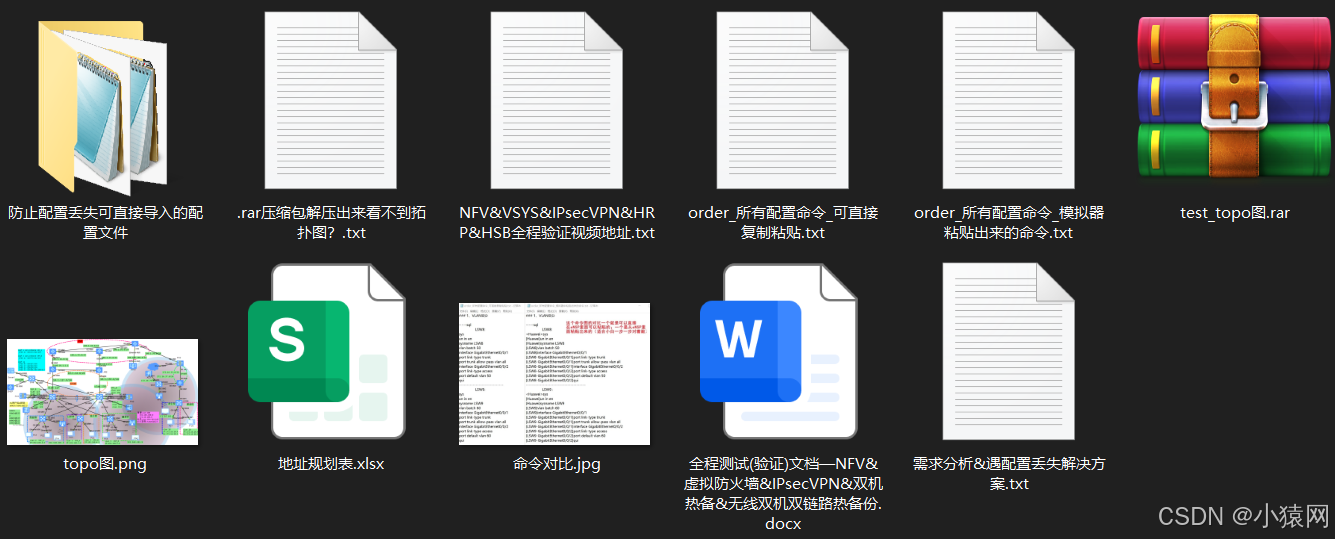
模拟器中防火墙用户名:admin 密码:admin@123
topo图也就是这样子的,相应的地址规划和路由规划大部分都在图中明确的标注了
该topo网络中用到的技术有Eth-trunk、VLAN划分、MSTP、VRRP、OSPF、DHCP、DHCP中继、防火墙双机热备(双活模式)、防火墙虚拟系统、安全策略、IPsecV*N、IP-link、静态路由、ISIS、NAT、NATserver、NQA、无线WLAN、无线双机双链路热备份等。
该实验非常适合于把相应的单个技术学完想把这些技术综合起来的小伙伴,特别是适合于想搞NFV、防火墙这一块设计图的,且对于毕设课设的小伙伴可以进行参考,进行自己的规划与设计。使用场景适用于毕业设计、校园网络规划、企业网络规划、政府网络规划等场合。
有什么问题可以在平台私信博主,博主看到都会第一时间回复的,最后说明该topo规划最后的作者权归于:BSXY_信息学院_19计科_陈永跃

腾讯云面向开发者汇聚海量精品云计算使用和开发经验,营造开放的云计算技术生态圈。
更多推荐
 31
31 0
0- 0


 已为社区贡献1条内容

所有评论(0)