nvm install node.js :The system cannot find the file specified.
·
nvm 安装node.js时,遇到:The system cannot find the file specified.问题时,可以通过降低nvm版本解决。
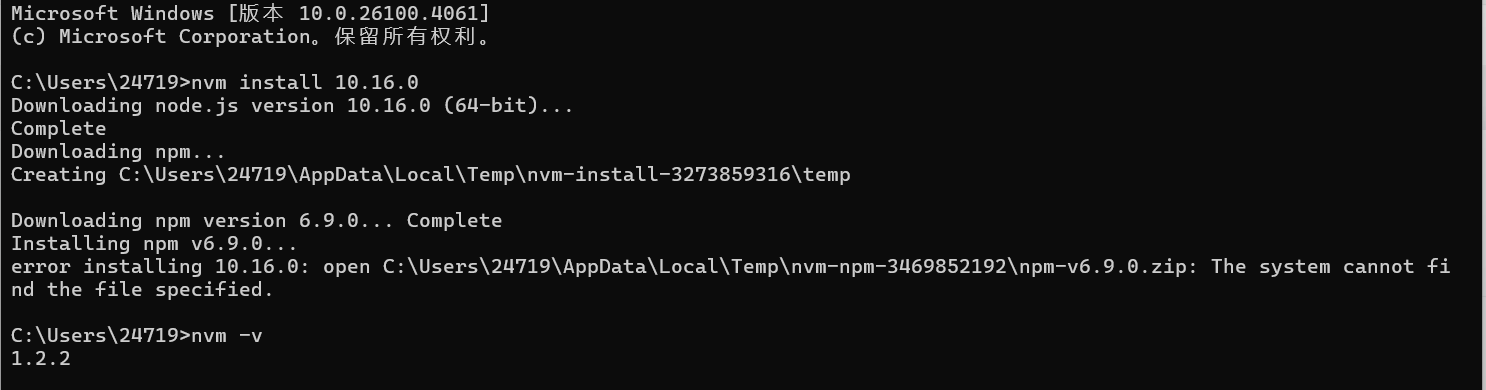
🌟 Windows 降低 nvm 版本步骤
1️⃣ 卸载当前 nvm
-
打开 控制面板 > 程序和功能
-
找到
nvm-windows或Node Version Manager并卸载 -
手动删除残留文件(重要!):
-
删除
C:\Users\<你的用户名>\AppData\Roaming\nvm文件夹 -
删除环境变量(系统属性 > 环境变量):
-
用户变量:删除
NVM_HOME和NVM_SYMLINK -
系统变量:编辑
Path,删除所有包含nvm的条目
-
-
2️⃣ 下载旧版本 nvm
-
访问 nvm-windows 发布页:
👉 Releases · coreybutler/nvm-windows · GitHub -
在 Assets 中找到旧版本安装包(如
nvm-setup.exe):-
推荐稳定旧版本:v1.1.12
-
点击版本号查看历史版本(页面下方有历史版本列表)
-
3️⃣ 安装旧版本
-
关闭所有命令行窗口(CMD/PowerShell)
-
右键选择 以管理员身份运行 下载的安装包
-
安装路径保持默认(
C:\Users\<用户名>\AppData\Roaming\nvm) -
Node.js 符号链接路径保持默认(
C:\Program Files\nodejs)
issue参考:[Issue]: Unable to install npm on older nodejs versions · Issue #1209 · coreybutler/nvm-windows · GitHub

腾讯云面向开发者汇聚海量精品云计算使用和开发经验,营造开放的云计算技术生态圈。
更多推荐
 4
4 0
0- 0


 已为社区贡献1条内容

所有评论(0)