yolov5lite模型训练
这里注意如果是在虚拟环境安装的找不到labellimg指令就去你的conda文件夹,找到envs,点击就有你的python项目名字,点击你安装labellimg的python项目,一般在Scripts目录下,快捷键主要是三个,d下一张,w进行标注,a上一张,最好加上标签名字。会显示软件包不存在,我尝试从github网站直接下载结果显示无法解压,找不到软件包,我都放在我的文件夹还找不到我也不清楚为什
最近在训练yolov5lite的时候看了许多文章,搞了两天终于是把模型结果训练出来了,这里给大家注意一下容易踩坑的点在哪里。
手把手教你:从零开始搭建CUDA环境并基于YOLOv5-Lite进行本地训练再到树莓派4B上的部署_在电脑是训练模型,然后把模型部署到树莓派,在树莓派是预测-CSDN博客
大家可以参考这篇文章,我是按照这篇文章一步一步做的,虽然遇见了一些问题但是最后成功了。
注意如果你的显卡不是英伟达的可以直接跳过前面安装CUDA的步骤,直接下载anaconda和yolov5lite的源文件,当然这里好像并没有v5lite-s.pt的权重文件通过网盘分享的文件:v5lite-s.pt等2个文件
链接: https://pan.baidu.com/s/1ABvvHg-K6yI_ZJsDZRu-rA?pwd=gdvd 提取码: gdvd
这里大家需要的可以自行下载,这里的pycharm版本不受影响,但是不要下载最新版的,还有大家的python版本最好和作者一样下载3.8的,因为后面的依赖环境根据不同的python版本适配不一样,如果python版本不一样按作者方法走或许有许多意想不到的意外。
注意大家在使用pycharm的时候,终端一定要选择anaconda自带的,不要直接使用本地终端,不然你会发现虽然虚拟环境安装了Python3.8但是终端输入python仍然是电脑自带的python版本。
第二点大家在配置requirements.txt文件的时候或许会出现pycocotools无法安装的情况,这种情况下注释掉txt文本中的pycocotools文件,然后继续安装,至于pycocotools,大家进去anaconda prompt终端,
python3.8安装pycocotools(个人备忘录)_python3.8装哪个版本的pycocotool-CSDN博客
参照这个作者的单独安装pycocotools,这样我们需要的依赖就算初步完成了,当然如果你是cpu训练记得要安装torch>=1.8.0和torchvision>=0.9.0,这个原作者注释掉因为他是GPU训练。
之后就是标注你的模型,
LabelImg(目标检测标注工具)的安装与使用教程-CSDN博客
这里注意如果是在虚拟环境安装的找不到labellimg指令就去你的conda文件夹,找到envs,点击就有你的python项目名字,点击你安装labellimg的python项目,一般在Scripts目录下,快捷键主要是三个,d下一张,w进行标注,a上一张,最好加上标签名字。
大家在存放项目路径注意每个路径对应的文件夹之间要用”/”隔开,直接复制绝对路径的话是”\”
在训练过程中也遇见不少问题,最关键的就是内存不足,或者报错Unable to allocate 15.3 MiB for an array with shape (2000, 2000, 4) and data type uint8,这里我最开始问AI改了batch - size ,但是并没有什么用,之后又看教程改了虚拟内存,结果程序直接崩溃了,大家最好不要去试虚拟内存最后找咸鱼技术支持了一下,在train.py文件夹里面找到if __name__ == '__main__':,找到--workers,把dafault的参数改成0,就行了就可以生成最优权重文件。然后按教程把best.pt改成onnx文件运行export.py文件会自动把生成的onnx文件放在weight,这个就是我们需要的模型文件best.onnx,然后我们通过filezilla把onnx传给树莓派5FileZilla客户端的安装配置教程以及使用教程(超级详细)_filezilla使用教程-CSDN博客
注意这里主机一定要加sftp://
再把我们的推理追踪代码
import cv2
import numpy as np
import onnxruntime as ort
import time

def plot_one_box(x, img, color=None, label=None, line_thickness=None):
    """
    description: Plots one bounding box on image img,
                 this function comes from YoLov5 project.
    param:
        x:      a box likes [x1,y1,x2,y2]
        img:    a opencv image object
        color:  color to draw rectangle, such as (0,255,0)
        label:  str
        line_thickness: int
    return:
        no return
    """
    tl = (
        line_thickness or round(0.002 * (img.shape[0] + img.shape[1]) / 2) + 1
    )  # line/font thickness
    color = color or [random.randint(0, 255) for _ in range(3)]
    c1, c2 = (int(x[0]), int(x[1])), (int(x[2]), int(x[3]))
    cv2.rectangle(img, c1, c2, color, thickness=tl, lineType=cv2.LINE_AA)
    if label:
        tf = max(tl - 1, 1)  # font thickness
        t_size = cv2.getTextSize(label, 0, fontScale=tl / 3, thickness=tf)[0]
        c2 = c1[0] + t_size[0], c1[1] - t_size[1] - 3
        cv2.rectangle(img, c1, c2, color, -1, cv2.LINE_AA)  # filled
        cv2.putText(
            img,
            label,
            (c1[0], c1[1] - 2),
            0,
            tl / 3,
            [225, 255, 255],
            thickness=tf,
            lineType=cv2.LINE_AA,
        )

def _make_grid( nx, ny):
        xv, yv = np.meshgrid(np.arange(ny), np.arange(nx))
        return np.stack((xv, yv), 2).reshape((-1, 2)).astype(np.float32)

def cal_outputs(outs,nl,na,model_w,model_h,anchor_grid,stride):

    row_ind = 0
    grid = [np.zeros(1)] * nl
    for i in range(nl):
        h, w = int(model_w/ stride[i]), int(model_h / stride[i])
        length = int(na * h * w)
        if grid[i].shape[2:4] != (h, w):
            grid[i] = _make_grid(w, h)

        outs[row_ind:row_ind + length, 0:2] = (outs[row_ind:row_ind + length, 0:2] * 2. - 0.5 + np.tile(
            grid[i], (na, 1))) * int(stride[i])
        outs[row_ind:row_ind + length, 2:4] = (outs[row_ind:row_ind + length, 2:4] * 2) ** 2 * np.repeat(
            anchor_grid[i], h * w, axis=0)
        row_ind += length
    return outs


def post_process_opencv(outputs,model_h,model_w,img_h,img_w,thred_nms,thred_cond):
    conf = outputs[:,4].tolist()
    c_x = outputs[:,0]/model_w*img_w
    c_y = outputs[:,1]/model_h*img_h
    w  = outputs[:,2]/model_w*img_w
    h  = outputs[:,3]/model_h*img_h
    p_cls = outputs[:,5:]
    if len(p_cls.shape)==1:
        p_cls = np.expand_dims(p_cls,1)
    cls_id = np.argmax(p_cls,axis=1)

    p_x1 = np.expand_dims(c_x-w/2,-1)
    p_y1 = np.expand_dims(c_y-h/2,-1)
    p_x2 = np.expand_dims(c_x+w/2,-1)
    p_y2 = np.expand_dims(c_y+h/2,-1)
    areas = np.concatenate((p_x1,p_y1,p_x2,p_y2),axis=-1)

    areas = areas.tolist()
    ids = cv2.dnn.NMSBoxes(areas,conf,thred_cond,thred_nms)
    if len(ids)>0:
        return  np.array(areas)[ids],np.array(conf)[ids],cls_id[ids]
    else:
        return [],[],[]
def infer_img(img0,net,model_h,model_w,nl,na,stride,anchor_grid,thred_nms=0.4,thred_cond=0.5):
    img = cv2.resize(img0, [model_w,model_h], interpolation=cv2.INTER_AREA)
    img = cv2.cvtColor(img, cv2.COLOR_BGR2RGB)
    img = img.astype(np.float32) / 255.0
    blob = np.expand_dims(np.transpose(img, (2, 0, 1)), axis=0)

    outs = net.run(None, {net.get_inputs()[0].name: blob})[0].squeeze(axis=0)

    outs = cal_outputs(outs,nl,na,model_w,model_h,anchor_grid,stride)

    img_h,img_w,_ = np.shape(img0)
    boxes,confs,ids = post_process_opencv(outs,model_h,model_w,img_h,img_w,thred_nms,thred_cond)

    return  boxes,confs,ids


if __name__ == "__main__":

    model_pb_path = "best.onnx"
    so = ort.SessionOptions()
    net = ort.InferenceSession(model_pb_path, so)

    dic_labels= {0:'drug',
            1:'glue',
            2:'prime'}

    model_h = 320
    model_w = 320
    nl = 3
    na = 3
    stride=[8.,16.,32.]
    anchors = [[10, 13, 16, 30, 33, 23], [30, 61, 62, 45, 59, 119], [116, 90, 156, 198, 373, 326]]
    anchor_grid = np.asarray(anchors, dtype=np.float32).reshape(nl, -1, 2)

    video = 0
    cap = cv2.VideoCapture(video)
    flag_det = False
    while True:
        success, img0 = cap.read()
        if success:

            if flag_det:
                t1 = time.time()
                det_boxes,scores,ids = infer_img(img0,net,model_h,model_w,nl,na,stride,anchor_grid,thred_nms=0.4,thred_cond=0.5)
                t2 = time.time()


                for box,score,id in zip(det_boxes,scores,ids):
                    label = '%s:%.2f'%(dic_labels[id],score)

                    plot_one_box(box.astype(np.int16), img0, color=(255,0,0), label=label, line_thickness=None)

                str_FPS = "FPS: %.2f"%(1./(t2-t1))

                cv2.putText(img0,str_FPS,(50,50),cv2.FONT_HERSHEY_COMPLEX,1,(0,255,0),3)


            cv2.imshow("video",img0)
        key=cv2.waitKey(1) & 0xFF
        if key == ord('q'):

            break
        elif key & 0xFF == ord('s'):
            flag_det = not flag_det
            print(flag_det)

    cap.release()
和我们的best.onnx放在一个文件夹,这个时候我们就可以安装树莓派的虚拟环境了。注意这里大家用 usb不要用csi,具体问题可以参考我之前的帖子树莓派5配合opencv打开摄像头_树莓派5使用 mobilenet v2 实时推理相机视频-CSDN博客,
因为onnx依赖在主环境用
sudo apt-get install onnx会显示软件包不存在,我尝试从github网站直接下载结果显示无法解压,找不到软件包,我都放在我的文件夹还找不到我也不清楚为什么,如果大家使用树莓派5的usb摄像头可以参考这个作者的基于树莓派5连接并调用usb摄像头_树莓派怎么调用usb摄像头-CSDN博客
下载guvcview软件包就可以完美调用摄像头。然后我们直接创建一个虚拟环境,在虚拟环境直接安装onnx和onnxruntime,如果大家显示超时换流量热点多试几次。
pip install onnx
pip install onnxruntime
之后运行我们的主文件。这个时候运行推理代码或许会出现报错
Traceback (most recent call last):
  File "/home/cb123/project/main.py", line 138, in <module>
    det_boxes, scores, ids = infer_img(img0, net, model_h, model_w, nl, na, stride, anchor_grid,
                             ^^^^^^^^^^^^^^^^^^^^^^^^^^^^^^^^^^^^^^^^^^^^^^^^^^^^^^^^^^^^^^^^^^^
  File "/home/cb123/project/main.py", line 101, in infer_img
    outs = cal_outputs(outs, nl, na, model_w, model_h, anchor_grid, stride)
           ^^^^^^^^^^^^^^^^^^^^^^^^^^^^^^^^^^^^^^^^^^^^^^^^^^^^^^^^^^^^^^^^
  File "/home/cb123/project/main.py", line 57, in cal_outputs
    outs[row_ind:row_ind + length, 0:2] = (outs[row_ind:row_ind + length, 0:2] * 2. - 0.5 + np.tile(
                                           ^^^^^^^^^^^^^^^^^^^^^^^^^^^^^^^^^^^^^^^^^^^^^^^^^^^^^^^^^
ValueError: operands could not be broadcast together with shapes (3,2,40,6) (4800,2)


------------------
(program exited with code: 1)
Press return to continue可以参考yolov5-lite移植树莓派报错:_人工智能-CSDN问答直接按照这里面的方法改一下,在使用export.py将pt文件转换成onnx文件的时候,需要把parser.add_argument('--concat', action='store_true')这部分(你直接CTRL+f查找就能找到),这里的action='store_true'要改成action='store_false',重新转一个onnx文件出来,就可以了,最后完美运行程序。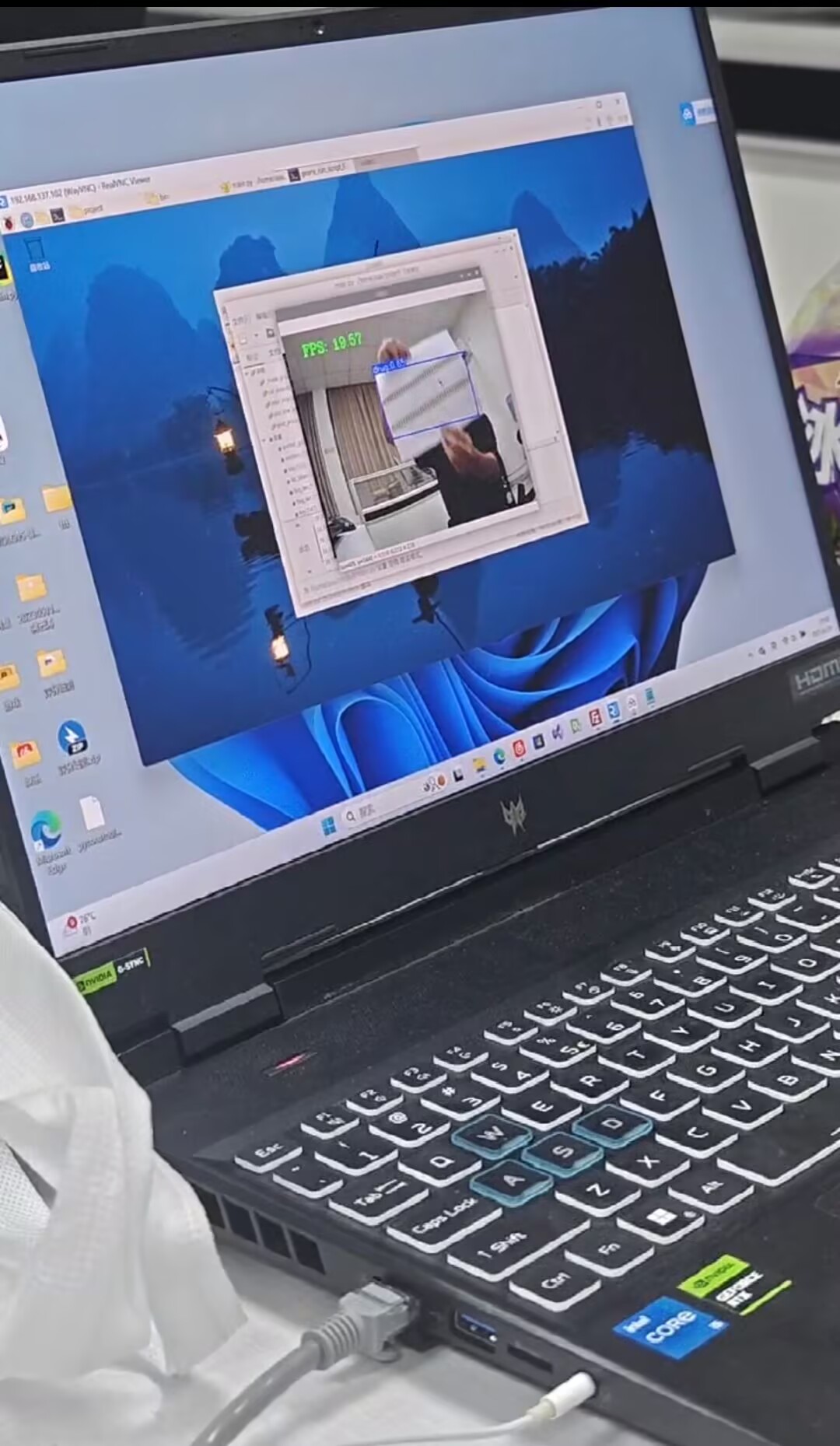
大家还有什么不懂的可以在评论区交流,一起解决问题。

腾讯云面向开发者汇聚海量精品云计算使用和开发经验,营造开放的云计算技术生态圈。
更多推荐
 35
35 0
0- 0


 已为社区贡献1条内容

所有评论(0)