如何使用C++和Dynamsoft精细调整深度学习模型构建桌面 MRZ扫描仪
机器可读区 (MRZ)使用的字体称为OCR-B,该字体已标准化并在全球范围内统一。在最新版本的 Capture Vision SDK 中,Dynamsoft 发布了用于 MRZ 识别的全新深度学习模型。该模型已在大量 MRZ 样本数据集上进行训练,并在 MRZ 文本识别方面提供了显著更高的准确率。在本文中,我们将演示如何使用 C++ 和 Dynamsoft 经过精细调整的深度学习模型构建桌面 MR
如何使用 C++ 和 Dynamsoft 的精细调整深度学习模型构建桌面 MRZ 扫描仪
机器可读区 (MRZ)使用的字体称为OCR-B,该字体已标准化并在全球范围内统一。在最新版本的 Capture Vision SDK 中,Dynamsoft 发布了用于 MRZ 识别的全新深度学习模型。该模型已在大量 MRZ 样本数据集上进行训练,并在 MRZ 文本识别方面提供了显著更高的准确率。在本文中,我们将演示如何使用 C++ 和 Dynamsoft 经过精细调整的深度学习模型构建桌面 MRZ 扫描仪。
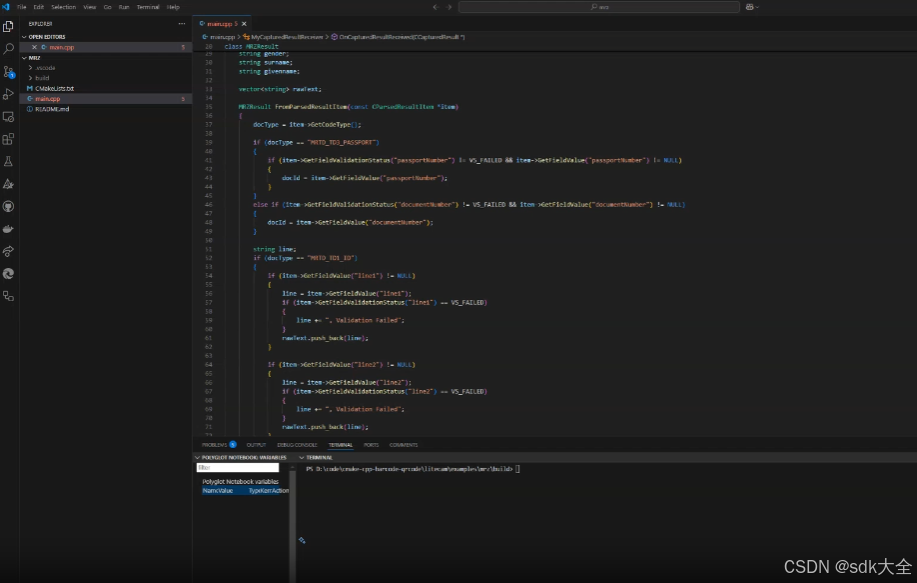
C++ MRZ 扫描仪演示视频
先决条件
- C++ 编译器
- CMake
- Dynamsoft Capture Vision 的试用许可证密钥
- Dynamsoft Capture Vision C++ SDK
MRZ深度学习模型
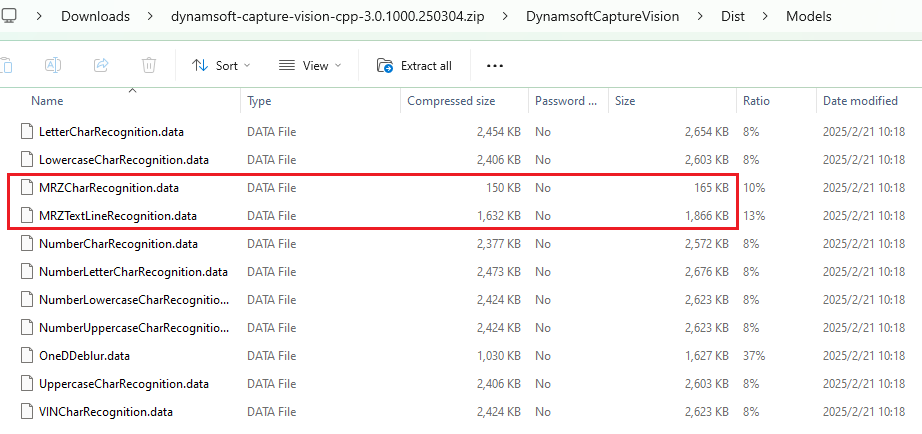
解压 SDK 压缩包后,您可以在文件夹中找到模型文件DynamsoftCaptureVision\Dist\Models。模型文件大小小于 2MB。
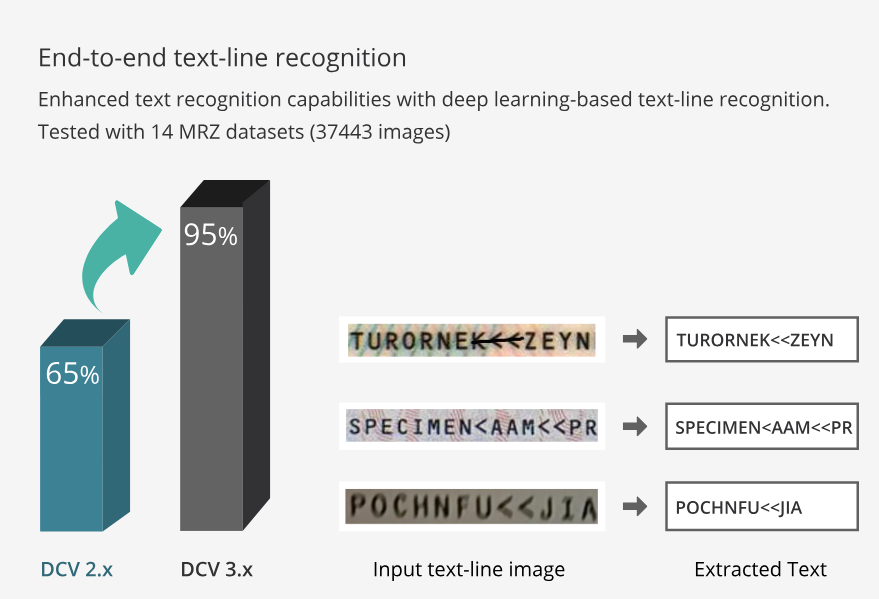
与上一版本相比,新模型将Dynamsoft MRZ数据集的识别准确率从65%提升至95%,性能实现了显著飞跃。
如何配置 CMakeLists.txt 文件
MRZ 扫描仪应用程序需要访问摄像头。我们使用Litecam来捕捉视频帧。
在文件中CMakeLists.txt:
-
编译源代码文件并链接 litecam 和 Dynamsoft Capture Vision 库。用于确定Windows
CMAKE_BUILD_TYPE的运行时库和链接目录。cmake_minimum_required(VERSION 3.15) project(MRZScanner) if(WIN32) if (CMAKE_BUILD_TYPE STREQUAL "Debug") set(CMAKE_MSVC_RUNTIME_LIBRARY "MultiThreadedDebug") else() set(CMAKE_MSVC_RUNTIME_LIBRARY "MultiThreaded") endif() if(CMAKE_BUILD_TYPE STREQUAL "Release") link_directories(${CMAKE_CURRENT_SOURCE_DIR}/../../dist/lib/windows/release ${CMAKE_CURRENT_SOURCE_DIR}/../../../examples/10.x/sdk/platforms/win/lib) else() link_directories(${CMAKE_CURRENT_SOURCE_DIR}/../../dist/lib/windows/debug ${CMAKE_CURRENT_SOURCE_DIR}/../../../examples/10.x/sdk/platforms/win/lib) endif() set(DBR_LIBS "DynamsoftCorex64" "DynamsoftLicensex64" "DynamsoftCaptureVisionRouterx64" "DynamsoftUtilityx64") elseif(APPLE) set(CMAKE_CXX_FLAGS "-std=c++11 -O3 -Wl,-rpath,@executable_path") set(CMAKE_INSTALL_RPATH "@executable_path") link_directories( ${CMAKE_CURRENT_SOURCE_DIR}/../../dist/lib/macos ${CMAKE_CURRENT_SOURCE_DIR}/../../../examples/10.x/sdk/platforms/macos ) set(DBR_LIBS "DynamsoftCore" "DynamsoftLicense" "DynamsoftCaptureVisionRouter" "DynamsoftUtility" "pthread" ) elseif(UNIX) SET(CMAKE_CXX_FLAGS "-std=c++11 -O3 -Wl,-rpath=$ORIGIN") SET(CMAKE_INSTALL_RPATH "$ORIGIN") link_directories(${CMAKE_CURRENT_SOURCE_DIR}/../../dist/lib/linux ${CMAKE_CURRENT_SOURCE_DIR}/../../../examples/10.x/sdk/platforms/linux) set(DBR_LIBS "DynamsoftCore" "DynamsoftLicense" "DynamsoftCaptureVisionRouter" "DynamsoftUtility" pthread) endif() add_executable(${PROJECT_NAME} main.cpp) target_include_directories(${PROJECT_NAME} PUBLIC ${CMAKE_CURRENT_SOURCE_DIR}/../../dist/include ${CMAKE_CURRENT_SOURCE_DIR}/../../../examples/10.x/sdk/include) target_link_libraries(${PROJECT_NAME} litecam ${DBR_LIBS}) -
将资源(包括模板、模型和共享库)复制到输出目录。确保资源名称和结构与 Dynamsoft Capture Vision SDK 保持一致。
if(WIN32)
     if(CMAKE_BUILD_TYPE STREQUAL "Release")
         add_custom_command(TARGET ${PROJECT_NAME} POST_BUILD
         COMMAND ${CMAKE_COMMAND} -E copy_directory
         ${CMAKE_CURRENT_SOURCE_DIR}/../../dist/lib/windows/release
         $<TARGET_FILE_DIR:${PROJECT_NAME}>)
     else()
         add_custom_command(TARGET ${PROJECT_NAME} POST_BUILD
         COMMAND ${CMAKE_COMMAND} -E copy_directory
         ${CMAKE_CURRENT_SOURCE_DIR}/../../dist/lib/windows/debug
         $<TARGET_FILE_DIR:${PROJECT_NAME}>)
     endif()

     add_custom_command(TARGET ${PROJECT_NAME} POST_BUILD
     COMMAND ${CMAKE_COMMAND} -E copy_directory
     ${CMAKE_CURRENT_SOURCE_DIR}/../../../examples/10.x/sdk/platforms/win/bin/
     $<TARGET_FILE_DIR:${PROJECT_NAME}>)
 elseif(APPLE)
     add_custom_command(TARGET ${PROJECT_NAME} POST_BUILD
         COMMAND ${CMAKE_COMMAND} -E copy_directory
         ${CMAKE_CURRENT_SOURCE_DIR}/../../../examples/10.x/sdk/platforms/macos
         $<TARGET_FILE_DIR:${PROJECT_NAME}>
     )
 elseif(UNIX)
     add_custom_command(TARGET ${PROJECT_NAME} POST_BUILD
     COMMAND ${CMAKE_COMMAND} -E copy_directory
     ${CMAKE_CURRENT_SOURCE_DIR}/../../../examples/10.x/sdk/platforms/linux/
     $<TARGET_FILE_DIR:${PROJECT_NAME}>)
 endif()


 add_custom_command(TARGET ${PROJECT_NAME} POST_BUILD
 COMMAND ${CMAKE_COMMAND} -E make_directory $<TARGET_FILE_DIR:${PROJECT_NAME}>/Templates
 COMMAND ${CMAKE_COMMAND} -E copy_directory
 ${CMAKE_CURRENT_SOURCE_DIR}/../../../examples/10.x/sdk/Templates
 $<TARGET_FILE_DIR:${PROJECT_NAME}>/Templates)

 add_custom_command(TARGET ${PROJECT_NAME} POST_BUILD
 COMMAND ${CMAKE_COMMAND} -E make_directory $<TARGET_FILE_DIR:${PROJECT_NAME}>/Models
 COMMAND ${CMAKE_COMMAND} -E copy_directory
 ${CMAKE_CURRENT_SOURCE_DIR}/../../../examples/10.x/sdk/Models
 $<TARGET_FILE_DIR:${PROJECT_NAME}>/Models)

 add_custom_command(TARGET ${PROJECT_NAME} POST_BUILD
 COMMAND ${CMAKE_COMMAND} -E make_directory $<TARGET_FILE_DIR:${PROJECT_NAME}>/ParserResources
 COMMAND ${CMAKE_COMMAND} -E copy_directory
 ${CMAKE_CURRENT_SOURCE_DIR}/../../../examples/10.x/sdk/ParserResources
 $<TARGET_FILE_DIR:${PROJECT_NAME}>/ParserResources)

 add_custom_command(TARGET ${PROJECT_NAME} POST_BUILD
 COMMAND ${CMAKE_COMMAND} -E copy
 ${CMAKE_CURRENT_SOURCE_DIR}/../../../examples/10.x/sdk/ConfusableChars.data
 $<TARGET_FILE_DIR:${PROJECT_NAME}>/ConfusableChars.data)

 add_custom_command(TARGET ${PROJECT_NAME} POST_BUILD
 COMMAND ${CMAKE_COMMAND} -E copy
 ${CMAKE_CURRENT_SOURCE_DIR}/../../../examples/10.x/sdk/OverlappingChars.data
 $<TARGET_FILE_DIR:${PROJECT_NAME}>/OverlappingChars.data)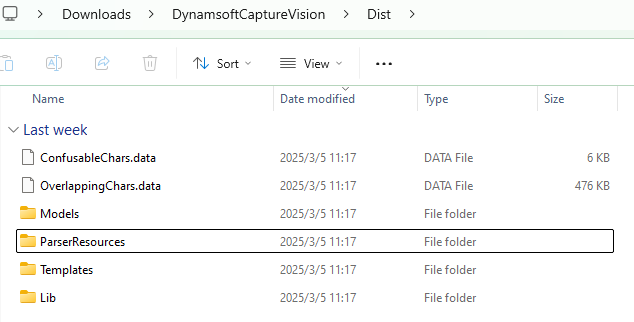
使用 C++ 实现 MRZ 扫描仪的步骤
在接下来的步骤中,我们将逐步完成main.cpp实现 MRZ 扫描仪的文件。
步骤 1:包含头文件
#include <iostream>
#include <deque>
#include <vector>
#include <mutex>
#include <string>
#include "DynamsoftCaptureVisionRouter.h"
#include "DynamsoftUtility.h"
#include "Camera.h"
#include "CameraPreview.h"

using namespace std;
using namespace dynamsoft::license;
using namespace dynamsoft::dlr;
using namespace dynamsoft::cvr;
using namespace dynamsoft::utility;
using namespace dynamsoft::basic_structures;
using namespace dynamsoft::dcp;
步骤2:初始化图像处理引擎
-
使用您自己的许可证密钥设置。
int iRet = -1; char szErrorMsg[256]; iRet = CLicenseManager::InitLicense("LICENSE-KEY", szErrorMsg, 256); if (iRet != EC_OK) { std::cout << szErrorMsg << std::endl; } -
实例化
CCaptureVisionRouter、MyVideoFetcher和CCapturedResultReceiver。CCaptureVisionRouter管理图像处理的工作流程。MyVideoFetcher是 的子类CImageSourceAdapter,用于获取视频帧。CCapturedResultReceiver是 的子类CCapturedResultReceiver,用于接收 MRZ 识别结果。class MyCapturedResultReceiver : public CCapturedResultReceiver { public: virtual void OnCapturedResultReceived(CCapturedResult *capturedResult) override { // TODO: process the MRZ text } }; class MyVideoFetcher : public CImageSourceAdapter { public: MyVideoFetcher() {} ~MyVideoFetcher() {} bool HasNextImageToFetch() const override { return true; } void MyAddImageToBuffer(const CImageData *img, bool bClone = true) { AddImageToBuffer(img, bClone); } }; int main() { int errorCode = 0; char errorMsg[512] = {0}; CCaptureVisionRouter *cvr = new CCaptureVisionRouter; MyVideoFetcher *fetcher = new MyVideoFetcher(); fetcher->SetMaxImageCount(4); fetcher->SetBufferOverflowProtectionMode(BOPM_UPDATE); fetcher->SetColourChannelUsageType(CCUT_AUTO); cvr->SetInput(fetcher); CCapturedResultReceiver *capturedReceiver = new MyCapturedResultReceiver; cvr->AddResultReceiver(capturedReceiver); errorCode = cvr->StartCapturing("ReadPassportAndId", false, errorMsg, 512); if (errorCode != EC_OK) { std::cout << "error:" << errorMsg << std::endl; return -1; } }
步骤 3:创建相机对象并启动相机预览
-
创建一个
Camera对象并循环捕获视频帧。Camera camera; if (camera.Open(0)) { CameraWindow window(camera.frameWidth, camera.frameHeight, "Camera Stream"); if (!window.Create()) { std::cerr << "Failed to create window." << std::endl; return -1; } window.Show(); CameraWindow::Color textColor = {255, 0, 0}; while (window.WaitKey('q')) { FrameData frame = camera.CaptureFrame(); if (frame.rgbData) { window.ShowFrame(frame.rgbData, frame.width, frame.height); // Process the frame ReleaseFrame(frame); } } camera.Release(); } -
将帧附加到
MyVideoFetcher对象以进行 MRZ 识别。if (frame.rgbData) { window.ShowFrame(frame.rgbData, frame.width, frame.height); CImageData data(frame.size, frame.rgbData, frame.width, frame.height, frame.width * 3, IPF_RGB_888, 0, 0); fetcher->MyAddImageToBuffer(&data); }
步骤4:在回调函数中接收MRZ识别结果
-
OnCapturedResultReceivedMRZ 识别过程完成后触发回调函数。MRZ 文本存储在对象中CCapturedResult。class Point { public: int x; int y; Point(int x, int y) : x(x), y(y) {} }; struct TextResult { int id; MRZResult info; std::vector<Point> textLinePoints; }; std::vector<TextResult> textResults; std::mutex textResultsMutex; class MyCapturedResultReceiver : public CCapturedResultReceiver { public: virtual void OnCapturedResultReceived(CCapturedResult *capturedResult) override { std::lock_guard<std::mutex> lock(textResultsMutex); textResults.clear(); CRecognizedTextLinesResult *textLineResult = capturedResult->GetRecognizedTextLinesResult(); if (textLineResult == nullptr) { return; } int lCount = textLineResult->GetItemsCount(); for (int li = 0; li < lCount; ++li) { TextResult textResult; const CTextLineResultItem *textLine = textLineResult->GetItem(li); CPoint *points = textLine->GetLocation().points; textResult.textLinePoints.push_back(Point(points[0][0], points[0][1])); textResult.textLinePoints.push_back(Point(points[1][0], points[1][1])); textResult.textLinePoints.push_back(Point(points[2][0], points[2][1])); textResult.textLinePoints.push_back(Point(points[3][0], points[3][1])); const CParsedResultItem *item = capturedResult->GetParsedResult()->GetItem(li); MRZResult mrzResult; mrzResult.FromParsedResultItem(item); textResult.info = mrzResult; textResults.push_back(textResult); } } }; -
该
FromParsedResultItem()功能从MRZ文本中提取证件类型、签发国、证件号码、姓名、国籍、出生日期、性别、有效期等标准化信息。class MRZResult { public: string docId; string docType; string nationality; string issuer; string dateOfBirth; string dateOfExpiry; string gender; string surname; string givenname; vector<string> rawText; MRZResult FromParsedResultItem(const CParsedResultItem *item) { docType = item->GetCodeType(); if (docType == "MRTD_TD3_PASSPORT") { if (item->GetFieldValidationStatus("passportNumber") != VS_FAILED && item->GetFieldValue("passportNumber") != NULL) { docId = item->GetFieldValue("passportNumber"); } } else if (item->GetFieldValidationStatus("documentNumber") != VS_FAILED && item->GetFieldValue("documentNumber") != NULL) { docId = item->GetFieldValue("documentNumber"); } string line; if (docType == "MRTD_TD1_ID") { if (item->GetFieldValue("line1") != NULL) { line = item->GetFieldValue("line1"); if (item->GetFieldValidationStatus("line1") == VS_FAILED) { line += ", Validation Failed"; } rawText.push_back(line); } if (item->GetFieldValue("line2") != NULL) { line = item->GetFieldValue("line2"); if (item->GetFieldValidationStatus("line2") == VS_FAILED) { line += ", Validation Failed"; } rawText.push_back(line); } if (item->GetFieldValue("line3") != NULL) { line = item->GetFieldValue("line3"); if (item->GetFieldValidationStatus("line3") == VS_FAILED) { line += ", Validation Failed"; } rawText.push_back(line); } } else { if (item->GetFieldValue("line1") != NULL) { line = item->GetFieldValue("line1"); if (item->GetFieldValidationStatus("line1") == VS_FAILED) { line += ", Validation Failed"; } rawText.push_back(line); } if (item->GetFieldValue("line2") != NULL) { line = item->GetFieldValue("line2"); if (item->GetFieldValidationStatus("line2") == VS_FAILED) { line += ", Validation Failed"; } rawText.push_back(line); } } if (item->GetFieldValidationStatus("nationality") != VS_FAILED && item->GetFieldValue("nationality") != NULL) { nationality = item->GetFieldValue("nationality"); } if (item->GetFieldValidationStatus("issuingState") != VS_FAILED && item->GetFieldValue("issuingState") != NULL) { issuer = item->GetFieldValue("issuingState"); } if (item->GetFieldValidationStatus("dateOfBirth") != VS_FAILED && item->GetFieldValue("dateOfBirth") != NULL) { dateOfBirth = item->GetFieldValue("dateOfBirth"); } if (item->GetFieldValidationStatus("dateOfExpiry") != VS_FAILED && item->GetFieldValue("dateOfExpiry") != NULL) { dateOfExpiry = item->GetFieldValue("dateOfExpiry"); } if (item->GetFieldValidationStatus("sex") != VS_FAILED && item->GetFieldValue("sex") != NULL) { gender = item->GetFieldValue("sex"); } if (item->GetFieldValidationStatus("primaryIdentifier") != VS_FAILED && item->GetFieldValue("primaryIdentifier") != NULL) { surname = item->GetFieldValue("primaryIdentifier"); } if (item->GetFieldValidationStatus("secondaryIdentifier") != VS_FAILED && item->GetFieldValue("secondaryIdentifier") != NULL) { givenname = item->GetFieldValue("secondaryIdentifier"); } return *this; } string ToString() { string msg = "Raw Text:\n"; for (size_t idx = 0; idx < rawText.size(); ++idx) { msg += "\tLine " + to_string(idx + 1) + ": " + rawText[idx] + "\n"; } msg += "Parsed Information:\n"; msg += "\tDocument Type: " + docType + "\n"; msg += "\tDocument ID: " + docId + "\n"; msg += "\tSurname: " + surname + "\n"; msg += "\tGiven Name: " + givenname + "\n"; msg += "\tNationality: " + nationality + "\n"; msg += "\tIssuing Country or Organization: " + issuer + "\n"; msg += "\tGender: " + gender + "\n"; msg += "\tDate of Birth(YYMMDD): " + dateOfBirth + "\n"; msg += "\tExpiration Date(YYMMDD): " + dateOfExpiry + "\n"; return msg; } };
步骤5:在屏幕上显示MRZ文本
{
    std::lock_guard<std::mutex> lock(textResultsMutex);
    for (const auto &result : textResults)
    {
        if (!result.textLinePoints.empty())
        {
            std::vector<std::pair<int, int>> corners = {{result.textLinePoints[0].x, result.textLinePoints[0].y},
                                                        {result.textLinePoints[1].x, result.textLinePoints[1].y},
                                                        {result.textLinePoints[2].x, result.textLinePoints[2].y},
                                                        {result.textLinePoints[3].x, result.textLinePoints[3].y}};
            window.DrawContour(corners);

            int x = 20;
            int y = 40;

            MRZResult mrzResult = result.info;
            string msg = "Document Type: " + mrzResult.docType;
            window.DrawText(msg, x, y, 24, textColor);
            y += 20;
            msg = "Document ID: " + mrzResult.docId;
            window.DrawText(msg, x, y, 24, textColor);
            y += 20;
            msg = "Surname: " + mrzResult.surname;
            window.DrawText(msg, x, y, 24, textColor);
            y += 20;
            msg = "Given Name: " + mrzResult.givenname;
            window.DrawText(msg, x, y, 24, textColor);
            y += 20;
            msg = "Nationality: " + mrzResult.nationality;
            window.DrawText(msg, x, y, 24, textColor);
            y += 20;
            msg = "Issuing Country or Organization: " + mrzResult.issuer;
            window.DrawText(msg, x, y, 24, textColor);
            y += 20;
            msg = "Gender: " + mrzResult.gender;
            window.DrawText(msg, x, y, 24, textColor);
            y += 20;
            msg = "Date of Birth(YYMMDD): " + mrzResult.dateOfBirth;
            window.DrawText(msg, x, y, 24, textColor);
            y += 20;
            msg = "Expiration Date(YYMMDD): " + mrzResult.dateOfExpiry;
        }
    }
}
步骤 6:构建并运行 MRZ 扫描仪
-
创建构建目录:
mkdir build cd build -
使用 CMake 配置并构建:
cmake ..
 cmake --build .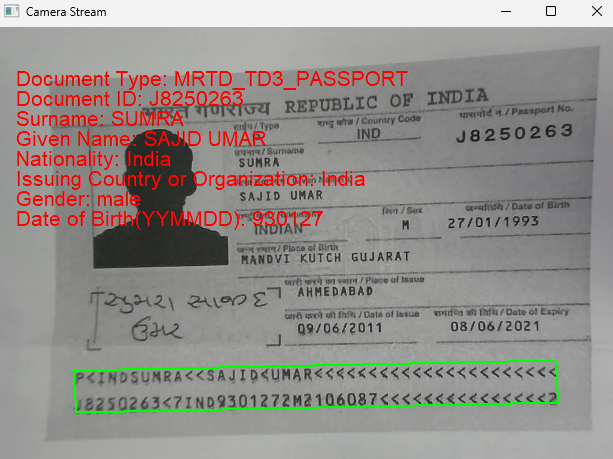
源代码
https://github.com/yushulx/cmake-cpp-barcode-qrcode-mrz/tree/main/litecam/examples/mrz

腾讯云面向开发者汇聚海量精品云计算使用和开发经验,营造开放的云计算技术生态圈。
更多推荐
 31
31 0
0- 0


 已为社区贡献25条内容

所有评论(0)