Oracle数据库启动失败修复记录,ora-01092,ora-00704,ora-00702,bootstrap process failure引导版本与‘8.0.0.0.0‘不一致
·
这一台备机在当时新建之后没有启动过,也并没有启动RMAN和DG备份。只是通过拷贝数据文件和控制文件进行备份,突然就启动不了了,通过尝试startup提示bootstrap都是失败。查资料发现是基表损坏了。
试图拷贝system01.dbf进行替换也无济于事,需要导出system01.dbf的数据块,再导入到问题数据库进行修复块。
应该是数据文件的某一块损坏了,最终通过一个正常数据库导出块,然后导入,成功修复该数据库。必须是相同版本的数据库,题主的备库是11.2.0.4,然后通过办公机 虚拟机安装同版本的Oracle11g,导出块。
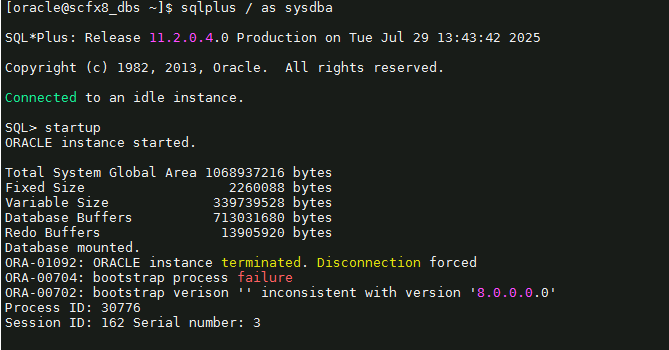
ORA-01092:0RACLE instance terminated. Disconnection forced
0RA-00704:bootstrap process failure
ORA-00702: bootstrap verison '' inconsistent with version '8.0.0.0.0'
Process ID:30776
Session ID:162 Serial number: 3
192.168.78.110是办公电脑虚拟机安装的同版本的数据库。
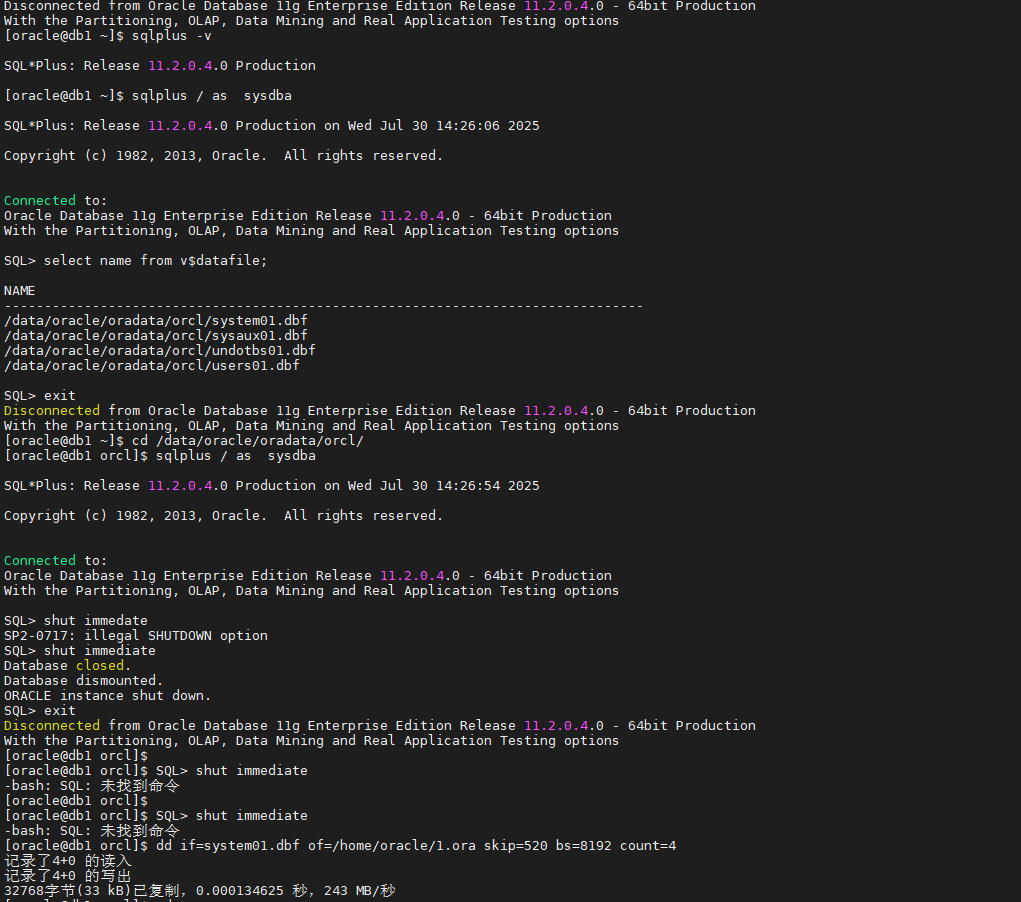
[root@db1 ~]# su - oracle
上一次登录:二 7月 29 16:46:28 CST 2025pts/0 上
[oracle@db1 ~]$ sqlplus / as sysdba

SQL*Plus: Release 11.2.0.4.0 Production on Wed Jul 30 14:25:07 2025

Copyright (c) 1982, 2013, Oracle.  All rights reserved.

Connected to an idle instance.

SQL>
SQL>
SQL>
SQL>
SQL>
SQL>
SQL> startup
ORACLE instance started.

Total System Global Area 1068937216 bytes
Fixed Size                  2260088 bytes
Variable Size             335545224 bytes
Database Buffers          725614592 bytes
Redo Buffers                5517312 bytes
Database mounted.
Database opened.
SQL> exit
Disconnected from Oracle Database 11g Enterprise Edition Release 11.2.0.4.0 - 64bit Production
With the Partitioning, OLAP, Data Mining and Real Application Testing options
[oracle@db1 ~]$ sqlplus -v

SQL*Plus: Release 11.2.0.4.0 Production

[oracle@db1 ~]$ sqlplus / as  sysdba

SQL*Plus: Release 11.2.0.4.0 Production on Wed Jul 30 14:26:06 2025

Copyright (c) 1982, 2013, Oracle.  All rights reserved.


Connected to:
Oracle Database 11g Enterprise Edition Release 11.2.0.4.0 - 64bit Production
With the Partitioning, OLAP, Data Mining and Real Application Testing options

SQL> select name from v$datafile;

NAME
--------------------------------------------------------------------------------
/data/oracle/oradata/orcl/system01.dbf
/data/oracle/oradata/orcl/sysaux01.dbf
/data/oracle/oradata/orcl/undotbs01.dbf
/data/oracle/oradata/orcl/users01.dbf

SQL> exit
Disconnected from Oracle Database 11g Enterprise Edition Release 11.2.0.4.0 - 64bit Production
With the Partitioning, OLAP, Data Mining and Real Application Testing options
[oracle@db1 ~]$ cd /data/oracle/oradata/orcl/
[oracle@db1 orcl]$ sqlplus / as  sysdba

SQL*Plus: Release 11.2.0.4.0 Production on Wed Jul 30 14:26:54 2025

Copyright (c) 1982, 2013, Oracle.  All rights reserved.


Connected to:
Oracle Database 11g Enterprise Edition Release 11.2.0.4.0 - 64bit Production
With the Partitioning, OLAP, Data Mining and Real Application Testing options

SQL> shut immedate
SP2-0717: illegal SHUTDOWN option
SQL> shut immediate
Database closed.
Database dismounted.
ORACLE instance shut down.
SQL> exit
Disconnected from Oracle Database 11g Enterprise Edition Release 11.2.0.4.0 - 64bit Production
With the Partitioning, OLAP, Data Mining and Real Application Testing options
[oracle@db1 orcl]$
[oracle@db1 orcl]$ SQL> shut immediate
-bash: SQL: 未找到命令
[oracle@db1 orcl]$
[oracle@db1 orcl]$ SQL> shut immediate
-bash: SQL: 未找到命令
[oracle@db1 orcl]$ dd if=system01.dbf of=/home/oracle/1.ora skip=520 bs=8192 count=4
记录了4+0 的读入
记录了4+0 的写出
32768字节(33 kB)已复制,0.000134625 秒,243 MB/秒
[oracle@db1 orcl]$ cd
[oracle@db1 ~]$ ll
总用量 32
-rw-r--r--  1 oracle oinstall 32768 7月  30 14:30 1.ora
drwxr-xr-x. 2 oracle oinstall    61 8月  22 2024 response
[oracle@db1 ~]$ pwd
/home/oracle
通过导入后,成功opened数据库;
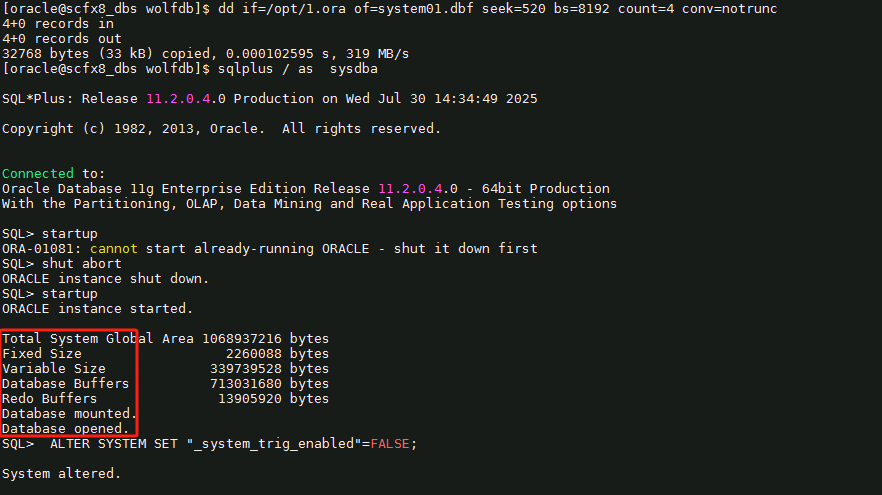
关键代码,不懂可以问AI;
ALTER SYSTEM SET "_system_trig_enabled"=FALSE;

dd if=system01.dbf of=/home/oracle/1.ora skip=520 bs=8192 count=4

dd if=/opt/1.ora of=system01.dbf seek=520 bs=8192 count=4 conv=notrunc

腾讯云面向开发者汇聚海量精品云计算使用和开发经验,营造开放的云计算技术生态圈。
更多推荐
 4
4 0
0- 0


 已为社区贡献2条内容

所有评论(0)