centos安装gitlab服务
·
服务器最低配置为:配置最低是2核4G
1、更换yum源为阿里云:
1.1、备份
cp /etc/yum.repos.d/CentOS-Base.repo /etc/yum.repos.d/CentOS-Base.repo.backup
1.2. 更换阿里云镜像源
wget -O /etc/yum.repos.d/CentOS-Base.repo http://mirrors.aliyun.com/repo/Centos-7.repo
1.3. 清理并重建缓存
yum clean all
yum makecache
1.4. 升级系统所有包
yum -y update
2、安装依赖包
yum install -y curl policycoreutils-python openssh-server
3、启动sshd服务
# 设置开机自启动sshd服务
systemctl enable sshd
# 启动sshd服务
systemctl start sshd
4、修改镜像源
# 1.进入目录
cd /etc/yum.repos.d
# 新建
touch /etc/yum.repos.d/gitlab-ce.repo
# 进入该文件进行编辑
vi gitlab-ce.repo
按下键盘i键进行编辑,复制下方内容后保存。保存操作为:Esc键后 + :wq + 回车
[gitlab-ce]

name=Gitlab CE Repository

baseurl=https://mirrors.tuna.tsinghua.edu.cn/gitlab-ce/yum/el$releasever/

gpgcheck=0

enabled=1

sslverify=0
重新生成缓存
yum makecache
5、安装gitlab
yum install -y gitlab-ce
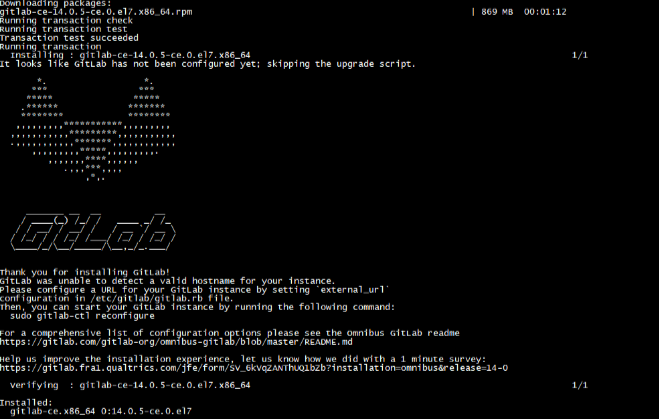
6、配置GitLab页面访问地址(重点)
进入配置文件
vi /etc/gitlab/gitlab.rb
修改external_url,设置成你自己本地地址和端口号
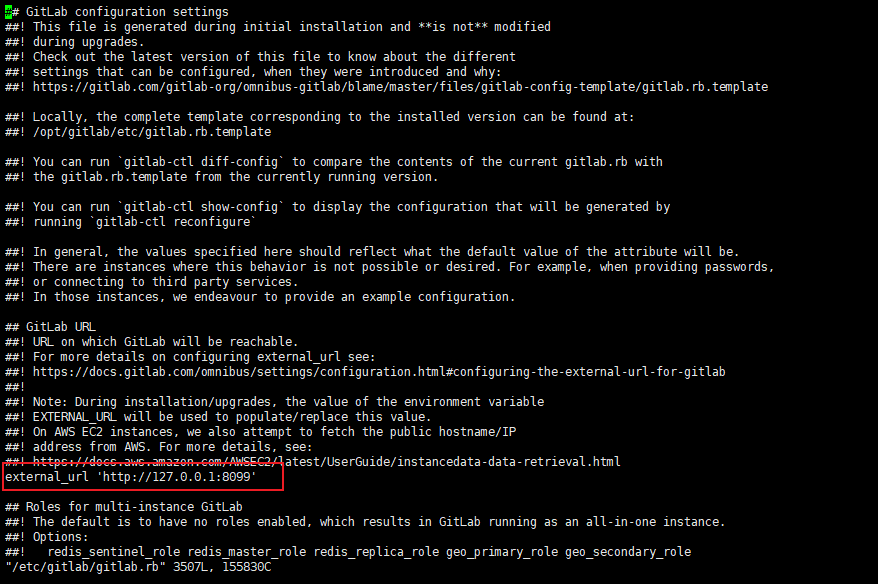
允许防火墙或关闭防火墙
firewall-cmd --add-port=8099/tcp --permanent  #允许8099端口
firewall-cmd --reload  #配置生效
firewall-cmd --list-ports  #查看允许端口

或者直接关闭防火墙
systemctl stop firewalld
重置gitlab配置(过程可能会慢–几分钟左右)
gitlab-ctl reconfigure
重启gitlab服务
gitlab-ctl restart
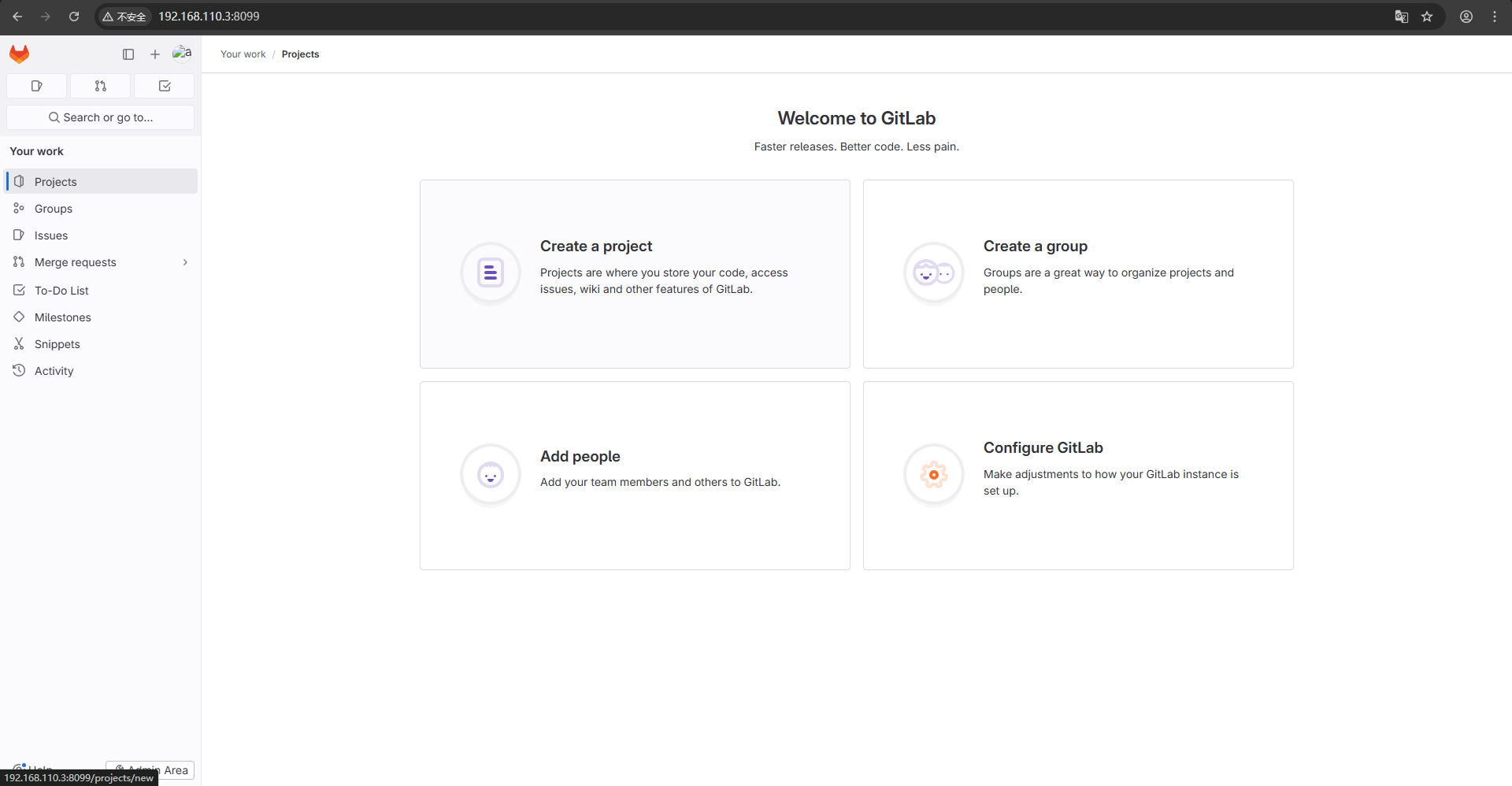
访问页面
我服务是安装在虚拟机上,下页面是登录成功页面
管理员账号为root
默认密码存在/etc/gitlab/initial_root_password文件中
# 查看默认密码
cat /etc/gitlab/initial_root_password
默认密码如下:

登录成功页面:
附:
1、页面显示502问题:
查看puma服务启动是否成功,有时会显示端口占用
sudo less /var/log/gitlab/puma/current
/opt/gitlab/embedded/lib/ruby/gems/3.2.0/gems/puma-6.5.0/lib/puma/binder.rb:335:in `initialize’: Address already in use - bind(2) for “127.0.0.1” port
修改puma端口
我这边修改为不常用的11800端口(对应防火墙开发此端口或直接关闭防火墙)
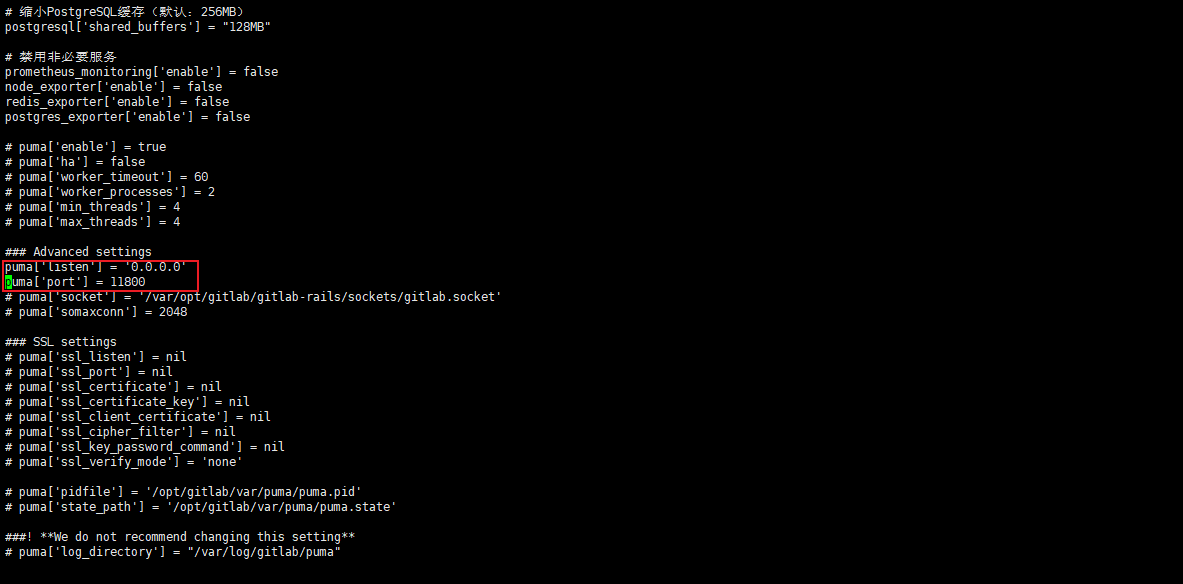
因为我虚拟机上也安装了nginx。gitlab内置也会安装nginx。可能会导致端口占用。我这边选择修改gitlab中的 nginx端口。
在配置文件添加如下:
所有端口需要防火墙配置允许
nginx['redirect_http_to_https_port'] = 8443
这边端口记得与第六步的external_url端口一致
nginx['listen_port'] = 8099
代理到puma服务器
nginx['proxy_pass'] = 'http://127.0.0.1:11800'
重置配置(过程可能会慢–几分钟左右)
gitlab-ctl reconfigure
重启服务
gitlab-ctl restart
2、如果虚拟机内存不足可创建Swap交换分区
# 创建4GB Swap文件(推荐大小为物理内存1.5-2倍)
sudo dd if=/dev/zero of=/swapfile bs=1G count=4

# 设置权限
sudo chmod 600 /swapfile

# 格式化Swap
sudo mkswap /swapfile

# 启用Swap
sudo swapon /swapfile

# 永久生效(重启后保留)
echo '/swapfile none swap sw 0 0' | sudo tee -a /etc/fstab
验证:free -h 查看Swap是否生效
free -h
还可以优化GitLab配置
sudo vim /etc/gitlab/gitlab.rb
添加以下配置
# 减少Puma工作进程(默认:2)
puma['worker_processes'] = 1

# 减少Sidekiq并发数(默认:25)
sidekiq['concurrency'] = 10

# 缩小PostgreSQL缓存(默认:256MB)
postgresql['shared_buffers'] = "128MB"

# 禁用非必要服务
prometheus_monitoring['enable'] = false
node_exporter['enable'] = false
redis_exporter['enable'] = false
postgres_exporter['enable'] = false
配置生效
sudo gitlab-ctl reconfigure
sudo gitlab-ctl restart

腾讯云面向开发者汇聚海量精品云计算使用和开发经验,营造开放的云计算技术生态圈。
更多推荐
 5
5 0
0- 0


 已为社区贡献1条内容

所有评论(0)