使用drogon后端+Vue3 实现登录功能 数据库mysql 使用异步接口实现较高并发
使用 Drogon C++ 框架实现后端 RESTful API,提供登录和注册功能。前端采用 Vue3 和 Axios 进行接口调用,实现前后端分离架构。数据库操作通过异步 SQL 查询实现,密码使用 SHA3 哈希存储。用户输入验证包括用户名长度、密码复杂度等基本校验。并通过对数据库和运行负载的cpu进行优化调度,在apipost 得到QFS>2k/s并发量。
项目介绍:使用drogon 框架实现简单的登录,注册功能,使用Vue3 ,axios,调用drogon后端接口,实现简单的网页功能调用。在总体实现前后端分离项目。
服务器配置:4核+4gb
语言环境:C++
Ubuntu22.0.4
数据库:
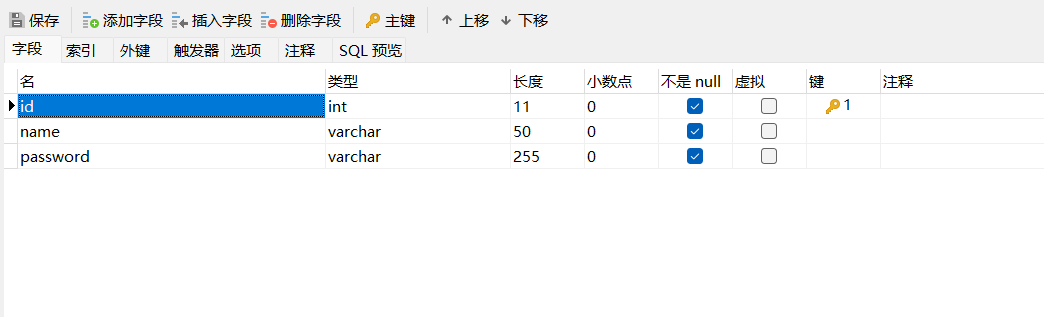
后端目录: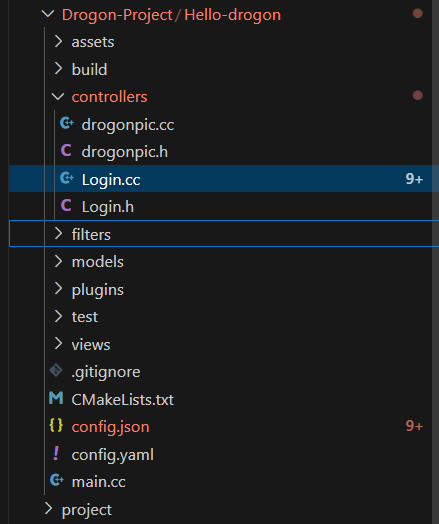
前端:vue3目录:
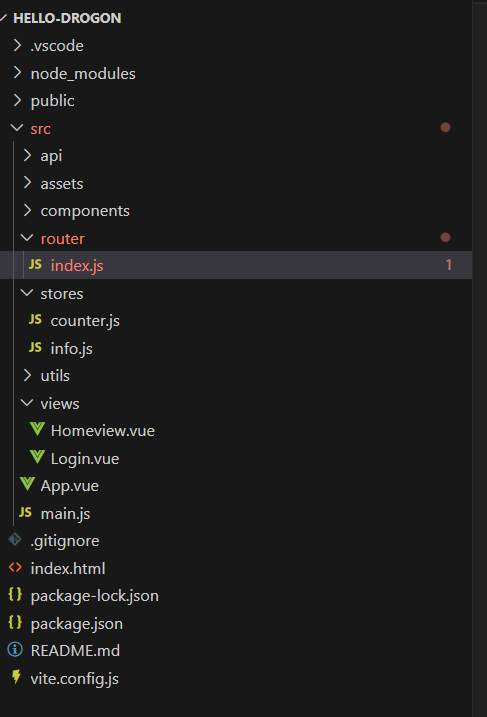
后端:
登录控制器
创建一个login控制器
drogon_ctl create controller -h login编写login.h: 从请求头中解析出username 和password封装到RegUser 与LoginUser结构体中,传递给函数中。
#pragma once

#include <drogon/HttpController.h>
#include <stdexcept>

using namespace drogon;

struct RegUser {
	std::string username;
	std::string password;

};

// 登录专用结构体
struct LoginUser {
	std::string username;
	std::string password;
};

class Login : public drogon::HttpController<Login>
{
  public:
    METHOD_LIST_BEGIN
    // 注册方法
    ADD_METHOD_TO(Login::registe, "/api/reg", Post);
    // 登录方法
    ADD_METHOD_TO(Login::login, "api/login", Post);


    METHOD_LIST_END
    // 注册函数声明
    void registe(const HttpRequestPtr& req,
	  std::function<void(const HttpResponsePtr&)>&& callback,RegUser user)const;
    // 登录函数声明
    void login(const HttpRequestPtr& req,
	  std::function<void(const HttpResponsePtr&)>&& callback, LoginUser user)const;


};


namespace drogon
{
    // 注册用户转换
    template<>
    inline RegUser fromRequest(const HttpRequest& req)
    {
        auto json = req.getJsonObject();
        if (!json) throw std::runtime_error("Invalid JSON");

        RegUser user;
        // 用户名验证
        if (!json->isMember("username") || (*json)["username"].asString().size() < 8)
            throw std::runtime_error("Username too short (min 8 chars)");
        user.username = (*json)["username"].asString();

        // 密码验证
        if (!json->isMember("password") || (*json)["password"].asString().size() < 6)
            throw std::runtime_error("Password too short (min 6 chars)");
        user.password = (*json)["password"].asString();

        // 角色验证
        // if (!json->isMember("role") || (*json)["role"].asString().size() < 0)
        //     throw std::runtime_error("Role too short (min 2 chars)"); // 修正错误信息
        // user.role = (*json)["role"].asString();

        return user;
    }

    // 登录用户转换
    template<>
    inline LoginUser fromRequest(const HttpRequest& req)
    {
        auto json = req.getJsonObject();
        if (!json) throw std::runtime_error("Invalid JSON");

        LoginUser user;
        // 用户名验证
        if (!json->isMember("username") || (*json)["username"].asString().size() < 4)
            throw std::runtime_error("Username too short (min 8 chars)");
        user.username = (*json)["username"].asString();

        // 密码验证
        if (!json->isMember("password") || (*json)["password"].asString().size() < 6)
            throw std::runtime_error("Password too short (min 6 chars)");
        user.password = (*json)["password"].asString();

        return user;
    }


}
编写login.cc:使用异步模型 数据库异步接口,进行嵌套采用非阻塞IO设计(execSqlAsync)通过回调函数链处理嵌套操作,使用drogon自带的hash3 对用户的密码进行加密(安全性设计)。
#include "Login.h"
#include <drogon/orm/Exception.h>
#include <drogon/utils/Utilities.h>

using namespace drogon;
using namespace drogon::orm;

void Login::registe(const HttpRequestPtr& req,
          std::function<void(const HttpResponsePtr&)>&& callback, RegUser user) const
{
    auto dbClient = app().getDbClient();
    auto callbackPtr = std::make_shared<std::function<void(const HttpResponsePtr&)>>(std::move(callback));

    // 外层查询
    dbClient->execSqlAsync(
        "SELECT COUNT(*) FROM user WHERE name = ?",
        [this, user, callbackPtr, dbClient](const Result &result) {
            Json::Value json;
            if (result[0][0].as<size_t>() > 0) {
                json["error"] = "该用户名已存在";
                auto resp = HttpResponse::newHttpJsonResponse(json);
                resp->setStatusCode(k409Conflict);
                (*callbackPtr)(resp);
                return;
            }

            // 内层插入
            std::string hashedPassword = utils::getSha3(user.password);
            dbClient->execSqlAsync(
                "INSERT INTO user (name, password) VALUES(?, ?)",
                [callbackPtr](const Result &) {
                    Json::Value innerJson;
                    innerJson["message"] = "注册成功";
                    auto resp = HttpResponse::newHttpJsonResponse(innerJson);
                    resp->setStatusCode(k201Created);
                    (*callbackPtr)(resp);
                },
                [callbackPtr](const DrogonDbException &e) {
                    Json::Value json;
                    json["error"] = "数据库错误: " + std::string(e.base().what());
                    auto resp = HttpResponse::newHttpJsonResponse(json);
                    resp->setStatusCode(k500InternalServerError);
                    (*callbackPtr)(resp);
                },
                user.username,
                hashedPassword
            );
        },
        [callbackPtr](const DrogonDbException &e) {
            Json::Value json;
            json["error"] = "数据库错误: " + std::string(e.base().what());
            auto resp = HttpResponse::newHttpJsonResponse(json);
            resp->setStatusCode(k500InternalServerError);
            (*callbackPtr)(resp);
        },
        user.username
    );
}

void Login::login(const HttpRequestPtr& req,
          std::function<void(const HttpResponsePtr&)>&& callback, LoginUser user) const
{
    auto dbClient = app().getDbClient();
    auto callbackPtr = std::make_shared<std::function<void(const HttpResponsePtr&)>>(std::move(callback));

    dbClient->execSqlAsync(
        "SELECT password FROM user WHERE name = ?",
        [user, callbackPtr](const Result &result) {
            Json::Value json;
            if (result.empty()) {
                json["error"] = "用户名或密码错误";
                auto resp = HttpResponse::newHttpJsonResponse(json);
                resp->setStatusCode(k401Unauthorized);
                (*callbackPtr)(resp);
                return;
            }

            std::string storedHash = result[0]["password"].as<std::string>();
            std::string inputHash = utils::getSha3(user.password);

            if (inputHash != storedHash) {
                json["error"] = "用户名或密码错误";
                auto resp = HttpResponse::newHttpJsonResponse(json);
                resp->setStatusCode(k401Unauthorized);
                (*callbackPtr)(resp);
                return;
            }

            json["message"] = "登录成功";
            auto resp = HttpResponse::newHttpJsonResponse(json);
            (*callbackPtr)(resp);
        },
        [callbackPtr](const DrogonDbException &e) {
            Json::Value json;
            json["error"] = "数据库错误: " + std::string(e.base().what());
            auto resp = HttpResponse::newHttpJsonResponse(json);
            resp->setStatusCode(k500InternalServerError);
            (*callbackPtr)(resp);
        },
        user.username
    );
}
数据库
数据库sql 文件:
SET NAMES utf8mb4;
SET FOREIGN_KEY_CHECKS = 0;

-- ----------------------------
-- Table structure for user
-- ----------------------------
DROP TABLE IF EXISTS `user`;
CREATE TABLE `user`  (
  `id` int(11) NOT NULL AUTO_INCREMENT,
  `name` varchar(50) CHARACTER SET utf8mb4 COLLATE utf8mb4_general_ci NOT NULL,
  `password` varchar(255) CHARACTER SET utf8mb4 COLLATE utf8mb4_general_ci NOT NULL,
  PRIMARY KEY (`id`) USING BTREE
) ENGINE = InnoDB AUTO_INCREMENT = 16 CHARACTER SET = utf8mb4 COLLATE = utf8mb4_general_ci ROW_FORMAT = Dynamic;

-- ----------------------------
-- Records of user
-- ----------------------------
'87CD084D190E436F147322B90E7384F6A8E0676C99D21EF519EA718E51D45F9C');
INSERT INTO `user` VALUES (10, 'xhm1234568', '87CD084D190E436F147322B90E7384F6A8E0676C99D21EF519EA718E51D45F9C');
INSERT INTO `user` VALUES (11, 'xhm123456810', '87CD084D190E436F147322B90E7384F6A8E0676C99D21EF519EA718E51D45F9C');
INSERT INTO `user` VALUES (12, 'test12345', '87CD084D190E436F147322B90E7384F6A8E0676C99D21EF519EA718E51D45F9C');
INSERT INTO `user` VALUES (13, 'xhm12345678', '3D3E655F38CC749FF7CAD28F41FA5472527F765F341ABCA9CD4268B9E2919A8D');

SET FOREIGN_KEY_CHECKS = 1;
前端
vue3 项目
Login.vue:
<template>
  <div class="login-container">
    <h1>{{ loginStore.isRegistering ? '用户注册' : '用户登录' }}</h1>

    <form @submit.prevent="handleSubmit">
      <div class="form-group">
        <label>用户名:</label>
        <input
          type="text"
          v-model="loginStore.username"
          placeholder="请输入用户名"
          required
        >
      </div>

      <div class="form-group">
        <label>密码:</label>
        <input
          type="password"
          v-model="loginStore.password"
          placeholder="请输入密码"
          required
        >
      </div>

      <!-- 注册时才显示确认密码 -->
      <div v-if="loginStore.isRegistering" class="form-group">
        <label>确认密码:</label>
        <input
          type="password"
          v-model="loginStore.confirmPassword"
          placeholder="请再次输入密码"
          required
        >
      </div>

      <button
        type="submit"
        :disabled="loginStore.isLoading"
        class="login-btn"
      >
        {{
          loginStore.isLoading
            ? (loginStore.isRegistering ? '注册中...' : '登录中...')
            : (loginStore.isRegistering ? '注册' : '登录')
        }}
      </button>

      <div class="switch-mode">
        <a href="#" @click.prevent="loginStore.toggleRegister">
          {{ loginStore.isRegistering ? '已有账号?立即登录' : '没有账号?立即注册' }}
        </a>
      </div>

      <div v-if="loginStore.error" class="error-message">
        {{ loginStore.error }}
      </div>
    </form>
  </div>
</template>

<script setup>
import { useLoginStore } from '@/stores/info.js'
import { useRouter } from 'vue-router'

const router = useRouter()
const loginStore = useLoginStore()

const handleSubmit = async () => {
  try {
    if (loginStore.isRegistering) {
      await loginStore.register()
      // 注册成功后自动切换到登录表单
      loginStore.toggleRegister()
      // 可以添加注册成功的提示
    } else {
      const response = await loginStore.login()
      console.log('登录成功vue:', response)
      router.push('/login') // 登录成功后跳转到首页
    }
  } catch (error) {
    console.error(loginStore.isRegistering ? '注册失败:' : '登录失败:', error)
  }
}
</script>

<style scoped>
.login-container {
  max-width: 400px;
  margin: 2rem auto;
  padding: 2rem;
  border: 1px solid #ddd;
  border-radius: 8px;
}

.form-group {
  margin-bottom: 1.5rem;
}

.form-group label {
  display: block;
  margin-bottom: 0.5rem;
}

.form-group input {
  width: 100%;
  padding: 0.75rem;
  border: 1px solid #ccc;
  border-radius: 4px;
}

.login-btn {
  width: 100%;
  padding: 0.75rem;
  background-color: #42b983;
  color: white;
  border: none;
  border-radius: 4px;
  cursor: pointer;
  margin-bottom: 1rem;
}

.login-btn:disabled {
  background-color: #ccc;
  cursor: not-allowed;
}

.switch-mode {
  text-align: center;
  margin-bottom: 1rem;
}

.switch-mode a {
  color: #42b983;
  text-decoration: none;
}

.switch-mode a:hover {
  text-decoration: underline;
}

.error-message {
  margin-top: 1rem;
  color: #ff5252;
  font-size: 0.9rem;
  text-align: center;
}
</style>
HomeView.vue:
<template>
  <div class="login-success-container">
    <!-- 背景图容器 -->
    <div class="background-overlay"></div>

    <!-- 内容区域 -->
    <div class="content-wrapper">
      <div class="success-card">
        <h1 class="welcome-title">🎉 登录成功!</h1>
        <p class="welcome-message">欢迎回来,{{ username }}</p>
        <div class="action-area">
          <button class="logout-btn" @click="handleLogout">
            <span class="btn-text">退出登录</span>
          </button>
        </div>
      </div>
    </div>
  </div>
</template>

<script>
export default {
  name: 'LoginSuccess',
  data() {
    return {
      username: '用户名称' // 实际应从登录信息获取
    }
  },
  methods: {
    handleLogout() {
      // 这里添加退出登录逻辑
      this.$router.push('/login')
    }
  }
}
</script>

<style scoped>
.login-success-container {
  position: relative;
  height: 100vh;
  width: 100vw;
  overflow: hidden;
}

/* 背景图样式 */
.background-overlay {
  position: absolute;
  top: 0;
  left: 0;
  width: 100%;
  height: 100%;
  background:
    linear-gradient(rgba(0, 0, 0, 0.5), rgba(0, 0, 0, 0.5)),
    url('../assets/Login-Succcess.png') no-repeat center center;
  background-size: cover;
  filter: blur(2px);
  z-index: 1;
}

.content-wrapper {
  position: relative;
  z-index: 2;
  display: flex;
  justify-content: center;
  align-items: center;
  height: 100%;
}

.success-card {
  background: rgba(255, 255, 255, 0.95);
  padding: 2.5rem 4rem;
  border-radius: 15px;
  box-shadow: 0 8px 32px rgba(0, 0, 0, 0.1);
  text-align: center;
  backdrop-filter: blur(10px);
}

.welcome-title {
  color: #2d3748;
  font-size: 2.5rem;
  margin-bottom: 1rem;
  background: linear-gradient(45deg, #4f46e5, #06b6d4);
  -webkit-background-clip: text;
  -webkit-text-fill-color: transparent;
}

.welcome-message {
  color: #4a5568;
  font-size: 1.2rem;
  margin-bottom: 2rem;
}

.logout-btn {
  background: linear-gradient(45deg, #4f46e5, #06b6d4);
  color: white;
  padding: 0.8rem 2rem;
  border: none;
  border-radius: 8px;
  cursor: pointer;
  transition: transform 0.2s, box-shadow 0.2s;
}

.logout-btn:hover {
  transform: translateY(-2px);
  box-shadow: 0 4px 12px rgba(79, 70, 229, 0.3);
}

.btn-text {
  font-size: 1rem;
  font-weight: 500;
}
</style>
接口文件:
info.js:
import { ref } from 'vue'
import { defineStore } from 'pinia'
import axios from 'axios'

export const useLoginStore = defineStore('login', () => {
  const username = ref('')
  const password = ref('')
  const confirmPassword = ref('') // 新增确认密码字段
  const isLoading = ref(false)
  const error = ref(null)
  const isLoggedIn = ref(false)
  const isRegistering = ref(false) // 新增注册状态

  // 登录方法(保持不变)
  const login = async () => {
    isLoading.value = true
    error.value = null

    try {
      const response = await axios.post('http://192.168.59.132:8080/api/login', {
        username: username.value,
        password: password.value
      })

      isLoggedIn.value = true
      return response.data

    } catch (err) {
      error.value = err.response?.data?.message || '登录失败,请重试'
      isLoggedIn.value = false
      throw err
    } finally {
      isLoading.value = false
    }
  }

  // 新增注册方法
  const register = async () => {
    isLoading.value = true
    error.value = null

    try {
      // 检查密码一致性
      if (password.value !== confirmPassword.value) {
        throw new Error('两次输入的密码不一致')
      }

      const response = await axios.post('http://192.168.59.132:8080/api/reg', {
        username: username.value,
        password: password.value
      })

      // 注册成功后自动切换到登录状态
      isRegistering.value = false
      return response.data

    } catch (err) {
      error.value = err.response?.data?.message || err.message || '注册失败,请重试'
      throw err
    } finally {
      isLoading.value = false
    }
  }

  // 登出方法(保持不变)
  const logout = () => {
    username.value = ''
    password.value = ''
    confirmPassword.value = ''
    isLoggedIn.value = false
  }

  // 新增切换注册/登录状态方法
  const toggleRegister = () => {
    isRegistering.value = !isRegistering.value
    error.value = null
    confirmPassword.value = ''
  }

  return {
    username,
    password,
    confirmPassword, // 导出确认密码字段
    isLoading,
    error,
    isLoggedIn,
    isRegistering, // 导出注册状态
    login,
    register, // 导出注册方法
    logout,
    toggleRegister // 导出切换方法
  }
})
测试
配置文件优化:
该项目并没有使用redis 需要对redis 的部分进行删除。并通过对数据的连接数提高并发量,通过"number_of_threads": 0,进行配置 默认使用系统使用cpu。
{
  "listeners": [
    {
      "address": "0.0.0.0",
      "port": 8080,
      "https": false
    }

  ],

"db_clients": [
    {
        "name": "default",
        "rdbms": "mysql",
        "host": "192.168.59.132", // 数据库地址
        "port": 3307,
        "dbname": "apidata",
        "user": "root",
        "passwd": "123456",
        "client_encoding": "utf8",
        "connection_number": 120,
        "timeout": 3000,
        "auto_reconnect": true,
        "max_idle_time": 30000 ,
        "test_before_use": true  //链接时先测试
    }
],
    "app": {
        //number_of_threads: The number of IO threads, 1 by default, if the value is set to 0, the number of threads
        //is the number of CPU cores
        "number_of_threads": 0,
        //enable_session: False by default
        "enable_session": false,
        "session_timeout": 0,
        //string value of SameSite attribute of the Set-Cookie HTTP response header
        //valid value is either 'Null' (default), 'Lax', 'Strict' or 'None'
        "session_same_site" : "Null",
        //session_cookie_key: The cookie key of the session, "JSESSIONID" by default
        "session_cookie_key": "JSESSIONID",
        //session_max_age: The max age of the session cookie, -1 by default
        "session_max_age": -1,
        //document_root: Root path of HTTP document, default path is ./
        "document_root": "./",
        //home_page: Set the HTML file of the home page, the default value is "index.html"
        //If there isn't any handler registered to the path "/", the home page file in the "document_root" is send to clients as a response
        //to the request for "/".
        "home_page": "index.html",
        //use_implicit_page: enable implicit pages if true, true by default
        "use_implicit_page": true,
        //implicit_page: Set the file which would the server access in a directory that a user accessed.
        //For example, by default, http://localhost/a-directory resolves to http://localhost/a-directory/index.html.
        "implicit_page": "index.html",
        //static_file_headers: Headers for static files
        /*"static_file_headers": [
            {
                "name": "field-name",
                "value": "field-value"
            }
        ],*/
        //upload_path: The path to save the uploaded file. "uploads" by default.
        //If the path isn't prefixed with /, ./ or ../,
        //it is relative path of document_root path
        "upload_path": "uploads",
        /* file_types:
         * HTTP download file types,The file types supported by drogon
         * by default are "html", "js", "css", "xml", "xsl", "txt", "svg",
         * "ttf", "otf", "woff2", "woff" , "eot", "png", "jpg", "jpeg",
         * "gif", "bmp", "ico", "icns", etc. */
        "file_types": [
            "gif",
            "png",
            "jpg",
            "js",
            "css",
            "html",
            "ico",
            "swf",
            "xap",
            "apk",
            "cur",
            "xml",
            "webp",
            "svg"
        ],
        // mime: A dictionary that extends the internal MIME type support. Maps extensions into new MIME types
        // note: This option only adds MIME to the sever. `file_types` above have to be set for the server to serve them.
        "mime": {
            // "text/markdown": "md",
            // "text/gemini": ["gmi", "gemini"]
        },
        //locations: An array of locations of static files for GET requests.
        "locations": [
            {
                //uri_prefix: The URI prefix of the location prefixed with "/", the default value is "" that disables the location.
                //"uri_prefix": "/.well-known/acme-challenge/",
                //default_content_type: The default content type of the static files without
                //an extension. empty string by default.
                "default_content_type": "text/plain",
                //alias: The location in file system, if it is prefixed with "/", it
                //presents an absolute path, otherwise it presents a relative path to
                //the document_root path.
                //The default value is "" which means use the document root path as the location base path.
                "alias": "",
                //is_case_sensitive: indicates whether the URI prefix is case sensitive.
                "is_case_sensitive": false,
                //allow_all: true by default. If it is set to false, only static files with a valid extension can be accessed.
                "allow_all": true,
                //is_recursive: true by default. If it is set to false, files in sub directories can't be accessed.
                "is_recursive": true,
                //filters: string array, the filters applied to the location.
                "filters": []
            }
        ],
        //max_connections: maximum number of connections, 100000 by default
        "max_connections": 100000,
        //max_connections_per_ip: maximum number of connections per client, 0 by default which means no limit
        "max_connections_per_ip": 0,
        //Load_dynamic_views: False by default, when set to true, drogon
        //compiles and loads dynamically "CSP View Files" in directories defined
        //by "dynamic_views_path"
        "load_dynamic_views": false,
        //dynamic_views_path: If the path isn't prefixed with /, ./ or ../,
        //it is relative path of document_root path
        "dynamic_views_path": [
            "./views"
        ],
        //dynamic_views_output_path: Default by an empty string which means the output path of source
        //files is the path where the csp files locate. If the path isn't prefixed with /, it is relative
        //path of the current working directory.
        "dynamic_views_output_path": "",
        //json_parser_stack_limit: 1000 by default, the maximum number of stack depth when reading a json string by the jsoncpp library.
        "json_parser_stack_limit": 1000,
        //enable_unicode_escaping_in_json: true by default, enable unicode escaping in json.
        "enable_unicode_escaping_in_json": true,
        //float_precision_in_json: set precision of float number in json.
        "float_precision_in_json": {
            //precision: 0 by default, 0 means use the default precision of the jsoncpp lib.
            "precision": 0,
            //precision_type: must be "significant" or "decimal", defaults to "significant" that means
            //setting max number of significant digits in string, "decimal" means setting max number of
            //digits after "." in string
            "precision_type": "significant"
        },
        //log: Set log output, drogon output logs to stdout by default
        "log": {
            //use_spdlog: Use spdlog library to log
            "use_spdlog": false,
            //log_path: Log file path,empty by default,in which case,logs are output to the stdout
            //"log_path": "./",
            //logfile_base_name: Log file base name,empty by default which means drogon names logfile as
            //drogon.log ...
            "logfile_base_name": "",
            //log_size_limit: 100000000 bytes by default,
            //When the log file size reaches "log_size_limit", the log file is switched.
            "log_size_limit": 100000000,
            //max_files: 0 by default,
            //When the number of old log files exceeds "max_files", the oldest file will be deleted. 0 means never delete.
            "max_files": 0,
            //log_level: "DEBUG" by default,options:"TRACE","DEBUG","INFO","WARN"
            //The TRACE level is only valid when built in DEBUG mode.
            "log_level": "DEBUG",
            //display_local_time: false by default, if true, the log time is displayed in local time
            "display_local_time": false
        },
        //run_as_daemon: False by default
        "run_as_daemon": false,
        //handle_sig_term: True by default
        "handle_sig_term": true,
        //relaunch_on_error: False by default, if true, the program will be restart by the parent after exiting;
        "relaunch_on_error": false,
        //use_sendfile: True by default, if true, the program
        //uses sendfile() system-call to send static files to clients;
        "use_sendfile": true,
        //use_gzip: True by default, use gzip to compress the response body's content;
        "use_gzip": true,
        //use_brotli: False by default, use brotli to compress the response body's content;
        "use_brotli": false,
        //static_files_cache_time: 5 (seconds) by default, the time in which the static file response is cached,
        //0 means cache forever, the negative value means no cache
        "static_files_cache_time": 5,
        //simple_controllers_map: Used to configure mapping from path to simple controller
        //"simple_controllers_map": [
        //    {
        //        "path": "/path/name",
        //        "controller": "controllerClassName",
        //        "http_methods": [
        //            "get",
        //            "post"
        //        ],
        //        "filters": [
        //            "FilterClassName"
        //        ]
        //    }
        //],
        //idle_connection_timeout: Defaults to 60 seconds, the lifetime
        //of the connection without read or write
        "idle_connection_timeout": 60,
        //server_header_field: Set the 'Server' header field in each response sent by drogon,
        //empty string by default with which the 'Server' header field is set to "Server: drogon/version string\r\n"
        "server_header_field": "",
        //enable_server_header: Set true to force drogon to add a 'Server' header to each HTTP response. The default
        //value is true.
        "enable_server_header": true,
        //enable_date_header: Set true to force drogon to add a 'Date' header to each HTTP response. The default
        //value is true.
        "enable_date_header": true,
        //keepalive_requests: Set the maximum number of requests that can be served through one keep-alive connection.
        //After the maximum number of requests are made, the connection is closed.
        //The default value of 0 means no limit.
        "keepalive_requests": 0,
        //pipelining_requests: Set the maximum number of unhandled requests that can be cached in pipelining buffer.
        //After the maximum number of requests are made, the connection is closed.
        //The default value of 0 means no limit.
        "pipelining_requests": 0,
        //gzip_static: If it is set to true, when the client requests a static file, drogon first finds the compressed
        //file with the extension ".gz" in the same path and send the compressed file to the client.
        //The default value of gzip_static is true.
        "gzip_static": true,
        //br_static: If it is set to true, when the client requests a static file, drogon first finds the compressed
        //file with the extension ".br" in the same path and send the compressed file to the client.
        //The default value of br_static is true.
        "br_static": true,
        //client_max_body_size: Set the maximum body size of HTTP requests received by drogon. The default value is "1M".
        //One can set it to "1024", "1k", "10M", "1G", etc. Setting it to "" means no limit.
        "client_max_body_size": "1M",
        //max_memory_body_size: Set the maximum body size in memory of HTTP requests received by drogon. The default value is "64K" bytes.
        //If the body size of a HTTP request exceeds this limit, the body is stored to a temporary file for processing.
        //Setting it to "" means no limit.
        "client_max_memory_body_size": "64K",
        //client_max_websocket_message_size: Set the maximum size of messages sent by WebSocket client. The default value is "128K".
        //One can set it to "1024", "1k", "10M", "1G", etc. Setting it to "" means no limit.
        "client_max_websocket_message_size": "128K",
        //reuse_port: Defaults to false, users can run multiple processes listening on the same port at the same time.
        "reuse_port": false,
        // enabled_compressed_request: Defaults to false. If true the server will automatically decompress compressed request bodies.
        // Currently only gzip and br are supported. Note: max_memory_body_size and max_body_size applies twice for compressed requests.
        // Once when receiving and once when decompressing. i.e. if the decompressed body is larger than max_body_size, the request
        // will be rejected.
        "enabled_compressed_request": false,
        // enable_request_stream: Defaults to false. If true the server will enable stream mode for http requests.
        // See the wiki for more details.
        "enable_request_stream": false,
    },
    //plugins: Define all plugins running in the application
    "plugins": [
        {
            //name: The class name of the plugin
            "name": "drogon::plugin::PromExporter",
            //dependencies: Plugins that the plugin depends on. It can be commented out
            "dependencies": [],
            //config: The configuration of the plugin. This json object is the parameter to initialize the plugin.
            //It can be commented out
            "config": {
                "path": "/metrics"
            }
        },
        {
            "name": "drogon::plugin::AccessLogger",
            "dependencies": [],
            "config": {
                "use_spdlog": false,
                "log_path": "",
                "log_format": "",
                "log_file": "access.log",
                "log_size_limit": 0,
                "use_local_time": true,
                "log_index": 0,
                // "show_microseconds": true,
                // "custom_time_format": "",
                // "use_real_ip": false
            }
        }
    ],
    //custom_config: custom configuration for users. This object can be get by the app().getCustomConfig() method.
    "custom_config": {}
}
接口测试:/api/reg: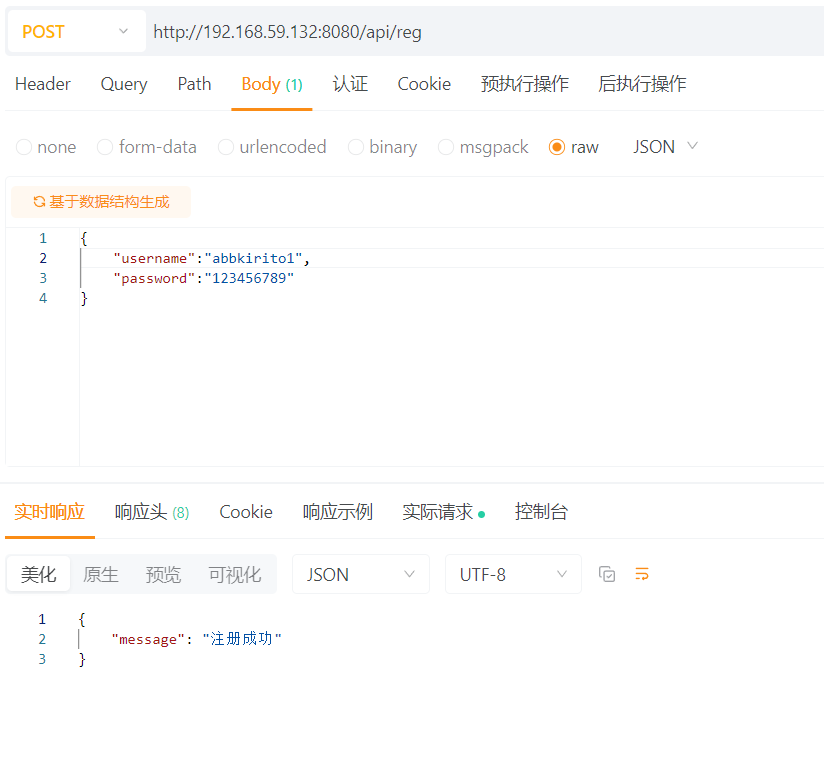
接口测试:/api/login
并发量测试:
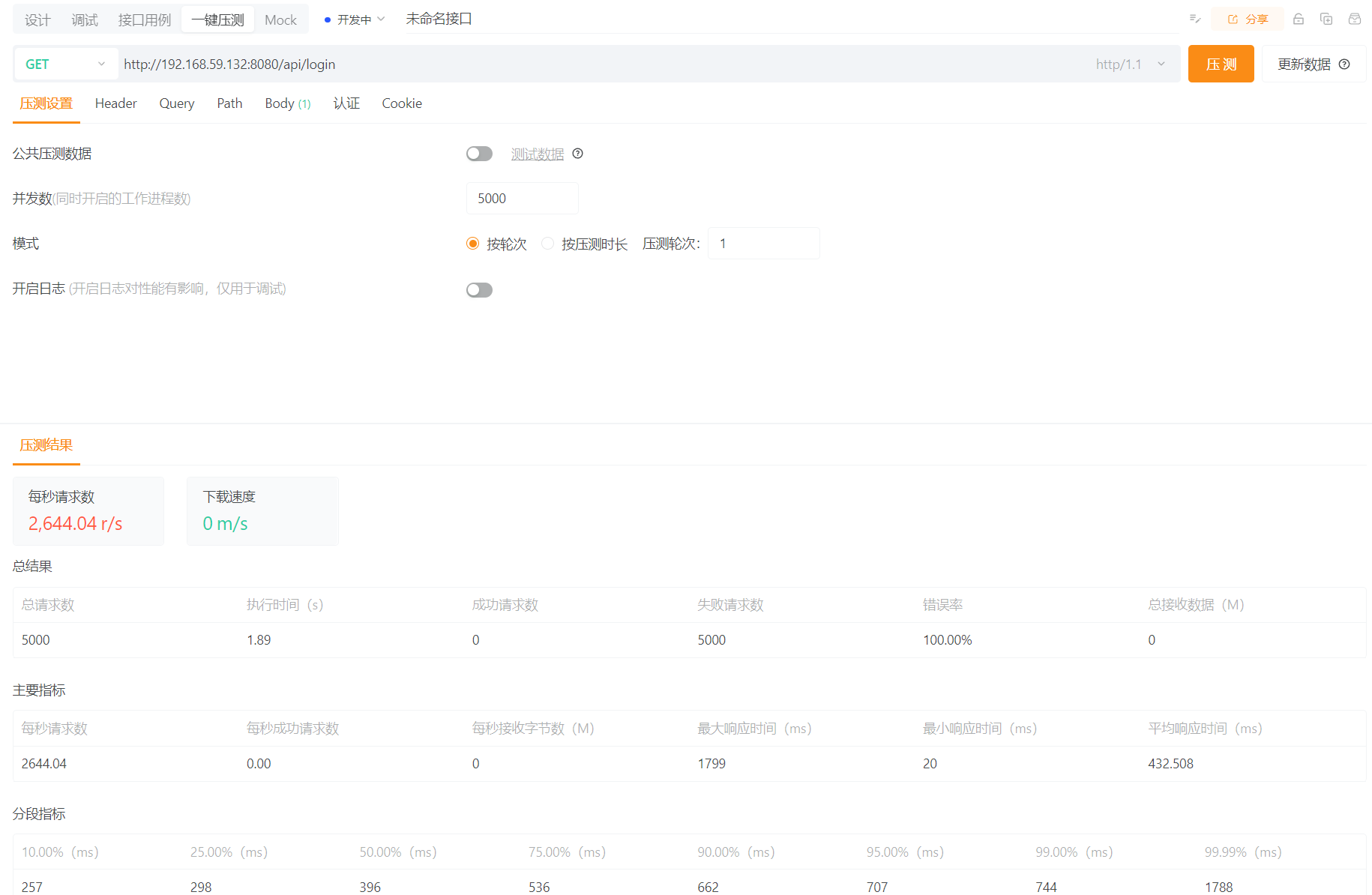

效果展示:
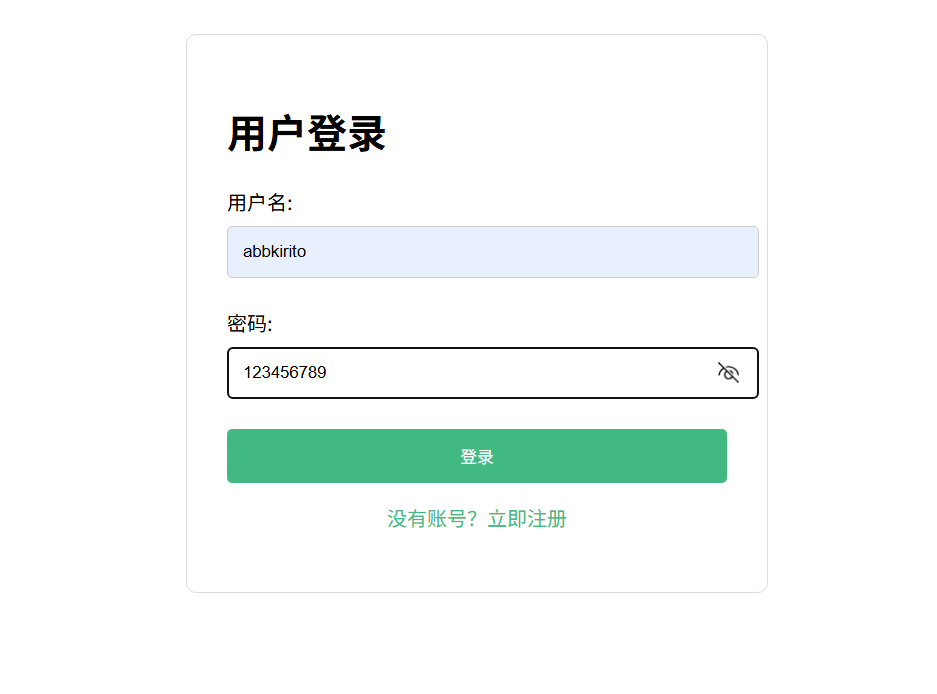
登录成功:
项目总结
技术实现
- 使用 Drogon C++ 框架实现后端 RESTful API,提供登录和注册功能。
- 前端采用 Vue3 和 Axios 进行接口调用,实现前后端分离架构。
- 数据库操作通过异步 SQL 查询实现,密码使用 SHA3 哈希存储。
- 用户输入验证包括用户名长度、密码复杂度等基本校验。
- 并通过对数据库和运行负载的cpu进行优化调度,在apipost 得到QFS>2k/s并发量。
功能完整性
- 实现了核心的注册和登录流程,包括用户名冲突检测。
- 前后端数据交互使用 JSON 格式,符合现代 Web 开发规范。
- 错误处理机制涵盖数据库异常、输入验证失败等场景。
代码结构
- 后端控制器采用 Drogon 的 HttpController 设计模式,路由清晰。
- 请求参数通过模板特化的 fromRequest 实现自动转换。
- 嵌套的异步数据库操作保证了数据一致性。
不足之处
安全性
短期优化
- 缺少 JWT 或 Session 等完整的身份认证机制。
- 密码哈希未使用盐值(Salt),存在彩虹表攻击风险。
- 未实现登录失败次数限制等防暴力破解措施。
- 补充 JWT 鉴权中间件实现
- 为密码哈希添加随机盐值
- 统一验证规则和错误提示文案
- 完善前端页面与后端接口的联调细节

腾讯云面向开发者汇聚海量精品云计算使用和开发经验,营造开放的云计算技术生态圈。
更多推荐
 19
19 0
0- 0


 已为社区贡献1条内容

所有评论(0)