环境搭建-dockerfile构建镜像时apt软件包出现exit100错误+ pip下载python库时下载过慢的解决方法
·
报错
ERROR: failed to solve: process "/bin/sh -c apt-get update && apt-get install -y \tgit\tvim\tcmake\tlibsm6\tlibxext6\tlibxrender-dev\tlibgl1-mesa-glx\tlocales\tbuild-essential\tzlib1g-dev\tlibssl-dev\tlibbz2-dev\tlibreadline-dev\tlibsqlite3-dev\tlibhdf5-dev\tlibncursesw5-dev\tlibgdbm-dev\tliblzma-dev\tlibdb-dev\tlibffi-dev\tuuid-dev\ttk-dev&& apt-get clean&& rm -rf /var/lib/apt/lists/*" did not complete successfully: exit code: 100
还有docker中pip下载太慢的问题,这里不详细展开
错误原因
docker构建时机器可能无法访问 apt-get 需要连接的服务器来下载软件包列表。这可能是由于网络连接问题、DNS 解析问题或代理设置不正确导致的。
解决方法
在dockerfile中加入更换软件源的操作
- 更换apt的软件源
- 更换pip的软件源
FROM nvcr.io/nvidia/tensorrt:21.06-py3

MAINTAINER shuhei.tarashima@ntt.com
LABEL OBJECT="Dockerfile for Widely Applicable Strong Baseline for Sports Ball Detection and Tracking [BMVC2023]"
ARG http_proxy
ARG https_proxy
ENV http_proxy ${http_proxy}
ENV https_proxy ${https_proxy}
ENV DEBIAN_FRONTEND noninteractive

# 替换 apt 软件源为阿里云镜像,以提高下载成功率
# Replace apt software sources with Aliyun mirrors to improve download success rate
RUN sed -i 's/http:\/\/archive.ubuntu.com/http:\/\/mirrors.aliyun.com/g' /etc/apt/sources.list \
    && sed -i 's/http:\/\/security.ubuntu.com/http:\/\/mirrors.aliyun.com/g' /etc/apt/sources.list

RUN apt-get update && apt-get install -y --no-install-recommends \
    apt-utils \
    apt-transport-https \
    ca-certificates \
    software-properties-common \
&& apt-get clean \
&& rm -rf /var/lib/apt/lists/*

RUN apt-get update && apt-get install -y \
    git \
    vim \
    cmake \
    libsm6 \
    libxext6 \
    libxrender-dev \
    libgl1-mesa-glx \
    locales \
    build-essential \
    zlib1g-dev \
    libssl-dev \
    libbz2-dev \
    libreadline-dev \
    libsqlite3-dev \
    libhdf5-dev \
    libncursesw5-dev \
    libgdbm-dev \
    liblzma-dev \
    libdb-dev \
    libffi-dev \
    uuid-dev \
    tk-dev \
&& apt-get clean \
&& rm -rf /var/lib/apt/lists/*

ENV LANG en_US.UTF-8
ENV LANGUAGE en_US:en
ENV LC_ALL en_US.UTF-8
RUN locale-gen en_US.UTF-8

# 替换 pip 软件源为清华大学镜像,并保留 PyTorch 官方源
# Replace pip sources with Tsinghua mirror while keeping the official PyTorch source
RUN pip3 install -i https://pypi.tuna.tsinghua.edu.cn/simple \
    numpy==1.22.4 torch==1.11.0+cu113 torchvision==0.12.0+cu113 \
    --extra-index-url https://download.pytorch.org/whl/cu113

RUN pip3 install -i https://pypi.tuna.tsinghua.edu.cn/simple \
    hydra-core==1.2.0 tqdm==4.64.0 opencv-python==4.6.0.66 scikit-learn==1.1.1 scikit-image==0.19.3 pandas==1.3.5 einops==0.4.1 timm==0.6.5 matplotlib==3.5.2 \
    --extra-index-url https://download.pytorch.org/whl/cu113

COPY src /root/src
WORKDIR /root/src
-
sed -i: 这个命令会直接修改容器中的/etc/apt/sources.list文件。 -
s/.../.../g: 这是 sed 的替换规则。它会把文件中所有匹配到的 Ubuntu 官方源地址http://archive.ubuntu.com和http://security.ubuntu.com全局替换成阿里云的镜像源http://mirrors.aliyun.com。
至于pip怎么换的源,我是直接追加了镜像地址
# 替换 pip 软件源为清华大学镜像,并保留 PyTorch 官方源
# Replace pip sources with Tsinghua mirror while keeping the official PyTorch source
RUN pip3 install -i https://pypi.tuna.tsinghua.edu.cn/simple \
    numpy==1.22.4 torch==1.11.0+cu113 torchvision==0.12.0+cu113 \
    --extra-index-url https://download.pytorch.org/whl/cu113

RUN pip3 install -i https://pypi.tuna.tsinghua.edu.cn/simple \
    hydra-core==1.2.0 tqdm==4.64.0 opencv-python==4.6.0.66 scikit-learn==1.1.1 scikit-image==0.19.3 pandas==1.3.5 einops==0.4.1 timm==0.6.5 matplotlib==3.5.2 \
    --extra-index-url https://download.pytorch.org/whl/cu113
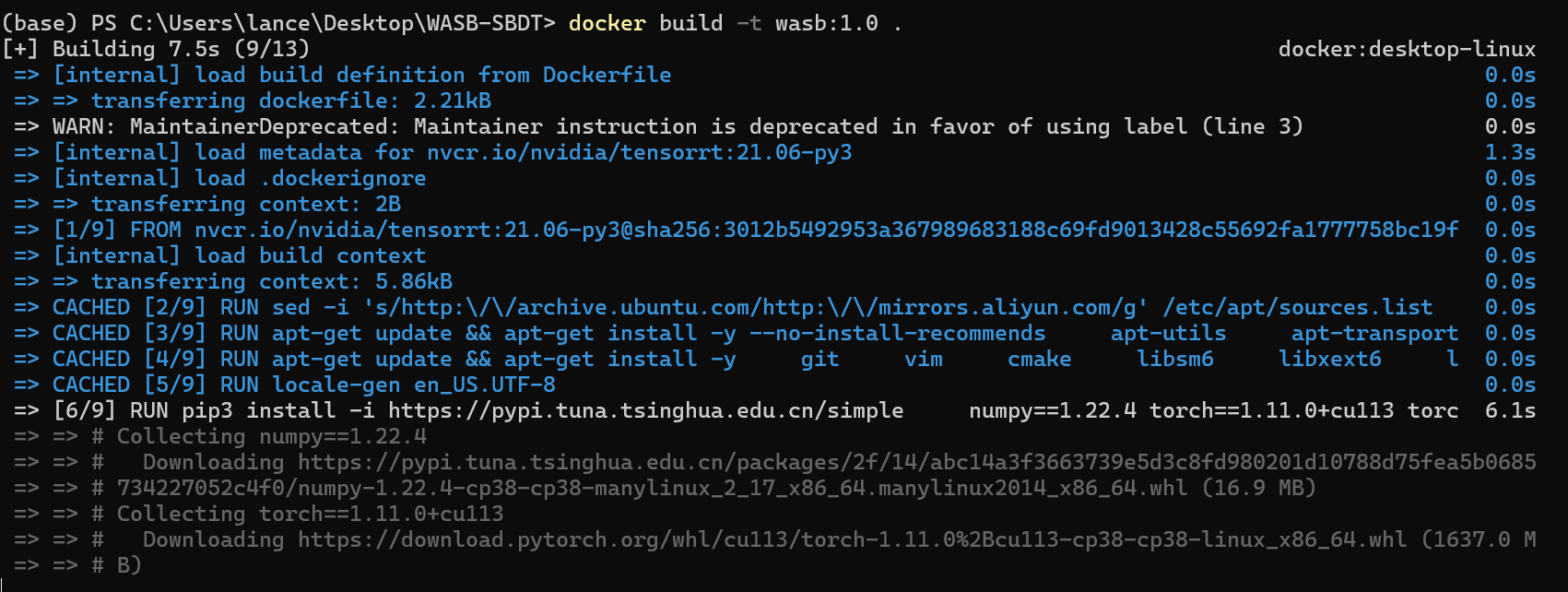
解决后效果
下载快的飞起,很不错

腾讯云面向开发者汇聚海量精品云计算使用和开发经验,营造开放的云计算技术生态圈。
更多推荐
 6
6 0
0- 0


 已为社区贡献1条内容

所有评论(0)