centos 用 docker 方式安装 dufs
·
首先安装 docker 环境
Alibaba Cloud Linux 3 安装 docker-CSDN博客
下载dufs镜像
docker pull sigoden/dufs部署dufs应用
- 创建部署目录
mkdir -p /app/dufs/data && cd /app/dufs/- 设置目录权限
chmod 777 -R /app/dufs/配置参照
Dufs is a distinctive utility file server - https://github.com/sigoden/dufs

Usage: dufs [OPTIONS] [serve-path]

Arguments:
  [serve-path]  Specific path to serve [default: .]

Options:
  -c, --config <file>        Specify configuration file
  -b, --bind <addrs>         Specify bind address or unix socket
  -p, --port <port>          Specify port to listen on [default: 5000]
      --path-prefix <path>   Specify a path prefix
      --hidden <value>       Hide paths from directory listings, e.g. tmp,*.log,*.lock
  -a, --auth <rules>         Add auth roles, e.g. user:pass@/dir1:rw,/dir2
  -A, --allow-all            Allow all operations
      --allow-upload         Allow upload files/folders
      --allow-delete         Allow delete files/folders
      --allow-search         Allow search files/folders
      --allow-symlink        Allow symlink to files/folders outside root directory
      --allow-archive        Allow download folders as archive file
      --enable-cors          Enable CORS, sets `Access-Control-Allow-Origin: *`
      --render-index         Serve index.html when requesting a directory, returns 404 if not found index.html
      --render-try-index     Serve index.html when requesting a directory, returns directory listing if not found index.html
      --render-spa           Serve SPA(Single Page Application)
      --assets <path>        Set the path to the assets directory for overriding the built-in assets
      --log-format <format>  Customize http log format
      --log-file <file>      Specify the file to save logs to, other than stdout/stderr
      --compress <level>     Set zip compress level [default: low] [possible values: none, low, medium, high]
      --completions <shell>  Print shell completion script for <shell> [possible values: bash, elvish, fish, powershell, zsh]
      --tls-cert <path>      Path to an SSL/TLS certificate to serve with HTTPS
      --tls-key <path>       Path to the SSL/TLS certificate's private key
  -h, --help                 Print help
  -V, --version              Print version
编辑部署文件
- 可以直接使用docker-cli方式部署
docker run -v `pwd`:/data -p 5000:5000 --rm sigoden/dufs /data -A- 编辑docker-compose.yaml部署文件
version: '3'
services:
  dufs:
    image: sigoden/dufs
    ports:
      - '5000:5000'
    volumes:
      - /app/dufs/data:/data
    command: /data -A
    restart: always
可以设置路径别名:command: /data -A --path-prefix dufs
启动镜像
docker compose up -d卸载镜像
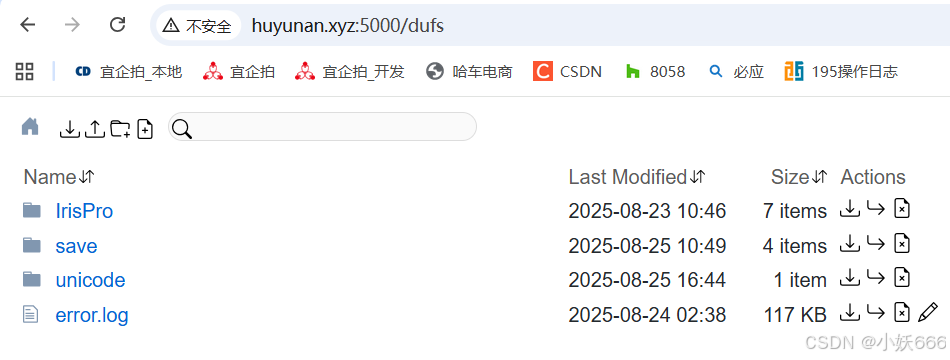
docker compose down现在可以访问 dufs 了

腾讯云面向开发者汇聚海量精品云计算使用和开发经验,营造开放的云计算技术生态圈。
更多推荐
 9
9 0
0- 0


 已为社区贡献29条内容

所有评论(0)