解决 onnxruntime-gpu运行时出现的问题,RuntimeError: Error when binding input: There‘s no data transfer register
项目场景:
加载使用YOLO转换成的onnx模型,加载.onnx文件时运行出现的错误;[Bug] RuntimeError: Error when binding input: There's no data transfer registered for copying tensors from Device:[DeviceType:1 MemoryType:0 DeviceId:0] to Device:[DeviceType:0 MemoryType:0 DeviceId:0]
问题描述
出现这个问题的核心原因在于使用模型进行推理时加载.onnx模型,如果只是使用onnxruntime进行读取和推理会导致模型进行Inference的时间很长,读取很慢,平均在100ms以上,所以为了加速推理时间和运行效率我们需要使用onnxruntime-gpu,而在下载使用时就容易出现上述描述的bug情况
原因分析:
若使用onnxruntime-gpu,先在命令行中删除原本的onnxruntime包
conda activate 你的虚拟环境名称pip uninstall onnxruntimepip install onnxruntime-gpu如果觉得安装速度较慢可以使用镜像,在命令最后面加入:-i https:// ....... (后面的省略号写入你的镜像地址即可)
解决方案:
如果安装完成onnxruntime-gpu出现问题:[Bug] RuntimeError: Error when binding input: There's no data transfer registered for copying tensors from Device:[DeviceType:1 MemoryType:0 DeviceId:0] to Device:[DeviceType:0 MemoryType:0 DeviceId:0]
大概率是你的cuda版本和onnxruntime-pug版本不匹配的问题,解决方案是:降低或者提升你的onnxruntime-gpu包的版本,达到与你的cuda互相匹配的版本即可解决问题
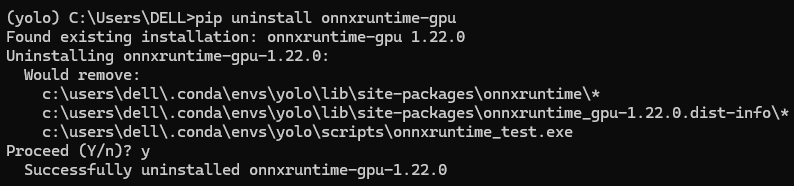
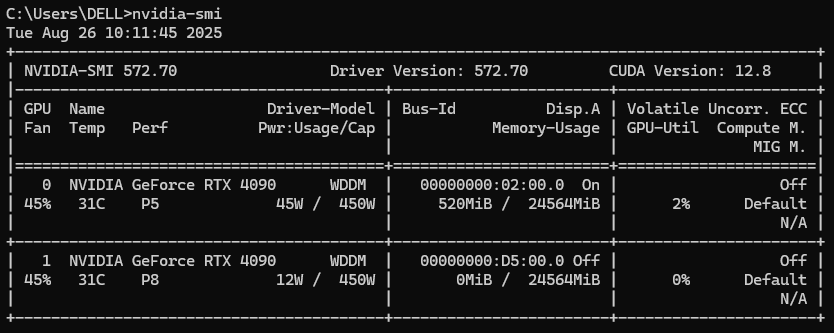
下图是我的包版本,我的包版本过高我将其降低到onnxruntime-gpu-1.20.0 即解决了问题,我的cuda版本是:12.8 如果有和我类型的cuda版本按照我的下载版本下载进行即可

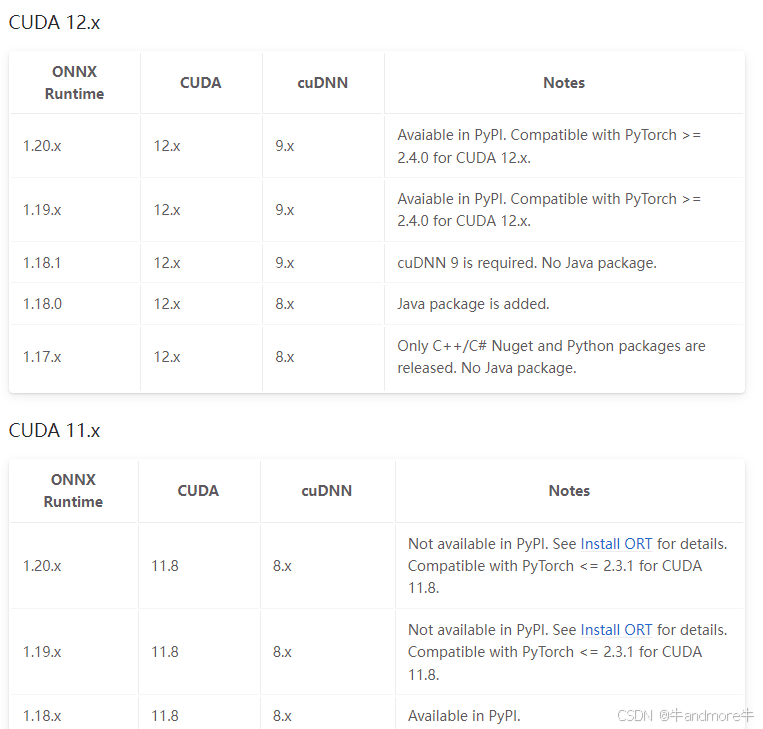
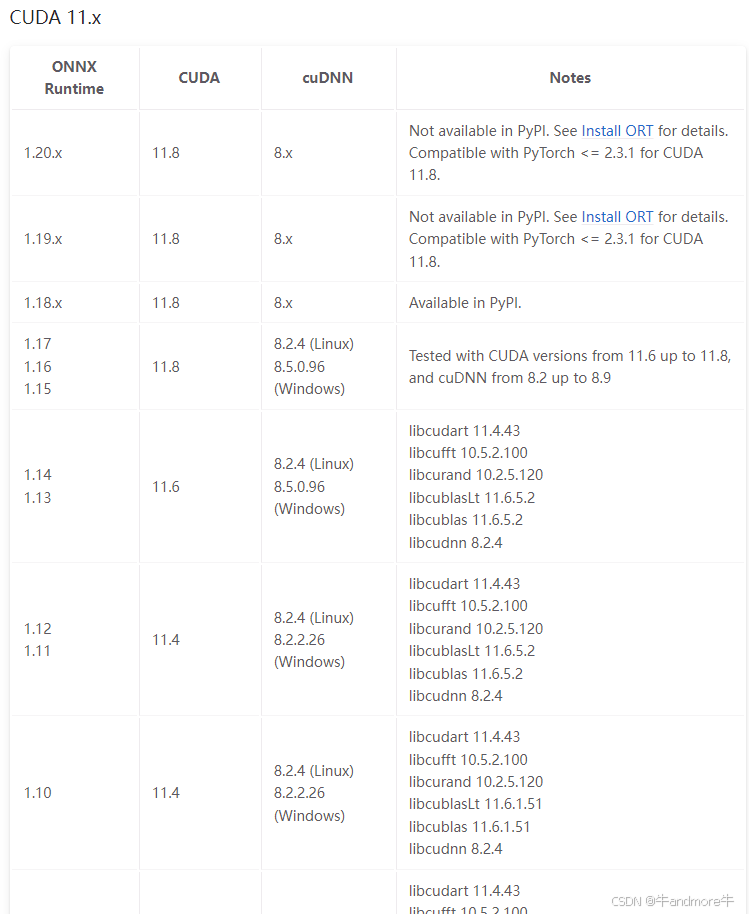
下图是onnxruntime-gpu与cuda版本对应关系(仅供参考)
https://onnxruntime.ai/docs/execution-providers/CUDA-ExecutionProvider.html#requirements 上这个网站看就行
当前(20250311)无非用的多的就是cuda11/12,所以截图如下:
详细的版本情况和onnxruntime其他情况请参考这边博客:onnxruntime-gpu与cuda版本对应及是否能调用cuda测试_onnxruntime-gpu版本与cuda版本-CSDN博客
其他问题扩展
遇到运行加载onnxruntime-gpu时可能出现这个问题:AttributeError: module 'onnxruntime' has no attribute 'set_default_logger_severity'
又或者运行时出现这个问题:onnxruntime:无法导入名称“”get_all_providers“”
请参考这个链接:onnxruntime:无法导入名称“”get_all_providers“”-腾讯云开发者社区-腾讯云
结语
如果版本都匹配的话而且安装没有问题,问题应该解决了,而且推理时间大大减少,大概从原来100ms以上缩减为20-40ms以内 每帧图像,希望此篇文章对你有用!

腾讯云面向开发者汇聚海量精品云计算使用和开发经验,营造开放的云计算技术生态圈。
更多推荐
 13
13 0
0- 0


 已为社区贡献1条内容

所有评论(0)