【ES】[教程10]----第十章:spring boot 3 整合 Easy-Es 实战操作详解
easy-es 开发实战笔记,整合过程+正删改查+分页+高级查询+单机集群配置
文章目录
一、Easy-ES概述
2022年国内团队首次发布的ES搜索引擎封装成mybatisPlus 形式,提高开发效率。
Easy-Es(简称EE)是一款由国内开发者打造并完全开源的ElasticSearch-ORM框架。在原生 RestHighLevelClient 的基础上,只做增强不做改变,为简化开发、提高效率而生。Easy-Es采用和MP一致的语法设计,降低ElasticSearch搜索引擎使用门槛,和额外学习成本,并大幅减少开发者工作量,帮助企业降本提效。在有些方面甚至比MP更简单,同时也融入了更多ElasticSearch独有的功能,助力您快速实现各种场景的开发。(也可以理解为是操作es的mp)
官网地址:https://www.easy-es.cn/
项目地址:https://gitee.com/dromara/easy-es/
开源社区:https://gitee.com/dromara/
开发文档:官方提供了完整的中文技术文档:
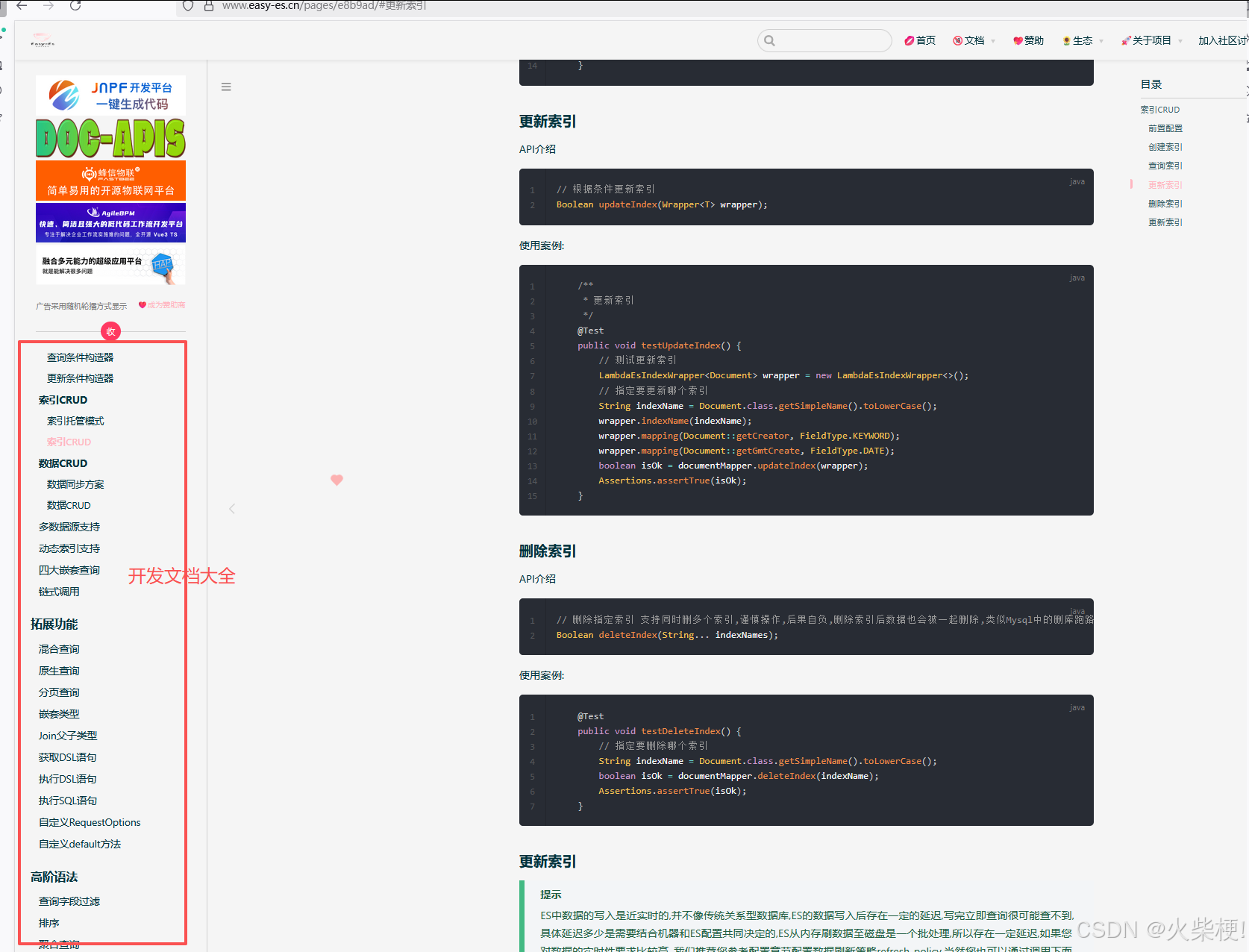
EE特性:
**无侵入**:只做增强不做改变,引入它不会对现有工程产生影响,如丝般顺滑。
**损耗小**:启动即会自动注入基本 CURD,性能基本无损耗,直接面向对象操作
**强大的 CRUD 操作**:内置通用 Mapper,仅仅通过少量配置即可实现大部分 CRUD 操作,更有强大的条件构造器,满足各类使用需求。
**支持 Lambda 形式调用**:*通过 Lambda 表达式,方便的编写各类查询条件,无需再担心字段写错段。
**支持主键自动生成**:支持2 种主键策略,可自由配置,完美解决主键问题。
**支持 ActiveRecord 模式**:支持 ActiveRecord 形式调用,实体类只需继承 Model 类即可进行强大的 CRUD 操作。
**支持自定义全局通用操作**:支持全局通用方法注入( Write once, use anywhere )。
**内置分页插件**:基于RestHighLevelClient 物理分页,开发者无需关心具体操作,且无需额外配置插件,写分页等同于普通 List 查询,且保持和PageHelper插件同样的分页返回字段,无需担心命名影响。
**MySQL功能全覆盖**:MySQL中支持的功能通过EE都可以轻松实现。
支持ES高阶语法:**支持高亮搜索,分词查询,权重查询,Geo地理位置查询,IP查询,聚合查询等高阶语法。
良好的拓展性:**底层仍使用RestHighLevelClient,可保持其拓展性,开发者在使用EE的同时,仍可使用RestHighLevelClient的功能。
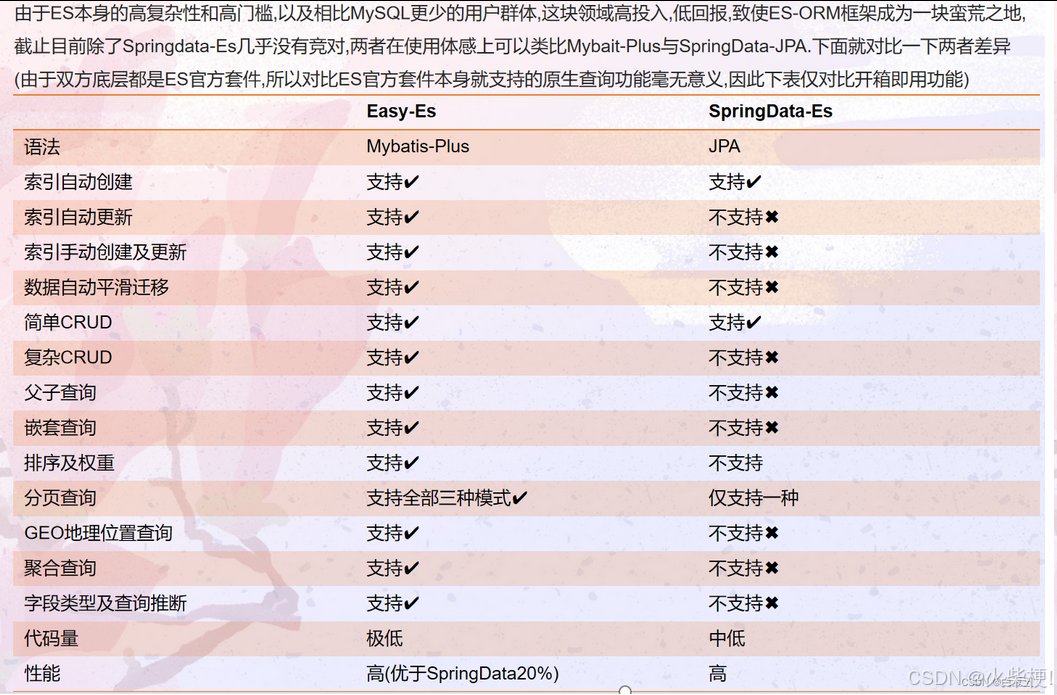
EE与Spring Data ES技术对比:
一、spring boot 整合EE 过程(Easy-ES快速入门)
1. 引入依赖
首先在 pom.xml 中添加 Easy-Es 依赖(需与 Spring Boot3 版本兼容):
<dependency>
    <groupId>org.dromara.easy-es</groupId>
    <artifactId>easy-es-boot-starter</artifactId>
    <version>最新兼容版本</version>
</dependency>
2. 启动类配置
在 Spring Boot 启动类上添加 @EnableEasyEs 注解开启 Easy-Es 功能:
package com.zgb;

import org.dromara.easyes.starter.annotation.EnableEasyEs;
import org.springframework.boot.SpringApplication;
import org.springframework.boot.autoconfigure.SpringBootApplication;

/**
 * 应用启动类
 * @author 架构师
 */
@SpringBootApplication
@EnableEasyEs
public class Application {
    public static void main(String[] args) {
        SpringApplication.run(Application.class, args);
    }
}
二、配置文件
1. 单机版配置(application.yml)
spring:
  # Easy-Es 配置
  easy-es:
    enable: true  # 是否启用EasyEs,默认true
    address: 127.0.0.1:9200  # es连接地址,单机版
    username: elastic  # 用户名,如果es没有设置可以省略
    password: 123456   # 密码,如果es没有设置可以省略
    global-config:
      process-index-name: false  # 是否处理索引名称,默认false
      db-config:
        table-prefix: article_  # 索引前缀
        id-type: custom  # id生成策略,自定义
2. 分布式版配置(application.yml)
spring:
  # Easy-Es 配置
  easy-es:
    enable: true
    address: 192.168.1.101:9200,192.168.1.102:9200,192.168.1.103:9200  # 集群地址
    username: elastic
    password: 123456
    connection-timeout: 5000  # 连接超时时间
    socket-timeout: 30000     #  socket超时时间
    max-conn-total: 100       # 最大连接数
    global-config:
      process-index-name: false
      db-config:
        table-prefix: article_
        id-type: custom
三、核心实体类
package com.zgb.entity;

import com.fasterxml.jackson.annotation.JsonFormat;
import lombok.Data;
import org.dromara.easyes.annotation.*;
import org.dromara.easyes.annotation.rely.FieldType;

import java.time.LocalDateTime;
import java.util.List;

/**
 * 文章索引实体类
 * 对应ES中的article索引
 * @author 架构师
 */
@Data
@IndexName(value = "article")  // 索引名称
public class Article {
    /**
     * 文章ID
     */
    @Id
    private String id;

    /**
     * 文章标题
     * 分词,可搜索,权重较高
     */
    @HighLight(mappingField = "titleHighLight")  // 高亮配置
    @IndexField(fieldType = FieldType.TEXT, analyzer = "ik_max_word", searchAnalyzer = "ik_smart", boost = 2.0f)
    private String title;

    /**
     * 标题高亮结果
     */
    private String titleHighLight;

    /**
     * 文章内容
     * 分词,可搜索
     */
    @HighLight(mappingField = "contentHighLight")
    @IndexField(fieldType = FieldType.TEXT, analyzer = "ik_max_word", searchAnalyzer = "ik_smart")
    private String content;

    /**
     * 内容高亮结果
     */
    private String contentHighLight;

    /**
     * 文章摘要
     */
    @IndexField(fieldType = FieldType.TEXT, analyzer = "ik_max_word")
    private String summary;

    /**
     * 文章作者
     */
    @IndexField(fieldType = FieldType.KEYWORD)
    private String author;

    /**
     * 创建时间
     */
    @IndexField(fieldType = FieldType.DATE, dateFormat = "yyyy-MM-dd HH:mm:ss")
    @JsonFormat(pattern = "yyyy-MM-dd HH:mm:ss", timezone = "GMT+8")
    private LocalDateTime createTime;

    /**
     * 文章类型
     * 如: 原创、转载、翻译
     */
    @IndexField(fieldType = FieldType.KEYWORD)
    private String type;

    /**
     * 文章标签
     */
    @IndexField(fieldType = FieldType.KEYWORD)
    private List<String> tags;

    /**
     * 点赞数
     */
    @IndexField(fieldType = FieldType.INTEGER)
    private Integer likeCount;

    /**
     * 分享数
     */
    @IndexField(fieldType = FieldType.INTEGER)
    private Integer shareCount;

    /**
     * 预览数
     */
    @IndexField(fieldType = FieldType.INTEGER)
    private Integer viewCount;
}
四、Mapper 接口
package com.zgb.mapper;

import com.zgb.entity.Article;
import org.dromara.easyes.core.core.BaseEsMapper;
import org.springframework.stereotype.Repository;

/**
 * 文章ES操作Mapper
 * 继承BaseEsMapper获得基础CRUD能力
 * @author 架构师
 */
@Repository
public interface ArticleEsMapper extends BaseEsMapper<Article> {
}
五、Service 层实现
1. Service 接口
package com.zgb.service;

import com.zgb.entity.Article;
import com.baomidou.mybatisplus.extension.service.IService;
import org.dromara.easyes.core.conditions.LambdaEsQueryWrapper;
import org.dromara.easyes.core.toolkit.PageInfo;

import java.util.List;

/**
 * 文章搜索服务接口
 * @author 架构师
 */
public interface ArticleSearchService extends IService<Article> {

    /**
     * 新增或更新文章索引
     * @param article 文章实体
     * @return 是否成功
     */
    boolean saveOrUpdateArticle(Article article);

    /**
     * 批量新增或更新文章索引
     * @param articles 文章列表
     * @return 是否成功
     */
    boolean batchSaveOrUpdateArticles(List<Article> articles);

    /**
     * 根据ID删除文章索引
     * @param id 文章ID
     * @return 是否成功
     */
    boolean deleteArticleById(String id);

    /**
     * 根据ID查询文章
     * @param id 文章ID
     * @return 文章实体
     */
    Article getArticleById(String id);

    /**
     * 简单条件查询文章列表
     * @param keyword 搜索关键词
     * @param pageNum 页码
     * @param pageSize 每页条数
     * @return 分页结果
     */
    PageInfo<Article> searchArticles(String keyword, Integer pageNum, Integer pageSize);

    /**
     * 高级条件查询
     * @param queryWrapper 查询条件构造器
     * @param pageNum 页码
     * @param pageSize 每页条数
     * @return 分页结果
     */
    PageInfo<Article> advancedSearch(LambdaEsQueryWrapper<Article> queryWrapper, Integer pageNum, Integer pageSize);
}
2. Service 实现类
package com.zgb.service.impl;

import com.zgb.entity.Article;
import com.zgb.mapper.ArticleEsMapper;
import com.zgb.service.ArticleSearchService;
import lombok.RequiredArgsConstructor;
import org.dromara.easyes.core.conditions.LambdaEsQueryWrapper;
import org.dromara.easyes.core.toolkit.PageInfo;
import org.springframework.stereotype.Service;
import java.util.List;

/**
 * 文章搜索服务实现类
 * @author 架构师
 */
@Service
@RequiredArgsConstructor
public class ArticleSearchServiceImpl implements ArticleSearchService {

    private final ArticleEsMapper articleEsMapper;

    /**
     * 新增或更新文章索引
     * @param article 文章实体
     * @return 是否成功
     */
    @Override
    public boolean saveOrUpdateArticle(Article article) {
        return articleEsMapper.insertOrUpdate(article) > 0;
    }

    /**
     * 批量新增或更新文章索引
     * @param articles 文章列表
     * @return 是否成功
     */
    @Override
    public boolean batchSaveOrUpdateArticles(List<Article> articles) {
        return articleEsMapper.insertBatch(articles) > 0;
    }

    /**
     * 根据ID删除文章索引
     * @param id 文章ID
     * @return 是否成功
     */
    @Override
    public boolean deleteArticleById(String id) {
        return articleEsMapper.deleteById(id) > 0;
    }

    /**
     * 根据ID查询文章
     * @param id 文章ID
     * @return 文章实体
     */
    @Override
    public Article getArticleById(String id) {
        return articleEsMapper.selectById(id);
    }

    /**
     * 简单条件查询文章列表
     * @param keyword 搜索关键词
     * @param pageNum 页码
     * @param pageSize 每页条数
     * @return 分页结果
     */
    @Override
    public PageInfo<Article> searchArticles(String keyword, Integer pageNum, Integer pageSize) {
        LambdaEsQueryWrapper<Article> wrapper = new LambdaEsQueryWrapper<>();
        // 标题或内容包含关键词
        wrapper.match(Article::getTitle, keyword)
               .or()
               .match(Article::getContent, keyword);
        // 按创建时间倒序
        wrapper.orderByDesc(Article::getCreateTime);
        return articleEsMapper.pageQuery(wrapper, pageNum, pageSize);
    }

    /**
     * 高级条件查询
     * @param queryWrapper 查询条件构造器
     * @param pageNum 页码
     * @param pageSize 每页条数
     * @return 分页结果
     */
    @Override
    public PageInfo<Article> advancedSearch(LambdaEsQueryWrapper<Article> queryWrapper, Integer pageNum, Integer pageSize) {
        return articleEsMapper.pageQuery(queryWrapper, pageNum, pageSize);
    }
}
六、高级查询示例(Controller层)
package com.zgb.controller;

import com.zgb.entity.Article;
import com.zgb.service.ArticleSearchService;
import com.dromara.easyes.core.conditions.LambdaEsQueryWrapper;
import com.dromara.easyes.core.toolkit.PageInfo;
import lombok.RequiredArgsConstructor;
import org.springframework.format.annotation.DateTimeFormat;
import org.springframework.web.bind.annotation.*;

import java.time.LocalDateTime;
import java.util.List;

/**
 * 文章搜索控制器
 * @author 架构师
 */
@RestController
@RequestMapping("/api/article")
@RequiredArgsConstructor
public class ArticleSearchController {

    private final ArticleSearchService articleSearchService;

    /**
     * 创建或更新文章
     */
    @PostMapping
    public boolean saveOrUpdate(@RequestBody Article article) {
        return articleSearchService.saveOrUpdateArticle(article);
    }

    /**
     * 删除文章
     */
    @DeleteMapping("/{id}")
    public boolean delete(@PathVariable String id) {
        return articleSearchService.deleteArticleById(id);
    }

    /**
     * 获取文章详情
     */
    @GetMapping("/{id}")
    public Article getById(@PathVariable String id) {
        return articleSearchService.getArticleById(id);
    }

    /**
     * 简单搜索
     */
    @GetMapping("/search")
    public PageInfo<Article> search(
            @RequestParam String keyword,
            @RequestParam(defaultValue = "1") Integer pageNum,
            @RequestParam(defaultValue = "10") Integer pageSize) {
        return articleSearchService.searchArticles(keyword, pageNum, pageSize);
    }

    /**
     * 高级搜索示例
     * 演示复杂查询条件组合
     */
    @GetMapping("/advanced-search")
    public PageInfo<Article> advancedSearch(
            @RequestParam(required = false) String keyword,
            @RequestParam(required = false) String author,
            @RequestParam(required = false) String type,
            @RequestParam(required = false) List<String> tags,
            @RequestParam(required = false) @DateTimeFormat(pattern = "yyyy-MM-dd HH:mm:ss") LocalDateTime startTime,
            @RequestParam(required = false) @DateTimeFormat(pattern = "yyyy-MM-dd HH:mm:ss") LocalDateTime endTime,
            @RequestParam(defaultValue = "1") Integer pageNum,
            @RequestParam(defaultValue = "10") Integer pageSize) {

        LambdaEsQueryWrapper<Article> wrapper = new LambdaEsQueryWrapper<>();

        // 关键词匹配(标题或内容)
        if (keyword != null && !keyword.isEmpty()) {
            wrapper.match(Article::getTitle, keyword)
                   .or()
                   .match(Article::getContent, keyword);
        }

        // 作者精确匹配
        if (author != null && !author.isEmpty()) {
            wrapper.eq(Article::getAuthor, author);
        }

        // 文章类型精确匹配
        if (type != null && !type.isEmpty()) {
            wrapper.eq(Article::getType, type);
        }

        // 标签包含(任一标签)
        if (tags != null && !tags.isEmpty()) {
            wrapper.in(Article::getTags, tags);
        }

        // 时间范围查询
        if (startTime != null) {
            wrapper.ge(Article::getCreateTime, startTime);
        }
        if (endTime != null) {
            wrapper.le(Article::getCreateTime, endTime);
        }

        // 排序:优先按点赞数降序,再按创建时间降序
        wrapper.orderByDesc(Article::getLikeCount)
               .orderByDesc(Article::getCreateTime);

        // 高亮设置(全局已配置,这里可以覆盖)
        wrapper.highLight(true);

        return articleSearchService.advancedSearch(wrapper, pageNum, pageSize);
    }
}
七、总结
以上实现了 Spring Boot3 与 Easy-Es 的完整整合,包括:
- 单机版与分布式版的配置方案
- 标准的文章索引结构设计
- 完整的 CRUD 基础操作
- 包含高亮、多条件组合、范围查询、排序等的高级查询
Easy-Es 作为 Elasticsearch 的 ORM 框架,极大简化了 ES 操作,通过类似 MyBatis-Plus 的 API 风格,降低了学习成本,提高了开发效率。在实际项目中,可根据业务需求进一步扩展查询条件和索引设计。
如果文章对你有一点点帮助,欢迎【点赞、留言、+ 关注】
您的关注是我创作的动力!若有疑问、交流、需求,欢迎留言私聊!
多一个朋友多一条路!

腾讯云面向开发者汇聚海量精品云计算使用和开发经验,营造开放的云计算技术生态圈。
更多推荐
 18
18 0
0- 0


 已为社区贡献30条内容

所有评论(0)