vscode使用tmux技巧+使用不同的显卡跑任务的命令
tmux ls回溯logctl+b上下键。
- 生成会话
tmux
tmux new -s <session-name>
- 退出当前会话
tmux detach
exit
- 查看有什么会话
tmux ls
- 再次链接会话
tmux attach -t <session-name>
- 删除会话
tmux kill-session -t <session-name>
- 重命名会话
tmux rename-session -t <new-name>
- 切换会话
tmux switch -t <session-name>
回溯log ctl+b 上下键
git stash
临时保存工作区和暂存区的修改
典型使用场景包括
- 当你正在一个分支上开发,突然需要切换到另一个分支处理紧急问题,但当前修改还没完成不想提交
- 需要拉去远程最新代码,但本地i修改与远程有冲突
- 想临时回答某个干净状态测试或查看代码
常用操作:
保存当前修改
git stash
会把工作区和暂存区的修改保存到一个 “储藏栈” 中,工作区恢复到最近一次提交的状态
查看储藏列表
git stash list
会显示所有保存的储藏,格式类似:stash@{0}: WIP on 分支名: 提交哈希 提交信息
恢复最近的储藏
git stash apply  # 恢复后,储藏仍会保留在栈中
# 或
git stash pop    # 恢复后,会删除该储藏(推荐日常使用)
恢复指定的储藏
git stash apply stash@{n} # n是储藏的编号,如stash@{1}
删除指定储藏
git stash drop stash@{n}
删除所有储藏
git stash clear
使用huggingface下载模型
-
本地 git clone 下载
git clone 网址(modelcard)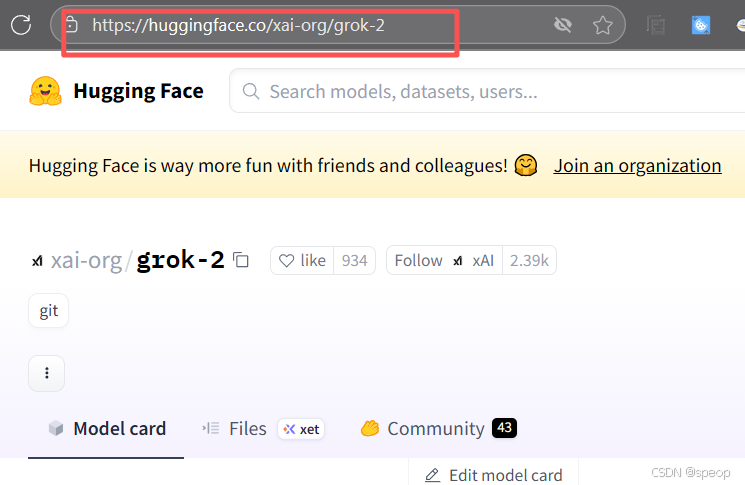
-
服务器镜像下载
pip install -U huggingface_Hub
设置环境变量
export HF_ENDPOINT=https://hf-mirror.com
export HF_ENDPOINT=https://hf-mirror.com && huggingface-cli download --resume-download gpt2 --local-dir gpt2
- modelscope下载
pip install modelscope
命令行下载
modelscope download --model llava-hf/llava-1.5-7b-hf ....
SDK下载
#模型下载
from modelscope import snapshot download
model dir =snapshot download('llava-hf/llava-1.5-7b-hf')
git下载
git lfs install
git clone https://www.modelscope.cn/llava-hf/llava-1.5-7b-hf
如果您希望跳过 Ifs 大文件下载,可以使用如下命令
GIT LFS SKIP SMUDGE=1 git clone https://www.modelscop
使用不同的显卡跑任务的命令
不同的任务跑在不同的GPU上,可分别指定设备
方法 命令行指定GPU(环境变量)
# 终端 1:脚本跑在 GPU 0
CUDA_VISIBLE_DEVICES=0 python script1.py

# 终端 2:脚本跑在 GPU 1
CUDA_VISIBLE_DEVICES=1 python script2.py
方法:在代码中指定GPU编号
在代码中指定GPU编号
pytorch代码中
在 PyTorch 代码中,使用 torch.cuda.set_device() 或在张量 / 模型迁移时指定 device,可以控制任务在哪个 GPU 上运行。
import torch

# 指定使用 GPU 0
torch.cuda.set_device(0)##########在这里指定
x = torch.tensor([1.0, 2.0]).cuda()  # 张量迁移到 GPU 0

# 或者在创建模型时指定
model = MyModel().cuda(0)  # 模型迁移到 GPU 0
import torch
from torch import nn

# 任务 1:跑在 GPU 0
device0 = torch.device("cuda:0")
x0 = torch.tensor([1.0, 2.0]).to(device0)
model0 = nn.Linear(2, 2).to(device0)
output0 = model0(x0)

# 任务 2:跑在 GPU 1
device1 = torch.device("cuda:1")
x1 = torch.tensor([3.0, 4.0]).to(device1)
model1 = nn.Linear(2, 2).to(device1)
output1 = model1(x1)
Tensorflow场景
TensorFlow 中通过 ** 指定设备作用域(tf.device)** 来控制任务的 GPU 分配。
import tensorflow as tf

# 任务 1:跑在 GPU 0
with tf.device('/GPU:0'):
    a = tf.constant([1.0, 2.0])
    b = tf.constant([3.0, 4.0])
    c = a + b

# 任务 2:跑在 GPU 1
with tf.device('/GPU:1'):
    d = tf.constant([5.0, 6.0])
    e = tf.constant([7.0, 8.0])
    f = d * e

# 运行并查看结果
with tf.Session() as sess:
    print(sess.run(c))
    print(sess.run(f))
在 TensorFlow 2.x( eager execution 模式)中,也可通过 tf.distribute.MirroredStrategy 实现多 GPU 并行训练,类似 PyTorch 的 DataParallel。
使用 DataParallel 或 DistributedDataParallel(多 GPU 并行训练)
如果是模型训练任务,想让一个模型在多个 GPU 上并行训练,可使用 PyTorch 提供的并行工具:
DataParallel:简单易用,适合单节点多 GPU,会自动将数据划分到不同 GPU 并聚合结果,但存在主 GPU 显存占用更高的问题。
import torch
from torch import nn
from torch.utils.data import DataLoader

model = MyModel()
# 将模型包装为 DataParallel,指定使用 GPU 0 和 GPU 1
model = nn.DataParallel(model, device_ids=[0, 1])
# 在这里指定
model.cuda()  # 模型会被分散到 device_ids 指定的 GPU 上

dataloader = DataLoader(dataset, batch_size=32)
for batch in dataloader:
    batch = batch.cuda()
    output = model(batch)
    # 后续 loss 计算、优化等逻辑
DistributedDataParallel(DDP):更高效的分布式训练方式,支持多节点多 GPU,各 GPU 进程独立且通信更高效,适合大规模训练。使用时需要通过启动脚本指定 GPU(如 python -m torch.distributed.launch --nproc_per_node=2 train.py,会自动分配 GPU 0 和 GPU 1 给两个进程)。

腾讯云面向开发者汇聚海量精品云计算使用和开发经验,营造开放的云计算技术生态圈。
更多推荐
 6
6 0
0- 0


 已为社区贡献2条内容

所有评论(0)