java实验课作业
·
(2)输出20个不重复的(1-100)随机数。
public class test1 {
    public static  int[] random(int n,int range)
    {
        int x[]=new int[n];
        for(int i=0;i<n;i++)
        {
            x[i]=(int)(Math.random()*range)+1;
        }
        return x;
    }

    public static int[] random()
    {
        return random(20,100);
    }

    public static void print(final int[] x)
    {
        System.out.print("{");
        if(x.length>0)
        {
            System.out.print(x[0]);
        }
        for(int i=1;i<x.length;i++)
        {
            System.out.print(","+x[i]);
        }
        System.out.println("}");
    }

    public static void main(String[] args) {
        int value[]=random();
        print(value);
    }
}
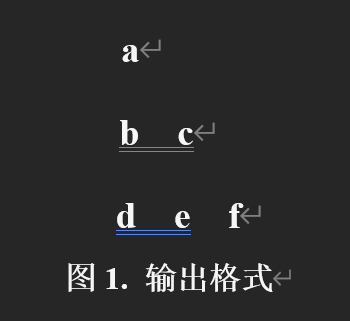
(3)找出10-100之间3的倍数,并按照每行递增一个数字的格式输出(如图1所示:第一行输出1个数字,第二行输出2个数字,依次类推)。
public class test2 {
    public static void main(String[] args) {
        int num = 1, count = 0;

        for (int i = 10; i < 100; i++) {
            if (i % 3 == 0) {
                System.out.print(i + " ");
                count += 1;
            }

            if (num == count) {
                System.out.println();
                num += 1;
                count = 0;
            }
        }
    }
}
(1)将课堂作业1运行成功(定义一个“车”类,车具有颜色、价格、型号三个属性。构建获取和设置属性的成员方法,设计构造函数。设计main函数,新建对象后,输出各类属性)。
public class test3 {
    public static class Car {
        private String color;
        private int price;
        private String type;

        public void set(String color, int price, String type) {
            this.color = color;
            this.price = price;
            this.type = type;
        }

        public void set(Car car) {
            this.set(car.color, car.price, car.type);
        }

        public Car(String color, int price, String type) {
            this.set(color, price, type);
        }

        public Car() {
            this("yellow", 10000, "super");
        }

        public Car(Car car) {
            this.set(car);
        }

        public String getColor() {
            return this.color;
        }

        public int getPrice() {
            return this.price;
        }

        public String getType() {
            return this.type;
        }

        public static void main(String[] args) {
            Car car1 = new Car();
            System.out.println(car1.getColor() + " " + car1.getPrice() + " " + car1.getType());

            Car car2 = new Car("blue", 1000000000, "max");
            System.out.println(car2.getColor() + " " + car2.getPrice() + " " + car2.getType());

            Car car3 = new Car(car1);
            System.out.println(car3.getColor() + " " + car3.getPrice() + " " + car3.getType());
        }
    }
}
(2)首先设计一个坐标点类(X坐标和Y坐标)和颜色类(红、绿、蓝三个属性值,单色值范围0~255),基于上述两个类,构建一个像素类(带有颜色的坐标点)。分别为上述类设计相应的构造方法、set()和get()方法。在像素类中构建main函数,实现像素点的初始化、改变像素点属性,输出像素点信息等操作。
public class pixel {
    public axis a;
    public color c;

    public pixel(axis a,color c)
    {
        this.set(a,c);
    }

    public pixel(pixel p)
    {
        this.set(p);
    }

    public pixel()
    {
        this(new axis(),new color());
    }

    public void set(axis a,color c)
    {
        this.a=a;
        this.c=c;
    }

    public void set(pixel p)
    {
        this.set(new axis(p.a),new color(p.c));
    }

    public static void main(String[] args) {
        pixel p=new pixel();
        System.out.println(p.a.getX()+" "+p.a.getY() +","+p.c.getRed()+" "+p.c.getGreen()+" "+p.c.getBlue());

        pixel p1= new pixel(new axis(2,2),new color(200,200,200));
        System.out.println(p1.a.getX()+" "+p1.a.getY() +","+p1.c.getRed()+" "+p1.c.getGreen()+" "+p1.c.getBlue());

        pixel p2=new pixel(p1);
        System.out.println(p2.a.getX()+" "+p2.a.getY() +","+p2.c.getRed()+" "+p2.c.getGreen()+" "+p2.c.getBlue());
    }
}

class axis
{
    private int x;
    private int y;

    public axis(int x,int y)
    {
        this.set(x,y);
    }

    public axis(axis axis1)
    {
        this.set(axis1);
    }

    public axis()
    {
        this(0,0);
    }

    public void set(int x,int y)
    {
        this.x=x;
        this.y=y;
    }

    public void set(axis axis1)
    {
        this.set(axis1.x,axis1.y);
    }

    public int getX()
    {
        return this.x;
    }

    public int getY()
    {
        return this.y;
    }
}

class color
{
    private int red;
    private int green;
    private int blue;

    public color(int red,int green,int blue)
    {
        this.set(red,green,blue);
    }

    public color(color color1)
    {
        this.set(color1);
    }

    public color()
    {
        this(0,0,0);
    }

    public void set(int red,int green,int blue)
    {
        this.red=red;
        this.green=green;
        this.blue=blue;
    }

    public void set(color color1)
    {
        this.set(color1.red,color1.green,color1.blue);
    }

    public int getRed()
    {
        return this.red;
    }

    public int getGreen()
    {
        return this.green;
    }

    public int getBlue()
    {
        return this.blue;
    }
}

腾讯云面向开发者汇聚海量精品云计算使用和开发经验,营造开放的云计算技术生态圈。
更多推荐
 3
3 0
0- 0


 已为社区贡献1条内容

所有评论(0)