Vscode上传代码库到 github
·
目录
📚 正常操作流程
vscode 的终端输入
还未配置 Git,你需要先设置你的 Git 用户名和邮箱:
git config --global user.name "Your Name"
git config --global user.email "youremail@example.com"
正常操作流程
 git init
 git add .
 git commit -m "first commit"
 git branch -M main
 git remote add origin https://github.com/你的名字/项目名字.git
 git push -u origin main
命令功能详细描述
# 1. 在当前目录初始化一个新的 Git 仓库
# 创建一个 .git 隐藏文件夹,用于存储版本控制相关信息
git init

# 2. 将所有当前目录下的文件添加到暂存区(staging area)
# 点号 . 表示当前目录的所有文件和文件夹
# 也可以使用 git add 文件名 添加特定文件
git add .

# 3. 将暂存区的内容提交到本地仓库
# -m 表示添加提交信息
# "first commit" 是本次提交的描述信息
git commit -m "first commit"

# 4. 将当前分支重命名为 main
# 由于历史原因,Git 默认分支名是 master
# 现在通常使用 main 作为默认分支名
git branch -M main

# 5. 添加一个远程仓库地址
# origin 是远程仓库的别名(可自定义)
# URL 是你的 GitHub 仓库地址
git remote add origin https://github.com/你的名字/项目名字.git

# 6. 将本地 main 分支推送到远程仓库
# -u 表示设置 upstream,后续可以直接使用 git push/pull
# origin 是远程仓库别名
# main 是要推送的本地分支
git push -u origin main
补充说明:
- 在执行这些命令前,需要在 GitHub 上先创建一个空的仓库
- 第一次推送时可能需要身份验证(用户名密码或 SSH 密钥)
- 如果远程仓库已经有文件(如 README),可能需要先执行 git pull
📋 问题概述
在推送代码到 GitHub 时遇到了一系列问题,主要包括:
- SSH 密钥认证失败(Permission denied)
- 远程仓库已存在冲突
- 本地分支与远程分支不同步
🔧 完整解决流程
这里的 SSH 密钥 很关键
阶段1:解决 SSH 认证问题
问题表现:Permission denied (publickey)
解决方案:
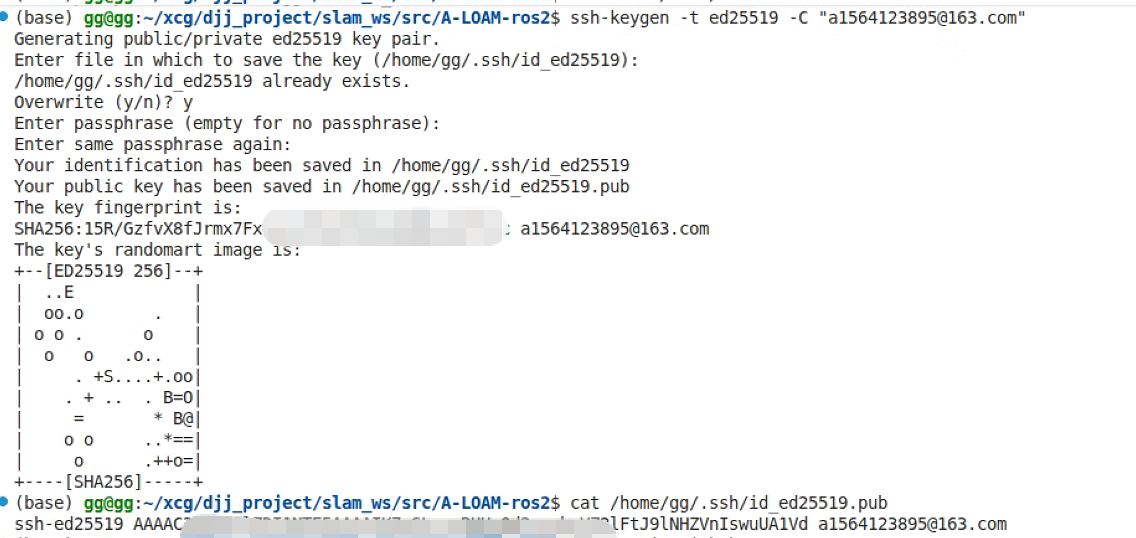
# 1. 生成 SSH 密钥
ssh-keygen -t ed25519 -C "your_email@example.com"

# 2. 启动 SSH 代理并添加密钥(可以跳过)
eval "$(ssh-agent -s)"
ssh-add ~/.ssh/id_ed25519

# 3. 查看密钥,并复制公钥到 GitHub
cat ~/.ssh/id_ed25519.pub
# 将输出内容添加到 GitHub → Settings → SSH and GPG keys

# 4. 测试连接
ssh -T git@github.com
# 应该看到: Hi G-Apple1! You've successfully authenticated...
参考过程
不需要密码的话,两次回车即可
阶段2:配置正确的远程仓库
问题表现:remote origin already exists
解决方案:
# 1. 删除错误配置的远程仓库
git remote remove origin

# 2. 添加正确的 SSH 远程仓库
git remote add origin git@github.com:G-Apple1/new_nav2_ws.git

# 3. 验证配置
git remote -v
阶段3:解决分支同步问题 ✅(已解决)
问题表现:non-fast-forward错误
关键原因是新建库的时候生成了 README.md 文件,需要把文件先同步到本地
最终有效解决方案:
# 使用 rebase 方式拉取并合并远程更改
git pull --rebase origin main
# 推送代码到远程仓库
git push -u origin main
阶段4:完成推送(当前步骤)
现在 SSH 认证和分支同步问题都已解决,可以正常推送:
sunrise@ubuntu:~/njau/new_nav2_ws/src$ git remote -v
origin  git@github.com:G-Apple1/new_nav2_ws.git (fetch)
origin  git@github.com:G-Apple1/new_nav2_ws.git (push)
sunrise@ubuntu:~/njau/new_nav2_ws/src$ git push -u origin main
To github.com:G-Apple1/new_nav2_ws.git
 ! [rejected]        main -> main (non-fast-forward)
error: failed to push some refs to 'github.com:G-Apple1/new_nav2_ws.git'
hint: Updates were rejected because the tip of your current branch is behind
hint: its remote counterpart. Integrate the remote changes (e.g.
hint: 'git pull ...') before pushing again.
hint: See the 'Note about fast-forwards' in 'git push --help' for details.
sunrise@ubuntu:~/njau/new_nav2_ws/src$ git branch
* main
sunrise@ubuntu:~/njau/new_nav2_ws/src$
失败示例
sunrise@ubuntu:~/njau/new_nav2_ws/src$ git remote add origin https://github.com/G-Apple1/new_nav2_ws.git
error: remote origin already exists.
sunrise@ubuntu:~/njau/new_nav2_ws/src$ git push -u origin main
To https://github.com/G-Apple1/new_nav2_ws.git
 ! [rejected]        main -> main (fetch first)
error: failed to push some refs to 'https://github.com/G-Apple1/new_nav2_ws.git'
hint: Updates were rejected because the remote contains work that you do
hint: not have locally. This is usually caused by another repository pushing
hint: to the same ref. You may want to first integrate the remote changes
hint: (e.g., 'git pull ...') before pushing again.
hint: See the 'Note about fast-forwards' in 'git push --help' for details.
sunrise@ubuntu:~/njau/new_nav2_ws/src$ git status
On branch main
nothing to commit, working tree clean
sunrise@ubuntu:~/njau/new_nav2_ws/src$ git log --oneline
8012a7d (HEAD -> main) Initial commit
sunrise@ubuntu:~/njau/new_nav2_ws/src$ git remote -v
origin  https://github.com/G-Apple1/new_nav2_ws.git (fetch)
origin  https://github.com/G-Apple1/new_nav2_ws.git (push)
sunrise@ubuntu:~/njau/new_nav2_ws/src$ git pull origin main
fatal: unable to access 'https://github.com/G-Apple1/new_nav2_ws.git/': GnuTLS recv error (-110): The TLS connection was non-properly terminated.
sunrise@ubuntu:~/njau/new_nav2_ws/src$ git push -u origin main --force-with-lease
fatal: unable to access 'https://github.com/G-Apple1/new_nav2_ws.git/': GnuTLS recv error (-110): The TLS connection was non-properly terminated.
sunrise@ubuntu:~/njau/new_nav2_ws/src$ ping github.com
PING github.com (20.205.243.166) 56(84) bytes of data.
64 bytes from 20.205.243.166 (20.205.243.166): icmp_seq=1 ttl=104 time=76.4 ms
64 bytes from 20.205.243.166 (20.205.243.166): icmp_seq=2 ttl=104 time=92.5 ms
64 bytes from 20.205.243.166 (20.205.243.166): icmp_seq=3 ttl=104 time=77.1 ms
64 bytes from 20.205.243.166 (20.205.243.166): icmp_seq=4 ttl=104 time=75.2 ms
64 bytes from 20.205.243.166 (20.205.243.166): icmp_seq=5 ttl=104 time=86.7 ms
64 bytes from 20.205.243.166 (20.205.243.166): icmp_seq=6 ttl=104 time=106 ms
64 bytes from 20.205.243.166 (20.205.243.166): icmp_seq=7 ttl=104 time=78.3 ms
64 bytes from 20.205.243.166 (20.205.243.166): icmp_seq=8 ttl=104 time=79.1 ms
^C
--- github.com ping statistics ---
9 packets transmitted, 8 received, 11.1111% packet loss, time 8010ms
rtt min/avg/max/mdev = 75.193/83.940/106.272/10.094 ms
成功示例
sunrise@ubuntu:~/njau/new_nav2_ws/src$ git status
On branch main
nothing to commit, working tree clean
sunrise@ubuntu:~/njau/new_nav2_ws/src$ git pull origin main
From github.com:G-Apple1/new_nav2_ws
 * branch            main       -> FETCH_HEAD
hint: You have divergent branches and need to specify how to reconcile them.
hint: You can do so by running one of the following commands sometime before
hint: your next pull:
hint:
hint:   git config pull.rebase false  # merge (the default strategy)
hint:   git config pull.rebase true   # rebase
hint:   git config pull.ff only       # fast-forward only
hint:
hint: You can replace "git config" with "git config --global" to set a default
hint: preference for all repositories. You can also pass --rebase, --no-rebase,
hint: or --ff-only on the command line to override the configured default per
hint: invocation.
fatal: Need to specify how to reconcile divergent branches.
sunrise@ubuntu:~/njau/new_nav2_ws/src$ git pull --rebase origin main
From github.com:G-Apple1/new_nav2_ws
 * branch            main       -> FETCH_HEAD
Successfully rebased and updated refs/heads/main.
sunrise@ubuntu:~/njau/new_nav2_ws/src$ git push -u origin main
Enumerating objects: 1202, done.
Counting objects: 100% (1202/1202), done.
Delta compression using up to 8 threads
Compressing objects: 100% (1152/1152), done.
Writing objects: 100% (1201/1201), 213.08 MiB | 1.50 MiB/s, done.
Total 1201 (delta 316), reused 0 (delta 0), pack-reused 0
remote: Resolving deltas: 100% (316/316), done.
To github.com:G-Apple1/new_nav2_ws.git
   9e40f8a..19534a8  main -> main
Branch 'main' set up to track remote branch 'main' from 'origin'.
💡 关键成功因素
- 正确的 SSH 配置:确保密钥正确生成并添加到 GitHub
- 使用 SSH 协议:git@github.com:而非 HTTPS
- rebase 策略:git pull --rebase 成功解决了分支冲突
- 正确的远程仓库 URL:匹配 GitHub 用户名和仓库名

腾讯云面向开发者汇聚海量精品云计算使用和开发经验,营造开放的云计算技术生态圈。
更多推荐
 3
3 0
0- 0


 已为社区贡献2条内容

所有评论(0)