python镜像源配置
·
python镜像源配置
一、临时指定镜像源
- pip install [安装包] -i [指定的镜像源]
比如:
- pip install pandas -i https://pypi.tuna.tsinghua.edu.cn/simple
二、永久指定镜像源
- pip config set global.index-url [指定的镜像源]
- pip config set install.trusted-host [镜像源域名]
比如:
- pip config set global.index-url https://pypi.tuna.tsinghua.edu.cn/simple
- pip config set install.trusted-host pypi.tuna.tsinghua.edu.cn
查看镜像源配置: pip config list
如下图所示:
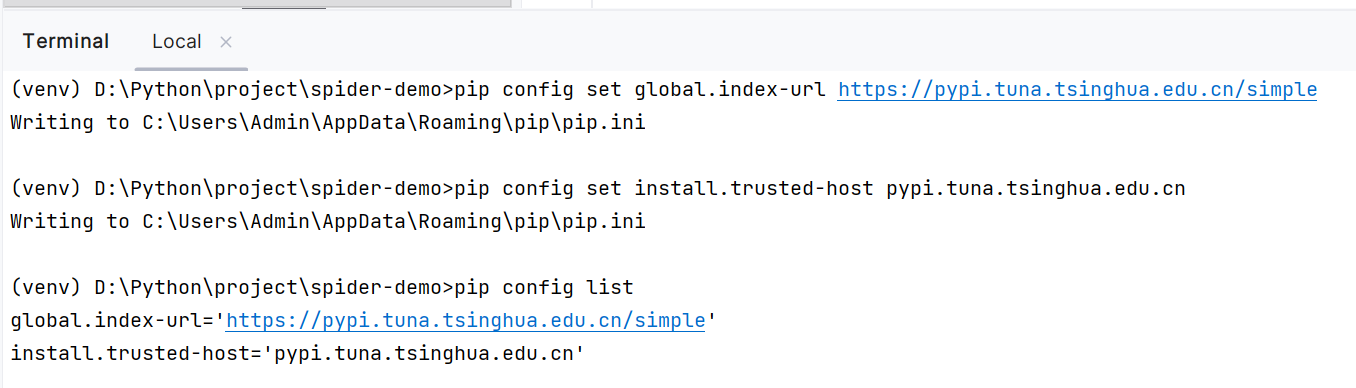
三、常用的国内镜像源
- 清华大学(推荐):https://pypi.tuna.tsinghua.edu.cn/simple
- 阿里云:http://mirrors.aliyun.com/pypi/simple/
- 中国科技大学:https://pypi.mirrors.ustc.edu.cn/simple/
- 豆瓣:http://pypi.douban.com/simple/

腾讯云面向开发者汇聚海量精品云计算使用和开发经验,营造开放的云计算技术生态圈。
更多推荐
 7
7 0
0- 0


 已为社区贡献1条内容

所有评论(0)