【javaFX基础】javaFX文档学习及基础编程实践
一、知识点
1、节点、根节点、场景的设置
1、 Button button = new Button(  "切换按钮1");//建节点
2、AnchorPane pane =new AnchorPane();//建根节点
3、 pane.getChildren().add(button);//将节点包含在根节点中
4、Scene scene =new Scene(pane,500,500);//建场景,设置大小,将根节点包含在场景中
5、primaryStage.setScene(scene);//显示场景
2、图片资源加载
getClass().getResourceAsStream() 是Java标准库方法,专门用于从classpath加载资源,它理解/开头的路径表示从classpath根目录开始,返回的InputStream可以直接被Image构造函数使用。
InputStream is = getClass().getResourceAsStream("/image/6手指光标.png");
scene.setCursor(new ImageCursor(new Image(is, 32, 32, true, true)));
3、JavaFX参考资料
官网文档:
(1)JavaFX API 文档跳转链接,最权威的API文档,包含所有类、方法、属性的详细说明
(2)OpenJFX 官方网站跳转链接,入门指南、教程、示例代码
(3)Oracle JavaFX 教程和文档跳转链接,虽然基于Java 8,但大部分内容仍然适用
常用类文档链接:
(1)Node 类 (setLayoutX, setOpacity等)跳转链接,包含:setLayoutX(double)、setLayoutY(double)、setOpacity(double)、setCursor(Cursor)、其他所有节点通用方法
(2) Scene 类跳转链接,包含:构造函数、setCursor()、setRoot()、事件处理等
(3)Pane 和 Layout 类跳转链接
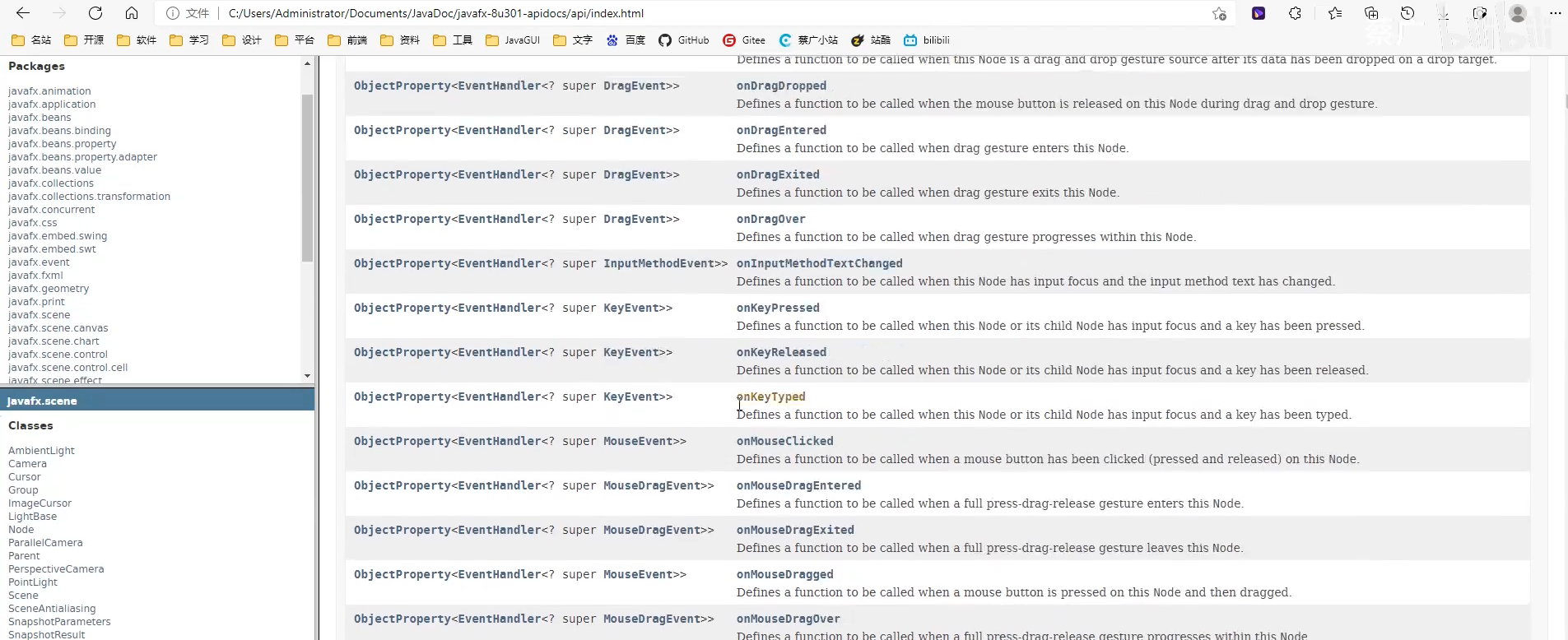
代码示例网站:
(1)JavaFX Examples:https://github.com/javafxports/openjdk-jfx/tree/master/apps
(2)TutorialsPoint: https:http:////www.tutorialspoint.com/javafx/index.htm
(3)Jenkov.com: http://tutorials.jenkov.com/javafx/index.html
推荐的学习顺序:
(1)先学基础: Node → Parent → Scene → Stage
(2)再学控件: Button, Label, TextField 等基础控件
(3)然后布局: Pane, HBox, VBox, BorderPane 等布局管理器
(4)最后高级: 表格、树形、图表等复杂控件
建议从官方文档开始,遇到具体问题再查阅详细的API说明。
4、javaFX文档怎么查
新手可能和我一样,虽然收藏了很多文档和笔记的链接,但是这些资料之间有什么关联?怎么系统学习?零零散散地了解总如荒海觅洲,不知道目前学到哪里,未来还有哪些要学,每每遇到问题总是重新发起询问,收藏夹里的方法完美隐藏,当点击收藏时才发现曾经已经来过.......

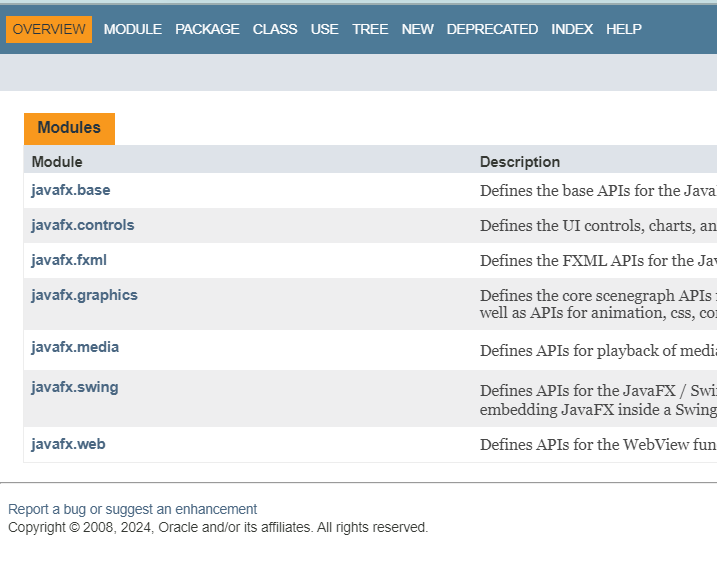
再次感谢deepseek的解答!帮助了我更好了解文档的结构和内容:
javafx.base       // 数据绑定、属性系统
javafx.graphics   // 场景图、图形、效果
javafx.controls   // UI控件 (重点!)
javafx.fxml       // FXML相关
javafx.web        // Web组件
javafx.media      // 音视频
可以通过以下路径来定位需要的类,例如Button:
(1)访问官方文档:首先进入JavaFX某个模块的主页,例如控件的模块主页:https://openjfx.cn/javadoc/22/javafx.controls/module-summary.html。
(2)进入包(Package)视图:在模块主页中,找到并点击 "Packages" 部分。所有具体的类都按功能组织在不同的包里。
(3)找到具体类(Class):在包列表中,点击 javafx.scene.control,即可进入该包的摘要页,这里列出了所有可用的UI控件,包括Button、Label、TextField等。
搜索技巧:
(1)利用页面内搜索:进入具体的包或类页面后,可以使用浏览器自带的页面搜索功能(通常是 Ctrl+F 或 Cmd+F)快速定位方法或属性。
(2)类的继承关系:JavaFX拥有一个清晰的类继承结构。Node类是所有场景图节点的基类,因此很多通用属性(如layoutX、layoutY、opacity)和方法都在Node类中定义。
(3) 查找事件处理:在类的文档中,关注以 setOn... 开头的方法(例如 setOnAction、setOnMouseClicked),这些通常就是设置事件监听器的方法。
控件、属性、方法、事件、监听的关系:
控件 (Control)
    ↓ 包含
属性 (Properties) + 方法 (Methods)
    ↓ 关联
事件 (Events) ← 监听 (Listeners)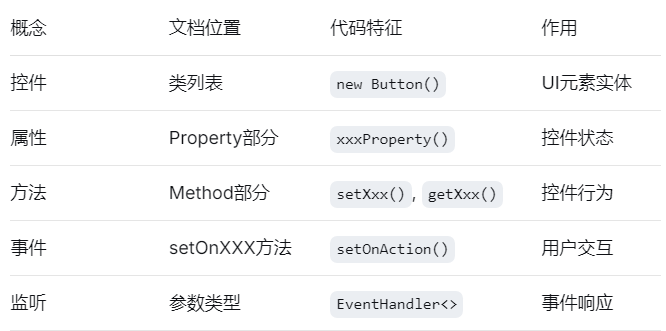
控件 (Control) - 实体对象
属性 (Properties) - 控件的状态(在文档中查找: "Property Summary")
方法 (Methods) - 控件的行为(在文档中查找: "Method Summary")
事件 (Events) - 发生的事情(在文档中查找: "setOnXXX" 方法)
监听 (Listeners) - 响应事件的代码
Button btn = new Button();           // 1. 创建控件
btn.setText("保存");                 // 2. 设置属性

// 3. 设置事件监听
btn.setOnAction(event -> {          // 4. 事件: ActionEvent
    // 5. 监听器: 这里的Lambda表达式
    String fileName = "document.txt";
    btn.setText("已保存: " + fileName); // 属性变化
});

// 6. 属性变化监听
btn.textProperty().addListener((obs, oldText, newText) -> {
    System.out.println("按钮文本变化: " + oldText + " → " + newText);
});
二、问题及解决方法
1、问题描述
图片路径正确,但仍报错报错“Caused by: java.lang.IllegalArgumentException: Invalid URL or resource not found at javafx.graphics/javafx.scene.image.Image.validateUrl(Image.java:1119)
... 11 more.Exception running application cc.caiguang.hello.Main”
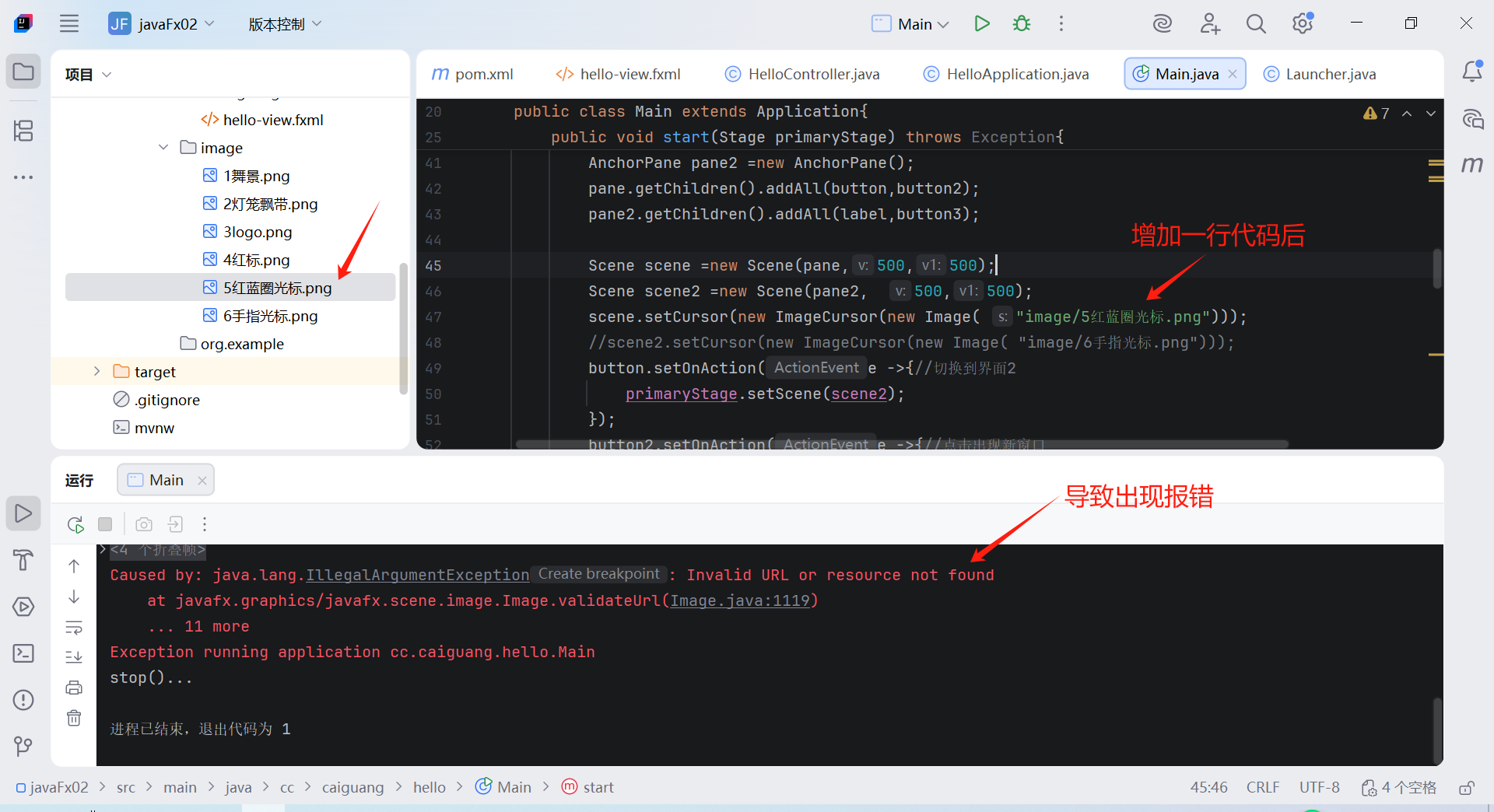
解决方法:
将:
scene.setCursor(new ImageCursor(new Image( "/image/5红蓝圈光标.png")));
scene2.setCursor(new ImageCursor(new Image( "file:image/6手指光标.png")));替换为(使用InputStream):
String possiblePaths="/image/5红蓝圈光标.png";
String possiblePaths2="/image/6手指光标.png";
InputStream is = getClass().getResourceAsStream(possiblePaths);
InputStream is2 = getClass().getResourceAsStream(possiblePaths2);
scene.setCursor(new ImageCursor(new Image(is, 32, 32, true, true)));
scene2.setCursor(new ImageCursor(new Image(is2, 32, 32, true, true)));原因分析:这两种方式的区别在于资源加载机制和路径解析的不同!
原方式:JavaFX的Image构造函数会将字符串直接作为URL处理,它期望一个完整的URL(如"http://example.com/image.png")或一个file:协议路(如"file:/path/to/image.png"),但对于classpath资源,它无法直接识别/image/...这种路径。
修改后:getClass().getResourceAsStream() 是Java标准库方法,专门用于从classpath加载资源,它理解/开头的路径表示从classpath根目录开始,返回的InputStream可以直接被Image构造函数使用。完整代码见模块三的实践测试2。
三、实践测试
1、页面跳转
在scene与scene2能通过点击场景的按钮相互跳转
package cc.caiguang.hello;
import javafx.application.Platform;
import javafx.scene.Scene;
import javafx.scene.control.Alert;
import javafx.scene.control.Button;
import javafx.scene.control.ButtonType;
import javafx.scene.control.Label;
import javafx.scene.image.Image;
import javafx.scene.layout.AnchorPane;
import javafx.scene.layout.BorderPane;
import javafx.scene.layout.Pane;
import javafx.stage.Modality;
import javafx.stage.Stage;
import javafx.application.Application;
import javafx.stage.StageStyle;
import org.w3c.dom.ls.LSOutput;
import java.util.Optional;

public class Main extends Application{
    public static void main(String[] args){
        Application.launch(args);
    }
    @Override
    public void start(Stage primaryStage) throws Exception{
        Button button = new Button(  "切换按钮1");
        Button button2 = new Button(  "弹窗按钮");
        button.setLayoutX(200);
        button.setLayoutY(300);
        button2.setLayoutX(200);
        button2.setLayoutY(350);

        Label label =new Label( "你好,JavaFX");
        label.setLayoutY(250);
        label.setLayoutX(200);
        Button button3 = new Button(  "切换按钮2");
        button3.setLayoutX(200);
        button3.setLayoutY(300);

        AnchorPane pane =new AnchorPane();
        AnchorPane pane2 =new AnchorPane();
        pane.getChildren().addAll(button,button2);
        pane2.getChildren().addAll(label,button3);

        Scene scene =new Scene(pane,500,500);
        Scene scene2 =new Scene(pane2,  500,500);
        button.setOnAction(e ->{//切换到界面2
            primaryStage.setScene(scene2);
        });
        button2.setOnAction(e ->{//点击出现新窗口
            Stage stage= new Stage();
            stage.setHeight(200);
            stage.setWidth(300);
            stage.initOwner(primaryStage);
            stage.initModality(Modality.APPLICATION_MODAL);//WINDOW_MODAL可移动按钮1弹出的窗口,APPLICATION_MODAL不能
            stage.show();
        });
        button3.setOnAction(e ->{//切换到界面1
            primaryStage.setScene(scene);
        });

        Platform.setImplicitExit(false);//取消操作系统默认退出
        primaryStage.setOnCloseRequest(event-> {
                    event.consume();
                    Alert alert = new Alert(Alert.AlertType.CONFIRMATION);
                    alert.setTitle("退出程序");
                    alert.setHeaderText(null);
                    alert.setContentText("您是否要退出程序?");
                    Optional<ButtonType> result = alert.showAndWait();
                    if (result.get() == ButtonType.OK) {
                        Platform.exit();//调用退出程序
                    }
                });
        primaryStage.setScene(scene);
        primaryStage.setTitle("World");
        primaryStage.getIcons().add(new Image("Image/4红标.png"));
        primaryStage.setResizable(false);//固定窗口大小
        primaryStage.show();
    }

    @Override
    public void init() throws Exception{
        super.init();
        System.out.println("init()...");
    }

    @Override
    public void stop()throws Exception {
        super.stop();
        System.out.println("stop()...");
    }
}
2、跳转页面的光标样式
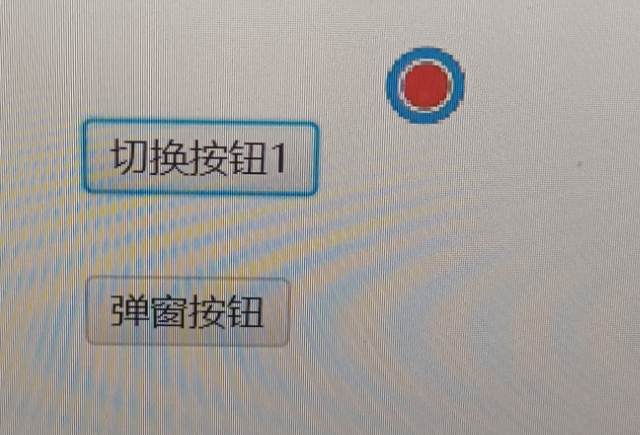
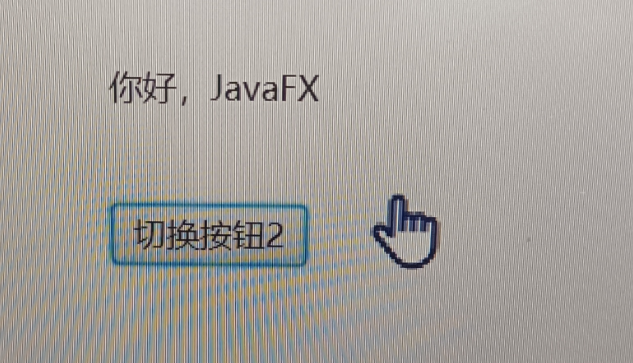
package cc.caiguang.hello;
import javafx.application.Platform;
import javafx.scene.Cursor;
import javafx.scene.ImageCursor;
import javafx.scene.Parent;
import javafx.scene.Scene;
import javafx.scene.control.Alert;
import javafx.scene.control.Button;
import javafx.scene.control.ButtonType;
import javafx.scene.control.Label;
import javafx.scene.image.Image;
import javafx.scene.layout.AnchorPane;
import javafx.scene.layout.BorderPane;
import javafx.scene.layout.Pane;
import javafx.stage.Modality;
import javafx.stage.Stage;
import javafx.application.Application;
import javafx.stage.StageStyle;
import org.w3c.dom.ls.LSOutput;

import java.io.InputStream;
import java.util.Optional;

public class Main extends Application{
    public static void main(String[] args){
        Application.launch(args);
    }
    @Override
    public void start(Stage primaryStage) throws Exception{
        Button button = new Button(  "切换按钮1");
        Button button2 = new Button(  "弹窗按钮");
        button.setLayoutX(200);
        button.setLayoutY(300);
        button2.setLayoutX(200);
        button2.setLayoutY(350);

        Label label =new Label( "你好,JavaFX");
        label.setLayoutY(250);
        label.setLayoutX(200);
        Button button3 = new Button(  "切换按钮2");
        button3.setLayoutX(200);
        button3.setLayoutY(300);

        AnchorPane pane =new AnchorPane();
        AnchorPane pane2 =new AnchorPane();
        pane.getChildren().addAll(button,button2);
        pane2.getChildren().addAll(label,button3);

        Scene scene =new Scene(pane,500,500);
        Scene scene2 =new Scene(pane2,  500,500);
        // 使用测试程序setCustomCursor时取消以下注释符号
        //setCustomCursor(scene);
        //setCustomCursor(scene2);
        String possiblePaths="/image/5红蓝圈光标.png";
        String possiblePaths2="/image/6手指光标.png";
        InputStream is = getClass().getResourceAsStream(possiblePaths);
        InputStream is2 = getClass().getResourceAsStream(possiblePaths2);
        scene.setCursor(new ImageCursor(new Image(is, 32, 32, true, true)));
        scene2.setCursor(new ImageCursor(new Image(is2, 32, 32, true, true)));
        //scene.setCursor(new ImageCursor(new Image( "/image/5红蓝圈光标.png")));//此写法存在问题,使用上述InputStream方法
        button.setOnAction(e ->{//切换到界面2
            primaryStage.setScene(scene2);
        });
        button2.setOnAction(e ->{//点击出现新窗口
            Stage stage= new Stage();
            stage.setHeight(200);
            stage.setWidth(300);
            stage.initOwner(primaryStage);
            stage.initModality(Modality.APPLICATION_MODAL);//WINDOW_MODAL可移动按钮1弹出的窗口,APPLICATION_MODAL不能
            stage.show();
        });
        button3.setOnAction(e ->{//切换到界面1
            primaryStage.setScene(scene);
        });

        Platform.setImplicitExit(false);//取消操作系统默认退出
        primaryStage.setOnCloseRequest(event-> {
                    event.consume();
                    Alert alert = new Alert(Alert.AlertType.CONFIRMATION);
                    alert.setTitle("退出程序");
                    alert.setHeaderText(null);
                    alert.setContentText("您是否要退出程序?");
                    Optional<ButtonType> result = alert.showAndWait();
                    if (result.get() == ButtonType.OK) {
                        Platform.exit();//调用退出程序
                    }
                });
        primaryStage.setScene(scene);
        primaryStage.setTitle("World");
        //primaryStage.getIcons().add(new Image("Image/4红标.png"));
        primaryStage.setResizable(false);//固定窗口大小
        primaryStage.show();
    }
    /* 测试程序
    private void setCustomCursor(Scene scene) {
        // 先测试一个简单的系统光标
        //scene.setCursor(Cursor.CROSSHAIR);
        //System.out.println("系统光标测试成功");

        // 然后尝试自定义光标
        String[] possiblePaths = {
                "/image/5红蓝圈光标.png",
                "/resources/image/5红蓝圈光标.png",
                "image/5红蓝圈光标.png"
        };
        for (String path : possiblePaths) {
            try {
                System.out.println("尝试路径: " + path);
                InputStream is = getClass().getResourceAsStream(path);
                if (is != null) {
                    Image cursorImage = new Image(is, 32, 32, true, true);
                    if (!cursorImage.isError()) {
                        scene.setCursor(new ImageCursor(cursorImage));
                        System.out.println("成功使用路径: " + path);
                        return;
                    }
                }
            } catch (Exception e) {
                System.out.println("路径 " + path + " 失败: " + e.getMessage());
            }
        }
        System.out.println("所有路径尝试失败,使用默认光标");
        scene.setCursor(Cursor.DEFAULT);
    }*/
    @Override
    public void init() throws Exception{
        super.init();
        System.out.println("init()...");
    }

    @Override
    public void stop()throws Exception {
        super.stop();
        System.out.println("stop()...");
    }
}
3、监听事件
(1)按钮图标监听事件
(2)键盘向下按键监听事件
(3)拖拽文件,文本框显示该文件绝对路径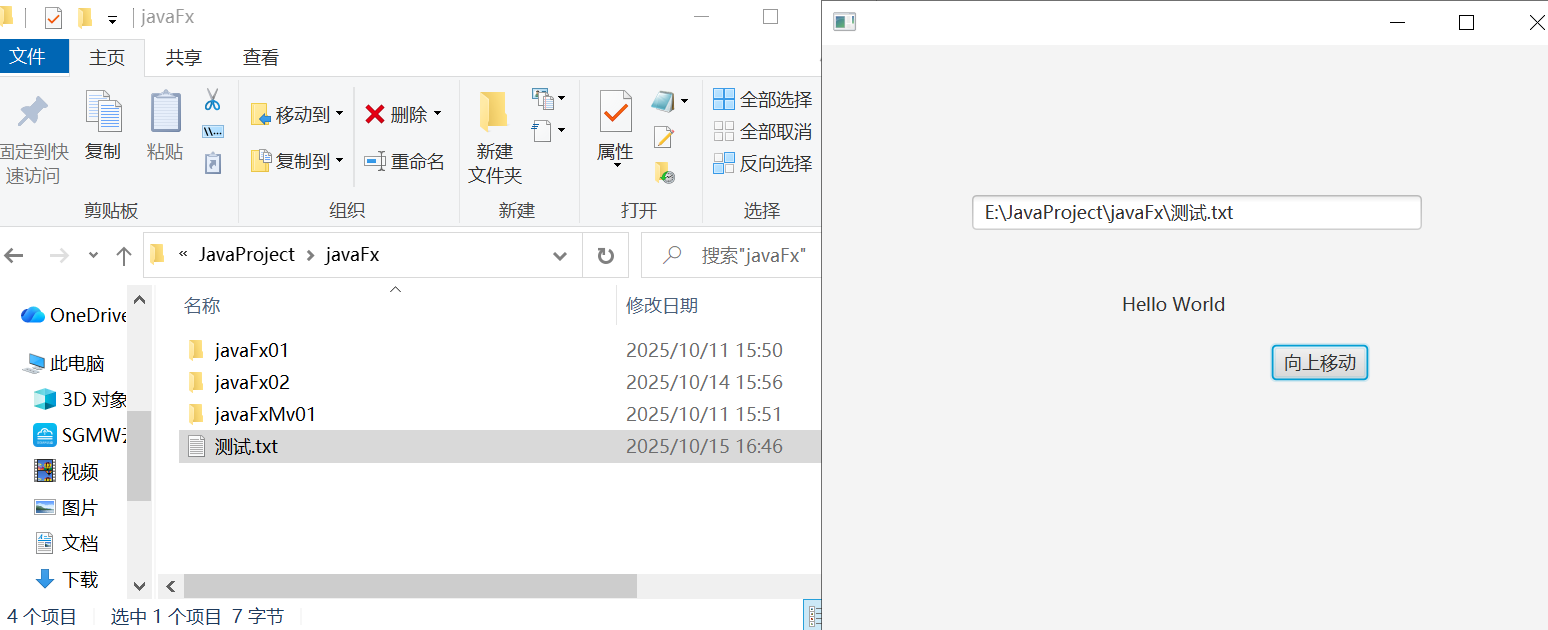
package cc.caiguang.hello;
import javafx.application.Platform;
import javafx.event.ActionEvent;
import javafx.event.EventHandler;
import javafx.scene.Cursor;
import javafx.scene.ImageCursor;
import javafx.scene.Parent;
import javafx.scene.Scene;
import javafx.scene.control.*;
import javafx.scene.image.Image;
import javafx.scene.input.Dragboard;
import javafx.scene.input.KeyCode;
import javafx.scene.input.TransferMode;
import javafx.scene.layout.AnchorPane;
import javafx.scene.layout.BorderPane;
import javafx.scene.layout.Pane;
import javafx.stage.Modality;
import javafx.stage.Stage;
import javafx.application.Application;
import javafx.stage.StageStyle;
import org.w3c.dom.ls.LSOutput;

import java.io.InputStream;
import java.util.Optional;

public class Main extends Application{
    public static void main(String[] args){
        Application.launch(args);
    }
    @Override
    public void start(Stage primaryStage) throws Exception {
        AnchorPane root=new AnchorPane();
        Scene scene = new Scene(root,500, 500);
        Label label = new Label( "Hello World");
        label.setLayoutX(200);
        label.setLayoutY(200);
        Button button = new Button( "向上移动");
        button.setLayoutX(300);
        button.setLayoutY(200);
        root.getChildren().addAll(label,button);
        //按钮图标监听事件
        button.setOnAction(new EventHandler<ActionEvent>() {
            @Override
            public void handle(ActionEvent actionEvent) {
                label.setLayoutY(label.getLayoutY()-5);
            }
        });
        //键盘向下按键监听事件
        scene.setOnKeyReleased(event ->{
            KeyCode keyCode = event.getCode();
            if(keyCode.equals(KeyCode.DOWN)) {
                label.setLayoutY(label.getLayoutY()+5);
            }
        });
        //拖拽文件,文本框显示该文件绝对路径
        TextField textField = new TextField();
        textField.setLayoutX(100);
        textField.setLayoutY(100);
        textField.setMinWidth(300);
        textField.setOnDragOver(event->{
                event.acceptTransferModes(TransferMode.ANY);
        });
        textField.setOnDragDropped(event ->{
            Dragboard dragboard =event.getDragboard();
            if(dragboard.hasFiles()){
                String path = dragboard.getFiles().get(0).getAbsolutePath();
                textField.setText(path);}
    });
        root.getChildren().add(textField);
        primaryStage.setScene(scene);
        primaryStage.show();
    }
    @Override
    public void init() throws Exception{
        super.init();
        System.out.println("init()...");
    }

    @Override
    public void stop()throws Exception {
        super.stop();
        System.out.println("stop()...");
    }
}
四、参考链接
1、问题1解决方法:https://blog.csdn.net/qq_44018692/article/details/127255765
(加path在路径前,但是我试过虽然运行不报错,但图标没有按需替换)
2、CSS使用教程:https://www.runoob.com/css/css-tutorial.html
3、javaFX样式:https://openjfx.cn/javadoc/24/javafx.graphics/javafx/scene/doc-files/cssref.html
4、javaFX笔记(博主NolanKy):https://blog.csdn.net/weixin_45644335/article/details/106712103

腾讯云面向开发者汇聚海量精品云计算使用和开发经验,营造开放的云计算技术生态圈。
更多推荐
 14
14 0
0- 0


 已为社区贡献9条内容

所有评论(0)