Spring Security深度实践:从单体到微服务架构下的多方式登录与统一认证
一、引言
(一)背景介绍
在当今数字化时代,随着互联网应用的飞速发展,用户登录认证已成为保障系统安全性和用户体验的关键环节。传统的登录方式,如简单的用户名和密码认证,已经无法满足现代复杂应用的需求。一方面,用户需要更加便捷的登录体验,例如通过手机号验证码登录;另一方面,系统需要更高的安全性,防止用户信息泄露和恶意攻击。
微服务架构的兴起进一步加剧了认证问题的复杂性。在单体架构中,认证和鉴权逻辑通常集中在一个应用中,管理相对简单。然而,在微服务架构下,系统被拆分为多个独立的服务,每个服务都有自己的用户认证需求。这不仅要求每个服务能够独立处理认证请求,还需要一个统一的认证中心来协调不同服务之间的认证和鉴权。
(二)目标阐述
本文旨在深入探讨如何在Spring Security框架下实现多方式登录和统一认证,从单体架构到微服务架构的演变过程。**建议有SpringSecurity基础再看!!!**具体目标包括:
- 摒弃传统实现方式:传统继承
UserDetails的方式在多方式登录场景下显得力不从心。我们将介绍如何通过自定义AbstractAuthenticationToken、AbstractAuthenticationProcessingFilter和AuthenticationProvider来实现更加灵活的用户认证逻辑。 - 实现多方式登录:支持多种登录方式,如用户名密码、手机号验证码等,并确保这些登录方式能够无缝连接,为用户提供一致的登录体验。
- 多客户端差异化认证:不同的客户端(如顾客端和员工端)可能有不同的认证需求。我们将探讨如何为不同客户端配置不同的
token秘钥,并实现差异化认证。 - 微服务架构下的统一认证与鉴权:在微服务架构下,如何通过OAuth2协议实现单点登录,并在不同服务之间传递和验证
token,确保系统的安全性和一致性。
二、Spring Security基础回顾
在深入探讨如何实现自定义的多方式登录和统一认证之前,我们先回顾一下Spring Security的核心组件及其工作原理。这将帮助我们更好地理解Spring Security的机制,并为后续的自定义实现打下坚实的基础。
(一)Spring Security核心组件
Spring Security是一个功能强大且高度可定制的Java安全框架,用于保护基于Spring的应用程序。它提供了认证(Authentication)和授权(Authorization)的核心功能。以下是Spring Security中一些关键的组件:
UserDetails与UserDetailsServiceUserDetails:这是一个接口,定义了用户认证所需的基本信息,如用户名、密码、权限等。通常,我们会创建一个实现类(如CustomUserDetails),并将其与数据库中的用户信息进行映射,通过UserDetailsService根据用户名获取处理的用户信息要封装成UserDetails对象返回。然后将这些信息封装到Authentication对象中。UserDetailsService:这是一个接口,定义了加载用户特定数据的方法。Spring Security通过调用UserDetailsService的loadUserByUsername方法来获取用户信息,并将其封装为UserDetails对象。默认情况下,Spring Security使用UserDetailsService来加载用户信息,然后进行认证。
Authentication与AuthenticationManagerAuthentication:这是一个接口,表示用户的认证信息。它通常包含用户的身份信息(如用户名)和认证状态(如是否认证成功)。Authentication对象在用户登录时被创建,并在后续的请求中用于表示用户的认证状态。AuthenticationManager:这是一个接口,定义了认证逻辑。它负责接收Authentication对象,并验证其是否有效(借助AuthenticationProvider进行校验)。如果认证成功,它会返回一个填充了用户详细信息的Authentication对象;如果认证失败,它会抛出一个异常。
- 过滤器链
- Spring Security的核心是其过滤器链,这些过滤器负责处理各种安全相关的任务,如认证、授权、会话管理等。默认情况下,Spring Security会配置一系列的过滤器,如
UsernamePasswordAuthenticationFilter、BasicAuthenticationFilter等。这些过滤器按照特定的顺序执行,确保每个请求都经过适当的安全检查。
- Spring Security的核心是其过滤器链,这些过滤器负责处理各种安全相关的任务,如认证、授权、会话管理等。默认情况下,Spring Security会配置一系列的过滤器,如
(二)传统实现方式的局限性
尽管Spring Security提供了强大的功能,但其默认的实现方式在某些场景下可能会显得不够灵活。例如,传统的实现方式通常依赖于继承UserDetails和实现UserDetailsService,这在多方式登录场景下可能会带来以下问题:
- 单一登录方式的限制
- 默认的
UserDetailsService通常只能处理一种登录方式(如用户名密码)。如果需要支持多种登录方式(如手机号验证码、邮箱验证码等),就需要扩展UserDetailsService,这可能会导致代码复杂度增加。
- 默认的
- 难以定制认证逻辑
- 默认的认证逻辑(如
DaoAuthenticationProvider)通常基于UserDetailsService加载的用户信息进行校验。如果需要实现更复杂的认证逻辑(如二次验证、动态权限校验等),就需要自定义AuthenticationProvider,这可能会涉及对Spring Security内部机制的深入理解。
- 默认的认证逻辑(如
- 集中式管理的挑战
- 在单体架构中,认证和鉴权逻辑通常集中在一个应用中,管理相对简单。但在微服务架构下,每个服务都有自己的用户认证需求,需要一个统一的认证中心来协调不同服务之间的认证和鉴权。传统的实现方式在这种分布式环境下可能会显得力不从心。
三、登录的进阶实现
(一)自定义实现登录认证思路
为了解决上述问题,我们需要自定义Spring Security的认证逻辑。通过自定义AbstractAuthenticationToken、AbstractAuthenticationProcessingFilter和AuthenticationProvider,我们可以实现更加灵活的用户认证机制,支持多种登录方式,并适应微服务架构下的认证需求。
- 自定义
AbstractAuthenticationToken- 作为认证信息的载体,
AuthenticationToken可以封装多种登录方式的认证信息(如用户名密码、手机号验证码等)。通过自定义AuthenticationToken,我们可以支持多种登录方式,并在后续的认证过程中使用这些信息。
- 作为认证信息的载体,
- 自定义
AbstractAuthenticationProcessingFilter- 拦截登录请求,并组装
AuthenticationToken。通过自定义AbstractAuthenticationProcessingFilter,我们可以根据不同的登录方式(如表单登录、手机号登录等)拦截相应的请求,并将其转换为AuthenticationToken对象,然后提交给AuthenticationManager进行认证。
- 拦截登录请求,并组装
- 自定义
AuthenticationProvider- 实现核心认证逻辑,校验用户名密码、手机号验证码等。通过自定义
AuthenticationProvider,我们可以实现复杂的认证逻辑,如二次验证、动态权限校验等,并返回认证结果。
- 实现核心认证逻辑,校验用户名密码、手机号验证码等。通过自定义
- 自定义Handler
- 处理认证成功或失败后的响应。通过自定义
AuthenticationSuccessHandler和AuthenticationFailureHandler,我们可以定义认证成功或失败后的跳转逻辑,为用户提供友好的提示信息。
- 处理认证成功或失败后的响应。通过自定义
一句话总结,
filter负责将前端传过来的数据封装成token,provider负责验证token中的信息是否与数据库中的匹配,注意:因为使用自定义登录逻辑,建议在配置中禁用掉原本的登录逻辑,并将UsernamePasswordAuthenticationFilter从过滤器中移除,除非依然想使用默认的用户名密码登录
(二)具体实现
下面模拟实现手机号验证码登录,通过仿照
SpringSecurity中默认用户名验证码的方式实现自定义登录逻辑,整个逻辑还可封装优化,这里只提供大体思路
1. 自定义Token
自定义
AbstractAuthenticationToken
在自定义token之前我们需要先知道AbstractAuthenticationToken中有哪些属性,AbstractAuthenticationToken中一共有三个属性,分别是:
-
final Collection authorities
权限列表,AuthenticationToken对象在构造时必须传入,通过构造器可以看出,当传入的authorities为null时用户的权限会被赋予
AuthorityUtils.NO_AUTHORITIES,即没有任何权限,后面在微服务架构中使用SpringSecurity时会特别使用这一点,同时应为其被修饰为final,所以与UsernamePasswordAuthenticationToken相同,认证前认证后需要分别创建对象 -
Object details
登录时的附加信息,就是
session和ip -
boolean authenticated = false
是否已经认证,默认未通过认证,之后调用登录成功或者是登录失败的
Handler就是基于此判断
为了更优雅的自定义一个用于手机号验证码登录的Token,我们有必要知道UsernamePasswordAuthenticationToken中定义了哪些属性,从源码中我们发现只有两个属性,principal和credentials,分别表示主体和凭证,根据SpringSecurity的设计理念,以默认的用户名密码登录为例,在授权成功之前,credentials凭证存储的就是密码password;principal主体就是前端传递过来的数据username,在授权成功之后,凭证信息需要被清空,即credentital=null;主体信息变为了当前登录的用户信息,例如user,employee等。
在了解了默认的用户名密码登录的Token的实现,我们来自己写一个手机号验证码登录的Token实现
public class PhoneAuthenticationToken extends AbstractAuthenticationToken {

    private Object principal;  //主体对象
    private String phone;     //手机号
    private String captcha;   //验证码

    public PhoneAuthenticationToken(Collection<? extends GrantedAuthority> authorities, String phone, String captcha, Object principal){
        super(authorities);
        super.setAuthenticated(false);
        this.phone = phone;
        this.captcha = captcha;
        this.principal = principal;
    }

    @Override
    public Object getCredentials() {
        return captcha;
    }

    @Override
    public Object getPrincipal() {
        return principal;
    }

    // get,set方法...
}
上面的代码也可以参考UsernamePasswordAuthenticationToken的双构造器设计,通过使用两个不同入参的构造器,明确 “认证前(封装前端参数)” 与 “认证后(封装用户信息)” 的构造器区分
2. 自定义Filter
自定义
AbstractAuthenticationProcessingFilter
同样的,在自定义Filter之前还是看一下UsernamePasswordAuthenticationFilter的默认实现,除了定义的请求参数名称username和password外,值得注意的是还定义了属性AntPathRequestMatcher DEFAULT_ANT_PATH_REQUEST_MATCHER = new AntPathRequestMatcher("/login", "POST")以及一个含有AuthenticationManager作为参数的构造方法,AntPathRequestMatcher定义了请求路径和请求方式,而AuthenticationManager是提供Provider作为验证的,所以在自定义Filter时我们就要自定义这两个属性
下面我们自定义Filter,同时还传入了成功和失败的Handler
public class PhoneAuthenticationFilter extends AbstractAuthenticationProcessingFilter {

    public PhoneAuthenticationFilter(AntPathRequestMatcher pathRequestMatcher,
                                        AuthenticationProvider authenticationProvider,
                                        AuthenticationSuccessHandler authenticationSuccessHandler,
                                        AuthenticationFailureHandler authenticationFailureHandler) {
        super(pathRequestMatcher);
        setAuthenticationManager(new ProviderManager(List.of(authenticationProvider)));
        setAuthenticationSuccessHandler(authenticationSuccessHandler);
        setAuthenticationFailureHandler(authenticationFailureHandler);
    }

    @Override
    public Authentication attemptAuthentication(HttpServletRequest request,
                                                HttpServletResponse response) throws AuthenticationException {
        // 提取请求数据: 标准的表单登录
        String phone = Optional
                .ofNullable(request.getParameter("phone"))
                .orElse("");
        String captcha = Optional
                .ofNullable(request.getParameter("captcha"))
                .orElse("");

        // 封装成Spring Security需要的对象
        AbstractAuthenticationToken authentication = new PhoneAuthenticationToken(null, phone, captcha, phone);
        // 设置“认证请求”的附加信息,看UsernamePasswordAuthenticationFilter的setDetail方法就可以得到,设置session和ip
        authentication.setDetails(this.authenticationDetailsSource.buildDetails(request));
        // 开始登录认证。SpringSecurity会利用当前绑定的AuthenticationManager对象去寻找 AuthenticationProvider进行登录认证
        return getAuthenticationManager().authenticate(authentication);
    }

}
3. 自定义Provider
自定义
AuthenticationProvider
Provider的作用就是校验Filter封装的AbstractAuthenticationToken对象是否和数据库一致,即用户登录的成功与否都在这里决定,默认的DaoAuthenticationProvider就会调用loadUserByUsername方法来辅助校验,当然,我们这里自定义Provider肯定不会在调用loadUserByUsername方法了
public class PhoneAuthenticationProvider implements AuthenticationProvider {

  @Override
  public Authentication authenticate(Authentication authentication) throws AuthenticationException {
      PhoneAuthenticationToken phoneAuthentication = (PhoneAuthentication) authentication;
      // 检查参数
      String phone = phoneAuthentication.getPhone();
      String captcha = phoneAuthentication.getCaptcha();
      // 这里模拟查询通过...
      // 通过后查询用户信息封装到Authentication中
      User user = ....
      PhoneAuthenticationToken authentication = new PhoneAuthenticationToken(user.getAuthorities, null, null, user);   // 手机号和验证码没用了可以直接设置为null
      //设置为已认证
      authentication.setAuthenticated(true);
      return authentication;
  }

  @Override
  public boolean supports(Class<?> authentication) {
      return authentication.isAssignableFrom(PhoneAuthenticationToken.class);
  }

}
4. 自定义Handler
自定义
AuthenticationSuccessHandler和AuthenticationFailureHandler
成功登录和失败登录的处理器比较简单,这里不做展示
5. 配置
将Filter注册到Spring容器中
    @Bean
    public PhoneAuthenticationFilter phoneLoginFilter(
            PhoneAuthenticationProvider phoneAuthenticationProvider,
            MyAuthenticationSuccessHandler phoneSuccessHandler,
            MyAuthenticationFailureHandler phoneFailHandler
    ){
        return new PhoneAuthenticationFilter(
                new AntPathRequestMatcher("/login/phone", "POST"),
                phoneAuthenticationProvider, phoneSuccessHandler, phoneFailHandler);
    }
之后再配置SecurityFilterChain时将过滤器加入过滤器链即可
// 加一个登录方式。电话、验证码登录
http.addFilterBefore(phoneLoginFilter, UsernamePasswordAuthenticationFilter.class);
6. 补充
整个自定义过程只是提供了一个思路,具体实现一定是多样的,例如:
-
PhoneAuthenticationToken中的phone和principal字段可以像UsernamePasswordAuthenticationToken一样使用同一字段principal表示 -
Filter的作用是封装前端传过来的数据,
PhoneAuthenticationFilter中模拟的是标准的表单登录,根据实际的需求可改成json等格式的数据获取 -
Provider的作用是校验用户信息,也可以很轻松的做拓展,包括微信小程序登录,多次连续登录锁定等
四、多方式登录的实现
在前面的章节中,我们已经详细介绍了如何通过自定义
AuthenticationToken、AuthenticationFilter、AuthenticationProvider和Handler来实现手机号验证码登录的整套流程。现在,我们将进一步扩展这个实现,以支持多方式登录,包括用户名密码+图形验证码登录、邮箱验证码登录、微信小程序等(每种的具体逻辑与上面相似,这里不再给出)
(一)多方式登录的无缝连接
-
自定义
AbstractAuthenticationToken的多态性- 在前面的实现中,我们已经创建了一个自定义的
AbstractAuthenticationToken类,用于封装手机号验证码登录的认证信息。现在,我们需要扩展这个类,使其能够支持多种登录方式。可以通过继承AbstractAuthenticationToken类,为每种登录方式创建一个具体的子类。例如:UsernamePasswordCodeAuthenticationToken:用于用户名密码+图形验证码登录EmailCodeAuthenticationToken:用于邮箱验证码登录WeChatAppAuthenticationToken:用于微信小程序登录
这些子类将封装各自登录方式的认证信息,并在认证过程中被使用。
- 在前面的实现中,我们已经创建了一个自定义的
-
自定义
AbstractAuthenticationProcessingFilter的扩展- 在前面的实现中,我们创建了一个自定义的
AbstractAuthenticationProcessingFilter,用于拦截手机号验证码登录的请求。现在,我们需要扩展这个过滤器,使其能够识别和处理多种登录方式的请求。可以通过配置多个过滤器,每个过滤器负责处理一种登录方式的请求。例如:UsernamePasswordCodeAuthenticationFilter:拦截用户名密码+图形验证码登录的请求EmailCodeAuthenticationFilter:拦截邮箱验证码登录的请求WeChatAppAuthenticationFilter:拦截微信小程序登录的请求
每个过滤器将根据请求的类型(通过
AntPathRequestMatcher进行指定),创建相应的AbstractAuthenticationToken子类,并将其提交给AuthenticationManager进行认证(实际由Provider执行校验)。 - 在前面的实现中,我们创建了一个自定义的
-
自定义
AuthenticationProvider的扩展- 在前面的实现中,我们创建了一个自定义的
AuthenticationProvider,用于实现手机号验证码登录的认证逻辑。现在,我们需要扩展这个认证提供者,使其能够支持多种登录方式的认证。可以通过实现一个通用的AuthenticationProvider接口,并在其中根据AbstractAuthenticationToken的类型,调用相应的认证逻辑。例如:UsernamePasswordCodeAuthenticationProvider:实现用户名密码登录的认证逻辑EmailCodeAuthenticationProvider:实现邮箱验证码登录的认证逻辑WeChatAppAuthenticationProvider:实现微信小程序登录的认证逻辑
这些认证提供者将根据
AbstractAuthenticationToken的类型,校验相应的认证信息,并返回认证结果。 - 在前面的实现中,我们创建了一个自定义的
-
自定义
Handler的扩展- 在前面的实现中,我们创建了自定义的
MyAuthenticationSuccessHandler和MyAuthenticationFailureHandler,用于处理认证成功或失败后的响应。现在,我们需要扩展这些处理器,使其能够根据不同的登录方式,提供不同的成功或失败响应。例如:UsernamePasswordCodeAuthenticationSuccessHandler:处理用户名密码登录成功后的响应EmailCodeAuthenticationSuccessHandler:处理邮箱验证码登录成功后的响应WeChatAppAuthenticationSuccessHandler:处理微信小程序登录成功后的响应
这些处理器将根据登录方式的不同,为用户提供不同的跳转逻辑和提示信息。当然,如果成功或失败各个登录方式的处理逻辑都相同,完全可以都使用同一个SuccessHandler或者FailureHandler
- 在前面的实现中,我们创建了自定义的
(二)多客户端的差异化认证
不同的客户端可能有不同的认证需求。例如,顾客端和员工端都使用手机号验证码登录,但根据手机号查询用户是否存在时可能需要根据情况查询顾客表或员工表。
为了满足差异化的需求,我们需要为每个客户端配置不同的认证逻辑,而我们通过前面的介绍已经知道,整个认证流程中负责校验用户信息的都是AuthenticationProvider实现类,所以我们这里也需要通过AuthenticationProvider来实现
首先我们需要先了解一下Provider具体是怎么工作的
这里只是简单介绍,具体还是得自己看源码
在前面的Filter的构造器中,我们传入了一个Provider,然后通过调用父类即AbstractAuthenticationProcessingFilter的setAuthenticationManager方法设置了一个AuthenticationManager,这里我们可以看到之前传入的是ProviderManager对象
	// 之前实现的PhoneAuthenticationFilter过滤器的构造器方法
	public PhoneAuthenticationFilter(AntPathRequestMatcher pathRequestMatcher,
                                        AuthenticationProvider authenticationProvider,
                                        AuthenticationSuccessHandler authenticationSuccessHandler,
                                        AuthenticationFailureHandler authenticationFailureHandler) {
        super(pathRequestMatcher);
        setAuthenticationManager(new ProviderManager(List.of(authenticationProvider)));
        setAuthenticationSuccessHandler(authenticationSuccessHandler);
        setAuthenticationFailureHandler(authenticationFailureHandler);
    }
可以看到ProviderManager在构造时传入的是AuthenticationProvider的集合(重点),
// SpringSecurity框架中的接口
public interface AuthenticationProvider {
    Authentication authenticate(Authentication authentication) throws AuthenticationException;  // 执行校验的方法

    boolean supports(Class<?> authentication);         // Provider能够处理的Authentication对象
}
在Filter中我们最后调用了getAuthenticationManager().authenticate(authentication),manager这里我们设置的都为ProviderManager,查看ProviderManager的authenticate方法我们可以发现它遍历了我们传入的AuthenticationProvider并调用了support方法判断是否支持,不支持则继续下一个,很明显,这是一个基于列表的责任链!!!
到这里已经很明显了,要想完成不同客户端的认证需求,我们可以从Provider的support方法入手,这里我给出一种实现思路
,不同的客户端在登录时携带不同的请求头,下面以顾客端和员工端为例:
-
前端进行登录时分别携带:[X-Request-Client:customer]、[X-Request-Client:employee]
-
PhoneAuthenticationToken在创建字段时多创建一个requestClient属性,在Filter封装token时同时将对应请求头的信息页封装进去 -
同时修改前面的Filter,将相应的部分修改为集合即可
-
定义两个Provider,
authenticate方法中分别为两个客户端在手机号验证码登录下自己的验证逻辑,这里我们重点修改supports方法,下面给出customer客户端的supports方法的实现@Override public boolean supports(Class<?> authentication) { if (authentication.isAssignableFrom(PhoneAuthenticationToken.class)) { PhoneAuthenticationToken authenticationToken = (PhoneAuthenticationToken) authentication; if ("customer".equals(authenticationToken.getRequestClient())){ return true; } } return false; }
五、统一认证
(一)使用不同的jwt秘钥进行认证
每个客户端可能有自己的
jwt。通过配置不同的jwt秘钥,我们可以实现客户端的差异化认证。例如,顾客端的jwt可能与员工端的jwt不同,具体不同点可能体现在秘钥、负载、过期时间等。注:下面一些关于jwt的代码,看不懂的可以先去看另一篇博客:《JWT 身份验证:从 Cookie/Session 到双 Token + 黑名单落地》
在登录成功后,我们会在AuthenticationSuccessHandler中向前端返回accessToken和refreshToken用于之后的请求,之后的请求我们都应该校验tjwt的合法性。
public class TokenFilter extends OncePerRequestFilter {
private static final AntPathMatcher PATH_MATCHER = new AntPathMatcher();
private final Set<String> ALLOWED_PATHS;
@Override
protected void doFilterInternal(HttpServletRequest request, HttpServletResponse response, FilterChain filterChain) throws ServletException, IOException {
// 判断请求路径是否需要过滤
if (allowedPath(request.getRequestURI())){
filterChain.doFilter(request, response);
return;
}
// 从请求头中获取 token
String token = ...
// 验证是否过期,签名是否正确等
// 查询用户信息和权限
Employee principal = ...
List<SimpleGrantedAuthority> authorities = ...
// 验证通过,将用户信息存储到上下文,三个参数的构造器构造的对象表示已经验证过的,可以查看构造器方法明确
UsernamePasswordAuthenticationToken authentication = new UsernamePasswordAuthenticationToken(principal, null, authorities);
SecurityContextHolder.getContext().setAuthentication(authentication); // 存储用户信息
filterChain.doFilter(request, response);
}
/**
* 判断请求路径是否需要过滤
*
* @param requestURI 请求路径
* @return true: 不需要过滤,允许通过
*/
private boolean allowedPath(String requestURI) {
for (String allowedPath : ALLOWED_PATHS) {
if (PATH_MATCHER.match(allowedPath, requestURI)) {
return true; // 匹配成功
}
}
return false;
}
}
这里使用UsernamePasswordAuthenticationToken已经足够,也可可以自己定义一个,配置时加在LogoutFilter.class前就行。上面这种方式如果只有一种认证方式和jwt策略的话已经完全够用了,但如果多个验证结果返回的对象不同,如customer对象和employee对象,jwt策略也不同那么如果都在这个TokenFilter进行处理就会很杂乱也不便于维护和拓展,这里我们采用策略模式进行处理
-
首先解决多个验证结果返回不同对象的问题
方法很简单,创建一个中间类进行传递就行
public class AuthenticationPrincipal { private Object principal; // 存储customer或者employee对象 private List<SimpleGrantedAuthority> authorities; // 权限信息 }jwt过滤器调用服务层方法进行验证时统一得到
AuthenticationPrincipal对象 -
然后解决**
jwt策略不同**的问题我们使用策略模式进行解决,根据前端传过来的请求头选择不同的策略,例如:[X-Token-Strategy:customer]、[X-Token-Strategy:employee]
-
jwt配置的顶层抽象类public abstract class AbstractTokenConfig { // 访问令牌 protected final TokenProp accessToken = new TokenProp(TimeUnit.MINUTES); // 刷新令牌 protected final TokenProp refreshToken = new TokenProp(TimeUnit.HOURS); @Data public static class TokenProp { public TokenProp(TimeUnit timeUnit) { this.timeUnit = timeUnit; } private Long expireTime; private final TimeUnit timeUnit; // 秘钥 private String secret; // 负载key的前缀 private String payloadKeyPrefix; // 获取过期时间, 毫秒 public Long getExpireTimeMillis() { return timeUnit.toMillis(expireTime); } } // token策略 public abstract String getTokenStrategy(); // get,set... } -
具体配置类(策略)
@Component @ConfigurationProperties(prefix = "jwt.token.customer") public class CustomerTokenConfig extends AbstractTokenConfig { @Override public String getTokenStrategy() { return "customer"; } } -
环境类
@Component public class TokenConfigManager { // key: 前端携带的请求头,value: 令牌配置 private final Map<String, AbstractTokenConfig> tokenConfigs; public TokenConfigManager(List<AbstractTokenConfig> tokenConfigs) { this.tokenConfigs = tokenConfigs.stream() .collect(Collectors .toMap(AbstractTokenConfig::getTokenStrategy, c -> c)); } public AbstractTokenConfig getTokenConfig(String tokenStrategy) { AbstractTokenConfig tokenConfig = tokenConfigs.get(tokenStrategy); if (tokenConfig == null) { throw new ServiceException("No token strategy found for: " + tokenStrategy); } return tokenConfig; } }
-
这样我们就可以通过前端传递的请求头获得对对应的jwt配置进行校验
六、到微服务的进阶
在前面的章节中,我们已经详细介绍了如何在单体架构下实现多方式登录和统一认证。现在,我们将进一步探讨如何将这些实现迁移到微服务架构下,并解决微服务架构下认证和鉴权的特殊需求
以下仅个人理解,仅作参考!
(一)微服务架构下的认证流程
在微服务架构中,认证和鉴权的实现方式与单体架构有显著不同。单体架构中,认证和鉴权逻辑通常集中在同一个应用中,而在微服务架构中,认证中心(实际上就是一个微服务)负责用户认证和颁发JWT,而各个微服务则负责根据JWT进行鉴权。这种分离使得系统更加模块化,但也增加了实现的复杂性。
1. 登录流程
- 用户发起登录请求:用户通过前端应用发起登录请求,携带登录信息(如用户名密码、手机号验证码等)。
- 网关转发请求:网关接收到登录请求后,将请求转发到认证中心。
- 认证中心处理登录:认证中心通过自定义的
AuthenticationProvider验证用户信息。如果验证成功,认证中心生成一个JWT,其中包含用户的基本信息(如用户ID)和权限信息。 - 返回
JWT:认证中心将生成的JWT返回给用户,用户将其存储在本地(如浏览器的localStorage或sessionStorage中)。
2. 退出登录流程
- 用户发起退出登录请求:用户通过前端应用发起退出登录请求,携带当前的
JWT。 - 网关转发请求:网关接收到退出登录请求后,将请求转发到认证中心。
- 认证中心处理退出登录:认证中心从请求头中获取
JWT,解析JWT,获取jti(JWT ID)和剩余有效期。将jti存入Redis黑名单,并设置TTL(过期时间)。 - 返回成功响应:认证中心返回退出登录成功响应。
3. 携带JWT的API请求
- 用户发起请求:用户发起API请求,携带
JWT。 - 网关检查
JWT:网关接收到请求后,本地检查JWT的签名和过期时间,并查询Redis中的黑名单。- 如果
JWT验证不通过(如签名无效、已过期、在黑名单中),网关直接返回异常信息。 - 如果
JWT验证通过,网关从JWT的Payload中提取出基础信息(如用户ID),并将这些信息作为HTTP请求头添加到转发的请求中。
- 如果
- 转发请求到微服务:网关将请求转发到相应的微服务。
- 微服务进行鉴权:微服务根据网关设置的请求头中的用户信息,查找用户的详细信息并进行鉴权。
4. 注册流程
- 用户发起注册请求:用户通过前端应用发起注册请求,携带注册信息(如用户名、密码等)。
- 网关转发请求:网关接收到注册请求后,将请求转发到对应的微服务(不经过认证中心)。
- 微服务处理注册:微服务处理注册逻辑,将用户信息存储到数据库中。
5. 鉴权流程
- 微服务接收请求:微服务接收到网关转发的请求,从请求头中获取用户信息(如用户ID)。
- 微服务查询用户详细信息:微服务根据用户ID查询用户详细信息,包括角色和权限。
- 微服务进行鉴权:微服务根据查询到的用户信息进行鉴权,判断用户是否有权限访问当前资源。
- 返回响应:微服务根据鉴权结果返回相应的响应。
6. 刷新JWT流程
- 客户端发起刷新请求:客户端在
Access Token即将过期时(例如,前端检测到还剩5分钟),主动向服务器发起一个请求到专门的token刷新端点(在认证中心)。 - 网关转发请求:网关接收到刷新请求后,将请求转发到认证中心。
- 认证中心处理刷新请求:认证中心验证
Refresh Token是否有效、是否被撤销。- 如果验证通过,认证中心生成一套新的
Access Token和Refresh Token。 - 将旧的
Refresh Token加入黑名单(防止被重复使用)。 - 将旧的
Access Token也加入黑名单(虽然它快过期了,但出于安全最佳实践,可以立即失效它)。
- 如果验证通过,认证中心生成一套新的
- 返回新的
JWT:认证中心将新的JWT对返回给客户端。
7. 图解
注:序号与上面并不对应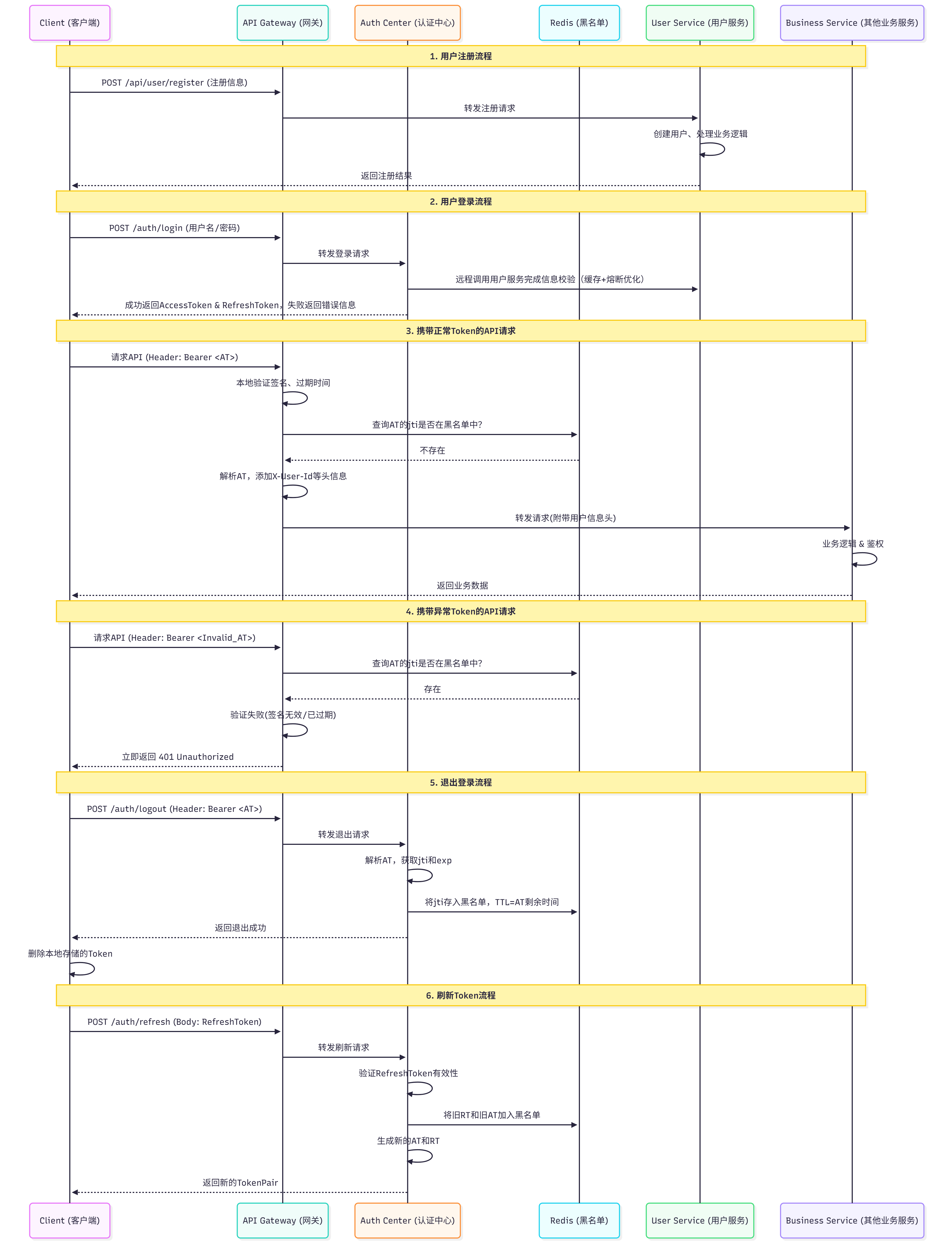
(二)鉴权策略详解
在微服务架构中,鉴权策略的选择至关重要。以下是两种常见的鉴权策略:
方案一:将权限信息放入JWT
这是最优雅、性能最高的解决方案,完美避免了每次请求的远程调用。
-
如何实现:
-
在用户登录成功时,认证中心不仅生成
JWT,还应该从用户服务获取该用户的**角色(Roles)或权限标识符(Permissions)**列表。 -
将这些信息作为自定义字段放入
JWT的Payload中。JSON
复制
{ "sub": "1234567890", "name": "John Doe", "roles": ["USER", "EDITOR"], "permissions": ["article:read", "article:write"] // ...其他标准字段 } -
网关在验证
JWT后,不仅解析出userId,还将roles和permissions也作为请求头(例如X-User-Roles、X-User-Permissions)传递给下游业务服务。 -
业务服务收到请求后,无需任何远程调用,直接根据请求头中的角色或权限信息进行鉴权。
-
-
优点:
- 性能极致:零远程调用开销,鉴权速度最快。
- 简单清晰:业务服务代码非常简单,只需要检查本地权限列表。
-
缺点:
- 用户权限变更后,必须等到当前用户的Token过期或重新登录后才会生效。对于权限频繁变更的场景不友好(但绝大多数系统权限变更都不频繁)。
方案二:业务服务远程调用用户服务
如果权限信息非常复杂、实时性要求极高,无法放入JWT,则采用此方案。
- 如何实现:
- 业务服务从网关转发的请求头中获取
userId。 - 业务服务通过RPC或REST API调用用户服务的接口(如
GET /users/{userId}/permissions)。 - 用户服务返回该用户的详细权限信息。
- 业务服务根据返回的权限执行鉴权逻辑。
- 业务服务从网关转发的请求头中获取
- 优化手段(避免性能问题):
- 本地缓存:在业务服务中,对获取到的用户权限进行短期缓存(例如1-5分钟)。这样,同一用户在短时间内的大量请求,只会触发一次远程调用,后续请求直接使用缓存结果。这是解决性能问题的关键。
- 缓存失效:当用户权限变更时,用户服务需要发布一个事件(Event),或者提供一个接口,通知所有业务服务清除对应用户的权限缓存。
- 优点:
- 权限实时生效:权限变更后,只要缓存失效,下次请求即可生效。
- 缺点:
- 依然存在网络开销和延迟,尽管通过缓存已大幅优化。
- 系统复杂度更高,需要引入缓存和缓存失效机制。
(三)SpringSecurity多方式多客户端登录与认证整合
登出、注册、刷新jwt比较简单这里不再赘述
1. 登录整合
整个认证中心还是以SpringSecurity为主体,使用前面讲到的多方式登录,但认证中心作为认证,并不需要知道用户权限,所以在自定义AbstractAuthenticationToken时可以直接将权限设置为null,之后也不用再创建新的Token对象。
这里我们将所有不同方式下相同的部分抽象了出来
@Getter
@Setter
public abstract class LoginAuthenticationToken extends AbstractAuthenticationToken {
protected Object principal; // 认证成功后,后台从数据库获取信息
protected String requestClient; // 客户端请求头
public LoginAuthenticationToken() {
// 1. 微服务下认证中心只做Token的颁发、认证、解析等操作,不用SpringSecurity自带的权限校验
// 鉴权发放到每个微服务中,由各个微服务自行实现权限校验
// 2. 单体模式下拒绝访问所有需要权限的资源。
super(null); // 它会被 Spring Security 判定为“无权限”
super.setAuthenticated(false); // 设置未认证
}
public void completeAuthentication(Object principal) {
this.principal = principal;
super.setAuthenticated(true);
}
}
下面还是给出手机号验证码登录的实现
@EqualsAndHashCode(callSuper = true)
@Data
@AllArgsConstructor
public class PhoneAuthenticationToken extends LoginAuthenticationToken {
private String phone; //手机号
private String captcha; //验证码
@Override
public Object getCredentials() {
// 根据SpringSecurity的设计,授权成后,Credential(比如,登录密码)信息需要被清空
return isAuthenticated() ? null : captcha;
}
@Override
public Object getPrincipal() {
// 根据SpringSecurity的设计,授权成功之前,getPrincipal返回的客户端传过来的数据。授权成功后,返回当前登陆用户的信息
return isAuthenticated() ? principal : phone;
}
}
public class PhoneAuthenticationFilter extends AbstractAuthenticationProcessingFilter {
public PhoneAuthenticationFilter(AntPathRequestMatcher pathRequestMatcher,
List<AuthenticationProvider> authenticationProviders,
AuthenticationSuccessHandler authenticationSuccessHandler,
AuthenticationFailureHandler authenticationFailureHandler) {
super(pathRequestMatcher);
setAuthenticationManager(new ProviderManager(authenticationProviders)); // 已经替换为集合
setAuthenticationSuccessHandler(authenticationSuccessHandler);
setAuthenticationFailureHandler(authenticationFailureHandler);
}
@Override
public Authentication attemptAuthentication(HttpServletRequest request,
HttpServletResponse response) throws AuthenticationException {
// 提取请求数据: 标准的表单登录
String phone = Optional
.ofNullable(request.getParameter("phone"))
.orElse("");
String captcha = Optional
.ofNullable(request.getParameter("phoneCaptcha"))
.orElse("");
LoginAuthenticationToken authentication = new PhoneAuthenticationToken(phone, captcha);
// 设置特定的请求头
authentication.setRequestClient(request.getHeader("X-Request-Client"));
// 设置“认证请求”的附加信息
authentication.setDetails(authenticationDetailsSource.buildDetails(request));
return getAuthenticationManager().authenticate(authentication);
}
}
@Component
@RequiredArgsConstructor
public class CusPhoneAuthenticationProvider implements AuthenticationProvider {
@Override
public Authentication authenticate(Authentication authentication) throws AuthenticationException {
PhoneAuthenticationToken phoneAuthentication = (PhoneAuthenticationToken) authentication;
// 检查参数
Customer customer = ....
// 存储用户信息和权限信息
phoneAuthentication.completeAuthentication(customer);
return phoneAuthentication;
}
  @Override
  public boolean supports(Class<?> authentication) {
    if (authentication.isAssignableFrom(PhoneAuthenticationToken.class)) {
        PhoneAuthenticationToken authenticationToken = (PhoneAuthenticationToken) authentication;
        if ("customer".equals(authenticationToken.getRequestClient())){
            return true;
        }
    }
    return false;
  }
}
@Component
@RequiredArgsConstructor
public class EmpPhoneAuthenticationProvider implements AuthenticationProvider {
@Override
public Authentication authenticate(Authentication authentication) throws AuthenticationException {
PhoneAuthenticationToken phoneAuthentication = (PhoneAuthenticationToken) authentication;
// 检查参数
Employee employee = ....
// 存储用户信息和权限信息
phoneAuthentication.completeAuthentication(employee);
return phoneAuthentication;
}
@Override
public boolean supports(Class<?> authentication) {
if (authentication.isAssignableFrom(PhoneAuthenticationToken.class)) {
PhoneAuthenticationToken authenticationToken = (PhoneAuthenticationToken) authentication;
if ("employee".equals(authenticationToken.getRequestClient())){
return true;
}
}
return false;
}
}
配置
注:Filter用于鉴权,即需要用到AbstractAuthenticationToken中的authorities进行权限校验以访问后端资源时,建议不要将Filter注入Spring容器
    @Bean
    public PhoneAuthenticationFilter phoneLoginFilter(
            List<PhoneAuthenticationProvider> phoneAuthenticationProviders,
            MyAuthenticationSuccessHandler phoneSuccessHandler,
            MyAuthenticationFailureHandler phoneFailHandler
    ){
        return new PhoneAuthenticationFilter(
                new AntPathRequestMatcher("/login/phone", "POST"),
                phoneAuthenticationProviders, phoneSuccessHandler, phoneFailHandler);
    }
// 加一个登录方式。电话、验证码登录
http.addFilterBefore(phoneLoginFilter, UsernamePasswordAuthenticationFilter.class);
这样就配置成功了,登录成功后,在AuthenticationSuccessHandler必须要返回的是accessToken和refreshToken
2. 处理API请求
前端在登录成功后,在请求后端资源时需要携带的请求头有:X-Request-Client、X-Token-Strategy、X-Access-Token、X-Refresh-Token
首先进入全局过滤器
/**
 * 允许请求头X-Token-Strategy和X-Request-Client的值(白名单)
 */
@Data
@Component
@ConfigurationProperties(prefix = "gateway.allow-request-header")
public class AllowRequestHeaderProperties {
    private List<String> tokenStrategy = new ArrayList<>();      // 请求方使用token策略
    private List<String> requestClient = new ArrayList<>();       // 请求客户端
}
/**
 * 全局过滤器:验证token
 * 职责是:“这个Token有效吗?有效就放行”。
 */
@Order(1)
@Component
@SuppressWarnings("deprecation")
@RequiredArgsConstructor
public class TokenGatewayFilter implements GlobalFilter {

    private final TokenConfigManager tokenConfigManager;
    private final TokenOperateUtil tokenOperateUtil;       // 负责token的创建、校验等工作
    private final AllowRequestHeaderProperties allowRequestHeaderProperties;
    private static final AntPathMatcher PATH_MATCHER = new AntPathMatcher();

    /**
     * 跳过验证的接口: 不需要token验证
     */
    private static final Set<String> SKIP_AUTH = Set.of(
            .......
    );

    @Override
    public Mono<Void> filter(ServerWebExchange exchange, GatewayFilterChain chain) {
        ServerHttpRequest request = exchange.getRequest();
        String path = request.getURI().getPath();

        // 检查是否携带正确的请求头
        String requestClient = request.getHeaders().getFirst(HttpHeader.X_REQUEST_CLIENT);
        String tokenStrategy = request.getHeaders().getFirst(HttpHeader.X_TOKEN_STRATEGY);
        if (requestClient == null || !allowRequestHeaderProperties.getRequestClient().contains(requestClient)){
            return returnErrorResponse(exchange, HttpStatus.BAD_REQUEST, "不合法的请求");
        }
        if (tokenStrategy == null || !allowRequestHeaderProperties.getTokenStrategy().contains(tokenStrategy)){
            return returnErrorResponse(exchange, HttpStatus.BAD_REQUEST, "不合法的请求");
        }

        // 不需要token验证
        if (allowedPath(path)) {
            return chain.filter(exchange);
        }

        // 本地检查jwt签名和过期时间
        AbstractTokenConfig tokenConfig = tokenConfigManager.getTokenConfig(tokenStrategy);
        String accessToken = request.getHeaders().getFirst("X-Access-Token");
        if (!tokenOperateUtil.checkAccessTokenSignatureAndExpireTime(accessToken, tokenConfig)) {
            return returnErrorResponse(exchange, HttpStatus.UNAUTHORIZED, "Token已失效");
        }

        // 查询redis中的黑名单
        if (tokenOperateUtil.checkBlackList(accessToken)) {
            return returnErrorResponse(exchange, HttpStatus.UNAUTHORIZED, "Token已失效");
        }

        // 从JWT的Payload中提取出最基础的、所有服务都可能需要的1-2个字段
        List<String> keys = List.of(
                "userId","userName","userRole"
        );
        Map<String, String> tokenPayloads = tokenOperateUtil
                .getTokenPayloads(accessToken, tokenConfig, keys);

        // 将这些基础信息作为HTTP请求头(Header) 添加到转发的请求中,
        ServerHttpRequest newRequest = request.mutate()
                .header("X-User-Id", tokenPayloads.get("userId"))
                .header("X-User-Name", tokenPayloads.get("userName"))
                .header("X-User-Role", tokenPayloads.get("userRole"))
                .build();

        // 关键:把新请求重新塞进 exchange
        ServerWebExchange newExchange = exchange.mutate().request(newRequest).build();

        // 继续走过滤器链
        return chain.filter(newExchange)
                .onErrorResume(throwable ->
                        returnErrorResponse(newExchange, HttpStatus.INTERNAL_SERVER_ERROR,"服务异常")
                );
    }

    // 返回错误信息
    private Mono<Void> returnErrorResponse(ServerWebExchange exchange, HttpStatus status, String message) {
        ........
    }

    /**
     * 判断请求路径是否需要过滤
     *
     * @param requestURI 请求路径
     * @return true: 不需要过滤,允许通过
     */
    private boolean allowedPath(String requestURI) {
        for (String allowedPath : SKIP_AUTH) {
            if (PATH_MATCHER.match(allowedPath, requestURI)) {
                return true;                         // 匹配成功
            }
        }
        return false;
    }
}
3. 微服务鉴权
在经过网关后,能到达之后微服务的都是携带了合法jwt的请求,之后的微服务中我们只需要写一个过滤器在SpringSecurity的认证上下文中设置认证对象和已通过认证的标识即可
public class GatewayAuthenticationFilter extends OncePerRequestFilter {
    @Override
    protected void doFilterInternal(HttpServletRequest request, HttpServletResponse response, FilterChain filterChain) throws ServletException, IOException {
        // 从请求头中获取网关传递的基础信息+权限信息
        String id = request.getHeader("userId");
        String name = request.getHeader("userName");
        String role = request.getHeader("userRole");

        // 假设一个用户只对应一个角色,并且以这个角色进行权限校验
        List<GrantedAuthority> authorities = List.of(new SimpleGrantedAuthority("ROLE_" + role));
        // 认证用户
        AuthenticationPrincipal principal = new AuthenticationPrincipal(id, name, role);

        Authentication authentication = new UsernamePasswordAuthenticationToken(principal, null, authorities);
        SecurityContextHolder.getContext().setAuthentication(authentication);
        filterChain.doFilter(request, response);
    }

}
/**
 * 认证用户 : 所有微服务的共享变量
 * 根据实际的需要修改
 */
@Data
@AllArgsConstructor
@NoArgsConstructor
public class AuthenticationPrincipal {
    // 后面的服务如果需要知道用户详细信息可以通过userId或者username远程调用对应模块雨爱查询用户信息信息
    private Long userId;
    private String username;

    // 可以用来动态鉴权
    private String roleCode;
}
远程调用时所有之前手动添加的请求头都不在了,所以我们需要加一个拦截器将必要的请求信息加上
/**
 * Feign请求头拦截器
 */
public class FeignHeaderInterceptor implements RequestInterceptor {
    @Override
    public void apply(RequestTemplate requestTemplate) {
        Authentication authentication = SecurityContextHolder.getContext()
            .getCurrentSecurityContext()
            .getAuthentication();
        // 获取认证用户对象
        AuthenticationPrincipal principal = (AuthenticationPrincipal) authentication.getPrincipal();
        requestTemplate.header("userId", principal.getUserId());
        requestTemplate.header("userName", principal.getUserName());
        requestTemplate.header("userRole", principal.getUserRole());
    }
}
七、未来展望
- 整个多方式多客户端登录虽然逻辑已经足够清晰,拓展性也很强,但其实每次加一种新的登录方式时都需要至少同时自定义
AbstractAuthenticationToken、AbstractAuthenticationProcessingFilter、AuthenticationProvider,但其实我们能发现除了在Provider校验用户信息时逻辑较为不同外,其他很多逻辑都相同,可以思考是否可以用配置文件+模版引擎的方式实现,配置文件中配置必要的请求路径、请求方式、请求参数等信息,模版引擎在项目启动时能够自动生成文件到target目录中,我们只需要编写必要的Provider中的逻辑。(以上仅是个人的一些思考,可能不具有可行性) SpringSecurity作为安全框架最大的问题还是太重了

腾讯云面向开发者汇聚海量精品云计算使用和开发经验,营造开放的云计算技术生态圈。
更多推荐
 22
22 0
0- 0


 已为社区贡献3条内容

所有评论(0)